
On this page
Start here
Quick answer
An LG refrigerator light that looks a different color is not automatically a failed part. LG documents a MyColor feature on compatible InstaView refrigerators that lets the user select five LED hues and adjust brightness through ThinQ, while ordinary LG models may use a bulb or a non-user-serviceable LED system. First identify whether the changed light is the interior light, an InstaView panel, a dispenser light or only the appearance of the refrigerator surface under different room lighting. Check the exact model manual and any documented color setting, clear food that blocks the light, and compare the appearance under consistent lighting. If the light flickers, changes color without a documented setting, stays dim, or the refrigerator is not cooling, stop experimenting with the light assembly; LG says LED lighting needs technician inspection. Do not open the light cover or wiring while powered, replace an LED board by guesswork, or assume every LG refrigerator has MyColor.
Before you begin
Safety first
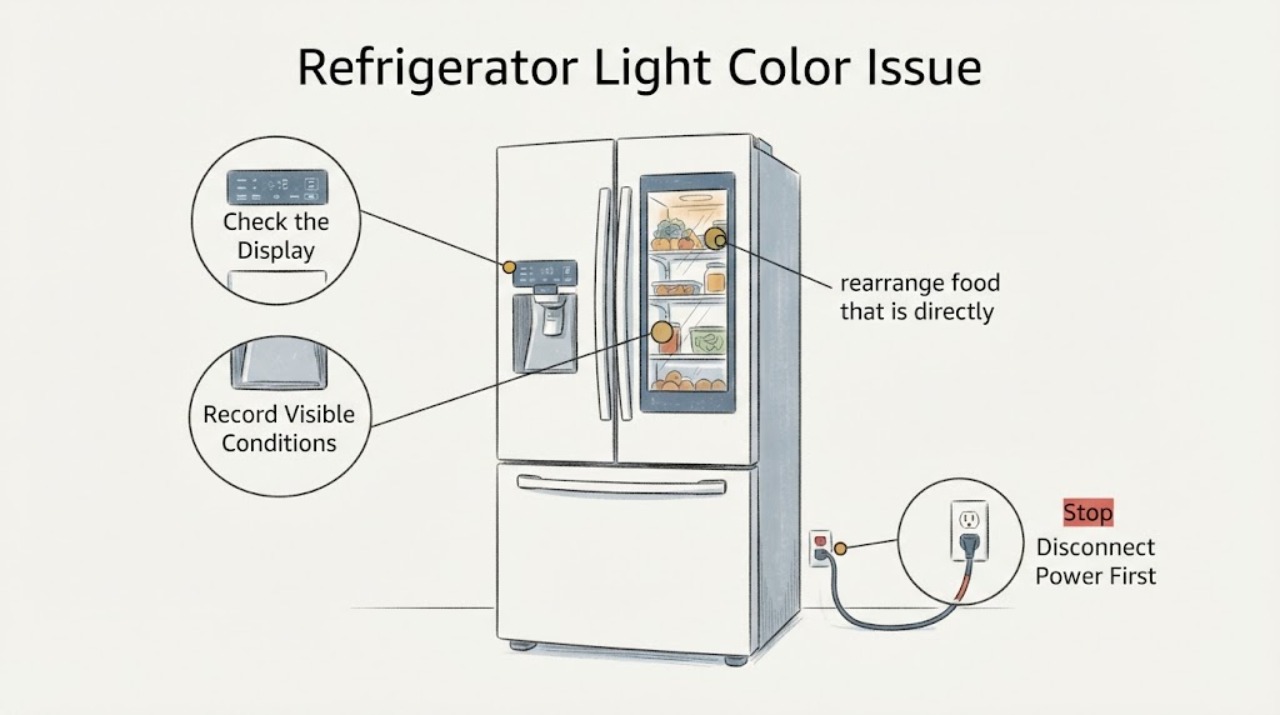
- Disconnect power before any bulb replacement allowed by the exact manual. Do not open an LED assembly, probe powered wiring, remove a door or liner, bypass a door sensor, install a bulb or LED module from another model, or assume MyColor is present without model evidence.
Work through in order
Diagnostic checks
Use only checks that match the exact appliance or system and its official guide.
-
Check 1
Identify the light location and the exact model from the refrigerator label or existing records: interior compartment, freezer, dispenser, or InstaView panel; record the old and new appearance without moving the refrigerator.
Expected result: The light is an InstaView or MyColor area, an ordinary interior lamp, a dispenser light, or the refrigerator surface only looks different under the room lighting.
Next step: Use the exact model manual or LG support lookup for the identified light location. Do not treat a generic LG light article or a different model's color setting as compatibility proof.
Why this matters
Why: These are different systems. LG documents color selection for compatible InstaView MyColor products, but the task has no model and cannot establish that feature on this refrigerator.
-
Check 2
If the light is a documented MyColor or InstaView light, check only the owner's documented color and brightness setting in the appliance or ThinQ control; compare the result with the setting shown on screen.
Expected result: The selected hue matches the light, the color changes without a setting change, the light flickers, or the refrigerator does not have a documented color control.
Next step: Restore the documented setting once. If the color changes by itself, flickers or cannot be controlled, stop using the light controls and arrange LG service; do not open the LED assembly.
Why this matters
Why: A matching selected hue is a feature state on compatible models. An uncommanded tint or flicker, or a model without the feature, is not explained by the MyColor source.
-
Check 3
With the doors open normally, rearrange food that is directly blocking the light and compare the brightness and color under the same room lighting; do not remove a cover or reach behind the liner.
Expected result: The light becomes brighter after food is moved, the apparent color changes with the room light or viewing angle, or the tint remains with clear surroundings.
Next step: If the appearance normalizes, keep the lamp unobstructed. If the tint persists, flickers or the light goes dark, document it and use LG service rather than assuming a bulb or LED board is compatible.
Why this matters
Why: LG says food can dim a refrigerator light, and its lighting-environment guidance says light source and installation conditions can change perceived color. A persistent tint with clear surroundings needs model-specific evaluation.
-
Check 4
Check whether the refrigerator is cooling normally and whether the light behavior is tied to opening the door or to the dispenser/door panel; note any dimming, flicker, heat, burning smell, moisture or repeated power interruption.
Expected result: Cooling is normal and only the light appearance changed, the light fails with the door open, the refrigerator and freezer also stop cooling, or there is flicker, heat, odor or moisture.
Next step: If cooling is also lost, check the household supply without opening the refrigerator and protect food as appropriate; request service if power is stable. For LED or repeated light faults, keep the assembly closed and arrange LG technician inspection.
Why this matters
Why: A light-only appearance issue may be optical or feature-related, but a light failure with loss of cooling can indicate a power condition. LED, wiring and door-sensor causes cannot be distinguished safely from this observation alone.
Use your observations
Decision map
Find the observation that best matches what you see, then follow the next safe action.
-
PATH 01Next step
What you see
The exact model is a compatible InstaView MyColor refrigerator and the selected app or control hue matches the light.
Do this next
Use the owner's manual for scheduling and brightness limits. If the hue changes without a command or the light flickers, request service.
Why this path and its safety boundary
Why it matters: The color is likely a documented feature state rather than an unconfirmed lamp failure.
-
PATH 02Next step
What you see
The model has no documented color control, but the appearance changes with room lighting, viewing position or food placement.
Do this next
Compare under consistent lighting, keep food clear of the lamp and record the result. If the tint remains, use the exact model support path.
Why this path and its safety boundary
Why it matters: The perceived difference may be caused by the lighting environment or obstruction rather than a changed LED output.
-
PATH 03Next step
What you see
The light is an LED assembly and it is tinted, flickering, intermittent or dark while the refrigerator otherwise cools.
Do this next
Do not remove the LED cover or probe wiring. Arrange LG or qualified appliance service with the model and a description of the light location and behavior.
Why this path and its safety boundary
Why it matters: LG treats LED light inspection as a technician task; the symptom does not identify a compatible module or wiring fault.
-
PATH 04Next step
What you see
The light issue is accompanied by loss of cooling, a burning smell, heat, moisture or unstable power.
Do this next
Avoid opening the appliance, check the household power only from a safe external point and request service. Protect perishable food according to its condition and temperature.
Why this path and its safety boundary
Why it matters: The condition may involve a broader electrical or appliance fault and is beyond a safe light-only adjustment.
Helpful context
Understand the symptom
First determine what is changing color
The phrase light color can describe an interior lamp, an InstaView window, a dispenser light, or the way the refrigerator finish looks under room lighting. LG's MyColor page applies to compatible InstaView refrigerators and describes five selectable LED hues, while its general light guidance covers standard bulb and LED arrangements. Without a model and light location, a color change cannot be assigned to a single part.
A feature setting and a lighting fault follow different paths
If the refrigerator is a compatible MyColor model, check the documented ThinQ or owner-manual color and brightness controls. If it is a conventional interior light, compare the light with the same door-open position and room lighting, and remove food that blocks the lamp. A new tint, flicker or loss of light in an LED assembly is not evidence for a user-replaceable bulb.
Keep LED and powered work inside the service boundary
LG's opened support guidance distinguishes user-replaceable bulbs from LED lighting that needs technician inspection and says to use the exact manual for bulb specifications. Record the model, light location, selected setting, whether the color changes with the door or app, and whether cooling is normal. Do not remove an LED cover, probe wiring or fit a lamp from another LG model.
When checks do not resolve it
Need a professional?
Arrange LG or qualified appliance service when an LED light changes color without a documented setting, flickers, remains dim or dark after external obstruction checks, or the issue accompanies cooling loss, heat, moisture, odor or unstable power. Provide the exact model, light location, selected setting and photos or video of the behavior.
Safety scope: Disconnect power before any bulb replacement allowed by the exact manual. Do not open an LED assembly, probe powered wiring, remove a door or liner, bypass a door sensor, install a bulb or LED module from another model, or assume MyColor is present without model evidence.
Common questions
FAQ
Do all LG refrigerators let me change the light color?
No. LG documents selectable colors for compatible InstaView MyColor refrigerators. A model without that documented feature should not be assigned a MyColor setting from a different product.
Could food make an LG refrigerator light look a different color?
Food can block and dim the light, according to LG. Move only items that visibly obstruct the lamp and compare under consistent room lighting; a persistent tint or flicker needs model-specific service evaluation.
Can I replace the refrigerator LED myself?
LG says bulb replacement depends on the model and manual, while LED lighting requires technician inspection. Do not open an LED assembly or substitute a part without exact model evidence.
What should I tell LG support?
Give the exact model, where the light is located, which color it shows, whether a MyColor or brightness setting is selected, whether the change is constant or intermittent, and whether cooling, door operation or the dispenser also changed.
Read the exact guide
Official sources
- [LG Refrigerator] Refrigerator Light Not WorkingLG USA Support · The opened LG support page says food can obstruct and dim the light; bulb models use model-specific replacement instructions; LED lights require technician inspection. It is general guidance and does not identify the unspecified refrigerator model or color fault.
- Discover LG InstaView MyColor RefrigeratorLG USA · The opened LG page documents MyColor on compatible InstaView refrigerators, including five selectable LED hues and ThinQ brightness or scheduling controls. It is not evidence that an unspecified LG refrigerator has MyColor.
- What to do if your LG refrigerator light is not workingLG USA Support · The opened LG support page supports checking whether a model has a light, distinguishing an air vent from a missing lamp, unplugging before a model-authorized bulb replacement and sending LED faults to support. It is based on standard models and does not authorize LED disassembly.
- LG Refrigerator - Troubleshooting Door Discoloration On an LG RefrigeratorLG USA Support · The opened LG guidance explains that light source, installation location and surrounding surfaces can change perceived color. It is used only for the optical-comparison branch; it does not diagnose a changed LED output.
Community feedback
Share a repair observation
Share a plain-text repair observation. Accepted observations are published automatically; this page may take a moment to update.