
On this page
Start here
Quick answer
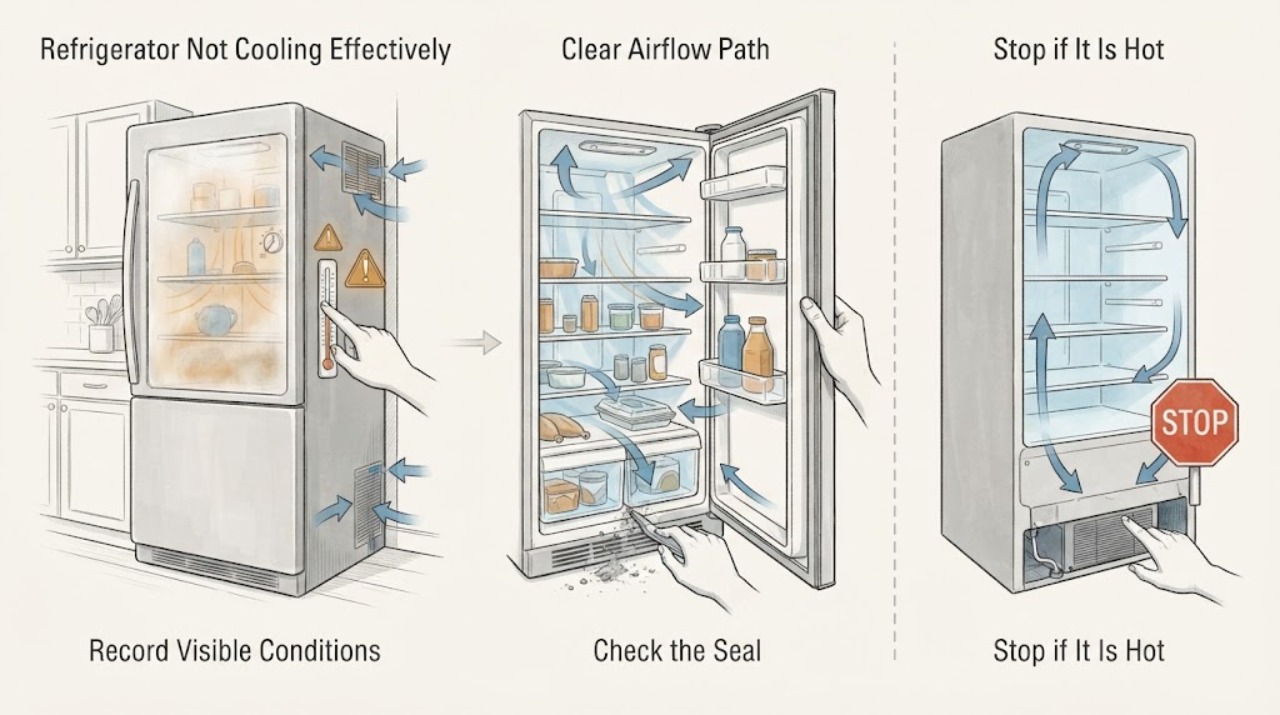
First verify the actual temperature trend and separate a new installation or warm environment from a persistent cooling problem. LG says an incorrect setting, overfilled compartment, blocked air outlet, door that does not close, poor clearance, unsuitable ambient location or insufficient time after installation can weaken cooling. Lower the refrigerator setting only according to the model manual, clear food from vents and the door path, confirm the doors and gaskets close, and keep the rear area ventilated. With power safely disconnected, LG permits vacuuming dust from the rear cover but says not to remove the machine-room cover or disturb internal piping. If an error code appears, temperatures continue rising, cooling does not recover after the model-appropriate external checks, or there is damage or an electrical hazard, stop relying on generic troubleshooting and arrange qualified LG service.
Work through in order
Diagnostic checks
Use only checks that match the exact appliance or system and its official guide.
-
Check 1
Record the refrigerator and freezer settings, the compartment that feels warm, whether food is thawing, and any displayed error. For a steadier comparison, place a thermometer in a liquid stored in the compartment for the period LG describes rather than relying on a quick reading near a door or vent.
Expected result: The measured trend is stable and near the model setting, clearly warmer or rising, or the reading varies widely with door openings and placement.
Next step: Repeat the observation under consistent conditions, then follow the airflow, door, setting and installation branches. If an error code appears or temperatures continue rising, stop generic checks and request service.
Why this matters
Why: LG says thermometer placement and door openings can change readings; a single quick reading does not prove a cooling-system failure. A sustained rise or thawing condition deserves faster service assessment.
-
Check 2
Use the exact model manual to confirm the refrigerator and freezer settings, then move food away from visible cold-air outlets and temperature-sensor areas. Do not pack the compartment tightly enough to block circulation.
Expected result: A setting is warmer than intended, food blocks a vent or sensor, or the settings and airflow are already consistent with the manual.
Next step: Make only the model-documented setting change and reorganize accessible food. Allow the appliance time to stabilize before judging the result; if cooling remains weak, continue to the door and installation checks.
Why this matters
Why: LG identifies an incorrect setting, overfilling and blocked vents or sensors as causes of weak or uneven cooling; this does not identify a failed fan or sensor.
-
Check 3
Inspect the visible door path, drawers, shelves and gasket for food or residue that prevents a complete seal. Close each door normally and check for an obvious persistent gap; do not force or realign a damaged door.
Expected result: A drawer, shelf, food item or gasket residue prevents closure, or the door closes fully but the temperature remains high.
Next step: Remove only the visible obstruction and clean the accessible gasket surface. If a gap remains, the gasket is worn, or cooling does not recover, arrange LG service instead of selecting a replacement part by appearance.
Why this matters
Why: LG says warm air enters when a door does not close completely and recommends correcting accessible shelf, drawer, food or gasket contamination conditions. A worn gasket or structural gap requires service guidance.
-
Check 4
Check that the refrigerator is not pressed against the wall or a heat source and that the rear and side ventilation space follows the exact installation manual. Note direct sun, an outdoor/balcony location, or unusually hot or cold ambient conditions.
Expected result: The rear area is blocked or dusty, the appliance is in an extreme location, or the installation environment is suitable.
Next step: Remove surrounding objects and improve only the accessible installation condition. If moving the appliance requires disconnecting water or electrical connections, use qualified help; otherwise allow stabilization and monitor.
Why this matters
Why: LG links restricted rear ventilation and unsuitable ambient conditions to weak cooling or thawing. Correcting clearance does not prove a sealed-system or compressor condition.
-
Check 5
If dust is visible around the rear cover, unplug the refrigerator before vacuuming dust from the cover and surrounding area. Do not remove the machine-room cover, expose piping, scrape coils, or touch internal wiring.
Expected result: Dust or objects restrict the rear area, or the rear cover is clean and ventilation is unobstructed.
Next step: Restore power only after the external area is clear and dry, then monitor under consistent conditions. If cooling remains poor or the cord/plug is damaged, leave it off and arrange service.
Why this matters
Why: LG says dust and poor ventilation can reduce cooling and permits external vacuuming after unplugging; it expressly prohibits removing the back machine-room cover.
-
Check 6
If an error code appears, the freezer is thawing, or the refrigerator remains warm after the external checks and stabilization period, record the exact model, code, measured trend and checks already completed. Do not run diagnostic tests, remove covers or replace an internal part.
Expected result: Cooling recovers after the external correction, or the problem persists/returns with an error, thawing, unusual heat or another hazard.
Next step: Use the exact model support/manual or request qualified LG service. If there is smoke, burning odor, a damaged cord, water near electrical parts or abnormal heat, disconnect power only if safe and keep the appliance off.
Why this matters
Why: A recovered temperature supports an external-condition branch but does not prove internal parts are healthy. LG directs professional inspection for error codes and difficult persistent cooling faults.
Use your observations
Decision map
Find the observation that best matches what you see, then follow the next safe action.
-
PATH 01Next step
What you see
The refrigerator was recently installed or power was just restored, and temperatures are slowly improving without an error.
Do this next
Keep doors closed as much as practical, follow the model setting and monitor a stable temperature trend; escalate if it does not improve or food is thawing.
Why this path and its safety boundary
Why it matters: LG says cold air can begin accumulating after connection but normal operating temperature may take substantially longer depending on conditions.
-
PATH 02Next step
What you see
Food blocks a cold-air outlet or sensor, the compartment is overfilled, or a door/drawer cannot close fully.
Do this next
Reorganize accessible contents and clean visible gasket residue; if a gap or worn gasket remains, request service.
Why this path and its safety boundary
Why it matters: LG identifies blocked airflow and warm-air entry as common external causes of weak cooling.
-
PATH 03Next step
What you see
The rear area is dusty, obstructed or too close to a wall, or the refrigerator is exposed to an unsuitable ambient location.
Do this next
Improve only accessible clearance and external cleanliness with power safely disconnected; do not remove the machine-room cover.
Why this path and its safety boundary
Why it matters: Restricted ventilation or extreme ambient conditions can reduce cooling performance.
-
PATH 04Next step
What you see
The settings and external conditions are correct but a stable measurement remains warm, the freezer is thawing, or an error code appears.
Do this next
Stop guessing at a compressor, fan, refrigerant or control fault and arrange qualified LG service with the model and recorded observations.
Why this path and its safety boundary
Why it matters: The symptom is no longer explained by the basic external checks, and LG says error-code or difficult cooling conditions require professional inspection.
-
PATH 05Next step
What you see
There is smoke, burning odor, a damaged cord, water near electrical parts or abnormal heat.
Do this next
Keep the refrigerator off and disconnect power only if safe; do not remove covers or restore power for testing, and use qualified appliance/electrical service.
Why this path and its safety boundary
Why it matters: This is an electrical or equipment-safety condition beyond routine cooling checks.
Helpful context
Understand the symptom
Measure the symptom before naming a fault
“Not cooling effectively” can mean the refrigerator compartment is warm, the freezer is thawing, cooling is uneven, or the appliance has not stabilized after installation. Record the set temperatures, a stable measured trend, door-opening conditions, frost or thawing observations, and any error display. LG warns that thermometer placement and door openings affect readings, and that the model images or controls may differ.
Restore airflow and door closure
LG links weak cooling to food blocking cold-air outlets or sensors, overloading, doors that do not close, gasket contamination, and inadequate rear clearance. Reorganize only accessible food and shelves, clean a visibly dirty gasket, and keep the refrigerator ventilated. A visible door gap or worn gasket needs LG service guidance rather than an assumed replacement part.
Keep rear cleaning external
If dust or objects surround the rear area, disconnect power before cleaning. LG says a vacuum can remove dust from the rear cover, while the machine-room cover must remain installed because removing it can cause accidents and damage internal piping. Do not diagnose a compressor, fan, refrigerant circuit or control board by sound or temperature alone.
Allow recovery time, then escalate
LG states that a newly connected refrigerator can begin producing cold air after a short period but may take much longer to reach normal temperature depending on food and conditions. If cooling remains poor after the external checks, if an error code appears, or if temperatures continue to rise, arrange qualified service with the exact model and observations.
When checks do not resolve it
Need a professional?
Request qualified LG service when an error code appears, cooling remains poor after model-appropriate setting/airflow/door/installation checks, a door gasket or structural gap persists, the refrigerator is abnormally hot, or the cord, plug or internal area is damaged. Do not choose a compressor, fan, sensor, control board or sealed-system part from this symptom alone.
Common questions
FAQ
What should I check first when an LG refrigerator is not cooling well?
Record a stable temperature trend, then check the model setting, blocked air outlets, overfilling, door closure, visible gasket residue and rear ventilation. These checks are supported by LG; they do not diagnose an internal cooling part.
Can I clean dust behind an LG refrigerator?
LG says to unplug the refrigerator and vacuum dust from the rear cover, but not to remove the machine-room cover because disassembly can cause accidents and damage internal piping.
Does a warm refrigerator prove the compressor or fan failed?
No. LG lists several external causes and directs professional inspection when an error code appears or cooling remains difficult after the external checks.
Read the exact guide
Official sources
- LG Refrigerator - Why Isn't My Freezer Cooling Properly?LG USA Support · Official LG all-model guidance linking rear dust/foreign matter and ventilation to weak freezing, with unplugging before external vacuuming.
- [LG refrigerator refrigeration] The fridge is not cold enough. Not cold enough.LG USA Support · Official LG all-model help guidance for insufficient refrigerator cooling, including temperature setting, loading, door closure, rear clearance, ambient conditions and initial stabilization.
- [LG refrigerator freezing] Food in the freezer is not frozen. Food has slightly thawed. The freezer's function is degraded.LG USA Support · Official LG all-model guidance for blocked airflow, door closure, ventilation, ambient conditions and recovery time when freezer food thaws.
- [LG refrigerator] Self-maintenance for fresh storageLG USA Support · Official LG guidance for temperature measurement, food/vent arrangement, door closure, clearance, rear dust cleaning and the machine-room-cover safety boundary.
Community feedback
Share a repair observation
Share a plain-text repair observation. Accepted observations are published automatically; this page may take a moment to update.