
On this page
Start here
Quick answer
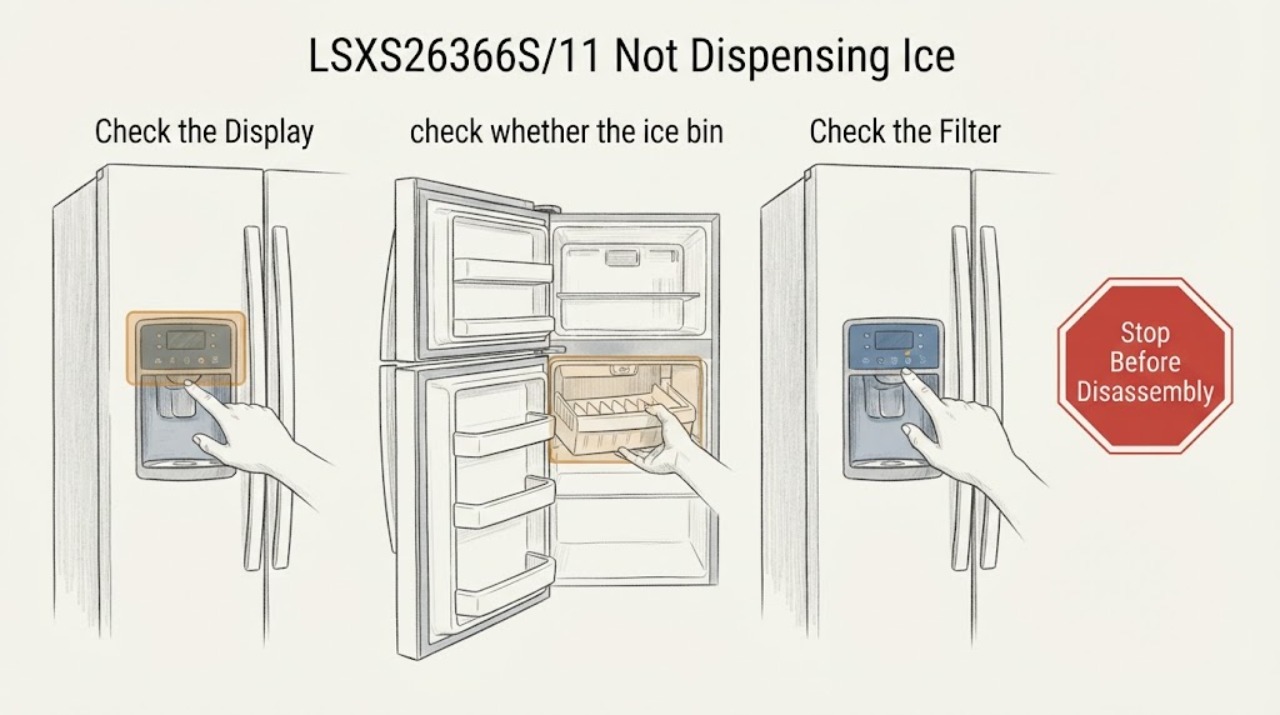
On the LG LSXS26366S/11, first separate an empty ice supply from a dispensing-path problem. Check that Control Lock is off, confirm the bin contains loose ice rather than one frozen clump, and make sure both doors close fully. If ice is present but there is no dispenser hum, stop at these external checks and arrange service; if the dispenser hums but ice does not fall, remove and dry the bin and clear only loose clumps without opening the door or dispenser assembly.
Work through in order
Diagnostic checks
Use only checks that match the exact appliance or system and its official guide.
-
Check 1
Check the display for a lit padlock and unlock Control Lock using the refrigerator's labeled Lock control; then select the ice function and press the dispenser once.
Expected result: The padlock clears and the dispenser responds, or the panel remains locked/unresponsive.
Next step: If it remains locked or the panel is unresponsive, stop using the dispenser and arrange service. If it unlocks, continue to the bin and sound checks.
Why this matters
Why: LG identifies Control Lock as an operational reason an ice or water dispenser may not respond; a lock state is not evidence of a failed motor or board.
-
Check 2
With the dispenser idle, check whether the ice bin contains usable ice; if cubes are fused into a large mass, remove the bin carefully, gently shake it to separate loose cubes, discard clumps that will not separate, clean it, let it dry completely, and reinstall it.
Expected result: The bin is empty, or the ice becomes loose and the dispenser opening is no longer blocked.
Next step: For an empty bin, use Action 3. For a clumped bin, test once after the dry, correctly seated bin is back in place; do not chip ice with a sharp tool.
Why this matters
Why: An empty bin points to ice production or water-supply work rather than an outlet blockage. LG also identifies clumped ice as a reason a full bin can fail to dispense.
-
Check 3
If the bin is empty or only makes a few cubes, verify that the ice maker is enabled, the freezer is cold enough for production, the household water valve is fully open, and the refrigerator water hose is not kinked; if the filter has been in use for six months or longer, follow LG's filter replacement guidance for the LT800P-equipped model.
Expected result: Ice production resumes after the supply/temperature/enable checks, or the bin remains empty despite an open supply and enabled ice maker.
Next step: After a temperature change, monitor production for the official 24-hour check window. If the bin remains empty or the unit shows an error, request LG or qualified appliance service instead of opening the ice maker.
Why this matters
Why: LG lists a recently installed or too-warm freezer, a disabled ice maker, a closed valve or kinked hose, and an old filter as causes of little or no ice. These findings concern ice production and do not by themselves identify a dispenser component.
-
Check 4
With loose ice in the bin and Control Lock off, press the ice dispenser and listen for a brief hum while confirming that both refrigerator and freezer doors close completely.
Expected result: There is a hum and no ice falls, or there is no hum at all; the interior lights should also turn off when each door is fully closed.
Next step: If the doors do not close or their lights stay on, correct only the external obstruction and stop if the sensor does not respond. If doors close and there is still no hum, stop disassembly and request service.
Why this matters
Why: A hum with ice present keeps the bin/chute branch active. No hum can mean the refrigerator believes a door is open or that the dispenser needs service; the sound alone cannot identify a motor, switch, or board.
-
Check 5
Only after the external checks pass, perform one normal refrigerator restart by disconnecting power or switching off the circuit for at least three minutes, restore power, and retest after the controls return.
Expected result: The dispenser works after the restart, or it remains silent/non-dispensing with ice present.
Next step: If the symptom returns or remains, leave the unit powered only as normal and request qualified service with the exact LSXS26366S/11 model and the observations from Actions 2–4.
Why this matters
Why: LG presents a short power restart as a way to clear a temporary system issue when the ice-maker test control cannot be found; it is not a substitute for diagnosing a persistent dispenser fault.
Use your observations
Decision map
Find the observation that best matches what you see, then follow the next safe action.
-
PATH 01Next step
What you see
The bin is empty, the ice maker is off, or the freezer is not producing enough ice.
Do this next
Enable the ice maker, check the valve and hose, address the filter/temperature branch, and monitor production before escalating.
Why this path and its safety boundary
Why it matters: The immediate problem is ice production or supply, so a dispenser motor diagnosis would be premature.
-
PATH 02Next step
What you see
The bin is full but contains a large fused clump.
Do this next
Remove the bin, gently separate loose cubes, discard unseparated clumps, dry the bin, and reinstall it; stop if the bin cannot be removed without force.
Why this path and its safety boundary
Why it matters: The clump can block the dispenser opening even though ice is being made.
-
PATH 03Next step
What you see
Loose ice is present, Control Lock is off, both doors close, and the dispenser hums but no ice exits.
Do this next
Repeat the loose-bin and dry-reinstall check once. If output still fails, request service without opening the dispenser assembly.
Why this path and its safety boundary
Why it matters: The remaining user-level branch is the bin/chute path; the sound does not prove which internal part is at fault.
-
PATH 04Next step
What you see
Loose ice is present, the panel is unlocked, doors close, and there is no dispenser hum.
Do this next
Stop at external checks and arrange qualified appliance service, providing the exact model and whether water still dispenses.
Why this path and its safety boundary
Why it matters: LG's troubleshooting path points to door-switch/sensor recognition or a repair condition; a specific motor, board, or switch cannot be confirmed from this symptom.
Helpful context
Understand the symptom
Start with the ice supply and the dispenser response
The LSXS26366S family has a door ice-and-water dispenser and SpacePlus ice system. A bin with no ice needs a production or water-supply check; a full bin with no output needs a clump, lock, door-sensor, or service decision. The exact-model community report is consistent with that distinction but does not prove an internal part failure.
Safe limit
Keep the checks external. Do not bypass a door switch, probe live connectors, remove the dispenser control or hinge wiring, or order a motor, board, or switch from a generic listing based only on this symptom. If the unit leaks, shows damaged wiring, or still will not dispense after the external branches below, leave the dispenser unused and request qualified appliance service.
When checks do not resolve it
Need a professional?
Request LG or qualified appliance service when the dispenser remains silent with loose ice present and both doors recognized as closed, when the panel will not unlock, when an error appears, or when the external checks and one normal restart do not restore dispensing. Stop immediately for a leak, damaged wiring, burning odor, or a door/hinge connection that would require opening the appliance.
Have this ready
- Provide LSXS26366S/11, whether the bin contains loose ice, whether the dispenser hums, whether water still dispenses, whether both door lights turn off, and which external checks changed the symptom.
Common questions
FAQ
Why can the freezer make ice while the dispenser does not release it?
Ice production and dispensing are separate observations. A full bin can still be blocked by clumped cubes; if loose ice is present but the dispenser is silent, use the door/lock checks and service boundary rather than assuming a specific motor or board.
Should I replace the auger motor or control board first?
No part should be selected from this symptom alone. LG's public troubleshooting path supports external lock, bin, water/ice, door, and service checks; the exact-model community report also did not establish a confirmed part failure.
What if the problem started after ice was dispensing continuously?
Use Control Lock to stop unintended dispensing, then let the unit return to a safe idle state and continue only with the external bin, door, and service checks. Do not open or bypass the paddle, switches, or wiring.
Read the exact guide
Official sources
- LSXS26366S.ASTCNA0: Support, Manuals, Warranty & More | LG USA Product Support PageLG Electronics USA · The page identifies the LSXS26366S 26 cu. ft. Door-in-Door refrigerator and its manuals, warranty, and support paths; the assigned /11 suffix is retained as the task identity while only family-level support scope is used.
- If Your LG Refrigerator Is Not Making Ice or Not Making EnoughLG Electronics USA · Opened LG Help Library text covers ice maker enablement, freezer temperature, door closure, water valve/hose, filter age, clumped ice, and a normal restart; the page notes settings vary by model.
- LG Refrigerator - Troubleshooting Dispenser IssuesLG Electronics USA · Opened LG Help Library text covers Control Lock, humming versus no humming, ice clumping, door switches/sensors, and requesting repair; it states the checks are troubleshooting guidance for LG refrigerator dispensers.
- LG LSXS26366S/11 Not Dispensing IceReddit r/appliancerepair · The opened post reports water dispensing and ice production continuing while the ice dispenser was silent after a prior stuck-open event; replies are unverified community opinions and are not used to diagnose or select a part.
- REFRIGERATION — LSXS26366_ Spec SheetLG Electronics USA · The official specification identifies LSXS26366S, Ice & Water Dispenser, SpacePlus ice system, vertical dispenser, 4.5 lb ice storage, and LT800P filter; it is used for feature scope only.
Community feedback
Share a repair observation
Share a plain-text repair observation. Accepted observations are published automatically; this page may take a moment to update.