
On this page
Start here
Quick answer
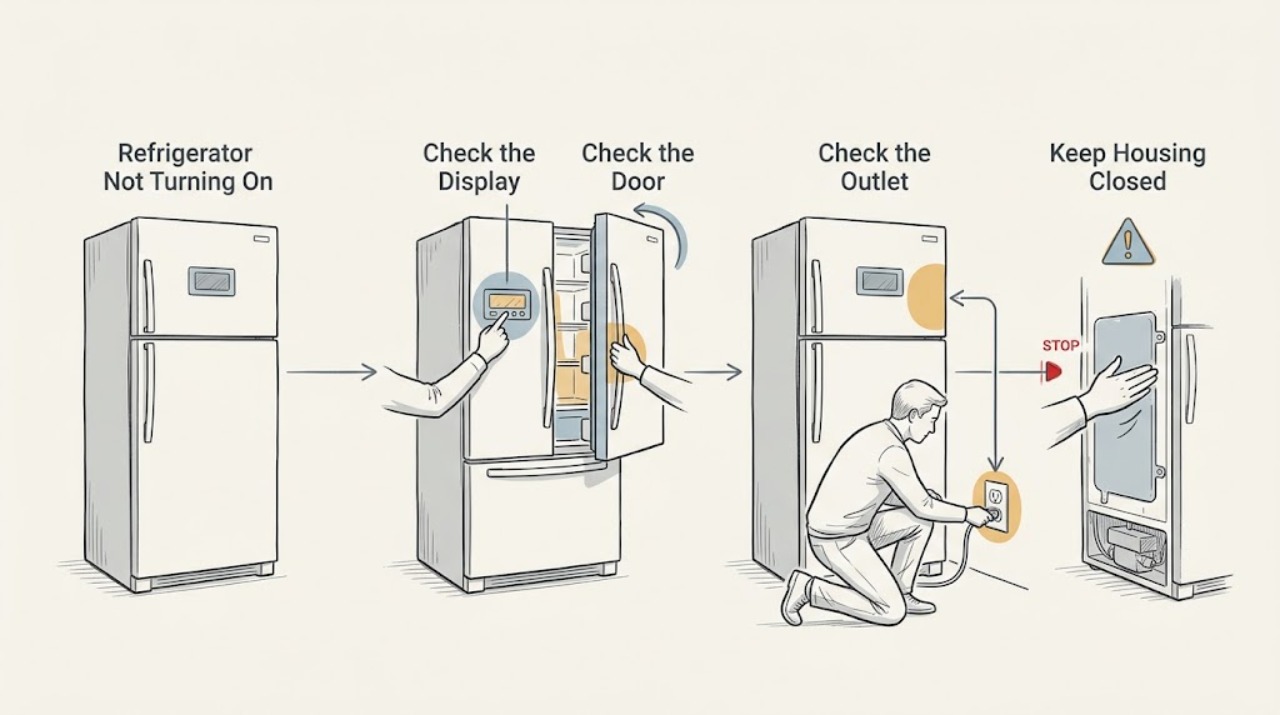
Wake the display and check for any interior light before concluding the refrigerator is off. LG displays can go dark after inactivity, while a loose plug, failed outlet, or tripped breaker can remove power entirely. If the display stays dark after a safe outlet check, do not open the control area; arrange service.
Work through in order
Diagnostic checks
Use only checks that match the exact appliance or system and its official guide.
-
Check 1
Open and close the refrigerator door, then press the normal lock or temperature control to wake the panel without changing settings.
Expected result: The display wakes, or it remains dark and the interior light is also absent.
Next step: If it wakes, observe cooling and stop treating the symptom as total power loss. If not, continue to the outlet check.
Why this matters
Why: LG says some displays turn off after inactivity and should light again after a door or button event; a fully dark appliance is a different condition.
-
Check 2
Check whether the interior light comes on and whether any fan, alarm, or cooling sound is present with the doors closed.
Expected result: The interior light or operating sound is present, or the refrigerator is completely silent.
Next step: Do not remove trim or probe wiring. Check only the plug and outlet next.
Why this matters
Why: Partial operation narrows the problem to display or control behavior; no light or sound makes the incoming power path more likely.
-
Check 3
Inspect the plug and wall outlet for a loose connection, visible damage, or signs of heat; test the outlet only with a safe known-working device.
Expected result: Another device also fails, or the outlet works while the refrigerator remains dark.
Next step: Have an electrician address a dead outlet; use appliance service for a live outlet with no refrigerator response.
Why this matters
Why: A failed outlet is a household electrical issue; a live outlet with a dark refrigerator points toward the appliance's power supply.
-
Check 4
Check the breaker label and reset the refrigerator circuit only once if the installation permits, then watch for an immediate repeat trip.
Expected result: Power returns and remains stable, or the breaker trips again or cannot reset.
Next step: Leave repeated trips alone and arrange qualified electrical or LG service.
Why this matters
Why: A single interruption may explain the symptom; repeat tripping is a protection response that should not be defeated.
Use your observations
Decision map
Find the observation that best matches what you see, then follow the next safe action.
-
PATH 01Next step
What you see
The display wakes after a door or button press and cooling is normal
Do this next
Use the model controls normally and monitor for a true recurrence.
-
PATH 02Next step
What you see
The display is dark but the interior light or cooling sound remains
Do this next
Request LG service if the panel cannot be used; do not open it.
-
PATH 03Next step
What you see
No light or sound returns from a live outlet after a safe breaker check
Do this next
Protect food and arrange service without repeated power cycling.
Helpful context
Understand the symptom
Start with the symptom
“Not turning on” can mean a sleeping display, a running refrigerator with no visible panel, or a true no-power event. The first check is whether the appliance responds to a door opening or control press.
When checks do not resolve it
Need a professional?
Arrange LG or electrical service if the panel and appliance remain dark at a live outlet, the breaker repeats a trip, or any cord, outlet, or wiring is damaged.
Common questions
FAQ
Why is an LG refrigerator display dark when the refrigerator still works?
LG says some models turn display lights off after about 20 seconds of inactivity. Open a door or press the normal control to check whether the panel wakes.
Is a dark display proof that the refrigerator has no power?
No. Check the interior light and cooling behavior. A dark panel with other operation can be a display state or display fault; a completely dark appliance requires a power-path check.
Read the exact guide
Official sources
- Why your LG refrigerator display(control panel) is flickering and how to fix itLG USA Support · LG refrigerator control display
- LG Refrigerator - Why is the Display Turned Off?LG USA Support · LG refrigerator display operation
- [LG refrigerator power] The circuit breaker suddenly tripped.LG USA Support · LG refrigerator electrical protection
- [LG Refrigerator] Refrigerator Light Not WorkingLG USA Support · LG refrigerator interior lighting
- [LG refrigerator power] Power is not supplied.LG USA Support · LG refrigerator power supply
Community feedback
Share a repair observation
Share a plain-text repair observation. Accepted observations are published automatically; this page may take a moment to update.