
On this page
Start here
Quick answer
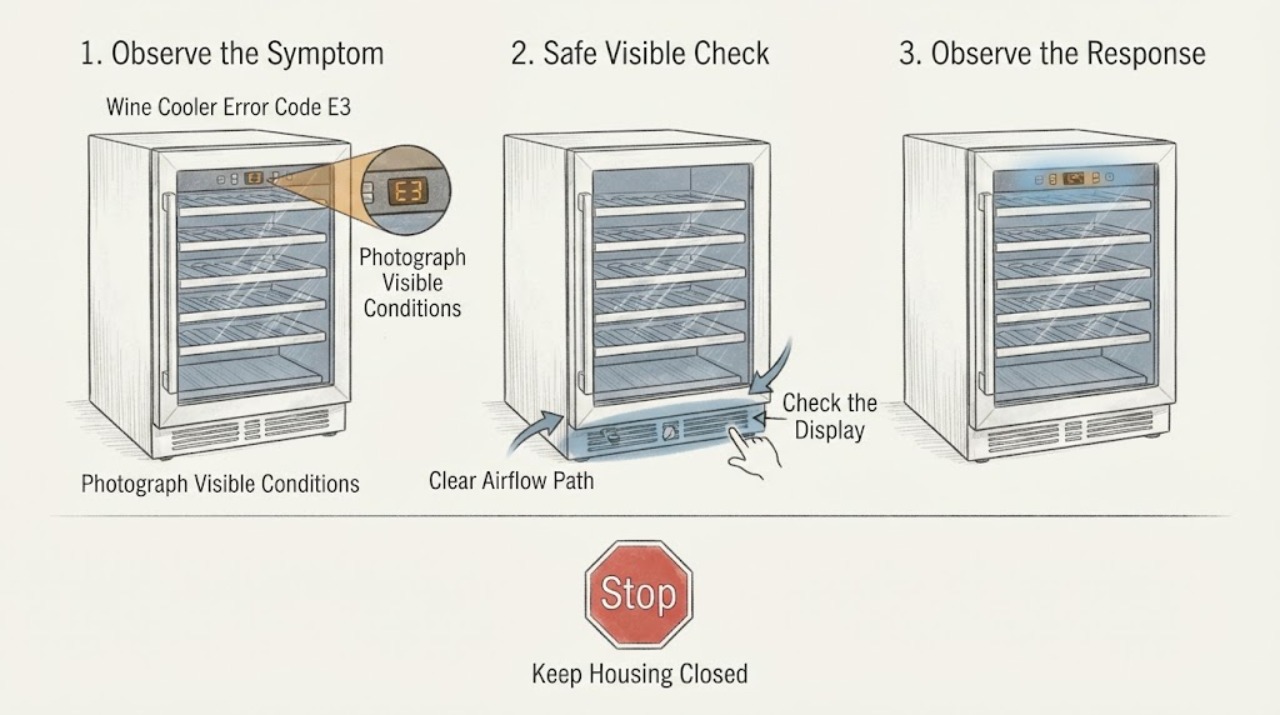
On the opened Magic Chef MCWBC77DZC wine-and-beverage-cooler manual, E3 means a DC electric fan error for the upper zone. The exact code map is model-specific, so first match the cooler's model and confirm which zone shows E3. Check only the external ventilation and loading areas with power off; do not open the cabinet or attempt a fan repair. The manual directs owners to contact customer service for E3 and says not to repair the unit themselves.
Work through in order
Diagnostic checks
Use only checks that match the exact appliance or system and its official guide.
-
Check 1
From a dry, safe position, stop the cooler and read the display and zone carefully. Record E3 exactly, note whether it appears beside the upper or lower temperature display, and photograph the model and serial label before moving bottles or shelves.
Expected result: E3 is shown for the upper zone; a different code is shown; the model is MCWBC77DZC; or the model, zone, or code cannot be confirmed.
Next step: If the model is not MCWBC77DZC, find the exact model manual through Magic Chef's manual portal and follow that code table. If the model is MCWBC77DZC and E3 is confirmed, continue with the safe external checks and service handoff.
Stop if: Do not assume E3 has the same meaning on another Magic Chef cooler, and do not touch a wet plug, cord, outlet, or control panel.
Why this matters
Why: For MCWBC77DZC, E3 identifies the upper-zone DC electric fan, while E1, E2, and E4 identify other components or zones. A model or zone mismatch prevents a reliable code interpretation.
-
Check 2
With the cooler unplugged and the shelves stable, inspect only the visible front and rear ventilation openings and the space around the cooler. Remove bottles, packaging, dust, or furniture that visibly blocks an air path, keeping the dual zones from being packed against their vents.
Expected result: A vent is blocked or the cabinet is tightly loaded; the visible airflow spaces are clear; or cleaning would require removing a panel or reaching the fan.
Next step: Correct only an obvious external obstruction, then leave the unit unplugged while arranging service for confirmed E3. If the visible path is clear, do not escalate to cabinet disassembly; provide that observation to the technician.
Stop if: Do not insert tools into vents, remove the rear cover, reach for a fan blade, or power the cooler with a guard or panel missing.
Why this matters
Why: The manual warns that blocked ventilation can hinder cooling efficiency, but clearing an external obstruction does not prove or repair an E3 fan fault. A fan or internal obstruction cannot be distinguished safely from the display alone.
-
Check 3
Compare the E3 symptom with the two-zone behavior without opening the cabinet: note whether the upper zone has stopped circulating air, whether the lower zone still displays normally, and whether the cooler has abnormal vibration, rubbing noise, burning odor, or a hot cord.
Expected result: Only the upper zone shows E3; both zones are affected; a fan sound is abnormal; or any smoke, burning odor, sparking, hot cord, or repeated breaker trip is present.
Next step: Keep the cooler off and give the service technician the zone behavior and safety observations. For smoke, burning odor, sparks, a hot cord, or repeated breaker trips, isolate power only from a dry safe location and arrange urgent qualified service.
Stop if: Do not run repeated tests to make the fan fail, bypass a fan or temperature protection, or perform live electrical measurements.
Why this matters
Why: A zone-specific E3 matches the upper-zone fan definition in the MCWBC77DZC manual. A second-zone symptom or an electrical warning may indicate a broader control or power problem and cannot be separated by listening or temperature alone.
-
Check 4
Prepare the service request with the exact model, serial number, E3 display location, zone temperatures, visible ventilation findings, and any sound or electrical symptoms. Use Magic Chef's support or service route rather than selecting a fan or control part from a generic listing.
Expected result: The model and serial are available; only a partial model is available; E3 returns after any permitted model-specific action; or the unit needs fan, wiring, control-board, sealed-system, or cabinet access.
Next step: Contact Magic Chef/MC Appliance customer service or a qualified appliance technician and provide the recorded details. Keep the cooler unplugged until the E3 condition is assessed.
Stop if: Do not buy or install a fan, board, sensor, or wiring harness until fitment is confirmed for the exact model, and do not attempt the repair yourself.
Why this matters
Why: Magic Chef's support flow and the product manual rely on product identity to determine the correct instructions and service path. E3 alone does not identify a compatible replacement fan or prove that the fan is the only failed component.
Use your observations
Decision map
Find the observation that best matches what you see, then follow the next safe action.
-
PATH 01Next step
What you see
The cooler is model MCWBC77DZC and E3 is displayed for the upper zone while the unit is otherwise dry and free of an electrical hazard.
Do this next
Leave the cooler unplugged, clear only any obvious external ventilation obstruction, and contact customer service for the fan/control diagnosis.
Why this path and its safety boundary
Why it matters: This matches the opened manual's definition of an upper-zone DC electric fan error.
-
PATH 02Next step
What you see
The display shows E3 but the model is different, the code appears in the lower zone, or the model and zone cannot be identified.
Do this next
Find the exact model manual through Magic Chef's manual portal and use its code table; if no matching documentation is available, keep the unit off and request model-specific service.
Why this path and its safety boundary
Why it matters: The MCWBC77DZC code map cannot safely be applied. Another Magic Chef model may assign E3 to a different component or zone.
-
PATH 03Next step
What you see
The visible vents and loading space are clear, but E3 remains, returns, or the fan cannot be assessed without removing a panel.
Do this next
Stop further testing and arrange qualified Magic Chef/MC Appliance service. Give the technician the model, zone, code, and external inspection results.
Why this path and its safety boundary
Why it matters: An internal fan, control, wiring, or related fault remains possible; external cleaning cannot verify or repair it.
-
PATH 04Next step
What you see
E3 is accompanied by smoke, burning odor, sparks, a hot or damaged cord, repeated breaker trips, or water near an electrical part.
Do this next
Do not touch the appliance or walk through water to unplug it. Isolate power from a dry, safe upstream point, keep people away, and arrange urgent qualified service; contact local emergency services for fire or spreading smoke.
Why this path and its safety boundary
Why it matters: The cooler presents an electrical or fire hazard in addition to the display code.
Helpful context
Understand the symptom
E3 is model- and zone-specific
Magic Chef wine coolers do not necessarily share one error-code table. In the opened MCWBC77DZC manual, E1 is the upper-zone temperature sensor, E2 is the lower-zone temperature sensor, E3 is the upper-zone DC electric fan, and E4 is the lower-zone DC electric fan. If the model number or zone does not match, use the matching Magic Chef manual before interpreting E3.
Keep the fan and control area closed
An E3 display is not a safe invitation to reach behind the shelves or control panel. The product manual directs owners to customer service for the listed error codes and says not to attempt a repair. A visible ventilation or loading problem can be corrected only from the outside and with power disconnected; a fan, wiring, control board, or internal obstruction belongs to qualified service.
When checks do not resolve it
Need a professional?
Arrange Magic Chef/MC Appliance or qualified appliance service when E3 persists, returns, appears on a model or zone not covered by the identified manual, or requires access to the fan, wiring, control board, cabinet, or sealed cooling system. Provide the exact model and serial number, E3 location, zone behavior, ventilation observations, and any abnormal sound or electrical symptom. Do not attempt the repair or order a replacement part from the code alone.
Common questions
FAQ
What does E3 mean on a Magic Chef wine cooler?
In the opened MCWBC77DZC manual, E3 means a DC electric fan error for the upper zone. Check the exact model and zone before applying that meaning because Magic Chef code tables are model-specific.
Can I reset E3 by unplugging my Magic Chef wine cooler?
The opened MCWBC77DZC manual directs owners to contact customer service for E3 and says not to attempt a repair; it does not provide a general owner reset that confirms a fan fault is fixed. Keep the cooler off and use the exact model's instructions or service route.
Should I replace the fan when E3 appears?
No. E3 identifies a fan-related error in the MCWBC77DZC manual, but it does not establish which fan, board, wiring, or connector has failed, and another model may use a different code map. Have the exact model assessed before ordering a part.
Read the exact guide
Official sources
- The Magic Chef Help CenterMagic Chef / MC Appliance · Opened the Magic Chef Help Center, which provides Product Support, Request Service, Manual Downloads, Contact Us, and a Wine & Beverage Cooler product category.
- ManualsMC Appliance / Magic Chef · Opened the official manual portal to establish the model/product-type lookup path needed before interpreting an error code on an unidentified cooler.
- Wine and Beverage Cooler User's Manual, Model MCWBC77DZCMagic Chef / MC Appliance · Opened the official MC Appliance manual result for MCWBC77DZC; used for the E1-E4 code meanings, upper-zone E3 fan definition, service direction, and external ventilation guidance.
Community feedback
Share a repair observation
Share a plain-text repair observation. Accepted observations are published automatically; this page may take a moment to update.