
On this page
Start here
Quick answer
A Maytag dryer beep is not one universal fault code: Maytag says the available sounds and controls vary by model. First write down exactly when the sound occurs—when a key is pressed, when Start is pressed, when the door closes, at cycle end, during a damp-load reminder, after a power interruption, or together with a display code. Check the exact model manual before changing tones or interpreting a code. An End Beep or Damp Beep can be a normal reminder, while repeated beeps with a code, failure to start, a restricted-airflow indication, an electrical symptom, or unusual heat needs a safe stop and model-specific service guidance. Do not keep resetting a dryer that smells burnt, smokes, sparks, overheats, trips the breaker, or has a damaged cord.
Before you begin
Safety first
- This article covers ordinary observation, model-manual settings, accessible lint and vent checks, and one safe recovery attempt only when no hazard is present. It does not authorize cabinet access, live electrical work, safety-device bypass, gas-path work, or repeated powered testing.
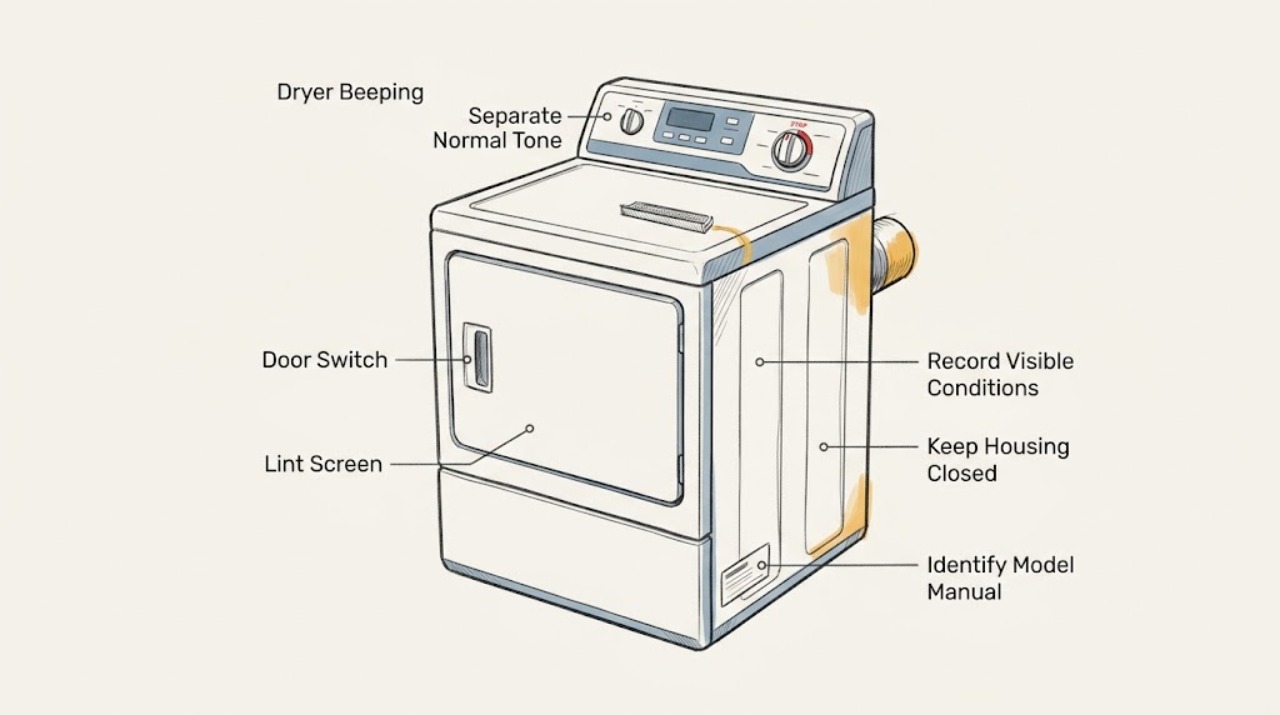
Work through in order
Diagnostic checks
Use only checks that match the exact appliance or system and its official guide.
-
Check 1
Before pressing buttons repeatedly, observe one normal attempt and record whether the dryer beeps at power-up, on a key press, when Start is pressed, when the door is closed, at cycle end, during a damp-load reminder, or continuously without interaction.
Expected result: Write the exact display text or code, the selected cycle, whether the drum or heat started, whether the door is fully closed, and whether the sound stops when the control is released; do not guess a code from the sound alone.
Next step: Use the exact model and serial information to open the matching Maytag manual, then compare the recorded pattern with that manual before changing a setting or attempting another start.
Stop if: Stop using the dryer for smoke, burning odor, abnormal heat, sparks, a damaged cord or plug, a repeated breaker trip, or any sound accompanied by a hazardous electrical or mechanical symptom.
Why this matters
Why: A cycle-end or damp-load sound can be a normal reminder, while a beep tied to Start or the door can indicate an input, door-closure, or cycle-state issue. A code or a sound with no user input needs the model manual rather than a generic reset.
-
Check 2
Read the model label from the location specified by Maytag for dryers, such as the door opening or cabinet area, without removing panels, and enter that model in Maytag's manuals resource.
Expected result: Confirm that the manual's model identity matches the dryer; record the listed audio controls, display-code meanings, door-start behavior, and any cycle-specific damp or end signal.
Next step: Follow only the matching manual's instructions for sound settings, cycle selection, door closure, and code handling; if the label or manual cannot be matched, provide the identity to Maytag support or a qualified technician.
Stop if: Do not remove the console or cabinet to find a label, bridge a switch, or use an unverified button sequence that could start a cycle unexpectedly.
Why this matters
Why: Maytag's beep and tone behavior is model-dependent. A control sequence or error-code explanation from another dryer may be wrong even when the brand is the same.
-
Check 3
With the matching manual open, check whether the recorded sound corresponds to End Beep, Cycle Signal, Damp Beep, or a user-interface confirmation, and change the volume or sound setting only by that manual's procedure.
Expected result: After one setting change, note whether the beep occurs only at the documented event, becomes quieter or off as documented, or continues during unrelated inputs or while the dryer is idle.
Next step: Leave the documented setting in the desired state and investigate the door, cycle state, airflow, power, or displayed code when the timing does not match the manual.
Stop if: Do not keep pressing or holding controls when the panel behaves unpredictably, the dryer starts without a normal command, the display flickers, or any smoke, heat, spark, or odor appears.
Why this matters
Why: A documented cycle-end or damp-load sound that responds to the model's setting is likely a normal reminder. A sound that continues outside that event, prevents a start, or returns with a display code is not resolved by muting the tone.
-
Check 4
With the dryer empty and cool, confirm that the door closes normally, the latch area is clear of clothing or lint, the intended cycle is selected, and the manual's Start action is used once; do not force the door or bypass its switch.
Expected result: Record whether the beep occurs only with the door open, after closing the door, after Start, or with a normal closed-door start; note whether the display acknowledges the selection and whether the drum begins normally.
Next step: Clean only visible lint from the door-contact area as the manual permits, then stop repeated start attempts and arrange model-specific service when the latch, door switch, panel, or start response is abnormal.
Stop if: Do not tape, hold, bridge, or defeat the door switch; stop for a loose hinge, broken latch, exposed wiring, a hot panel, burning smell, smoke, sparks, or a breaker trip.
Why this matters
Why: A beep tied to an open or incompletely closed door or an invalid cycle state points to the user-interface or door-state path. If the door closes normally but the dryer still refuses to start or beeps repeatedly, the issue may be a control, power, or model-specific fault.
-
Check 5
If a code appears with the beeping, copy it exactly—including letters, numbers, and any punctuation—and compare it with Maytag's dryer error-code guidance and the exact owner manual.
Expected result: Classify the display as AF or F4E3, L2, PF, F#E#, another documented code, or no code; note whether the code returns after a single normal reset or immediately on the next operation.
Next step: For AF or F4E3, perform only the external lint-screen and accessible vent checks in the next action. For L2 or PF, follow the manual's external power or one-time recovery guidance. For F#E#, a recurring code, or an unknown code, stop and request qualified service with the exact code.
Stop if: Do not open the cabinet, defeat a fuse or switch, repeatedly reset a breaker, or continue operation when the code returns with burning odor, smoke, abnormal heat, sparks, or a damaged cord.
Why this matters
Why: Maytag associates AF or F4E3 with restricted airflow, L2 with low or no line voltage, PF with power failure, and F#E# with a control problem requiring service. A different or unknown code must not be renamed to one of these categories.
-
Check 6
For an AF or F4E3 indication, stop the cycle, allow the dryer to cool, clean the lint screen as the manual directs, and inspect the accessible exhaust hose and outside outlet for lint, crushing, sharp kinks, or an unusual obstruction without dismantling the cabinet.
Expected result: Record whether the lint screen is blocked, the hose is crushed or sharply kinked, the outside outlet opens with airflow during a permitted cool observation, or the path cannot be safely judged; do not use a tool or reach into an unknown duct.
Next step: Correct only an obvious external lint or hose-position issue allowed by the manual, then make one monitored cycle attempt; if the warning returns, arrange vent cleaning or qualified appliance service.
Stop if: Stop immediately for hot surfaces beyond normal operation, smoke, burning odor, visible lint ignition, a damaged hose, a blocked exterior outlet that cannot be cleared safely, or any need to open the cabinet.
Why this matters
Why: A restriction at the screen or accessible exhaust path can explain an airflow warning and may also contribute to excess heat. If the accessible path is clear but the code or beeping returns, the restriction may be deeper or the sensor/control path may need service.
-
Check 7
Only when there is no odor, smoke, spark, abnormal heat, water exposure, damaged cord, or repeated trip, follow the exact manual's one-time power recovery or control reset procedure; otherwise leave the dryer off.
Expected result: After the single recovery attempt, record whether the display clears and the dryer completes the normal start sequence, whether the same beep or code returns, or whether the panel remains unresponsive.
Next step: If the symptom returns, stop further reset attempts and give the technician the model, code, beep timing, cycle, and result; for an L2 indication, follow only the external breaker, cord, and supply guidance in the manual and do not work inside the appliance.
Stop if: Do not repeatedly cycle the breaker, bypass a fuse, open electrical panels, or continue testing after a spark, shock, smoke, burning smell, overheating, or another trip.
Why this matters
Why: A one-time recovery can distinguish a transient power event such as PF from a persistent door, control, airflow, or power problem, but it does not prove that an underlying fault is repaired. A returning code or repeated beep needs diagnosis.
Use your observations
Decision map
Find the observation that best matches what you see, then follow the next safe action.
-
PATH 01Safety boundary
What you see
The dryer runs normally and the beep occurs only at the documented end-of-cycle or damp-load event.
Do this next
Use only the matching manual's volume or tone setting if the sound is unwanted; no repair is indicated when operation is otherwise normal.
Why this path and its safety boundary
Why it matters: This is consistent with a configurable End Beep, Cycle Signal, or Damp Beep on models that provide that function.
Safety stop: Request service if the sound begins during unrelated events, the dryer will not start, or a code or hazard appears.
-
PATH 02Safety boundary
What you see
A beep occurs on a key press or Start attempt and the dryer does not respond as expected.
Do this next
Check the exact manual for the documented control state and confirm the door and selected cycle once; if the response remains abnormal, stop repeated input and request service.
Why this path and its safety boundary
Why it matters: The panel may be acknowledging an unavailable control state, a door or cycle condition, or a model-specific lock or control behavior; the beep alone does not identify the cause.
Safety stop: Do not bypass a door switch or control lock, and stop for a panel that activates unexpectedly, becomes hot, smokes, sparks, or trips power.
-
PATH 03Safety boundary
What you see
AF or F4E3 is displayed with beeping or the manual identifies a restricted-airflow alert.
Do this next
Cool the dryer, inspect and clean only the accessible screen and exhaust path as the manual allows, then make one monitored attempt; escalate if the warning returns.
Why this path and its safety boundary
Why it matters: Maytag associates these codes with a restricted lint-screen or vent path, including a crushed or kinked vent or excessive turns.
Safety stop: Stop for smoke, burning lint odor, excessive heat, visible damage, or any required cabinet disassembly.
-
PATH 04Safety boundary
What you see
L2 or PF appears with the beeping.
Do this next
Record the code, follow the exact manual's external power guidance, and permit only one normal recovery attempt when no hazard is present; call a qualified technician if it returns.
Why this path and its safety boundary
Why it matters: Maytag describes L2 as low or no line voltage and PF as a power failure; these are different from a normal cycle reminder.
Safety stop: Do not repeatedly reset the breaker or handle wiring, and stop for a damaged cord, heat, smoke, sparks, shock, or another trip.
-
PATH 05Safety boundary
What you see
F#E#, an unknown code, a recurring code, or persistent beeping appears after the normal external checks.
Do this next
Stop using the dryer and provide the exact model, code, beep timing, cycle, and one-time recovery result to Maytag or a qualified appliance technician.
Why this path and its safety boundary
Why it matters: Maytag identifies F#E# as a control problem requiring service; an unrecognized code cannot safely be inferred from a generic list.
Safety stop: Do not open the console, replace a control, bypass a sensor, or keep running the dryer to see whether the condition changes.
-
PATH 06Safety boundary
What you see
Beeping is accompanied by burning odor, smoke, fire, abnormal heat, sparks or arcing, a damaged cord or plug, or repeated breaker trips.
Do this next
Stop using the dryer. If safe, move away from the appliance and leave it de-energized from the normal user control; contact the appropriate local emergency or qualified service resource from a safe location.
Why this path and its safety boundary
Why it matters: The sound is no longer a routine user-notification question; continued operation could increase fire or electrical risk.
Safety stop: Do not touch hot or damaged parts, spray water on an electrical appliance, restore power to repeat a test, or open panels.
Helpful context
Understand the symptom
Start with the beep pattern, not the brand name alone
A single beep at the end of a cycle is a different clue from a beep every time a key is touched, a refusal to start, or a continuous alarm. Note the cycle, whether the drum is running, the display message or code, the door position, and whether the sound stops after the control is released. Maytag's support guidance warns that models differ, so avoid applying a code or button combination from another Maytag dryer.
Normal reminders and user settings
Maytag describes End Beep or Cycle Signal for cycle completion and Damp Beep for a load that may need attention. Some models let the user change volume or turn tones off through a model-specific control sequence. Change only the setting described for the exact dryer; muting a sound does not repair a door, airflow, power, or control problem.
Codes and safety boundaries
If beeping accompanies AF or F4E3, inspect the lint screen and accessible exhaust path for restriction and look for a crushed or sharply kinked vent without opening the cabinet. If the display shows L2 or PF, record it and follow the external power guidance in the manual. A control-related F#E# code, a recurring code, or a code not identified in the manual belongs with Maytag or a qualified appliance technician.
Safety boundary
Stop conditions
- Stop using the dryer for smoke, fire, burning or melting odor, abnormal heat, sparks or arcing, a damaged cord or plug, electric shock, or repeated breaker trips.
- Do not defeat, tape, bridge, or bypass the door switch, a fuse, a control lock, or another safety device.
- Do not open the cabinet or console, handle internal wiring, replace a control, or perform live electrical testing as a user troubleshooting step.
- Do not repeatedly reset the breaker or keep starting cycles after AF, F4E3, L2, PF, F#E#, or another code returns.
- For a gas dryer, stop immediately for gas odor or a delayed ignition event; do not relight, disassemble the gas path, or continue operation.
- Do not reach into an unknown exhaust duct or use sharp tools to clear a restriction; arrange qualified vent or appliance service when the accessible path is not sufficient.
When checks do not resolve it
Need a professional?
Arrange Maytag or qualified appliance service when the exact model manual does not explain the sound, a code returns after one safe recovery attempt, the dryer will not start with a normal closed door, the panel behaves unpredictably, AF or F4E3 returns after accessible airflow checks, L2 persists, F#E# appears, or any internal access would be required. Use a qualified vent professional when the exhaust path remains restricted or cannot be safely assessed.
Safety scope: This article covers ordinary observation, model-manual settings, accessible lint and vent checks, and one safe recovery attempt only when no hazard is present. It does not authorize cabinet access, live electrical work, safety-device bypass, gas-path work, or repeated powered testing.
Common questions
FAQ
Is a Maytag dryer beep always an error?
No. Maytag says models differ, and End Beep, Cycle Signal, or Damp Beep can be normal reminders. Record when the sound occurs and compare it with the exact model manual. Repeated beeps with a code, no-start symptom, unusual heat, odor, smoke, sparks, or a breaker trip need a safe stop and service.
What should I do if the dryer beeps and shows AF or F4E3?
Maytag associates AF or F4E3 with restricted airflow. Allow the dryer to cool, clean the lint screen as the manual directs, and inspect only the accessible exhaust hose and outlet for lint, crushing, or sharp kinks. If the warning returns, stop repeated cycles and arrange qualified vent or appliance service.
What do L2 and PF mean on a Maytag dryer?
Maytag describes L2 as low or no line voltage and PF as a power failure. Copy the code exactly, follow the matching manual's external power guidance, and allow only one normal recovery attempt when there is no hazard. Do not repeatedly reset the breaker or work inside the dryer.
Can I turn off the beeping?
Some Maytag models provide volume or tone controls, but the button sequence and available settings vary. Use only the exact model manual. Muting a sound does not address a door, airflow, power, control, or safety problem.
When should I stop using a beeping dryer?
Stop for burning or melting odor, smoke, fire, abnormal heat, sparks or arcing, a damaged cord or plug, electric shock, repeated breaker trips, or gas odor on a gas dryer. Do not bypass safety devices, open panels, or keep resetting power to repeat a test.
Read the exact guide
Official sources
- Beeps and Tones - DryerMaytag Product Help · Maytag Product Help article for dryer beeps and tones; the available controls and button sequence are model-dependent.
- Understanding a Dryer's Beeps and TonesMaytag Product Help · Maytag Product Help guidance for Maytag dryers; exact sound behavior and controls vary by model.
- Error Codes in DryersMaytag Product Help · Maytag Product Help error-code guidance for Maytag dryers; other codes and model-specific procedures belong to the exact owner manual.
- MAYTAG® MANUALS & LITERATUREMaytag · Maytag's official manuals resource; the exact dryer model must be matched before applying a control sequence or code explanation.
- Contact MaytagMaytag · Maytag's official support page for identifying the appliance and preparing information for support; it does not replace the exact manual or qualified service.
Community feedback
Share a repair observation
Share a plain-text repair observation. Accepted observations are published automatically; this page may take a moment to update.