
On this page
Start here
Quick answer
A Maytag dryer that stops before the displayed cycle time ends may be finishing an automatic moisture-sensing cycle, entering a heat-free wrinkle-prevention phase, or stopping because of a door, load, airflow, drive, thermal, or control problem. First note whether the drum and display are actually off, whether the load is dry, and which cycle and options were selected. If the clothes are dry and the machine is only tumbling intermittently without heat, that may be the selected end-of-cycle feature. If the load is damp, the dryer stops with a hot or electrical smell, the door opens, the drum will not turn, the vent is restricted, or the stop repeats, keep it out of service while you check only the accessible lint screen, load, door/latch, visible vent, and cool-drum movement. Do not open the cabinet, bypass a thermal fuse or door switch, or keep restarting a dryer that overheats or shows electrical damage.
Before you begin
Safety first
- This article supports reading the model instructions, observing cycle behavior, checking the load and door from outside, cleaning the accessible lint screen, inspecting the visible exhaust path, and checking a cool empty drum only when the appliance is safely unplugged. Do not open the cabinet, perform live electrical or gas work, bypass a safety device, or operate with abnormal heat, damage, or airflow.
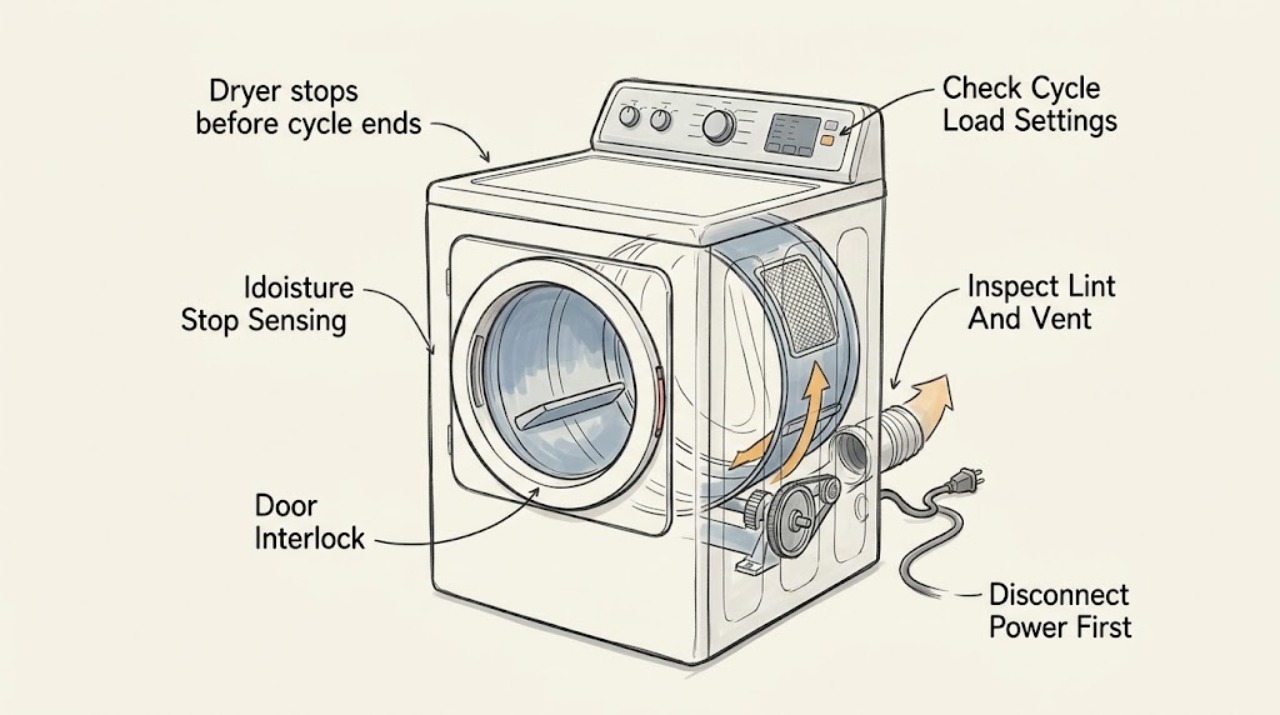
Work through in order
Diagnostic checks
Use only checks that match the exact appliance or system and its official guide.
-
Check 1
When the dryer appears to stop, do not immediately restart it. From a safe position, note whether the display and drum are completely off, whether the display says End or remains active, whether the drum tumbles without heat, and whether the load is dry, damp, or unusually hot.
Expected result: The load is dry and the dryer resumes occasional heat-free tumbling, the appliance is fully off with a damp load, the door is open, or the drum stopped with an odor, smoke, unusual heat, or an electrical symptom.
Next step: If there is smoke, flame, sparking, a hot cord or outlet, a burning or gas odor, or unusually hot laundry, stop use and seek the appropriate emergency, gas, or qualified appliance assistance. Otherwise record the state and continue with the cycle and load checks only after the dryer is cool.
Stop if: Do not restart a dryer that is smoking, sparking, producing a gas or electrical odor, unusually hot, or showing visible damage.
Why this matters
Why: Dry clothes followed by heat-free intermittent tumbling can fit a selected Wrinkle Prevent or Wrinkle Control feature. A fully powered-down appliance with damp clothes, an open door, or a safety symptom is not established as normal cycle completion.
-
Check 2
Read the selected cycle, dryness level, temperature, and options in the Maytag model manual or control panel. Remove some items if the drum is tightly packed, check that the load is suitable for that cycle, and make sure no item is caught in the door opening.
Expected result: The dryer was on Air Dry or a short timed cycle, the load was tightly packed or mixed in a way that leaves damp pockets, the dryness option is reached early, or the same stop occurs with a reasonable load and the documented cycle.
Next step: Use the model-specified cycle and load size for a later normal load only when no safety symptom is present. If the repeat stop is independent of settings or the load remains damp, stop troubleshooting by changing cycles and arrange service.
Stop if: Do not keep changing settings to conceal a recurring stop, overload the drum, or use heat after an overheating or electrical symptom.
Why this matters
Why: Cycle choice, load size, and moisture-sensing decisions can make a dryer stop earlier than the user expects. If the documented cycle stops with damp clothes regardless of load and setting, a mechanical, sensor, door, thermal, or control issue becomes more likely.
-
Check 3
With the dryer off and cool, clean the lint screen according to the model instructions and inspect the visible exhaust hose, wall connection, and outside hood for lint, kinks, crushing, or a flap that cannot open. Do not open the cabinet or reach into the blower or heater area.
Expected result: The lint screen has residue or heavy buildup, the hose is crushed or kinked, the outside hood has little exhaust, drying has become unusually long, or the visible path is clear and airflow had been normal.
Next step: Keep the dryer off until a damaged or blocked vent path is correctly restored and securely connected. If the path is clear but the dryer still stops with damp clothes or gets hot, request qualified diagnosis rather than repeating cycles.
Stop if: Do not operate with a crushed, disconnected, blocked, or unverified exhaust path, and do not disconnect a hot duct or clean inside the cabinet as a user test.
Why this matters
Why: A restricted screen or exhaust can reduce airflow and make drying take longer, which can interact with temperature protection or a cycle's moisture decision. A clear visible path does not rule out internal lint, a blower fault, or a thermal problem.
-
Check 4
After the dryer is cool, inspect the door opening, latch, strike, and visible seal for lint, distortion, looseness, or clothing caught between the door and frame. Close the door normally without forcing it and note whether it stays latched when the dryer is not running.
Expected result: The latch is bent or loose, the door does not stay closed, an item is trapped in the opening, or the door and visible latch appear intact while the stop still recurs.
Next step: Remove only loose lint or clothing that is accessible without tools. If the latch is damaged, the door opens during operation, or the cycle stops despite a secure door, leave the dryer out of service and arrange model-specific service.
Stop if: Do not tape, wedge, defeat, or bypass the door latch or switch, and do not remove the door or front panel to reach the interlock.
Why this matters
Why: A door that pops open or a switch that fails to register a closed door can cut a cycle short. An intact visible latch does not clear the hidden switch or control circuit.
-
Check 5
If the plug is cool, reachable, and undamaged, unplug the cool dryer before checking the empty drum by hand. Turn it gently from the opening and recall whether the last safe cycle had a squeal, rumble, scrape, motor hum, or a drum that stopped turning while heat continued.
Expected result: The empty drum turns smoothly, or it binds, scrapes, rocks, or has unusual resistance; the prior cycle had a belt-like squeal, motor hum without tumbling, or a mechanical rumble.
Next step: If the drum movement or sound is abnormal, keep the dryer unplugged and arrange qualified diagnosis. If movement is smooth but the stop recurs with damp clothes, use the cycle, airflow, and safety observations for the service handoff rather than opening the cabinet.
Stop if: Do not remove panels, reach past guards, lubricate or replace a belt or motor, or run the dryer with a panel removed.
Why this matters
Why: A belt, motor, seized drum, or roller problem can stop tumbling and end a cycle early. Maytag also notes that a dryer should not continue operating when it does not spin because tumbling supports airflow and drying; smooth hand movement does not clear the sensor, door, thermal, or control systems.
-
Check 6
Record whether the stop follows several minutes of heating, happens only on high heat, follows a long or restricted-airflow load, trips a breaker, or leaves a hot plug, odor, scorch, or error indication. Do not perform live electrical tests or reset a protective device repeatedly.
Expected result: The stop is accompanied by abnormal heat, an electrical or burning smell, smoke, a hot connection, a repeated breaker trip, or a thermal-related symptom; alternatively, none of these signs is present and the cycle simply ends with dry clothes.
Next step: For any heat, smoke, odor, electrical, or repeated protective-trip pattern, keep the dryer out of service and request qualified appliance or electrical diagnosis. If there is no hazard and the load is dry, compare the observed behavior with the model manual before considering a normal-cycle explanation.
Stop if: Do not bypass or test a thermal fuse, thermostat, door switch, motor circuit, heater, or wiring, and do not keep resetting a breaker to make the dryer continue.
Why this matters
Why: A thermal fuse or another heating, airflow, power, or control fault may be stopping the appliance for protection; Maytag says a triggered thermal fuse must be replaced before use and recommends professional inspection for concealed sensor or part faults. A dry load without hazard signs is more consistent with a documented cycle decision than an emergency stop.
Use your observations
Decision map
Find the observation that best matches what you see, then follow the next safe action.
-
PATH 01Safety boundary
What you see
The load is dry, the selected cycle is automatic or sensor-based, the display and controls behave normally, and the dryer only tumbles intermittently without heat after the apparent stop.
Do this next
Use the exact Maytag manual to confirm the selected cycle and end-of-cycle option. If the dryer instead stops with damp clothes or changes to a full power-off state unexpectedly, follow the fault branches.
Why this path and its safety boundary
Why it matters: The machine may have reached its selected dryness or entered a Wrinkle Prevent or Wrinkle Control phase rather than failing before the cycle ended.
Safety stop: Do not treat smoke, overheating, an odor, abnormal noise, or repeated damp-load stops as a normal sensor or wrinkle phase.
-
PATH 02Safety boundary
What you see
The dryer stops with a dry or partly dry load after Air Dry, a short timed cycle, a low dryness setting, an unsuitable mixed load, or a tightly packed drum, and no safety symptom is present.
Do this next
Use the Maytag manual to select a cycle appropriate to the load and avoid tight packing. If the same cycle still ends early with damp clothes on a reasonable load, stop changing settings and request service.
Why this path and its safety boundary
Why it matters: The selected cycle or load conditions can explain the user's expectation that the dryer should continue; the appliance may be following its control logic rather than losing power.
Safety stop: Do not overload the drum or use a setting change to continue a dryer that is overheating, smoking, or electrically abnormal.
-
PATH 03Safety boundary
What you see
The load is damp, drying time has increased, the lint screen or visible exhaust is restricted, the dryer is unusually hot, or the stop follows a long heated run.
Do this next
Keep the dryer off until the accessible vent path is corrected; if the stop or heat remains, arrange qualified inspection of internal airflow, thermal protection, and heating components.
Why this path and its safety boundary
Why it matters: Restricted airflow, internal lint, a blower or heating fault, or thermal protection is more likely than a simple cycle-selection issue.
Safety stop: Do not operate with a blocked or crushed vent, defeat a thermal fuse, or keep restarting a dryer that becomes unusually hot.
-
PATH 04Safety boundary
What you see
The door pops open or will not remain latched, or the stop is accompanied by a motor hum, squeal, rumble, scraping, drum drag, or a drum that no longer turns.
Do this next
Leave the dryer out of service and provide the technician with the door and drum observations; do not defeat the interlock or open the cabinet for a parts guess.
Why this path and its safety boundary
Why it matters: A door latch or switch, belt, motor, seized drum, roller, or another drive component can interrupt tumbling and end the cycle before the expected time.
Safety stop: Do not run the dryer with a faulty latch or without tumbling, and do not remove drive panels or guards.
-
PATH 05Safety boundary
What you see
The appliance loses all display power mid-cycle, a breaker trips repeatedly, a cord or outlet is hot, an electrical or burning odor appears, smoke or sparking occurs, or the stop repeats after the safe external checks.
Do this next
Stop use and request qualified appliance or electrical diagnosis. For smoke, fire, exposed wiring, or a gas odor, leave the area when appropriate and seek the relevant emergency or gas assistance from a safe location.
Why this path and its safety boundary
Why it matters: A power connection, control, heater, sensor, thermal safety, or internal wiring fault is possible and cannot be safely diagnosed by repeated resets or cabinet access.
Safety stop: Do not reset a protective device repeatedly, test live terminals, bypass a safety component, or energize the dryer with damage or exposed parts.
Helpful context
Understand the symptom
Define what stopped before diagnosing why
A timer reaching zero is not the only normal end state. In an automatic or sensor cycle, the dryer can shorten or extend the displayed time and stop when the selected dryness is reached. A Wrinkle Prevent or Wrinkle Control option can then start and stop tumbling without heat. The fault pattern is different when the load is still damp, the whole appliance loses power mid-cycle, the door pops open, the drum stops while the motor hums, or the dryer becomes unusually hot.
Start with low-risk observations
Record the Maytag model, cycle, dryness setting, load size, whether the load was dry, and whether the display stayed on. Clean the accessible lint screen and inspect the visible vent path only while the dryer is off and cool. A restricted screen or exhaust can lengthen drying and contribute to overheating, but a clear visible path does not rule out internal lint or a failed sensor, thermal device, motor, or control.
A repeated stop is a service boundary when it is not a normal cycle decision
Do not use repeated restarts as a test. A single incorrect cycle selection can explain a dry load or an apparently early stop, but a damp load with a recurring stop, abnormal heat, a smell, a door-interlock symptom, or abnormal drum movement needs model-specific diagnosis. Maytag identifies several of those causes as parts or access work best handled by a professional.
Safety boundary
Stop conditions
- Stop using the dryer for smoke, flame, sparking, a hot cord or outlet, a sharp electrical or burning odor, visible scorching, exposed wiring, a gas odor, or repeated breaker trips.
- Do not keep restarting the dryer to make it finish, especially when the load is unusually hot, the vent is restricted, or the stop repeats with damp clothing.
- Do not operate with a crushed, disconnected, blocked, or unverified exhaust path, and do not open the cabinet or clean internal lint as an ordinary user test.
- Do not defeat, tape, wedge, bypass, or test a door latch, door switch, thermal fuse, thermostat, heater, motor circuit, or other safety component.
- Leave the dryer out of service for abnormal drum resistance, a drum that does not tumble, a damaged latch, recurring mid-cycle stops, or a fault that remains after the documented cycle and accessible airflow checks.
Only after diagnosis
Potential parts
- dryer lint screen or exhaust venting component
Consider this category only if inspection confirms a damaged or restricted screen or vent path and the exact installation or care instructions call for replacement.
Confirm the Maytag model, vent routing, material, and installation requirements; do not operate with a blocked, crushed, or disconnected exhaust path. - dryer door latch or door switch
Consider this category only if the door does not remain latched or a qualified diagnosis confirms that the interlock is interrupting the cycle.
Confirm the exact Maytag model and manufacturer's fit information; never bypass the door interlock or substitute an unverified switch. - dryer belt, motor, roller, or drum support
Consider these categories only after abnormal drum movement, a motor-without-tumble symptom, or a diagnosed drive noise establishes a mechanical cause.
Confirm the exact Maytag model and configuration before ordering; do not replace a drive part based on an early stop alone. - dryer moisture sensor or thermal protection component
Consider this category only after qualified diagnosis of a recurring damp-load stop, overheating, or a protective shutdown with airflow and load causes addressed.
Confirm the exact model, electrical or gas configuration, safety rating, and manufacturer's fit information; do not bypass or reuse a triggered safety component.
When checks do not resolve it
Need a professional?
Arrange qualified Maytag appliance service when the dryer stops with damp clothes despite the correct cycle and reasonable load, the stop repeats after accessible lint and vent checks, the door or drum movement is abnormal, a sensor, thermal, heating, motor, or control fault is suspected, or any electrical symptom appears. Use emergency or gas assistance from a safe location for smoke, fire, exposed wiring, or a gas odor.
Safety scope: This article supports reading the model instructions, observing cycle behavior, checking the load and door from outside, cleaning the accessible lint screen, inspecting the visible exhaust path, and checking a cool empty drum only when the appliance is safely unplugged. Do not open the cabinet, perform live electrical or gas work, bypass a safety device, or operate with abnormal heat, damage, or airflow.
Common questions
FAQ
Why does my Maytag dryer stop before the timer reaches zero?
An automatic or sensor cycle can adjust its remaining time and stop when the selected dryness is reached. If the load is dry and the dryer only tumbles without heat afterward, Wrinkle Prevent or Wrinkle Control may be active. Damp clothing, a full loss of power, a door that opens, abnormal heat, or a repeated stop points to a fault instead.
Can an overloaded Maytag dryer stop early?
Yes. Maytag lists overloading as a possible reason for a door to pop open and cut a cycle short, and a tightly packed load can also interfere with drying. Use the model's load guidance, but do not keep operating if the stop is accompanied by overheating, smoke, odor, or an electrical symptom.
Could a dirty lint screen make a Maytag dryer stop before the clothes are dry?
A residue-loaded lint screen can restrict airflow, prolong drying, and contribute to an incomplete load. Clean the accessible screen as the model instructions direct and inspect the visible exhaust path while cool. If the dryer remains damp, hot, or repeatedly stops, keep it out of service for qualified diagnosis.
What does it mean if the Maytag dryer hums but the drum stops?
A belt, motor, seized drum, roller, or another drive problem is possible. Leave the dryer out of service, and only check a cool empty drum by hand when it is safely unplugged and no cord or outlet damage is present. Do not open panels or continue a cycle without tumbling.
Should I reset my Maytag dryer when it stops mid-cycle?
Do not repeatedly reset it as a diagnostic. First record the cycle state and check the load, accessible lint screen, visible exhaust, door, and cool-drum behavior. A recurring stop, a protective trip, unusual heat, an odor, smoke, or a damp load needs qualified service rather than repeated resets.
Read the exact guide
Official sources
- How to Fix a Dryer That Won’t SpinMaytag · General Maytag dryer mechanical guidance used to prioritize a service boundary; exact components and access depend on the model.
- Dry Time Keeps Going Up - DryerMaytag Product Help · Maytag dryer performance guidance; the installed model's cycle names and controls may differ.
- Dryer Stops Mid-CycleMaytag Product Help · Maytag dryer guidance; exact cycles and options vary by model and the owner's manual controls the installed appliance.
- How Hot Does a Dryer Get?Maytag · General Maytag dryer airflow and overheating guidance; exact service boundary depends on model and fuel type.
- ELECTRIC or GAS DRYERMaytag · One Maytag electric/gas dryer manual used to illustrate documented option behavior; the user's exact Maytag model manual takes precedence.
- Why Does My Dryer Keep Stopping Mid-Cycle?Maytag · General Maytag dryer troubleshooting; parts, access, and exact repair procedure depend on the model and fuel type.
- Cleaning the Lint Screen on a DryerMaytag Product Help · Maytag dryer maintenance guidance; use the exact model instructions for screen location and cleaning method.
Community feedback
Share a repair observation
Share a plain-text repair observation. Accepted observations are published automatically; this page may take a moment to update.