
On this page
Start here
Quick answer
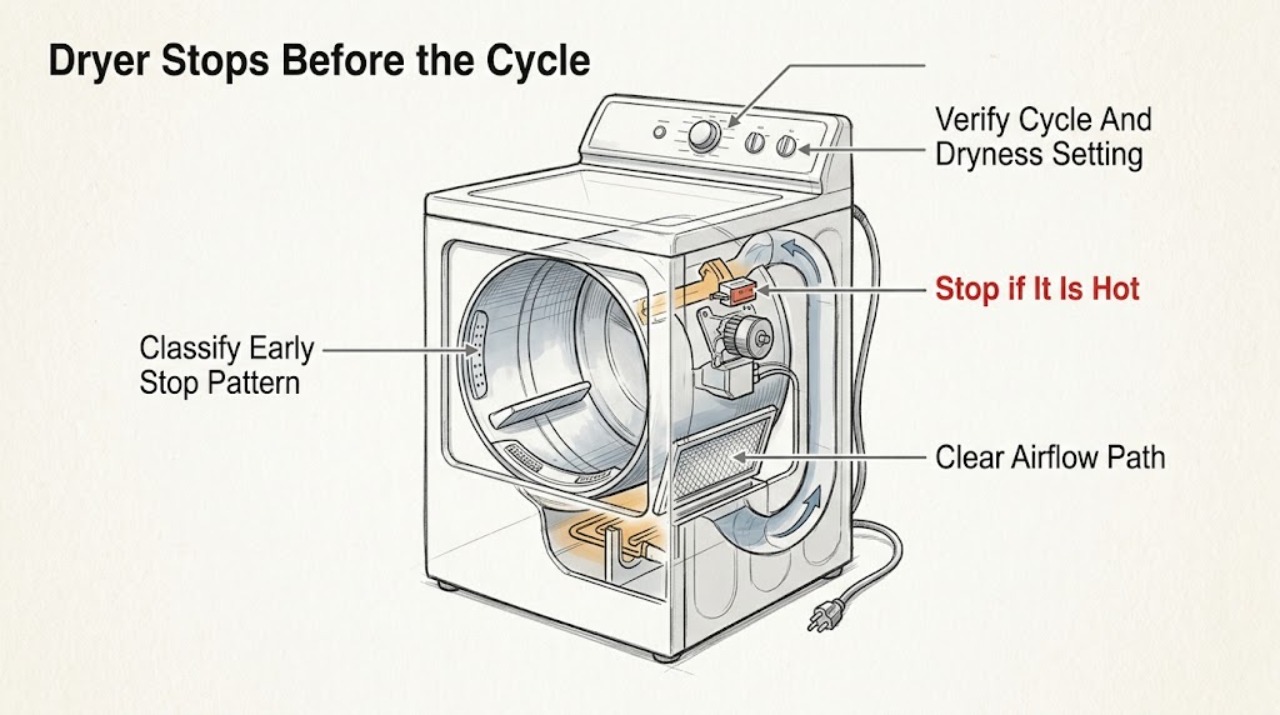
An Amana dryer can appear to stop early for a normal automatic-cycle decision, a restricted lint screen or exhaust path, an overloaded or poorly distributed load, a setting that does not match the load, a power or control interruption, or an overheating motor or thermal limiter. First note whether the clothes are already at the selected dryness, whether the display shows a power or diagnostic message, and whether the drum and controls stop completely. Check the selected cycle, dryness level, load size, lint screen, and visible exhaust condition. Let an overheated dryer cool before any safe retry, but do not keep restarting it if it is hot, smells burnt, shows smoke, trips a breaker, or has damaged wiring. Persistent early stopping with damp clothes, a recurring error, no heat, no tumbling, or a normal load needs qualified Amana appliance service; do not bypass a sensor or thermal safety device or open the cabinet.
Work through in order
Diagnostic checks
Use only checks that match the exact appliance or system and its official guide.
-
Check 1
When the Amana dryer stops, note whether the cycle display ends normally, whether the clothes are dry or damp, whether the drum and controls are still responsive, and whether the dryer starts again only after cooling. Record the selected cycle, dryness level, load type, any display message, and whether the stop occurs at a repeatable point.
Expected result: The clothes are dry and the cycle ends normally, clothes are damp while the cycle ends early, the drum or display goes dead, the dryer restarts after cooling, or an error or warning appears.
Next step: Use the cycle and load checks for a normal-looking early end. For damp clothes, a dead display, a hot cabinet, a repeated error, smoke, burning odor, or electrical symptom, stop using the dryer and move to the appropriate service boundary.
Stop if: Do not keep restarting a dryer that is hot, smoking, sparking, scorched, or repeatedly tripping a breaker.
Why this matters
Why: Dry clothes with a normal end can reflect automatic-cycle sensing. Damp clothes indicate a cycle, load, sensor, airflow, or heat problem. A dead control, cooling-dependent restart, or recurring message points toward power, overheating, thermal protection, or an internal fault.
-
Check 2
Compare the selected Amana cycle with the load and the result. Use an automatic cycle such as Normal, Heavy Duty, or Colors for a load that should dry to a selected level; use a timed cycle only when the model guidance and load call for it. Confirm that Air Dry or Fluff was not selected accidentally, and adjust the dryness level only according to the model manual.
Expected result: Air Dry or Fluff was selected, a quick cycle was used for a large or heavy load, an automatic cycle ended with dry clothes, or the selected cycle matches the load but damp clothes remain.
Next step: Correct the cycle and dryness setting, then run one representative load while observing the result. If the proper cycle still ends early with damp clothes, continue with lint, load, airflow, and service checks rather than repeatedly increasing settings.
Stop if: Do not use a heat setting or cycle that conflicts with the garment care label, and do not bypass a sensor to force the cycle to continue.
Why this matters
Why: Amana says Air Dry or Fluff adds no heat, quick cycles are intended for smaller loads, and automatic cycles stop when the sensed humidity reaches the chosen dryness. A matching cycle with damp clothes makes lint, load distribution, sensor contact, airflow, heat, or service more likely.
-
Check 3
Stop the dryer and clean the lint screen according to Amana guidance. Remove loose lint, and if residue from detergent or fabric softener has coated the screen, wash and brush it only as the model instructions permit, then dry it completely before reinstalling. From outside the appliance, inspect the visible exhaust hose and outside hood for crushing, kinks, lint, or a blocked damper; do not enter the cabinet.
Expected result: Lint falls from the screen, the mesh is coated or hard to breathe through, the exhaust hose or hood is visibly restricted, the dryer is hot or damp inside, or the screen and visible vent are clear.
Next step: Correct only the accessible lint or external airflow condition, reinstall the dry screen, and compare one safe load. If airflow is restricted beyond the accessible area, arrange qualified vent cleaning; if early stopping persists with clear airflow, arrange appliance service.
Stop if: Do not operate without the lint screen, use a damaged screen, remove internal vent panels, or continue through overheating or a blocked exhaust.
Why this matters
Why: Amana says lint-screen residue can lengthen drying and cause the dryer to stop before the load is dry. Restricted airflow can add heat and moisture and can make early stopping or poor drying recur. A clear screen and visible vent do not rule out an internal sensor, heater, motor, or control fault.
-
Check 4
Review whether the load is tightly packed, unusually heavy and wet, too small for the selected automatic cycle, or made of mixed fabrics with very different drying behavior. If the dryer stopped while hot, leave it off until it has cooled before trying a smaller, evenly distributed load. Do not continue a retry if the cabinet or clothes smell burnt or the drum makes abnormal contact noise.
Expected result: The dryer works with a smaller load, it stops only with a dense wet load, it stops after becoming hot, the load is too small to contact the sensor as the manual requires, or the same early stop occurs with a normal load.
Next step: Use a correctly sized and sorted load if the symptom clears. If the dryer overheats, stops again, or fails with a normal load, stop operating it and arrange qualified appliance service for the motor, thermal limiter, sensor, airflow, or control path.
Stop if: Do not bypass thermal protection, repeatedly restart a hot dryer, or operate with scorching, smoke, burning odor, or abnormal mechanical contact.
Why this matters
Why: Overloading can restrict tumbling and overheat the motor; Amana identifies motor overheating and thermal-limiter activation as reasons a dryer may stop. A very small or poorly distributed load can also make automatic sensing end at the wrong time. Recurrence with a normal load needs diagnosis.
-
Check 5
If the dryer stops completely, check from outside the appliance whether the plug remains seated, the display returns, and the household breaker or fuse shows an obvious trip. Record any Amana code or indicator before clearing it, and use the exact model manual for its meaning. Do not remove the power-cord cover, terminal block, cabinet, or control panel.
Expected result: A power failure message appears, the breaker has tripped, the display is dead, an airflow or fault code returns, or the external power and display look normal while the dryer still stops early.
Next step: Follow only the model manual's safe response to a one-time power message or obvious household reset. If a code returns, the breaker trips again, the cord or outlet is damaged, or the dryer remains unresponsive, leave it unused and arrange qualified appliance or electrical service.
Stop if: Do not probe the outlet, tighten terminal screws, remove covers, bypass a door or thermal switch, or repeatedly reset a tripping breaker.
Why this matters
Why: Amana identifies power interruptions, restricted airflow indicators, low line-voltage conditions, and fault-code families that require service as separate paths. A normal display and supply status with repeated early stopping makes an internal sensor, thermal, drive, heater, or control issue more likely.
-
Check 6
After the cycle, lint, airflow, load, and external-control checks, record whether the clothes are damp, whether the drum stopped or the cycle simply ended, whether the dryer was hot, and whether a code or airflow indicator appeared. Include the Amana model number and the exact load and cycle when requesting service.
Expected result: The dryer completes a suitable cycle with dry clothes, the cycle still ends early with damp clothes, the motor stops after heating, the controls go dead, or a fault or airflow message returns.
Next step: Use the dryer only when it completes safely without abnormal heat or noise. Otherwise leave it unused and arrange qualified Amana appliance service, providing the model, cycle, load, temperature, display, and checks already completed.
Stop if: Do not continue test cycles through a persistent safety symptom or open the dryer to inspect the heater, motor, sensor, thermal limiter, or wiring.
Why this matters
Why: A corrected setting, load, or lint condition supports an operating or maintenance cause. Persistent damp early stopping, heat-related shutdown, dead controls, or recurring codes require professional diagnosis and cannot identify a safe replacement part by symptom alone.
Use your observations
Decision map
Find the observation that best matches what you see, then follow the next safe action.
-
PATH 01Next step
What you see
The automatic cycle ends and the clothes are at the selected dryness, with no heat, odor, display, or mechanical symptom.
Do this next
Use the cycle and dryness setting that matches the load and monitor a representative load. If clothes are still damp or the end becomes progressively earlier, continue troubleshooting and arrange service if safe checks do not help.
Why this path and its safety boundary
Why it matters: Amana says automatic cycles sense drum humidity and turn off when the desired dryness is reached; this is not necessarily a fault.
-
PATH 02Next step
What you see
Air Dry or Fluff, a small-load cycle, an unsuitable dryness level, an overloaded drum, or a badly mixed load was selected.
Do this next
Select a model-appropriate cycle, sort and reduce the load, and compare one safe cycle. If early stopping returns with a suitable load and setting, check lint, airflow, heat, and service.
Why this path and its safety boundary
Why it matters: The cycle or load can explain an early end or incomplete drying without proving a component failure.
-
PATH 03Next step
What you see
The lint screen is coated, lint falls from the screen, the exhaust path is visibly restricted, or a restricted-airflow indicator appears.
Do this next
Clean the screen as directed and arrange qualified vent cleaning for restrictions beyond the accessible area. If the dryer remains hot or stops early with clear airflow, arrange appliance service.
Why this path and its safety boundary
Why it matters: Amana links screen residue and restricted airflow with longer drying and a dryer that stops before the load is completely dry.
-
PATH 04Next step
What you see
The dryer is hot, stops after a dense wet load, restarts only after cooling, or repeats the stop with a normal load.
Do this next
Let the dryer cool and reduce the load only when there is no unsafe odor, smoke, scorching, or abnormal noise. Stop using it and arrange service if heat-related stopping returns.
Why this path and its safety boundary
Why it matters: Overload can overheat the motor, and Amana identifies thermal-limiter activation as a possible reason an electric dryer stops. Repetition with a normal load requires diagnosis.
-
PATH 05Next step
What you see
The display goes dead, a power or low-line message appears, a fault code returns, a breaker trips, or the dryer has damaged power wiring.
Do this next
Stop using the dryer and arrange qualified appliance or electrical service. Record the code and model; do not remove covers, probe power, or repeatedly reset the breaker.
Why this path and its safety boundary
Why it matters: The symptom is an electrical, control, or installation boundary rather than a cycle-setting issue.
-
PATH 06Next step
What you see
The proper cycle, load, lint screen, visible airflow, and external-control checks are normal, but clothes remain damp or the cycle still stops early.
Do this next
Leave the dryer unused and arrange qualified Amana appliance service. Provide the model, load, cycle, dryness setting, heat behavior, display message, and troubleshooting observations.
Why this path and its safety boundary
Why it matters: An internal moisture-sensing, heater, motor, thermal, control, or airflow condition is more likely; the symptom cannot identify the failed component.
Helpful context
Understand the symptom
Not every early stop is a failed dryer
Amana automatic cycles sense humidity and turn off when the selected dryness is reached. Air Dry or Fluff is intentionally no-heat, while quick timed cycles are intended for smaller loads. If clothes are still damp, the dryer becomes hot, or the controls go completely dead, treat the symptom as a performance or safety problem rather than changing settings at random.
Use the model manual for cycle and sensor behavior
The exact Amana cycle names, dryness options, display messages, and sensor location vary by model. Safe checks stay outside the cabinet: cycle selection, load distribution, lint screen, visible exhaust, display, and household power status. Do not bypass a moisture sensor or thermal limiter, open the terminal area, or operate through scorching, smoke, or a burning odor.
Only after diagnosis
Potential parts
- Amana dryer lint screen
Consider this only if the exact model's screen is damaged, missing, or no longer seats correctly after cleaning and a qualified diagnosis confirms it is affecting safe airflow.
Lint-screen shape and fit vary by model. Confirm the model and condition before selecting a replacement; do not operate without the required screen. - Amana dryer moisture sensor or thermal limiter
Consider this only after qualified service confirms that a sensor or thermal-limiter fault is causing repeated early stopping or heat-related shutdown after airflow and load checks.
Sensor and thermal components are model-specific safety parts and require safe internal access. Do not bypass or substitute them based on a symptom alone. - Amana dryer motor or control component
Consider this only when service diagnosis identifies an internal motor, control, or power-path failure after external settings, load, lint, airflow, and household-power checks.
Drive and control components vary by model and electrical configuration. Have a qualified technician identify the failed part and confirm compatibility.
When checks do not resolve it
Need a professional?
Arrange qualified Amana appliance service when a suitable cycle and load still end early with damp clothes, the dryer stops after heating or restarts only after cooling, a thermal limiter or sensor is suspected, a fault code returns, or the controls and drum go dead. Arrange qualified vent service for a restricted exhaust path and qualified electrical help for damaged wiring, a damaged outlet, low-line symptoms, or repeated breaker trips. Stop immediately for smoke, scorching, burning odor, sparking, an active electrical hazard, or severe overheating; use local emergency guidance for fire or immediate danger. Do not bypass a moisture sensor, thermal limiter, door switch, or control, remove panels, probe wiring, or keep restarting an unsafe dryer.
Common questions
FAQ
Why does my Amana dryer stop before the clothes are dry?
Check whether an automatic cycle is ending at its sensed dryness, then check the cycle setting, load size, lint screen, visible airflow, and display message. Amana links lint-screen residue, overload and overheating, restricted airflow, and power or fault conditions with incomplete drying. Persistent damp early stopping needs service.
Can an automatic Amana dryer cycle end early normally?
Yes. Amana says automatic cycles sense humidity in the drum and turn off when the desired dryness is reached. If the clothes are still damp, the cycle becomes progressively shorter, or a warning or heat symptom appears, continue with the lint, load, airflow, and service checks.
Can a dirty lint screen make an Amana dryer stop early?
Yes. Amana says detergent or fabric-softener residue can build up on the lint screen, lengthen drying, and cause the dryer to stop before the load is dry. Clean and dry the screen according to the Amana instructions, reinstall it, and arrange vent or appliance service if the symptom remains.
What if my Amana dryer stops after it gets hot?
Stop the dryer and allow it to cool. Amana identifies overload-related motor overheating and thermal-limiter activation as possible causes of a dryer stopping. Reduce the load only when there is no smoke, burning odor, scorching, or abnormal noise. Repeated heat-related stopping needs qualified service.
When should I call for Amana dryer service?
Arrange service when a suitable cycle, load, clean lint screen, visible airflow, and external-control checks do not correct damp early stopping; when a fault or airflow message returns; or when the motor, sensor, heater, or thermal protection is suspected. Stop immediately for smoke, burning odor, scorching, sparking, damaged wiring, or severe overheating.
Read the exact guide
Official sources
- Not Tumbling or Spinning - DryerAmana Product Help · Amana dryer no-tumble controls, power response, start control, moisture on controls, cord installation, and service boundary
- TROUBLESHOOTING GUIDE: DRYERS - NOISES AND LIGHTSAmana · Amana dryer noise, drum seam objects, lint and vent indicators, and professional-repair boundary
- Dryer Stops Mid-CycleAmana Product Help · Amana dryer early cycle ending, automatic humidity sensing, cycle selection, Air Dry or Fluff, timed cycles, and service guidance
- Error Codes in DryersAmana Product Help · Amana dryer restricted airflow, low or no line voltage, power-failure messages, fault codes, and service escalation
- Washing the Lint Screen in a DryerAmana Product Help · Amana dryer lint-screen residue, early stopping, screen cleaning, drying, and reinstallation
Community feedback
Share a repair observation
Share a plain-text repair observation. Accepted observations are published automatically; this page may take a moment to update.