
On this page
Start here
Quick answer
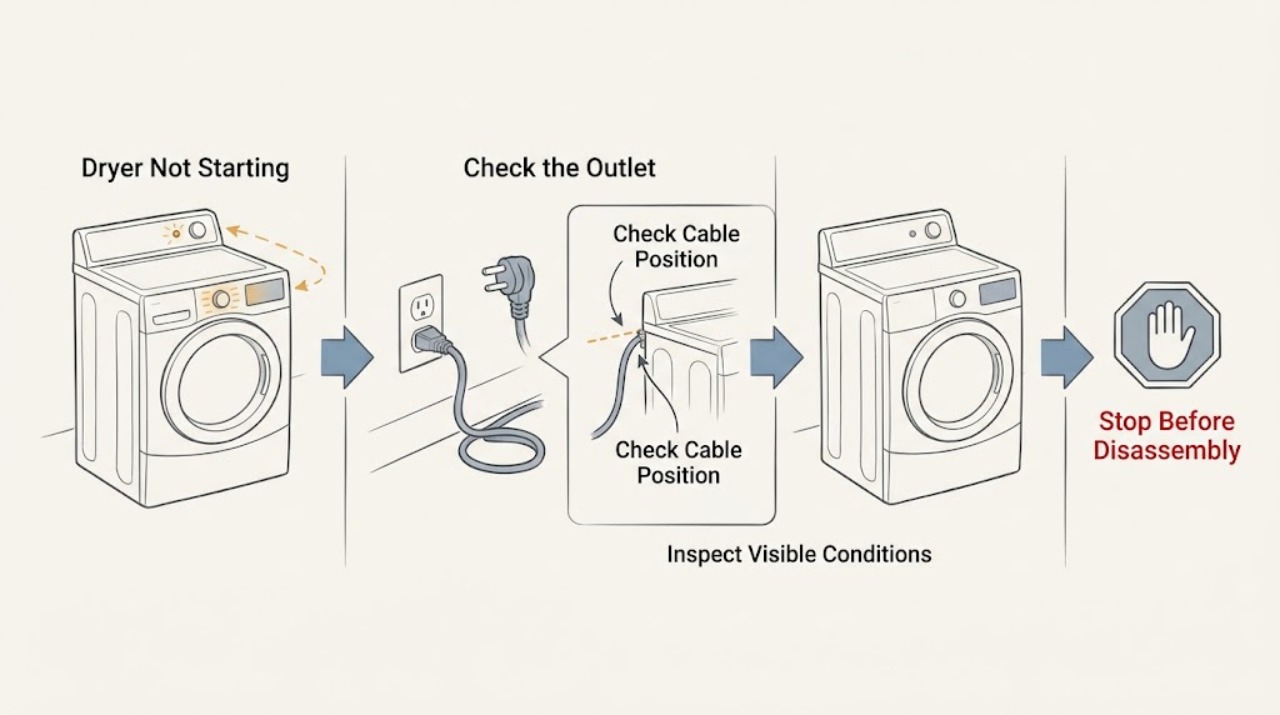
First decide whether the Maytag dryer is completely blank or has power but will not begin a cycle. Maytag's support sequence is to check power, control lock, a firmly held Start button, the door latch, the selected cycle, and any obstruction at the latch. A control panel or hand that is damp may not register touch. An electric dryer can have two household breakers or fuses, while a gas dryer uses one, so the model and supply matter. Record any error code instead of guessing at it. If there is a burning smell, smoke, sparking, abnormal heat, gas odor, damaged cord, or a breaker that trips again, stop and use qualified service; do not bypass protection or open the dryer.
Work through in order
Diagnostic checks
Use only checks that match the exact appliance or system and its official guide.
-
Check 1
Stop and inspect the dry, visible area around the dryer, plug, cord, outlet, controls, and vent. If there is smoke, sparking, a burning or gas smell, melted material, a damaged cord, intense heat, or a breaker that trips again, leave the dryer off and do not reset it repeatedly.
Expected result: A fire, gas, electrical, heat, or repeated-trip warning sign is present.
Next step: If gas odor is present, leave the area and contact the local gas authority from outside. Otherwise isolate power only if the path is dry and safe, then arrange qualified service. Do not open the cabinet.
Why this matters
Why: This is not a routine Start-button problem. Continuing to energize the dryer can increase fire, shock, or gas risk.
-
Check 2
Check whether the control panel or drum light has any response. For an electric dryer, inspect both user-accessible breaker positions or fuses; for a gas dryer, inspect the applicable household supply. Reset a tripped breaker only once when there is no hazard and the panel is dry, then stop if it trips again.
Expected result: The dryer is completely blank, only part of the display works, or the controls illuminate normally.
Next step: If the dryer remains blank or the breaker will not stay on, arrange an electrician or qualified appliance service. Do not substitute a fuse or breaker with a different rating and do not use an extension cord.
Why this matters
Why: A blank or partial display keeps the household supply, cord, outlet, or internal power path in scope. A lit display means the next checks should focus on the start conditions.
-
Check 3
Look for a Controls Locked or child-lock indicator. With dry hands and a dry panel, use only the documented Control Lock sequence for the exact Maytag model; Maytag support describes holding the lock control for three seconds on applicable models.
Expected result: The lock indicator clears and the controls respond, or the indicator stays on and touch commands remain unavailable.
Next step: If the lock clears, continue to the door and cycle checks. If it does not, retrieve the model manual and arrange service rather than trying random key combinations.
Why this matters
Why: A lock state deliberately prevents an unplanned start and can look like a failed control panel. A lock that will not clear may reflect a model-specific sequence or a control fault.
-
Check 4
Select a supported Automatic Dry, Timed Dry, or model-equivalent cycle. Then press and hold Start, Push to Start, or Hold to Start for the model's documented interval; a quick tap may not engage the motor. Keep fingers dry and use the fingertip on a touch panel.
Expected result: The dryer starts, the panel beeps but the drum remains still, or the panel ignores the selection.
Next step: If the dryer starts, observe it normally. If it does not, continue with the door-latch check; if the controls still ignore a dry, correct input, arrange service without opening the panel.
Why this matters
Why: Starting can be blocked by an unsupported cycle, an unregistered hold, moisture on the panel, or an internal start/control fault. Maytag notes that applicable models will not start on certain wrinkle options.
-
Check 5
Open and close the door, checking only the accessible latch area for clothing, packaging, lint, or an object preventing full engagement. Confirm the door sits evenly and closes without force; do not bridge or press the door switch while the door is open.
Expected result: The door is not fully latched, an item blocks the latch, the latch is damaged, or the door closes normally but the dryer still will not start.
Next step: Remove only the obvious accessible obstruction. If the latch, hinge, or switch appears damaged, stop and arrange service; do not defeat the interlock.
Why this matters
Why: Maytag dryers will not run unless the door latch condition is satisfied. A normal-looking door can still fail to actuate the switch if the latch is worn or misaligned.
-
Check 6
Read and record any exact display code, including punctuation and alternating characters, before clearing it. Compare it with the Maytag support page and the exact owner manual; for an ERR code, check the door-latch condition, while an F# E# code should be treated as a control-detected service issue.
Expected result: The code clears after the documented safe step, returns immediately, or does not match the model's manual.
Next step: If the code returns or is not documented for the model, leave the dryer unused and provide the code, model, and symptom to qualified service. Do not enter technician diagnostics or run repeated cycles.
Why this matters
Why: An error code is a diagnostic clue, not a reason to guess a part. Maytag identifies ERR with an incompletely closed or latched door and treats F# E# codes as requiring service.
-
Check 7
If the dryer previously stopped after overheating or showed a restricted-airflow warning, inspect only the lint screen and visible vent hose for lint, crushing, kinks, or blockage after the dryer is off and cool. Do not restart a dryer that smells burnt or is unusually hot.
Expected result: The lint screen or vent is restricted, the cabinet or clothes were excessively hot, or no external airflow issue is visible.
Next step: Clean accessible lint and correct an obvious external restriction only as the model instructions allow. If overheating, odor, or no-start remains, arrange professional service and do not bypass a thermal device.
Why this matters
Why: Maytag links airflow restrictions with overheating and automatic shutoff on applicable dryers. A thermal fuse, motor, heater, or control fault requires internal diagnosis.
Use your observations
Decision map
Find the observation that best matches what you see, then follow the next safe action.
-
PATH 01Next step
What you see
The dryer has no lights or display and a breaker or fuse is tripped or will not stay reset.
Do this next
Leave it off and arrange an electrician or qualified appliance service. Do not change the protective rating or use an extension cord.
Why this path and its safety boundary
Why it matters: The supply circuit, cord, outlet, or appliance power path is in scope.
-
PATH 02Next step
What you see
The display is active but Controls Locked is lit or touch commands do not respond.
Do this next
Dry the panel and hands, use the exact model unlock instruction once, and arrange service if the indicator or unresponsive panel persists.
Why this path and its safety boundary
Why it matters: A control-lock state or a damp/failed user interface may be blocking start.
-
PATH 03Next step
What you see
The dryer beeps but does not start after a correct cycle is selected and Start is held as directed.
Do this next
Check the accessible latch for obstruction and record any code. If the door is sound and the symptom persists, use qualified service rather than internal testing.
Why this path and its safety boundary
Why it matters: Door-latch engagement, door switch, start control, motor circuit, or a stored fault remains possible.
-
PATH 04Next step
What you see
An ERR or another exact code returns after the documented safe step.
Do this next
Stop repeated cycles, record the code and model, and arrange service. Do not guess or replace a part from the code alone.
Why this path and its safety boundary
Why it matters: The code needs model-specific interpretation and may indicate a fault requiring service.
-
PATH 05Next step
What you see
The no-start follows excessive heat, a burning smell, a restricted-vent warning, or very hot clothes.
Do this next
Keep the dryer off, clean only accessible lint as directed, and arrange service if heat, odor, or no-start continues. Never bypass a thermal fuse or run with a missing lint screen.
Why this path and its safety boundary
Why it matters: Airflow or a thermal safety event may be involved, but the symptom is a fire-risk boundary.
-
PATH 06Next step
What you see
There is smoke, sparking, a burning or gas odor, melted material, a damaged cord, a cracked or damaged cabinet, or a repeated breaker trip.
Do this next
For gas odor, leave and contact local gas authorities from outside. For electrical or fire signs, isolate power only when safe and arrange qualified service; do not re-energize the dryer.
Why this path and its safety boundary
Why it matters: This is an immediate stop condition.
Helpful context
Understand the symptom
Separate no power from no cycle
If the controls and drum light are dark, start with the supply path. If the display responds but the drum never moves, start with control lock, Start-button timing, door closure, and cycle selection. Maytag uses different control layouts across models, so the model-specific manual controls the exact lock sequence and error-code meaning.
Keep an apparent no-start safe
A dryer that refuses to start may be protecting against an open door, a detected fault, overheating, or a control problem. Do not defeat the door switch, thermal protection, or a breaker. Keep lint and combustibles away from the appliance, and stop immediately for smoke, a burning smell, gas odor, sparks, or unusual heat.
Safety boundary
Stop conditions
- Stop immediately for smoke, fire, sparking, burning or gas odor, melting, severe heat, a damaged cord, or a breaker that trips again.
- Do not bypass the door switch, thermal fuse, control lock, grounding, or any breaker or fuse protection.
- Do not probe live wiring, remove the cabinet or console, open a gas line, or enter technician diagnostics as a household workaround.
- Do not run a dryer with a missing or damaged lint screen, blocked exhaust, or a persistent burning smell.
Only after diagnosis
Potential parts
- door latch or door switch
Only consider this after the door cannot reliably latch or a qualified diagnosis confirms the interlock component is faulty.
Confirm the exact Maytag model and the manufacturer's fit information before ordering. - thermal fuse or thermal protection component
Only consider this after a qualified diagnosis confirms an overheat event and identifies the correct protection component; do not bypass it.
The component and cause vary by model; correct the underlying airflow or heat fault before replacement. - start switch or user-interface assembly
Only consider this when the dryer has normal supply, the lock and door conditions are good, and a technician confirms the start control is not registering.
Use the complete model number and a confirmed diagnosis; do not infer fit from a no-start symptom.
When checks do not resolve it
Need a professional?
Arrange qualified Maytag service when the dryer remains blank after safe supply checks, the breaker or fuse trips again, the lock or Start control will not respond, the door latch or switch is damaged, an error code returns, or the dryer has overheated, smelled burnt, sparked, or stopped after a thermal event. Use an electrician when the outlet, wiring, or household circuit is implicated; use qualified gas service for a gas-supply concern.
Have this ready
- The complete Maytag model number and whether the dryer is electric or gas
- Whether the controls or drum light are blank, and which breaker or fuse changed state
- The exact Start behavior, control-lock indicator, selected cycle, and door-latch observation
- Every displayed code exactly as shown and whether it returns
- Any recent move, installation, vent work, overheating, odor, smoke, spark, or gas event
Common questions
FAQ
Why is my Maytag dryer not starting but the display is on?
Check Controls Locked, select a supported cycle, hold Start as the model directs, and confirm the door is fully latched with no clothing blocking it. If those checks pass, arrange service rather than opening the dryer.
How long should I hold the Maytag dryer Start button?
Maytag says applicable Start, Push to Start, or Hold to Start controls should be held for two to five seconds. Use the exact model manual if the control behaves differently.
Can a locked control stop a Maytag dryer from starting?
Yes. A Controls Locked or child-lock indicator prevents normal start commands. Dry the panel and use the model-specific unlock instruction once; arrange service if it will not clear.
What does ERR mean on a Maytag dryer?
Maytag's ERR guidance associates the code with a door that is not completely closed and latched. Check the accessible latch and obstruction, then use the exact model manual or service if the code returns.
Should I keep trying if the dryer smells hot or trips the breaker?
No. Stop for burning smell, smoke, sparks, unusual heat, a damaged cord, or a repeated breaker trip. Keep the dryer off and arrange qualified service; never bypass thermal or electrical protection.
Read the exact guide
Official sources
- Dryer Too HotMaytag Product Help · Maytag dryer airflow, lint screen, vent restriction, and fire-risk reduction guidance
- Error Codes in DryersMaytag Product Help · Maytag dryer airflow, power, F# E#, L2, and PF code guidance
- Dryer Not Starting or No OperationMaytag Product Help · Maytag dryer power, Start button, touch panel, breaker, door latch, cycle, and Controls Locked guidance
- How to Fix a Dryer That Won't Start: Troubleshooting GuideMaytag · Maytag dryer starting, door, controls, breaker, and professional-service guidance
- How Hot Does a Dryer Get?Maytag · Maytag dryer overheating, burning smell, automatic shutoff, and professional diagnosis guidance
- Gas Dryer Owner's ManualMaytag · Maytag gas dryer installation and gas/fire safety boundaries
- ERR - Error Code - DryerMaytag Product Help · Maytag dryer ERR door-latch code and safe documented cycle-power guidance
- No Power - Electric DryerMaytag Product Help · Maytag electric dryer breaker, fuse, power supply, and qualified electrician guidance
Community feedback
Share a repair observation
Share a plain-text repair observation. Accepted observations are published automatically; this page may take a moment to update.