
On this page
Start here
Quick answer
Start by separating a Maytag dryer with no display from one that powers on but will not run, runs without heat, or stops with an error. Check the visible power state, Control Lock, the selected cycle and Start action, door and latch, lint screen, and the exact model's code guide. Maytag's published examples include AF or F4E3 for restricted airflow, L2 for low or no line voltage on supported models, PF for a power interruption, and F# E# for a control-detected service condition; codes and controls vary by model. Gas models can turn the drum without heating if the shutoff is closed. Do not open electrical covers, bypass the door, run with a damaged vent or hot connection, or continue after burning smell, smoke, sparks, overheating, gas odor, or a repeated breaker trip.
Before you begin
Safety first
- Do not remove electrical covers, probe live voltage, bypass the door switch or Control Lock, dismantle the heater or burner, adjust gas components, reach into a moving drum, operate with blocked airflow or a damaged vent, or continue after gas odor, smoke, sparks, arcing, burning smell, abnormal heat, wet electrics, or repeated trip.
Work through in order
Diagnostic checks
Use only checks that match the exact appliance or system and its official guide.
-
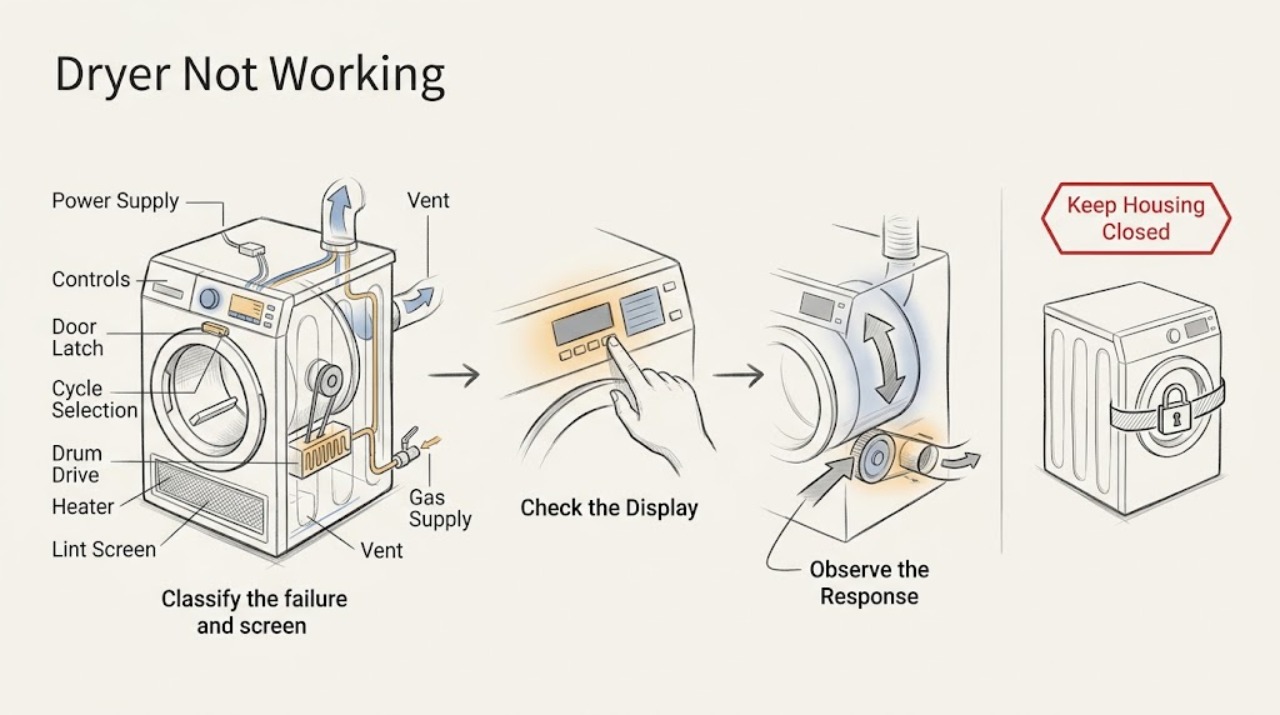
Classify the failure and screen for hazards
With the dryer stopped, note the display and drum-light state, whether pressing Power responds, whether Start is acknowledged, whether the drum turns, whether the load receives heat, and the complete code or indicator. Inspect the floor, plug or receptacle, cord, door opening, lint screen, and visible vent area without opening panels.
Expected result: The dryer is blank, powered but will not start, starts but the drum does not turn, turns but does not heat, shows a code, or has a leak, wet electrical area, hot or discolored connection, burning smell, smoke, spark, arcing, abnormal heat, gas odor, or repeated trip.
Next step: If safe, continue to the matching power, control, door, drum, heat, airflow, gas, or code action. If a hazard is present, leave the dryer off and arrange qualified appliance, electrical, or gas service without another test.
Stop if: Stop immediately for a gas odor, smoke, sparks, arcing, burning smell, abnormal heat, hot or discolored power connection, wet electrics, or repeated breaker trip.
Why this matters
Why: These observations choose different Maytag support paths; a no-start check should not be used to infer a heater or motor fault. A safety symptom makes further operation unsafe regardless of the displayed code.
-
Check household power and preserve any code
If the controls or drum light are off, inspect the visible plug and receptacle for secure connection and damage, then check the household fuse or breaker without touching wiring. Electric dryers may use more than one protection device; check the devices associated with the dryer once. If the display shows PF, L2, or another code, photograph it before clearing it and use the exact model guide.
Expected result: The receptacle or dryer is dead, a breaker or fuse is open, power returns after one safe restoration, PF indicates an interruption, L2 or another power code appears, or the supply looks normal but the dryer remains blank.
Next step: If one safe restoration returns normal power, continue to controls and door checks. If the supply remains dead, the code returns, or the breaker trips again, leave the dryer off and use qualified electrical or appliance service.
Stop if: Do not remove the terminal cover, measure live voltage, touch a hot or wet connection, replace a fuse with an improvised device, or reset a breaker repeatedly.
Why this matters
Why: Maytag associates no operation with supply protection and identifies PF as a power failure on supported models. Maytag's L2 guidance associates that code with low or no line voltage and warns that the heater may not turn on; a code does not identify an internal component by itself.
-
Check Control Lock, cycle selection, and Start input
If the panel is lit, look for a Controls Locked indicator and follow the exact model manual's unlock sequence. Dry your hands and the panel if it is a touch interface. Select a supported automatic or timed drying cycle and use the model's required press or hold of Start; do not treat a Wrinkle Reduction or other non-running option as a normal dry cycle.
Expected result: The lock indicator is on, buttons do not respond, moisture is present, no running cycle is selected, Start responds after the documented action, or the controls remain unresponsive with no visible lock state.
Next step: Make one start attempt after the correct unlock, cycle, and Start sequence. If the panel is still dead, the lock returns, or no cycle can be selected, record the state and request service.
Stop if: Do not pry controls, bypass Control Lock, or continue after smoke, sparks, burning smell, overheating, gas odor, wet electrics, or repeated trip.
Why this matters
Why: Maytag says Control Lock prevents the controls from responding, moisture can affect touch input, Start may require a deliberate press or hold, and cycle selection differs by model. A panel that remains unresponsive after the model-specific steps is a service clue, not proof of a failed board.
-
Check the door and latch without bypassing it
Open the cool dryer door and remove only clothing or packaging visibly caught in the opening or latch. Confirm the door closes squarely and latches, the visible frame is not damaged, and all clothing is inside the drum. Push the door closed normally; do not insert a tool or defeat the door switch.
Expected result: The door is not latched, clothing blocks the latch, the frame or latch is damaged, the door closes normally but the dryer still will not start, or an ERR or door-related code appears.
Next step: Clear the visible obstruction, close the door normally, and make one Start attempt. If the latch is damaged or the dryer still will not run, leave it off and request service.
Stop if: Do not bypass the door switch, operate with a damaged door or frame, reach into a moving drum, or continue after heat damage, smoke, sparks, burning smell, or repeated trip.
Why this matters
Why: Maytag says a door can look closed without latching, some models have more than one latch, and clothing can block closure. A dryer will not run when the model does not detect a closed door; a damaged or recurring latch state needs service.
-
Observe drum motion on one supervised start
After the safe power, control, cycle, and door checks, select the model's normal running cycle and press Start once while standing clear. Observe whether the drum begins turning, whether it stops immediately, and whether a code or indicator returns. Never reach into the drum while motion is possible.
Expected result: The drum turns normally, does not turn, starts and stops immediately, or the display changes to a code or door or control indicator.
Next step: If the drum turns, continue to the heat and airflow checks. If it does not turn, stops, scrapes, or returns a code, stop repeated attempts and request service.
Stop if: Do not reach into the drum, bypass the door, keep testing with scraping or hot sounds, or operate after smoke, sparks, burning smell, overheating, gas odor, or repeated trip.
Why this matters
Why: A turning drum separates a no-motion problem from a no-heat or airflow problem. If the drum will not turn after the documented start and door checks, the motor, drive, control, or safety circuit needs qualified diagnosis; the observation alone does not identify a part.
-
Separate no heat from restricted airflow
If the drum turns, verify that the selected cycle is intended to heat rather than Air Only or Air Fluff. With the dryer cool and stopped, clean and reseat the lint screen and inspect the visible vent connection for crushing, kinks, heavy lint, or an obstructed exterior hood. For a safe model-approved heat check, follow the exact Maytag guide; do not open the cabinet or continue if the cabinet or connection becomes unusually hot.
Expected result: Air Only is selected, the lint screen or visible vent is restricted, AF or F4E3 appears, the drum turns with no heat, or heat and airflow appear normal but drying remains poor.
Next step: Select the correct model-supported heated cycle, clean or correct only the visible lint or vent issue, and make one supervised observation. If AF/F4E3 returns, heat remains absent, or the vent needs internal cleaning, stop and arrange qualified service or vent inspection.
Stop if: Stop for overheating, hot or discolored vent or cord, burning smell, smoke, sparks, gas odor, or repeated trip; do not run a dryer with blocked airflow or dismantle the heater or burner.
Why this matters
Why: Maytag says Air Only does not add heat and identifies lint-screen or vent restriction as the AF/F4E3 airflow branch. A turning gas dryer may still not heat when its gas shutoff is closed; electric heat also depends on the household supply. Long drying or abnormal heat is not a reason to bypass a safety control.
-
Check gas supply and the exact error guide when applicable
If the model is gas and the drum turns without heat, confirm from the visible supply arrangement that the gas connection and shutoff are present and in the normal position described by the Maytag installation instructions. For any L2, PF, AF/F4E3, F# E#, ERR, or unfamiliar code, preserve the complete display and consult the exact model's Maytag guide; do not generalize a code from another dryer.
Expected result: The gas shutoff is closed, the code maps to airflow or power, an F# E# code alternates, the code is unfamiliar, or the gas and external conditions appear normal but heating or operation remains absent.
Next step: Correct only a visible setting or supply condition explicitly covered by the exact model instructions and make one supervised attempt. Leave the dryer off and request qualified gas, electrical, or appliance service when the code returns, gas supply is uncertain, or internal diagnosis is indicated.
Stop if: If gas odor is present, do not operate electrical switches or create flames; leave the area and use qualified emergency or gas service. Stop also for smoke, sparks, arcing, burning smell, abnormal heat, wet electrics, or repeated trip.
Why this matters
Why: Maytag says a gas dryer's drum can turn while a closed gas shutoff prevents heat. Maytag's error guidance associates AF/F4E3 with restricted airflow, L2 with line-voltage concerns, PF with power failure, and alternating F# E# with a control-detected problem requiring service on supported models.
-
Use one documented power cycle, then hand off the evidence
Only when the dryer is cool, dry, free of gas odor, and free of other hazards, perform the single cycle-power or reset sequence specified for the exact model or code. Do not improvise a factory reset or keep switching a breaker. Record the display, power state, lock, door, cycle, drum motion, heat, airflow, and breaker response after the reset.
Expected result: The dryer operates once, the same code or symptom returns, it remains blank or stopped, the drum still does not turn, heat remains absent, or the protection device trips again.
Next step: If the fault returns or operation remains incomplete, leave the dryer off and arrange qualified appliance service. Use qualified electrical service for the outlet, cord, breaker, or supply and qualified gas service for gas-supply or ignition concerns.
Stop if: Do not repeat resets or restart after a gas odor, leak, wet electrical area, hot or discolored connection, burning smell, smoke, sparks, overheating, or repeated trip.
Why this matters
Why: Maytag documents a cycle-power or restart action for some supported error codes, but a reset only clears a possible transient state. It cannot prove that a motor, heater, burner, vent, control, door switch, or household supply is sound.
Use your observations
Decision map
Find the observation that best matches what you see, then follow the next safe action.
-
PATH 01Next step
What you see
Gas odor, smoke, sparks, arcing, burning smell, abnormal heat, hot or damaged connection, wet electrics, or repeated trip
Do this next
Leave the dryer off, avoid operating switches when gas is suspected, keep clear of hot or energized parts, and arrange qualified emergency, gas, electrical, or appliance service as appropriate.
-
PATH 02Next step
What you see
The drum light and controls are off, an L2 or PF state is shown, or the breaker or fuse is open
Do this next
Check the visible connection and household protection once without touching wiring; persistent no power, low line voltage, or a repeat trip needs qualified electrical or appliance service.
-
PATH 03Next step
What you see
Control Lock, moisture, an unselected or unsupported cycle, a required Start action, or a door or latch state prevents starting
Do this next
Use the exact model unlock and Start sequence, select a running cycle, and close the door normally; persistent lock, door, or control failure needs service.
-
PATH 04Next step
What you see
The dryer has power and a valid cycle but the drum will not turn or stops immediately
Do this next
Stop repeated starts and request qualified appliance service; do not infer a motor or drive part from the observation alone.
-
PATH 05Next step
What you see
The drum turns but the dryer is on Air Only, shows AF/F4E3, has restricted visible airflow, or does not heat
Do this next
Select the proper model cycle, clean or correct visible lint and vent restrictions once, and use the exact model heat or gas guidance; recurring code, abnormal heat, or no heat needs service.
-
PATH 06Next step
What you see
An exact code returns after its documented external check or one reset, or the code is not listed for the model
Do this next
Leave the dryer off and provide service with the model, fuel type, full code, cycle, power state, drum motion, heat, airflow, and breaker observations.
Helpful context
Understand the symptom
Not working is several different symptoms
Record whether the drum light or control display works, whether Start is acknowledged, whether the drum turns, whether air is warm, and whether a code appears. A blank dryer leads to a supply branch; a powered dryer that will not run leads to controls, door, cycle, or start input. A turning drum with no heat leads to the selected cycle, airflow, electrical supply, or gas branch. An error code is useful only with its exact model and the condition observed when it appeared.
Keep inspection external and de-energized
Only check the dry, cool, visible exterior, control state, door opening, lint screen, and accessible vent connection. Disconnect the dryer before examining wiring or any component the model manual identifies as serviceable, and do not remove a terminal cover or probe live voltage. A gas odor, smoke, spark, arcing, hot or discolored cord or receptacle, burning smell, abnormal heat, or repeated trip is a stop condition for both gas and electric models.
When checks do not resolve it
Need a professional?
Request qualified appliance service when the safe model-specific checks and one permitted reset do not restore operation. Use qualified electrical service for a supply, cord, receptacle, breaker, or line-voltage concern and qualified gas service for gas-supply or ignition concerns.
Safety scope: Do not remove electrical covers, probe live voltage, bypass the door switch or Control Lock, dismantle the heater or burner, adjust gas components, reach into a moving drum, operate with blocked airflow or a damaged vent, or continue after gas odor, smoke, sparks, arcing, burning smell, abnormal heat, wet electrics, or repeated trip.
Have this ready
- Provide the exact model, electric or gas type, display and drum-light state, full code or indicator, cycle selected, Start response, door and latch observation, drum motion, heat and airflow observation, visible vent condition, breaker behavior, and the result of one model-approved reset.
Common questions
FAQ
Why is my Maytag dryer completely blank?
Check the visible plug and receptacle condition and the household fuse or breaker once, remembering that electric dryers may use more than one protection device. If the dryer remains blank, a power code returns, or the breaker trips again, leave it off and use qualified electrical or appliance service.
Why does my Maytag dryer turn but not heat?
Confirm that Air Only or Air Fluff is not selected, check the cool and accessible lint screen and vent path for restriction, and use the exact model's heat guidance. On a gas model, the drum can turn while a closed gas shutoff prevents heat. No heat, a returning airflow code, abnormal heat, or any gas odor needs qualified service.
What does AF or F4E3 mean on a Maytag dryer?
On supported Maytag models, AF or F4E3 indicates restricted airflow, such as a clogged lint screen or vent or a crushed or kinked vent. Clean and reseat the accessible lint screen and inspect the visible vent without dismantling the dryer. If the code returns or the vent requires internal work, stop and arrange service or qualified vent inspection.
Why does my Maytag dryer show PF or L2?
Maytag associates PF with a power interruption and L2 with low or no line voltage on supported models. Preserve the exact display, check the model guidance and household protection once, and request qualified electrical or appliance service if the condition returns. Do not assume the code identifies a failed internal part.
Read the exact guide
Official sources
- Dryer is Not Heating - Product Help | MaytagMaytag Product Help · Maytag electric and gas dryers; exact model and installation instructions control
- L2 - Error Code - Dryer - Product Help | MaytagMaytag Product Help · Maytag dryer models that display L2; confirm exact model and supply
- ERR - Error Code - Dryer - Product Help | MaytagMaytag Product Help · Maytag dryer models that display ERR; confirm exact model
- Dryer Not Starting or No Operation - Product Help | MaytagMaytag Product Help · Maytag dryers; follow the exact owner manual for model features
- Error Codes in Dryers - Product Help | MaytagMaytag Product Help · Maytag dryers; other codes require the exact owner manual
- Not Starting or Not Operating - Dryer - Product Help | MaytagMaytag Product Help · Maytag dryers; controls and cycle names vary by model
- Checking the Gas Supply and the Shutoff ValveMaytag Product Help · Maytag gas dryers; use the model installation instructions for the appliance
Community feedback
Share a repair observation
Share a plain-text repair observation. Accepted observations are published automatically; this page may take a moment to update.