
On this page
Start here
Quick answer
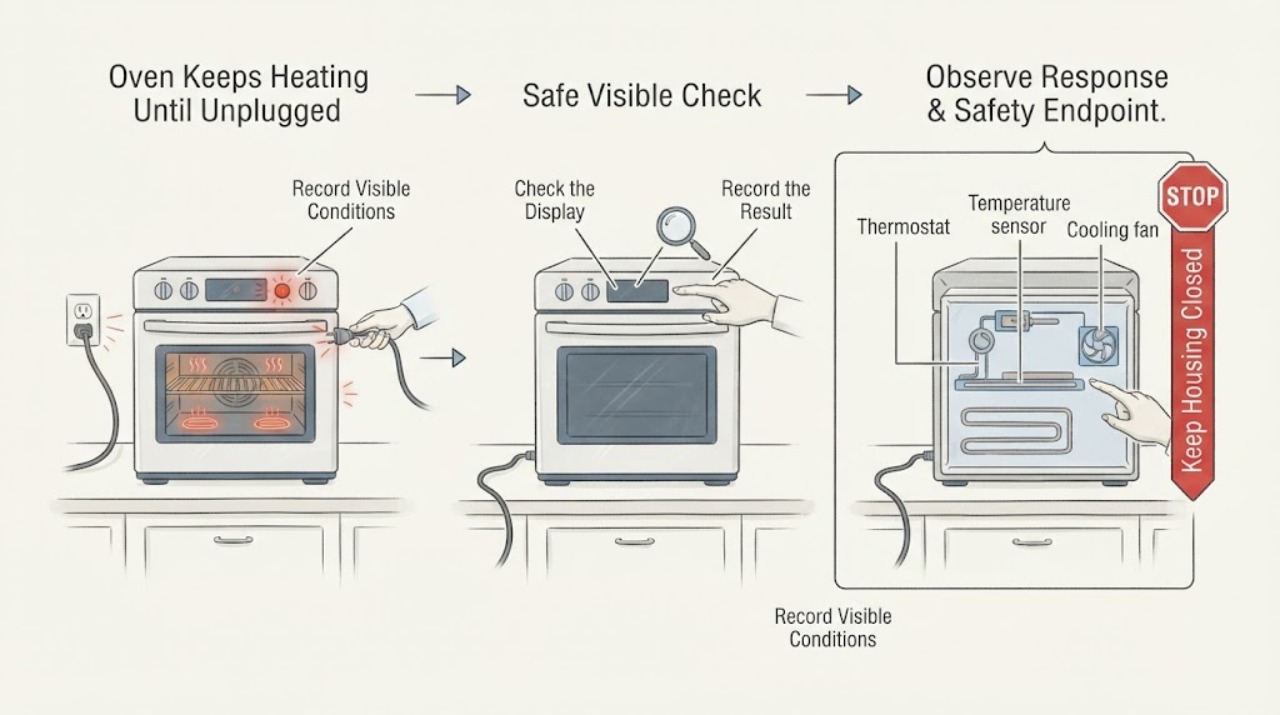
First determine whether the oven is still heating or whether only its cooling fan is running. Maytag says oven elements normally cycle on and off during a cooking cycle, and its cooling fan may continue for several minutes after the cycle to cool the appliance. Sabbath Mode can also keep the oven in a Bake setting until it is turned off. If the elements continue heating after Cancel or Off, the cavity temperature rises uncontrollably, the display does not respond, or smoke, gas odor, burning, sparks, or a repeat breaker trip occurs, stop using the oven and arrange qualified service; do not keep unplugging and reconnecting it as a test.
Work through in order
Diagnostic checks
Use only checks that match the exact appliance or system and its official guide.
-
Check 1
Treat the report as a possible overheating or control fault until you identify what is still active. From a safe position note whether the cavity or food continues getting hotter, whether only the cooling fan runs, and whether smoke, gas odor, burning insulation, sparks, damaged wiring, or a repeat breaker trip is present.
Expected result: Only the fan runs and the cavity is cooling, or the cavity continues heating after the cycle was cancelled or a safety symptom is present.
Next step: If the cavity keeps heating or any hazard is present, stop using the oven and obtain qualified appliance, gas, electrical, or emergency help from a safe location. Do not keep reconnecting power to reproduce the behavior.
Stop if: Do not touch hot elements or wiring, operate switches near a gas odor, open panels, or continue a test with smoke, sparks, fire, or uncontrolled heat.
Why this matters
Why: Maytag says a cooling fan can run for several minutes after a cycle, but continued uncontrolled heat or a safety symptom is outside normal fan operation.
-
Check 2
Record the complete model number and the exact control state without removing trim. Note whether the display shows Bake, Sabbath/Sab/5A6/5Ab, a timer, delayed start, Control Lock, a fault message, or no active cycle.
Expected result: Sabbath Mode or another documented programme is active, the display responds normally to Cancel or Off, or the control remains active while the oven keeps heating.
Next step: Use the exact owner's manual to confirm or exit the documented mode. If the mode is not active, cannot be identified, or the oven keeps heating after the model's normal stop command, leave it out of service and arrange qualified diagnosis.
Stop if: Do not use a generic Sabbath, lock, or reset sequence, and do not remove the control panel to make the oven stop.
Why this matters
Why: Maytag documents Sabbath Mode as intentionally remaining in Bake until turned off, while an unresponsive control or continued heating after the normal stop command is not explained by ordinary element cycling.
-
Check 3
After the oven is cool and the control state is understood, make at most one supervised check using the model-approved Bake cycle at a normal setting. Watch the display and temperature trend from outside the cavity; do not use Self-Clean or Broil as a stress test.
Expected result: The elements cycle and the oven maintains the selected temperature, the fan runs after Cancel while the cavity cools, or heat continues after Cancel or the selected temperature is exceeded.
Next step: For normal cycling or fan-only cooldown, follow the model manual. For continued heat after Cancel or a rising temperature that does not settle, stop the check and arrange qualified service.
Stop if: Do not repeatedly cancel and restart, hold a door switch, bypass an interlock, or probe live wiring.
Why this matters
Why: Maytag says element cycling during a cycle and post-cycle cooling-fan operation can be normal. Continued heating after the stop command or uncontrolled temperature rise points toward a control, sensor, thermostat, selector, or related heat-system fault.
-
Check 4
When the oven is cool, inspect only visible, accessible conditions named in the exact manual: a loose or damaged temperature knob, a visibly damaged element, an obstructed vent, or a sensor that is visibly displaced. Do not remove covers or touch internal parts.
Expected result: A visible condition is present, or the oven looks normal but continues to heat after the stop command.
Next step: Correct only a cool, clearly documented obstruction. For a damaged element, displaced sensor, persistent overheating, or suspected selector/control fault, leave the oven off and request model-specific service.
Stop if: Do not test continuity or voltage, replace a sensor or element, access a selector switch, or open gas or electrical compartments as an owner check.
Why this matters
Why: Maytag identifies the sensor, thermostat, heating elements, vent, cooling fan, and selector switch as possible contributors to overheating, but visual inspection cannot identify which internal component has failed.
-
Check 5
Prepare a service handoff with the model number, energy type, exact mode, stop command used, whether the elements or only the fan remained active, temperature trend, display text, and any power or safety event.
Expected result: The behavior repeats safely, or it cannot be repeated without uncontrolled heat, smoke, gas odor, electrical symptoms, or another unsafe condition.
Next step: Keep the oven out of service when heat continues after Cancel or Off, the control does not respond, or any hazard occurred. Use Maytag's model-based manuals and service route.
Stop if: Do not reconnect the appliance repeatedly, leave it unattended, or attempt an internal repair.
Why this matters
Why: This record distinguishes normal fan cooldown or a documented mode from a repeatable failure to stop heating and prevents a technician from guessing a part from the phrase ‘keeps heating.’
Use your observations
Decision map
Find the observation that best matches what you see, then follow the next safe action.
-
PATH 01Next step
What you see
Only the cooling fan runs after Cancel or the end of a cooking cycle, and the cavity is cooling without an abnormal smell or temperature rise.
Do this next
Allow the fan to finish cooling the appliance and follow the exact model manual. Arrange service if the fan runs abnormally long, the cavity keeps heating, or another symptom appears.
Why this path and its safety boundary
Why it matters: This matches Maytag's documented cooling behavior and does not by itself show that the heating elements are stuck on.
-
PATH 02Next step
What you see
The display identifies Sabbath Mode or the exact manual confirms a mode intended to remain in Bake until turned off, and the oven stops when that mode is exited correctly.
Do this next
Use the model-specific Maytag instructions to exit or configure the mode. If the oven does not respond to the documented stop procedure, leave it off and arrange service.
Why this path and its safety boundary
Why it matters: The behavior is explained by a deliberate control mode rather than proving a stuck relay or failed temperature sensor.
-
PATH 03Next step
What you see
The oven's heating elements or cavity continue heating after Cancel or Off, the temperature keeps rising, or the control does not respond after a documented mode check.
Do this next
Stop using the oven and arrange qualified Maytag appliance service. Do not repeatedly restore power or operate the oven unattended.
Why this path and its safety boundary
Why it matters: This is not explained by normal cycling or fan cooldown. A sensor, thermostat, selector, relay, control, or related heat-system fault is possible, but the symptom does not identify a part.
-
PATH 04Next step
What you see
Smoke, gas odor, delayed ignition, abnormal flame, burning insulation, sparks, damaged wiring or glass, uncontrolled heat, or a repeated breaker trip occurs.
Do this next
Stop using the oven. Leave the area for fire or gas concerns and use emergency or utility guidance from a safe location; arrange qualified electrical, gas, or appliance service before reuse.
Why this path and its safety boundary
Why it matters: The event has crossed a gas, fire, overheating, or electrical safety boundary and is outside a user heating-behavior check.
Helpful context
Understand the symptom
Separate heat from fan noise
A Maytag oven can sound as if it is still running after you cancel a cycle because the cooling fan may continue for several minutes. That fan protects the appliance and controls while the cavity cools; fan noise alone is not proof that the heating elements remain energized. A different and more urgent observation is continued cavity heating after Cancel or Off, especially when food or surfaces keep getting hotter rather than cooling.
Check for a deliberate control mode
Maytag documents Sabbath Mode as a setting that keeps the oven in Bake until it is turned off. In that mode, only Bake operates, tones and temperature changes may not appear normally, and heating does not respond immediately to door changes. The entry and exit procedure varies by model, so use the exact owner's manual and do not apply a keypad sequence from another Maytag oven.
When checks do not resolve it
Need a professional?
Keep the oven out of service and request qualified help if the heating elements continue after Cancel or Off, the cavity keeps getting hotter, the control will not respond, or the exact model mode cannot be identified. Stop immediately for smoke, gas odor, delayed ignition, abnormal flame, sparks, burning insulation, damaged wiring or glass, uncontrolled heat, or repeated breaker trips.
Common questions
FAQ
Is it normal for a Maytag oven to keep running after I turn it off?
It can be normal for the cooling fan to continue for several minutes after a cooking cycle so the appliance and controls can cool. That is different from the heating elements continuing to heat the cavity or temperature rising after Cancel or Off; that pattern needs service.
Can Sabbath Mode make a Maytag oven stay on until it is turned off?
Yes. Maytag says Sabbath Mode keeps the oven in a Bake setting until the feature is turned off and that entry and exit vary by model. Confirm the display and use the exact owner's manual before changing the mode.
What could make an oven overheat instead of cycling normally?
Maytag identifies the temperature sensor, thermostat, heating elements, vent, cooling fan, and selector switch as possible contributors. The correct component cannot be identified from continued heat alone, so leave internal testing and replacement to a qualified technician.
Read the exact guide
Official sources
- How to Use Sabbath Mode on Range or Oven - Product Help | MaytagMaytag Product Help · Official Maytag guidance; the procedure for entering or exiting Sabbath Mode varies by owner's model.
- Maytag Services | MaytagMaytag · Official Maytag support route for locating product literature and scheduling qualified service.
- Oven Not Heating - Powering On - Electric Range - Product Help | MaytagMaytag Product Help · Official Maytag Product Help guidance for applicable electric range models; control labels and procedures vary by model.
- Oven Overheating: Causes and Ways to Troubleshoot | MaytagMaytag · Official Maytag educational guidance for overheating symptoms; exact diagnosis and parts remain model-specific.
- Oven Elements Turning On/Off - Electric Range - Product Help | MaytagMaytag Product Help · Official Maytag Product Help guidance for applicable electric range models; exact behavior depends on the model and cycle.
- Oven Not Shutting Off - Product Help | MaytagMaytag Product Help · Official Maytag guidance for ovens where the reported ‘not shutting off’ behavior may be cooling-fan operation.
- Sabbath Mode - Range - Product Help | MaytagMaytag Product Help · Official Maytag guidance for models that offer Sabbath Mode; displayed labels and controls vary by model.
Community feedback
Share a repair observation
Share a plain-text repair observation. Accepted observations are published automatically; this page may take a moment to update.