
On this page
Start here
Quick answer
First separate a completely dead Maytag washer from one with a display that will not start. With no smoke, burning smell, sparks, hot wiring, or water near electricity, check the grounded outlet, household breaker or GFCI, Control Lock, cycle selector, Start or hold-to-start input, and the fully closed front door or top lid. Record any exact display message rather than guessing a code from another model. A front-load door may look closed without engaging its lock, while top-load models differ on when the lid must lock. Maytag documents a single five-minute power cycle for some control concerns, not repeated resets. Stop immediately for leakage near electricity, smoke, electrical odor, arcing, a hot plug or outlet, or a breaker that trips again, and arrange qualified service.
Before you begin
Safety first
- This article covers safe external observation and one model-documented reset only when the washer and connection are dry and intact. Do not touch wet electricity, force or bypass a door or lid lock, open panels, move a water-filled washer, or perform live work.
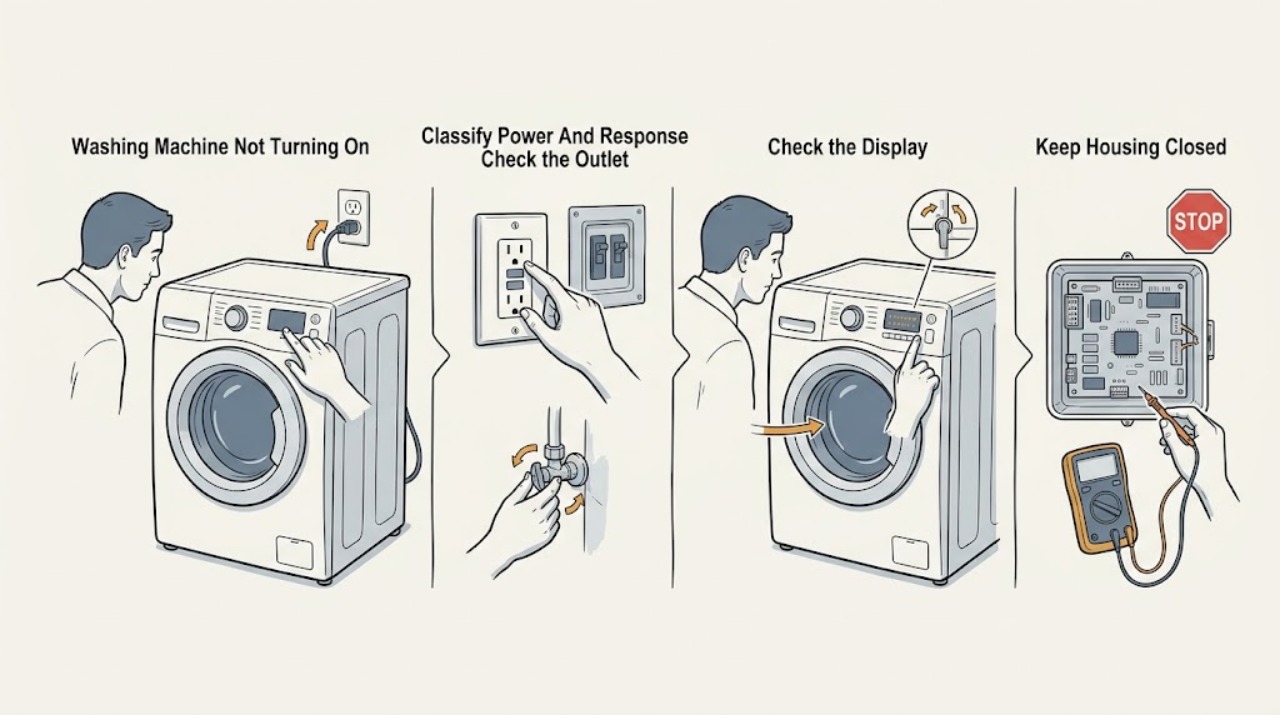
Work through in order
Diagnostic checks
Use only checks that match the exact appliance or system and its official guide.
-
Check 1
With the washer stopped and all controls off, note whether the display and indicators are fully dark, partly lit, or active but unresponsive. Check whether the drum or basket light, Control Lock indicator, door or lid-lock indicator, and any error message are present; do not touch controls with wet hands or near a leak.
Expected result: Everything is dark, only controls are unresponsive, the lock light is active, or the washer responds but does not begin the cycle.
Next step: Follow the matching power, control, lock, or cycle branch and the exact model manual. Do not keep pressing buttons or restarting an appliance with a safety symptom.
Stop if: Stop for smoke, burning smell, sparks, a hot or damaged plug or outlet, exposed wiring, water near electricity, or a breaker that has opened.
Why this matters
Why: A completely dark washer points toward outlet, GFCI or breaker, cord, or control power. A lit but unresponsive panel points toward Control Lock or a control fault, while a responding panel with no cycle points toward Start, door or lid, water, selector, or an error state.
-
Check 2
From a dry, safe position, inspect the accessible power cord and grounded three-prong outlet for looseness, scorching, or damage. Check whether the household breaker or GFCI outlet has tripped; reset protection only once if there is no damage, water, odor, or active electrical event and the household procedure permits it.
Expected result: The outlet or cord is damaged, the GFCI or breaker is open, the washer uses an extension cord, protection opens again, or the visible supply appears normal.
Next step: Leave the washer off and request qualified electrical or appliance service for damage, a repeat trip, or uncertain supply. If power is restored safely, continue only with the control and lock checks.
Stop if: Do not pull a wet plug, use an extension or adapter, increase protection, open an outlet, or test live wiring.
Why this matters
Why: Maytag identifies a grounded outlet and breaker or GFCI status as no-power checks. A damaged connection or repeat trip indicates an electrical or appliance fault, not a reason to keep resetting protection.
-
Check 3
If the panel is dry and undamaged, compare the controls with the exact Maytag manual. Check Control Lock, a selector that is not on a cycle, a delayed or special mode, a required Start hold, and any display such as LoC, LC, Err, dr, or an unassigned-cycle indication; do not assume these messages apply to every model.
Expected result: Control Lock is active, Start was not held as required, the selector is not on a valid cycle, a delay or special state is present, or the panel is ready but remains unresponsive.
Next step: Clear only the identified state using the model instructions and make one normal Start attempt if no hazard is present. If the state returns or the panel remains unresponsive, keep the washer off and arrange service.
Stop if: Do not bypass Control Lock, guess a code sequence, spray cleaner into the panel, or repeatedly press a faulty control.
Why this matters
Why: A lock or wrong cycle can intentionally prevent operation, and some models require a hold-to-start input. Model-specific codes can identify a door, cycle, or control state but cannot be safely interpreted without the manual.
-
Check 4
After the basket has stopped and the washer is cool, identify front-load or top-load design. Inspect the visible door or lid opening, gasket, latch, strike, and lock area for clothing, packing material, detergent or lint buildup, misalignment, or damage. Close the door or lid normally without slamming and note whether the lock engages; do not hold a switch closed.
Expected result: A garment or packing item blocks the latch, the contact area is dirty, the front door is not fully aligned, the top-lid lock light flashes, or the door or lid closes and locks normally.
Next step: Remove only a loose accessible obstruction and clean the documented external contact area with a soft cloth. Make one normal start attempt; if the door or lid still will not lock, keep the washer off and request service.
Stop if: Do not force, pry, prop, or tape the door or lid, pull a trapped garment, insert tools into the lock, or bypass an interlock.
Why this matters
Why: Maytag identifies obstructions, soil, incomplete closure, and lock-striker interference as causes of a no-start or flashing lid lock. A damaged hinge, latch, strike, gasket, glass, or lock needs service rather than force.
-
Check 5
Record whether both water valves are open and hoses are connected, whether water remains in the drum, whether the washer was recently installed or moved, and the complete error or light pattern. For a front-load door that stays locked, use only the manual's documented drain or cancel path; do not open the door against water or heat.
Expected result: An inlet valve is closed, a hose is disconnected or kinked, water remains, the washer was recently installed, a door or lid code is shown, or water and setup appear normal.
Next step: Correct only a clearly documented valve, hose, or setup condition from a safe position. If water remains, a lock code returns, or the washer was installed incorrectly, leave it off and arrange qualified service.
Stop if: Do not reach into hot or standing water, disconnect a wet hose, force a locked door, or run a cycle to reproduce a fault.
Why this matters
Why: Maytag notes that front-load operation may require both water supplies, and a door can remain locked when water, heat, movement, or a drain condition is present. Installation and exact code context change the correct next step.
-
Check 6
If the washer is dry, cool, free of visible damage, and no protection device is repeatedly opening, use the exact Maytag manual or support guidance for one power cycle: disconnect power for about five minutes, restore it, and observe the panel without bypassing the lock. Record the result and do not repeat the reset if the problem returns.
Expected result: The washer returns to normal, the same code or lock state returns, the panel remains blank, or the breaker or GFCI opens again.
Next step: Keep the washer off and provide the model, result, code, and protection history to qualified Maytag appliance or electrical service. Do not use a reset as a substitute for diagnosis.
Stop if: Do not cycle power near water or damage, repeatedly reset, open panels, perform live measurements, or bypass a door or lid lock.
Why this matters
Why: A power cycle can clear a temporary control interruption, but a returning code, blank panel, or repeat trip indicates an unresolved control, lock, supply, or wiring condition.
Use your observations
Decision map
Find the observation that best matches what you see, then follow the next safe action.
-
PATH 01Safety boundary
What you see
There is smoke, burning smell, arcing, a hot or damaged plug or outlet, exposed wiring, water near electricity, or a breaker or GFCI trips again.
Do this next
Keep away from the area and isolate power or water only from a dry, safe position if possible. Use local emergency procedures for smoke or fire and arrange qualified electrical or appliance help.
Why this path and its safety boundary
Why it matters: This is an immediate electrical or water-safety event, not a washer start diagnosis.
Safety stop: Do not touch a wet connection, pull a hot plug, reset protection again, or restart the washer.
-
PATH 02Safety boundary
What you see
The display and indicators are dark, the plug or outlet is loose or damaged, or the breaker or GFCI is open without a visible hazard.
Do this next
Check the grounded outlet and protection once as the model and household instructions permit. If power does not return or protection opens again, request qualified electrical or appliance service.
Why this path and its safety boundary
Why it matters: The washer may lack supply power or the circuit may have a fault.
Safety stop: Do not use an extension or adapter, increase protection, open the outlet, or probe live wiring.
-
PATH 03Safety boundary
What you see
The panel is lit but Control Lock, a selector state, delayed mode, required Start hold, or an exact control message prevents a cycle.
Do this next
Use the exact Maytag manual to clear the identified state and make one normal Start attempt. If it remains or returns, leave the washer off and request service.
Why this path and its safety boundary
Why it matters: The washer may be intentionally preventing operation or waiting for a model-specific input.
Safety stop: Do not guess a different model's code, bypass Control Lock, or repeatedly operate an unresponsive panel.
-
PATH 04Safety boundary
What you see
A front-load door is not fully closed, an item or residue blocks the latch, the door is misaligned, or a lock message returns.
Do this next
After the washer stops and the area is safe, remove only a loose obstruction and clean the visible contact area. Keep the machine off for damage, force-dependent closure, water, or a returning lock fault.
Why this path and its safety boundary
Why it matters: The washer cannot confirm a safe closed-door state, or the door hardware or lock circuit may be faulty.
Safety stop: Do not force, pry, prop, or bypass the door lock or reach into a hot or water-filled drum.
-
PATH 05Safety boundary
What you see
A top-load lid-lock indicator flashes, the lid is blocked or dirty, the striker does not meet the lock, or the selector and Start input are not accepted.
Do this next
Remove only loose visible material, wipe the external contact area with a soft cloth, select a valid cycle, and follow the model's Start instruction once. If the indicator still flashes, request service.
Why this path and its safety boundary
Why it matters: Maytag associates flashing lid lock with interference, a lock motor that cannot be powered, incomplete closure, or control selection.
Safety stop: Do not hold the lid switch, insert tools, operate with an unsecured lid, or repeat starts while the lock fails.
-
PATH 06Safety boundary
What you see
Power, controls, door or lid, water, and one documented reset appear appropriate, but the Maytag washer remains dead or will not begin a cycle.
Do this next
Keep the washer out of use and request qualified Maytag appliance service, with electrical help for the household circuit. Provide the full model and symptom record.
Why this path and its safety boundary
Why it matters: A supply, control, lock, motor, wiring, or model-specific component fault remains possible.
Safety stop: Do not open panels, perform live tests, bridge a lock, or replace a control or lock as a trial.
Helpful context
Understand the symptom
No power and no start are different problems
If the display, indicators, and drum light are all dark, start with the household supply and the washer's connection. If the panel is lit but ignores commands, check Control Lock, a damp panel, and the model's Start input. If the panel responds but the cycle will not begin, check the front door or top lid, cycle selection, water state, and any exact message.
Front-load and top-load lock behavior differs
Maytag front-load washers may show a closed-looking door that has not engaged the lock, and top-load washers may perform a brief lid-lock self-test after Start. Some models will fill before locking while others will not start until the lid locks. Use the exact manual for the appliance rather than holding a switch or bypassing the interlock.
A reset is a limited check
Maytag documents disconnecting power for about five minutes for some unresponsive controls or cycle interruptions. Perform that step only when the outlet, cord, floor, and washer are dry and free of damage, and only once as a diagnostic boundary. A returning fault, a repeated trip, or a no-start after the reset needs qualified service.
Safety boundary
Stop conditions
- Stop immediately for water near a plug, outlet, control, or wiring, smoke, burning smell, sparks, exposed wiring, a hot or damaged connection, or a repeated breaker or GFCI trip.
- Stop for a hot or moving drum, standing water, a leaking hose, cracked door or lid, sharp damage, severe vibration, or a lock that needs force.
- Do not force or prop the door or lid, bypass an interlock, hold a switch closed, open panels, or perform live electrical measurements.
- Do not repeatedly reset the breaker, GFCI, or washer control, and do not guess another model's error-code procedure.
- Keep the Maytag washer out of use when it remains dead or will not start after safe model-specific checks; arrange qualified service.
Only after diagnosis
Potential parts
- washer door or lid lock and striker assembly
Consider this category only when the door or lid aligns and visible obstructions are gone but qualified diagnosis confirms that the lock or striker does not engage.
Confirm the exact Maytag model and front-load or top-load lock design; never bypass the interlock or install a part as a start test. - washer power cord or control assembly
Consider this category only after qualified inspection identifies a damaged cord or a control-power fault with the household supply verified safe.
Confirm exact model and electrical requirements; do not reconnect a damaged cord or open the control area. - washer water inlet valve or drain component
Consider this category only when a documented water or residual-drain symptom is confirmed by qualified diagnosis as the reason the control will not begin or release the cycle.
Confirm the exact model and water-path diagnosis; isolate water and power before any service work.
When checks do not resolve it
Need a professional?
Request qualified Maytag appliance service when the washer remains dead or will not start after safe checks of the grounded outlet, breaker or GFCI, Control Lock, cycle and Start input, door or lid lock, water setup, and one model-documented reset. Use qualified electrical service for a damaged connection or repeated trip, and urgent local help for smoke, fire, shock, or water near electricity.
Safety scope: This article covers safe external observation and one model-documented reset only when the washer and connection are dry and intact. Do not touch wet electricity, force or bypass a door or lid lock, open panels, move a water-filled washer, or perform live work.
Common questions
FAQ
Why is my Maytag washer completely dead?
Check whether the grounded outlet, breaker or GFCI, and cord are supplying power. If the connection is damaged, wet, hot, or protection opens again, stop and arrange qualified electrical or appliance service. If the supply is normal, an internal control-power fault remains possible.
Why does my Maytag washer have lights but not start?
Check Control Lock, the cycle selector, any delay or special mode, the required Start hold, the front door or top lid, and the exact display message. Clear only an identified state using the model manual and make one normal start attempt.
Can a Maytag washer need the lid or door locked before starting?
Yes, but timing varies. Maytag says top-load models differ on whether the lid must lock before starting, and front-load doors can look closed without engaging the lock. Remove only a loose visible obstruction and never bypass the lock.
What does a flashing lid-lock light mean on a Maytag washer?
Maytag identifies possible interference, incomplete closure, a lock striker or buildup issue, a lock motor problem, or an invalid cycle selection. Inspect and clean only the accessible external contact area, then arrange service if the light continues to flash.
Should I unplug my Maytag washer for five minutes?
Maytag documents a five-minute power cycle for some control concerns. Do it only when the washer, floor, cord, and outlet are dry and undamaged, and do not repeat it if the fault returns or protection opens again.
When should I stop using a Maytag washer that will not turn on?
Stop for a leak near electricity, smoke, burning smell, sparks, a hot or damaged plug or outlet, exposed wiring, hot or moving water, severe vibration, or a repeated breaker or GFCI trip. Keep it off for persistent no-start after safe checks.
Read the exact guide
Official sources
- How to Reset a WasherMaytag Product Help · Official Maytag support resource; exact reset and factory settings vary by model.
- Not Starting - Washer - Product HelpMaytag Product Help · Official Maytag support guidance for top-load washers; exact lid and control behavior varies by model.
- Front Load Washer Installation Checklist - Product HelpMaytag Product Help · Official Maytag installation guidance for front-load washers; exact connections and requirements vary by model.
- Door Will Not Lock or Unlock - Front Load Washer - Product HelpMaytag Product Help · Official Maytag support guidance for front-load washers; options and sequences vary by model.
- No Power - Washer - Product HelpMaytag Product Help · Official Maytag support guidance for top-load washers; exact household supply requirements vary by model and local code.
- No Power - Not Turning On - Front Load Washer - Product HelpMaytag Product Help · Official Maytag support guidance for front-load washers; exact electrical installation details vary by model.
- Not Starting or Not Operating - Front Load Washer - Product HelpMaytag Product Help · Official Maytag support guidance for front-load washers; display codes and button sequences vary by model.
- Lid Lock Flashing - Washer - Product HelpMaytag Product Help · Official Maytag support guidance for top-load washers; striker location and lock timing vary by model.
- Lid Not Latching - Washer - Product HelpMaytag Product Help · Official Maytag support guidance for top-load washers; lid and lock designs vary by model.
Community feedback
Share a repair observation
Share a plain-text repair observation. Accepted observations are published automatically; this page may take a moment to update.