
On this page
Start here
Quick answer
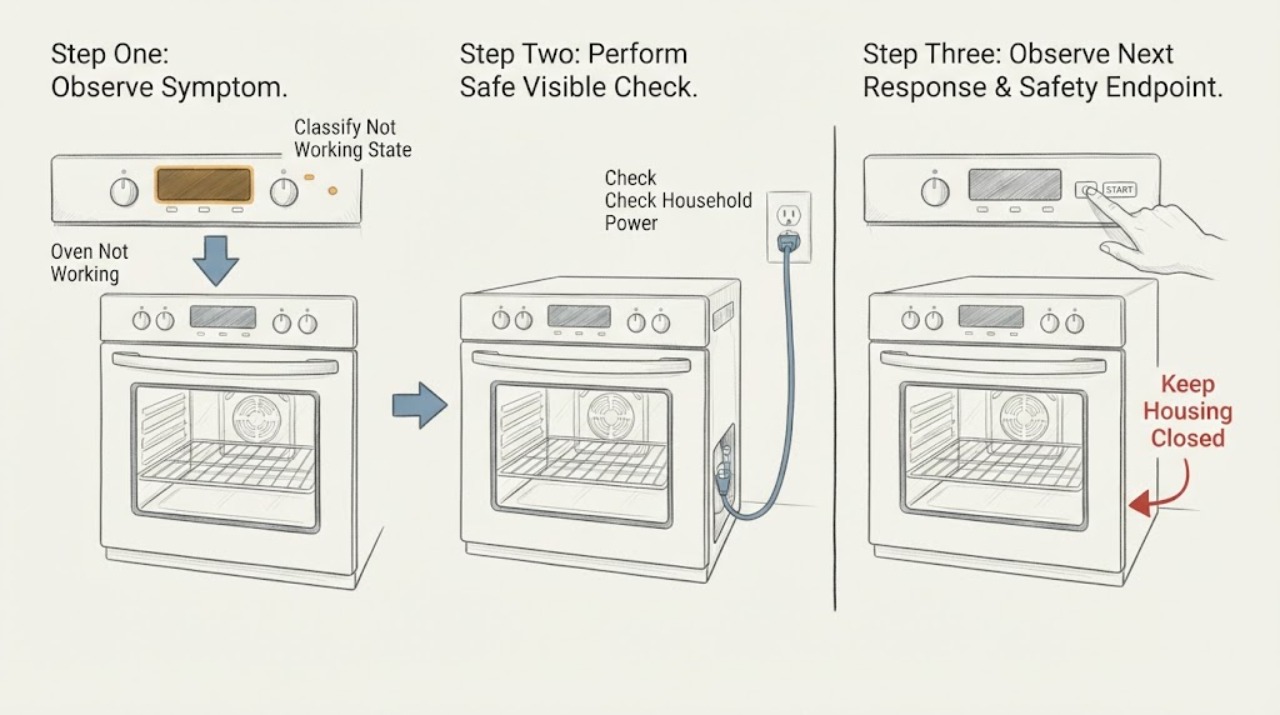
Treat Monogram Oven Not Working as a symptom to split, not a single part diagnosis. First record whether the display is dead, the display works but a cycle will not start, the cycle starts without heat, only one mode fails, or a steam or combination feature fails. Confirm the exact model, fuel type, Bake or Broil mode, temperature, Start command, control or Sabbath state, door or self-clean latch, and any complete error code. Check the household breaker or fuse and perform only one model-permitted control reset. Electric models allow a power-isolated visual check for a cracked bake element; gas models require model-specific gas and igniter handling. Steam features are model-specific and should be checked only against the Monogram manual. Do not open panels, probe live wiring, bypass a lock, manually light gas, or keep testing after gas odor, delayed ignition or boom, abnormal flame, smoke, burning smell, arcing, water near electricity, uncontrolled heat, or repeated trips.
Before you begin
Safety first
- Owner checks are limited to controls, breaker or fuse observations, cool accessible door and airflow checks, model-approved steam checks, and a visual electric-element inspection only after confirmed power isolation. Do not operate switches in a gas-smelling area, manually ignite, test energized circuits, bypass safety devices, move a built-in oven, or open gas, electrical or steam compartments.
Work through in order
Diagnostic checks
Use only checks that match the exact appliance or system and its official guide.
-
Check 1
With the Monogram oven cool and no hazard present, note whether the display, clock, interior light, fan and controls respond, and whether the symptom is no power, no start, no heat, one failed mode, an error message, or a steam-function failure.
Expected result: Record the exact visible message or code, which mode was selected, whether the door is locked, and whether the appliance makes any normal start or preheat indication.
Next step: Use the matching checks below and photograph the model and serial label. Do not remove covers to identify the failed component.
Stop if: Stop for gas odor, smoke, burning smell, arcing, water contacting electrical areas, unusually hot controls, damaged glass, uncontrolled heating, or repeated breaker trips.
Why this matters
Why: A dead display points toward supply or control power; a powered but idle oven points toward settings, locks, special modes or control logic; a running but cold oven points toward the applicable electric or gas heating path. A steam-only failure may be a model-specific water or mode condition rather than a Bake failure.
-
Check 2
Use the exact Monogram manual to select a normal cooking mode such as Bake or Broil, set a temperature, press Start when required, and check for Delay Start, Control Lock, Sabbath mode, or a self-clean latch that is still engaged.
Expected result: The oven begins a cycle, remains delayed or locked, shows a code, or accepts the settings but gives no heating indication.
Next step: If the cycle starts, allow normal preheat without repeatedly opening the door. If it does not, record the exact code and consult the Monogram manual or support portal.
Stop if: Do not force a latch, defeat a lock, guess at a code, or repeat a cycle when there is gas odor, smoke, electrical odor, or abnormal heat.
Why this matters
Why: A missing Start command, delayed schedule, lock, Sabbath state, or self-clean latch can prevent normal operation without a failed heater. A complete error code or a correctly started cold cycle needs model-specific follow-up.
-
Check 3
Check the household breaker or fuse serving the Monogram oven without removing covers or touching wiring; if it is tripped, perform only the single reset described by the model or installation instructions.
Expected result: The breaker is on and stable, the display returns after a reset, the display remains dead, or the breaker trips again.
Next step: Leave the oven off and arrange qualified Monogram service or an electrician when the display stays dead or the breaker will not remain on. Record whether other appliances or circuits are affected.
Stop if: Do not repeatedly reset, use an extension cord, access a built-in connection, or continue if there is heat, smoke, electrical odor, arcing, or a wet area near the appliance.
Why this matters
Why: A stable reset can clear a control-state interruption. A dead display may indicate missing supply or control power; a repeat trip suggests an electrical fault or overload and is not a reason to keep resetting.
-
Check 4
When cool, confirm that the door closes normally, the self-clean latch is unlocked after any cleaning cycle, racks are seated, the gasket is not visibly torn, and foil, liners or objects are not blocking vents or the cavity airflow path.
Expected result: The latch is locked, the door or gasket is damaged, airflow is blocked, or the door and visible airflow path are normal.
Next step: Remove only cool, loose items that the exact manual permits. If the latch will not release after cooling or glass, frame or gasket damage is present, stop and request service.
Stop if: Do not pry the door, bypass the latch, remove the gasket, cover vents, or run self-cleaning to test a no-work symptom.
Why this matters
Why: A locked self-clean latch can inhibit operation on applicable models, while a damaged gasket or blocked airflow can cause heat loss or poor cooking results. A normal door does not rule out a control or heating fault.
-
Check 5
For a cycle that starts, keep the door closed and compare the warm-up behavior in the selected mode with the exact Monogram manual; if safe and appropriate, compare Bake with Broil without repeating an abnormal gas ignition event.
Expected result: Both modes heat normally, one mode heats while the other stays cold, the oven warms slowly, or neither mode produces heat.
Next step: Record mode, set temperature, preheat timing, fan behavior and any code. If the preheat is far beyond model guidance, perform no more than the documented reset and arrange service if it persists.
Stop if: Do not use extreme temperatures, leave the oven unattended to force heat, or continue with smoke, burning odor, abnormal flame, uncontrolled temperature or electrical symptoms.
Why this matters
Why: A single failed mode can narrow the issue toward that mode's heating path; a slow preheat can reflect oven type, supply, settings, airflow or normal cycling; no heat in every mode points toward power, control, sensor, element, ignition or service.
-
Check 6
For a confirmed electric Monogram model only, switch the oven off and isolate power at the breaker or fuse as the exact manual directs, then make a visual check of an accessible bake element for a crack, break, blister or obvious burn mark; do not remove it.
Expected result: The element is visibly damaged, appears intact, or power isolation or access is uncertain because the oven is built in or the installation is unclear.
Next step: Leave power isolated if damage is visible and give the exact model to Monogram service. If the element looks intact or access is uncertain, arrange qualified diagnosis instead of opening the appliance.
Stop if: Do not touch terminals, probe wiring, remove panels, restore power with exposed parts, or apply this check to a gas or combination model without model-specific instructions.
Why this matters
Why: GE Appliances identifies a cracked or broken bake element as a service clue. An intact element does not prove that its relay, sensor, wiring or supply is good, and uncertain isolation makes inspection unsafe.
-
Check 7
For a confirmed gas Monogram model only and only when there is no gas odor or abnormal ignition, follow the exact manual to identify the gas Bake or Broil mode and observe from a safe position whether the model's normal igniter indication appears; never manually light the burner.
Expected result: The oven has known gas supply, the igniter shows the expected indication but heat does not develop, no expected indication appears, or ignition is delayed, loud or accompanied by an abnormal flame.
Next step: Stop the cycle and arrange qualified Monogram gas-appliance service for any failed or abnormal ignition. Preserve model, fuel type, timing and visible behavior for the technician.
Stop if: For gas odor, hissing, delayed ignition, boom, yellow or abnormal flame, smoke, or possible carbon-monoxide symptoms, stop immediately, leave or isolate the area as appropriate, and contact the gas supplier or emergency responders from a safe location.
Why this matters
Why: GE Appliances states that gas ovens depend on both gas supply and electrical ignition. No igniter indication can involve the igniter, control or electrical path; an indication without heat can involve gas, valve, burner or combustion service. Delayed ignition, a boom or abnormal flame must not be reproduced.
-
Check 8
If only a Monogram steam or combination function is not working, identify the exact model and follow its manual for the named steam mode, water reservoir or supply, door state, drain path and descaling or cleaning requirement; do not add water, open panels or substitute a Bake procedure.
Expected result: The manual shows an empty or mis-seated reservoir, an unavailable mode, a door or drain condition, a displayed code, or no model-specific cause.
Next step: Correct only the manual-approved, cool and accessible condition. If the reservoir, drain, sensor or steam generator needs internal access, stop and use Monogram service.
Stop if: Do not pour water into an unapproved area, run a steam cycle with leaking water, stand in water near the appliance, defeat a door or water interlock, or continue if there is electrical odor, smoke or arcing.
Why this matters
Why: Steam features differ by model and may be interlocked with water, door, temperature, drain or cleaning conditions. A steam-only symptom does not establish that the standard oven heating system has failed.
-
Check 9
If the safe checks do not restore operation, stop using the oven and prepare the Monogram model and serial information, fuel type, failed modes, exact code, power symptoms, preheat timing, door state, steam observations and any safety signs for qualified service.
Expected result: The issue is resolved by a documented low-risk setting or reset, or the oven remains inactive, intermittent, cold, unsafe or model-specific.
Next step: Use the official Monogram support and service route or a qualified appliance technician and follow the exact model instructions. Keep the oven out of use until it is cleared.
Stop if: Do not replace a part from appearance alone, bypass a safety device, open the control area, test energized circuits, or keep operating after a safety symptom.
Why this matters
Why: Persistent no-work symptoms can involve supply, control, relay, sensor, element, igniter, valve, wiring, grounding, steam hardware or combustion. These cannot be safely distinguished by a general owner check.
Use your observations
Decision map
Find the observation that best matches what you see, then follow the next safe action.
-
PATH 01Safety boundary
What you see
The display and light are dead, or the breaker trips again after one documented reset.
Do this next
Leave the oven off and arrange an electrician or qualified Monogram service inspection; record the breaker behavior.
Why this path and its safety boundary
Why it matters: Treat this as a supply or electrical fault path, not as a heating-element adjustment.
Safety stop: Do not keep resetting, access wiring, use an extension cord, or continue near water, smoke, heat, electrical odor or arcing.
-
PATH 02Safety boundary
What you see
The display works but the oven will not begin a cycle.
Do this next
Verify the exact control sequence and record the complete message or code; request service if the documented sequence does not start the oven.
Why this path and its safety boundary
Why it matters: Mode, Start, Delay Start, Control Lock, Sabbath mode, self-clean latch, door state or an error condition may be blocking operation.
Safety stop: Do not force controls or a latch, guess at an error-code meaning, or continue when gas, smoke, burning odor or arcing is present.
-
PATH 03Safety boundary
What you see
A confirmed electric oven starts but the accessible bake element is cracked or broken after safe power isolation.
Do this next
Keep power isolated and provide the model information to Monogram service for the correct repair.
Why this path and its safety boundary
Why it matters: The element is a credible service clue, but the rest of the circuit still requires model-specific diagnosis.
Safety stop: Do not remove terminals, open panels, or restore power with damaged or exposed parts.
-
PATH 04Safety boundary
What you see
A gas oven has no expected igniter indication, shows an indication without heat, or has delayed ignition or an abnormal flame.
Do this next
Keep the appliance off and arrange qualified Monogram gas-appliance service. Report any gas odor or emergency sign to the gas supplier or emergency responders first.
Why this path and its safety boundary
Why it matters: Gas supply, ignition, valve, burner, control, combustion or installation needs qualified diagnosis.
Safety stop: Do not manually light, bypass ignition, adjust gas parts, repeat a boom or delayed ignition, or operate with yellow flame, smoke or gas odor.
-
PATH 05Safety boundary
What you see
The oven eventually warms but takes too long, one mode differs from another, or food cooks unevenly.
Do this next
Correct only documented settings or placement, record the timing, and request service if the condition persists after one permitted reset.
Why this path and its safety boundary
Why it matters: Settings, convection conversion, rack or pan spacing, door sealing, supply, sensor, element, ignition or normal cycling may be involved.
Safety stop: Do not compensate with extreme heat, block airflow, leave the oven unattended, or continue with smoke, odor, damaged gasket or uncontrolled temperature.
-
PATH 06Safety boundary
What you see
Standard oven modes work but a steam or combination function does not, or the steam feature shows a water, door, drain or cleaning message.
Do this next
Follow only the exact Monogram manual's accessible checks and use service for reservoir, drain, sensor, generator or internal faults.
Why this path and its safety boundary
Why it matters: The fault is likely model-specific to the steam feature or its interlocks and cannot be inferred from a standard Bake cycle.
Safety stop: Do not pour water into an unapproved area, operate with a leak or water near electricity, or bypass a steam or door interlock.
-
PATH 07Safety boundary
What you see
There is gas odor, hissing, delayed ignition or boom, abnormal or yellow flame, smoke, or possible carbon-monoxide symptoms.
Do this next
Stop using the appliance, leave or isolate the area as appropriate, and contact the gas supplier or emergency responders from a safe location according to local emergency guidance.
Why this path and its safety boundary
Why it matters: Treat the event as a possible gas or combustion emergency rather than a routine no-work diagnosis.
Safety stop: Do not touch electrical switches, use a flame, search for a leak, operate the oven, or re-enter until qualified responders clear the area.
Helpful context
Understand the symptom
Start by naming the failure state
A Monogram oven can appear not to work because it has no supply, is waiting for a Start command, is locked, is in a special mode, has an error state, heats slowly, or has a failed heating path. Write down what the display, light, fan, preheat indication and controls do before changing settings. Use the exact model manual for the feature names and fuel configuration; a generic wall-oven page cannot safely define every Monogram control sequence.
Electric, gas and steam functions are different paths
An electric Monogram oven may use bake or broil elements, relays, sensors and a high-power supply. A gas model also needs fuel, ignition and safe combustion. A Monogram steam or combination function may have separate water, reservoir, drain, door and mode requirements; do not infer those requirements from a standard Bake cycle or add water unless the manual instructs you to. If water is near electrical parts, isolate the area without standing in water or touching the appliance.
A reset is a diagnostic step, not a repair
GE Appliances recommends a single breaker-based control reset for models equipped with electronic controls, even when the clock works. If the symptom returns, the breaker trips, or the oven remains unsafe or inactive, preserve the code and timing for Monogram support. Repeated resets, high-heat tests, manual ignition and internal disassembly can conceal or worsen the underlying fault.
Safety boundary
Stop conditions
- Stop and leave or isolate the area as appropriate for gas odor, hissing, delayed ignition, a boom, abnormal flame, smoke or possible carbon-monoxide symptoms; contact the gas supplier or emergency responders from a safe location.
- Do not touch electrical switches in a gas-smelling area, use a flame, manually light gas, search for a leak, bypass a door or safety control, or repeat an abnormal ignition test.
- Stop after a breaker trips again, water reaches electrical areas, an electrical odor or arc appears, controls become unusually hot, or wiring, glass, gasket or frame is damaged.
- Do not remove panels, probe energized circuits, alter gas or regulator components, dismantle a heater, igniter, valve, sensor or steam system, or run high heat as a diagnostic shortcut.
- Keep the oven out of service when safe checks do not restore operation and use the exact Monogram documentation and qualified service for model-specific diagnosis.
Only after diagnosis
Potential parts
- electric bake or broil element
Consider this category only if the exact electric model and a qualified diagnosis confirm a failed element or a visible element break after power isolation.
Confirm the exact Monogram model and element configuration before ordering; do not treat an intact-looking element as proof that the circuit is good. - gas oven igniter or burner assembly
Consider this category only when a qualified technician confirms an ignition or burner fault on a gas model after checking supply and installation conditions.
Match the exact Monogram model and fuel configuration; never manually light, bypass or replace gas components as a home test. - oven temperature sensor or control component
Consider this category only after qualified diagnosis shows that settings and supply are correct but sensing or cycle control is faulty.
Confirm exact model fitment and the technician's diagnosis; do not open the control area or substitute a generic component. - steam reservoir, drain or steam-system component
Consider this category only when the exact Monogram steam model and manual identify a failed reservoir, drain, sensor or steam-system component.
Steam hardware and water paths are model-specific; confirm compatibility and repair requirements before ordering or handling any internal part.
When checks do not resolve it
Need a professional?
Use Monogram support or a qualified appliance technician when the oven remains dead, will not start after the documented control checks, does not heat in the correct mode, shows a persistent error, has a damaged electric element, needs gas or internal steam diagnosis, or requires electrical or mechanical access. Use the gas supplier or emergency responders immediately for gas odor, hissing, delayed ignition, abnormal flame, smoke or possible carbon-monoxide symptoms; isolate the area and do not stand in water near the appliance.
Safety scope: Owner checks are limited to controls, breaker or fuse observations, cool accessible door and airflow checks, model-approved steam checks, and a visual electric-element inspection only after confirmed power isolation. Do not operate switches in a gas-smelling area, manually ignite, test energized circuits, bypass safety devices, move a built-in oven, or open gas, electrical or steam compartments.
Common questions
FAQ
Why is my Monogram oven not working even though the display is on?
Check the exact mode, temperature and Start sequence, then look for Delay Start, Control Lock, Sabbath mode, a self-clean latch or a complete error code. If a correctly started cycle stays cold, use the electric or gas branch for the confirmed model and arrange service when the safe checks do not restore operation.
What should I do if the Monogram oven has no display?
Check the household breaker or fuse without touching wiring and perform only one documented reset if appropriate. If the display remains dead or the breaker trips again, leave the oven off and arrange an electrician or qualified Monogram service inspection.
Can I check why an electric Monogram oven is not heating?
After the exact model instructions and confirmed power isolation, you may make a visual check of an accessible bake element for a crack or break. Do not touch terminals, open panels or probe wiring. A visible defect is a service clue, not permission to replace parts without model-specific diagnosis.
What if the burners work but my Monogram gas oven does not?
A cooktop can work while the oven's gas supply, igniter, valve, control or burner path has a fault. If there is no gas odor or abnormal ignition, record the model-specific igniter behavior and arrange qualified gas-appliance service. Never manually light or bypass ignition.
How do I troubleshoot a Monogram steam oven that is not working?
Identify the exact model and follow its manual for the named steam mode, reservoir or water supply, door, drain and cleaning conditions. Do not add water to an unapproved area or treat a steam-only error as a standard Bake failure. Use service for internal water, sensor, drain or steam-system faults.
When is a Monogram oven problem an emergency?
Stop for gas odor, hissing, delayed ignition or a boom, abnormal flame, smoke, burning or electrical odor, arcing, water near electricity, uncontrolled heat, damaged glass or repeated breaker trips. For gas-related signs, leave or isolate the area as appropriate and contact the gas supplier or emergency responders from a safe location.
Read the exact guide
Official sources
- Gas Range & Wall Oven - Oven Will Not Come OnGE Appliances · Official GE Appliances gas range and wall-oven guidance; apply gas checks only to a Monogram model confirmed to be gas and follow its exact manual.
- Gas Range - Gas OdorsGE Appliances · Official GE Appliances gas-odor guidance; use the emergency boundary for a Monogram gas oven when the source or odor is uncertain.
- Range & Wall Oven - Oven Temperature Is Not CorrectGE Appliances · Official GE Appliances temperature guidance for ranges and wall ovens; apply with the exact Monogram cooking and calibration instructions.
- Gas Range - What is Normal Operation vs What Requires ServiceGE Appliances · Official GE Appliances gas-range operating guidance; use only as a safety distinction for a confirmed gas Monogram model.
- Gas Range - Oven Does Not Heat, But The Burners HeatGE Appliances · Official GE Appliances guidance for a gas range whose surface burners work but oven does not heat; use only for a confirmed gas Monogram configuration.
- Range & Wall Oven - Oven Will Not Come OnGE Appliances · Official GE Appliances support guidance for range and wall-oven operating checks; the installed Monogram model manual controls for exact features and configuration.
- Support & Service | Monogram AppliancesMonogram Appliances · Official Monogram support portal for model-specific documentation and service routing.
- Range & Wall Oven - Preheat Time Too LongGE Appliances · Official GE Appliances preheat guidance for ranges and wall ovens; exact Monogram model, fuel, voltage and installation instructions control.
Community feedback
Share a repair observation
Share a plain-text repair observation. Accepted observations are published automatically; this page may take a moment to update.