
On this page
Start here
Quick answer
Do not pry the trim or remove the microwave's outer case just because a Panasonic NN-ST775S has stopped working. First identify whether the display is dead, the controls will not start, the door will not close, the turntable or fan behaves abnormally, or the oven runs without heating. From a safe, accessible position, check the breaker or directly reachable grounded plug, the door and visible vent openings, and the model and trim-kit labels. Panasonic lists NN-ST775S as a 1.6 cu. ft. microwave and says cabinet installations use a compatible trim kit; the NN-TK714S instructions require the oven to be unplugged for kit work and warn against modifying the oven or kit. If there is smoke, sparking, a damaged door, repeated breaker trips, or a fan or turntable running with the door open, stop using it and arrange authorized service.
Before you begin
Safety first
- Users may document symptoms and inspect only accessible external controls, labels, openings, and visible trim. Do not remove the microwave outer panel, probe live circuits, defeat door interlocks, alter the kit, or force a cabinet installation.
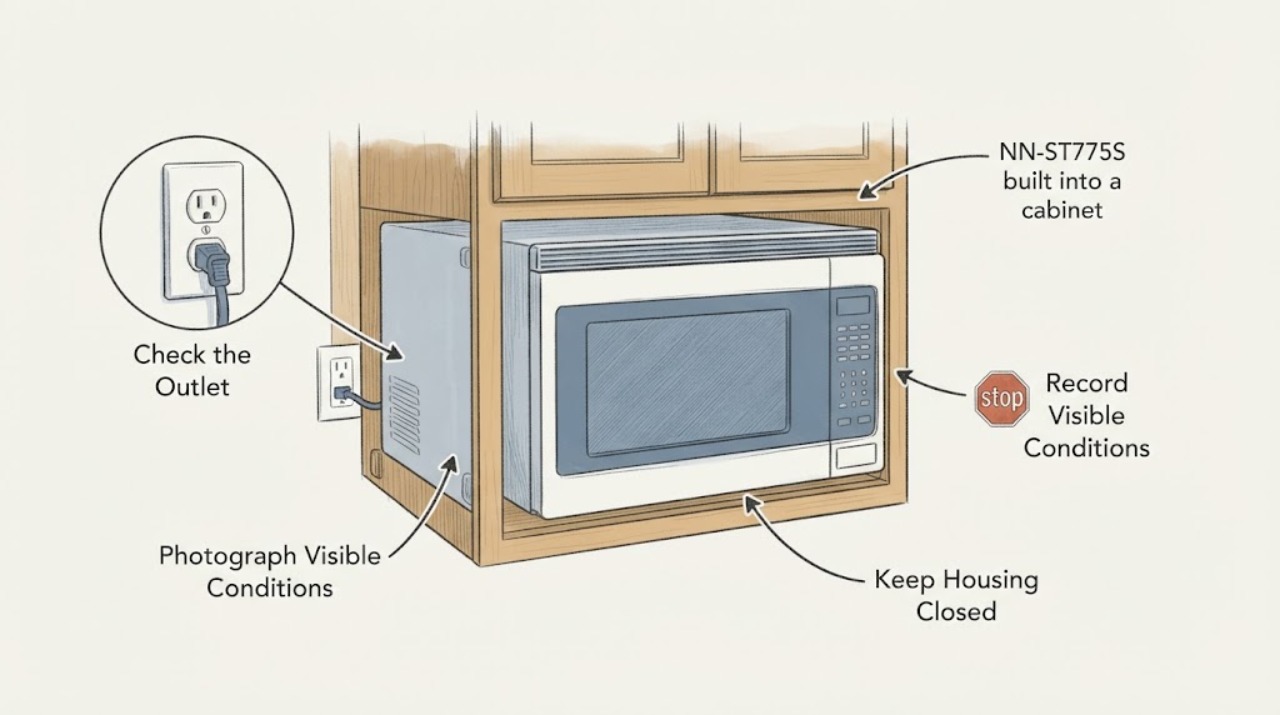
Work through in order
Diagnostic checks
Use only checks that match the exact appliance or system and its official guide.
-
Check 1
With the microwave idle, record the exact failure and visible safety signs: blank or flickering display, buttons that do nothing, a door that will not close, a turntable or fan that runs unexpectedly, a breaker trip, smoke, odor, sparks, or visible door, seal, or cavity damage. Do not start a cycle to reproduce a hazard.
Expected result: Only the display is dead; the display is lit but Start does nothing; the door is misaligned; the unit stops after a few seconds; or an abnormal sound, odor, spark, heat, or breaker trip is present.
Next step: For smoke, sparks, a damaged door or seal, repeated breaker trips, or unexpected operation with the door open, stop using the oven and disconnect power only if this can be done without moving the built-in unit or touching damage; otherwise have the building or appliance service provider isolate it. For a non-hazardous symptom, continue with external checks only.
Stop if: Do not continue testing after a hazard sign or if the unit behaves as though a door safety function is failing.
Why this matters
Why: These observations separate accessible power, control-state, and door symptoms from conditions that can indicate an appliance-side or safety fault. A visible hazard is not explained by the trim alone.
-
Check 2
From the access that already exists, check whether the dedicated grounded outlet or breaker is reachable and whether the cord is fully seated without pulling the oven forward. If the display is lit, make sure the door closes completely and cancel any previously entered program with the model's Stop/Reset control once; do not use an extension cord or an adapter.
Expected result: The breaker is tripped, the plug is loose but safely reachable, the display returns after a normal power correction, the door closes normally, or Start still does nothing with power and door closure apparently normal.
Next step: If a breaker trips again, leave it off and arrange service or an electrician. If the plug or breaker cannot be reached without moving the oven, do not pull the unit out; ask the building manager or qualified technician to provide access. If power and door checks pass, record the symptom for service rather than opening the cabinet.
Why this matters
Why: A shared or interrupted supply, an uncleared program, or an incomplete door closure can prevent operation. If the accessible power and door conditions are normal but the symptom remains, a control, interlock, or internal fault is possible and cannot be assigned to a trim piece from the outside.
-
Check 3
Read the model and accessory labels that are visible without moving the unit. Confirm that the appliance says NN-ST775S, photograph the trim frame and any label on its underside or side, and look for a Panasonic trim-kit number. Do not infer a kit from the cabinet width or from a visually similar Panasonic model.
Expected result: The exact NN-ST775S label and a matching Panasonic trim-kit number are both available; only the oven model is known; or neither label can be read while the unit remains safely installed.
Next step: Use the exact kit's installation instructions if both labels match. If the kit number is missing or the model suffix differs, stop at identification and have an authorized installer or service technician identify the kit before any trim fastener is disturbed.
Why this matters
Why: Panasonic's dimension table identifies NN-ST775S separately, while its trim-kit finder states that NN-ST775/NN-ST785 have multiple kit options. A cabinet opening or a neighboring NN-ST/NN-SD model is not enough to establish fit or release points.
-
Check 4
With the appliance cool and power already isolated by a safe, accessible means, inspect only the visible front trim openings and cabinet edges for blockage, crushed ducting, loose frame parts, or signs that the trim is carrying the oven's weight. Do not insert a tool into a vent, drill new holes, alter brackets, or remove the microwave's outer panel.
Expected result: The installed frame and openings resemble the matching kit, a duct or bracket is visibly damaged or blocked, or the frame cannot be identified and resists movement.
Next step: If the visible installation does not match the exact kit instructions, leave it in place and request a qualified installer. If only dust is accessible on an external opening, clean that surface gently; if blockage is inside the duct or the frame is loaded, do not continue.
Why this matters
Why: The trim system is part of the approved cabinet ventilation and support arrangement. Panasonic's NN-TK714S instructions specify a kit-only model family, cabinet dimensions, ducts, brackets, catches, and a trim frame; changing one piece can affect ventilation, support, or door alignment.
-
Check 5
If there is no damage, odor, sparking, breaker problem, or abnormal fan/turntable behavior, and the exact model instructions permit normal operation, perform one short, supervised check with a microwave-safe cup of water. Stop immediately if the oven arcs, smells hot, runs with the door open, or the supply trips; do not run it empty and do not repeat a failing test.
Expected result: The cup warms and the cycle completes; the display counts down but the water stays cold; the turntable or fan does not behave normally; or the cycle stops or trips the supply.
Next step: Record the exact result and stop. Give the technician the model, trim-kit identity, display behavior, and whether the cavity, turntable, and fan behaved normally. Do not remove panels or attempt a component-level repair.
Why this matters
Why: A normal supervised cycle makes a completely dead appliance less likely and points back to the original symptom or setup. No heat, abnormal fan behavior, repeated stopping, or a trip is an appliance-side service condition; it is not proof that the trim caused the failure.
Use your observations
Decision map
Find the observation that best matches what you see, then follow the next safe action.
-
PATH 01Next step
What you see
The display is blank or the breaker is tripped, and the plug cannot be reached without moving the built-in oven.
Do this next
Leave the breaker off if it trips again and ask the building manager, electrician, or authorized appliance technician to verify the dedicated grounded supply and provide safe access.
Why this path and its safety boundary
Why it matters: The immediate decision is safe electrical access, not trim removal. A condo cabinet can conceal the receptacle, and pulling the oven may pinch the cord or disturb the support and duct system.
-
PATH 02Next step
What you see
The display is lit but Start does nothing, the door does not close squarely, or a lock indication remains after the exact model's normal control-state check.
Do this next
Do not force the door or bypass a lock. Document the display and door fit, then arrange service if the model-specific operating instructions do not resolve it.
Why this path and its safety boundary
Why it matters: A door, interlock, child-lock, clock, or previously entered program may be preventing operation; this cannot be diagnosed by prying the face frame or opening the case.
-
PATH 03Next step
What you see
The oven powers and starts, but the turntable or fan is abnormal, the water test gives no heat, the cycle stops, or the breaker trips again.
Do this next
Stop using the microwave, do not repeat the test, and provide the technician with the exact model, symptoms, and trim-kit information.
Why this path and its safety boundary
Why it matters: Panasonic treats abnormal fan behavior, persistent no-heat, stopping, and electrical trips as service conditions. The trim may restrict access, but it does not identify a magnetron, inverter, interlock, or control fault.
-
PATH 04Next step
What you see
The trim has visible screws or catches, the kit number is missing, the frame is screwed into the cabinet, or it will not release using the exact matching installation instructions.
Do this next
Do not pry, drill, or pull the oven forward. Have a qualified installer or authorized service technician identify and release the trim while keeping the oven unplugged for installation work.
Why this path and its safety boundary
Why it matters: Panasonic's trim documentation uses model-specific brackets, catches, strikes, ducts, dimensions, and finishing steps; a generic pop-off claim can break the catch or damage the cabinet and cord routing.
-
PATH 05Next step
What you see
There is smoke, a burning odor, sparking, visible cavity or door damage, unexpected operation with the door open, or heat damage around the cabinet.
Do this next
Stop use, keep clear of the appliance, isolate power only through a safe accessible disconnect, and contact authorized service or the condo's emergency maintenance route.
Why this path and its safety boundary
Why it matters: This is a safety stop, not a trim-adjustment problem. The microwave must not be operated with damaged safety surfaces or an abnormal door/fan condition.
Helpful context
Understand the symptom
Why a cabinet installation changes the first check
NN-ST775S is listed by Panasonic in the 1.6 cu. ft. class, but a countertop size listing does not identify the trim kit installed in a condo cabinet. Panasonic's trim-kit materials distinguish the oven model, kit model, cabinet opening, ventilation path, brackets, catches, and trim frame. A failed oven therefore needs two questions kept separate: is the appliance itself not operating, and is the installed trim preventing safe access? The second question must be answered from the matching kit instructions, not from a generic pry or pull method.
Do not turn a trim question into a microwave repair
The trim frame is an installation component, while the outer microwave cabinet protects electrical and microwave-energy components. Panasonic says not to disassemble or repair the microwave yourself. Removing a decorative frame only under the exact kit instructions may be an installation task; removing the microwave outer panel, probing inside, or bypassing a door interlock is service work.
When checks do not resolve it
Need a professional?
Call authorized service or a qualified installer when the unit remains nonfunctional after safe external checks, when trim identity is uncertain, or when any safety sign appears.
Safety scope: Users may document symptoms and inspect only accessible external controls, labels, openings, and visible trim. Do not remove the microwave outer panel, probe live circuits, defeat door interlocks, alter the kit, or force a cabinet installation.
Have this ready
- Provide the full NN-ST775S label, any trim-kit number, cabinet-opening measurements if already available, photos of the visible frame and vents, the display symptom, breaker behavior, door fit, and the result of any single safe water check.
Common questions
FAQ
Can I just pull the trim frame off?
Not safely without identifying the exact Panasonic kit. Panasonic's trim instructions use model-specific catches, strikes, brackets, ducts, and cabinet dimensions, and warn against modifying the kit or oven. If the frame resists or appears screwed into the cabinet, stop and use a qualified installer.
Does a cabinet installation mean the microwave itself is a built-in model?
Not by itself. Panasonic's dimension table lists NN-ST775S as a 1.6 cu. ft. microwave, while Panasonic separately specifies compatible trim kits and cabinet openings. Confirm the exact oven and kit labels before treating the installation as approved.
What if the display works but the oven still does not run?
Check only the normal, model-specific conditions: a fully closed door, no visible obstruction, and no prior program left active. If the issue persists, or if the door, fan, turntable, or power behaves abnormally, stop and arrange service rather than opening the microwave.
Read the exact guide
Official sources
- Panasonic - Troubleshooting - Physical problem with your Microwave Door, Cavity, Cabinet, Tray (Turntable) or other physical pieces.Panasonic · Panasonic microwave door, display, cabinet, trim and turntable physical troubleshooting
- Panasonic - USA Microwave Oven and Multi and Combination Ovens Dimension ComparisonPanasonic · Panasonic USA microwave dimensions, including NN-ST775S
- Panasonic - Troubleshooting - Microwave power, fan or motor problems.Panasonic · Panasonic microwave power, fan, turntable, dedicated supply and stopping-operation troubleshooting
- Panasonic - No Heat, Low HeatPanasonic · Panasonic microwave no-heat troubleshooting
- Installation InstructionsPanasonic · Panasonic NN-TK714S cabinet trim kit installation and NN-ST7**S2 microwave family
- Owner’s ManualPanasonic · Panasonic NN-SD775S/NN-SD975S owner manual used only for shared microwave safety boundaries, not NN-ST775S identity
- Panasonic - Where does the vented air go when the microwave is installed in a cabinet with the trim kit NN-TK714SS?Panasonic · Panasonic NN-TK714SS ventilation path and supported microwave list including NN-ST775
- Panasonic - How to install a microwave trim kit into a cabinet.Panasonic · Panasonic cabinet trim-kit installation overview; procedure varies by kit
- Panasonic - How to use the child safety lock feature. - Panasonic Microwave OvensPanasonic · Panasonic microwave child-safety lock behavior, including NN-ST775 family
- Panasonic - Service - Where can I find instructions to repair my microwave myself?Panasonic · Panasonic microwave repair safety and authorized service boundary
- Panasonic - Trim Kit Finder - Use this trim kit finder to find compatible trim kits for Microwave ovens sold in Canada.Panasonic · Panasonic Canada trim-kit compatibility, including NN-ST775/NN-ST785 and multiple kit options
Community feedback
Share a repair observation
Share a plain-text repair observation. Accepted observations are published automatically; this page may take a moment to update.