
On this page
Start here
Quick answer
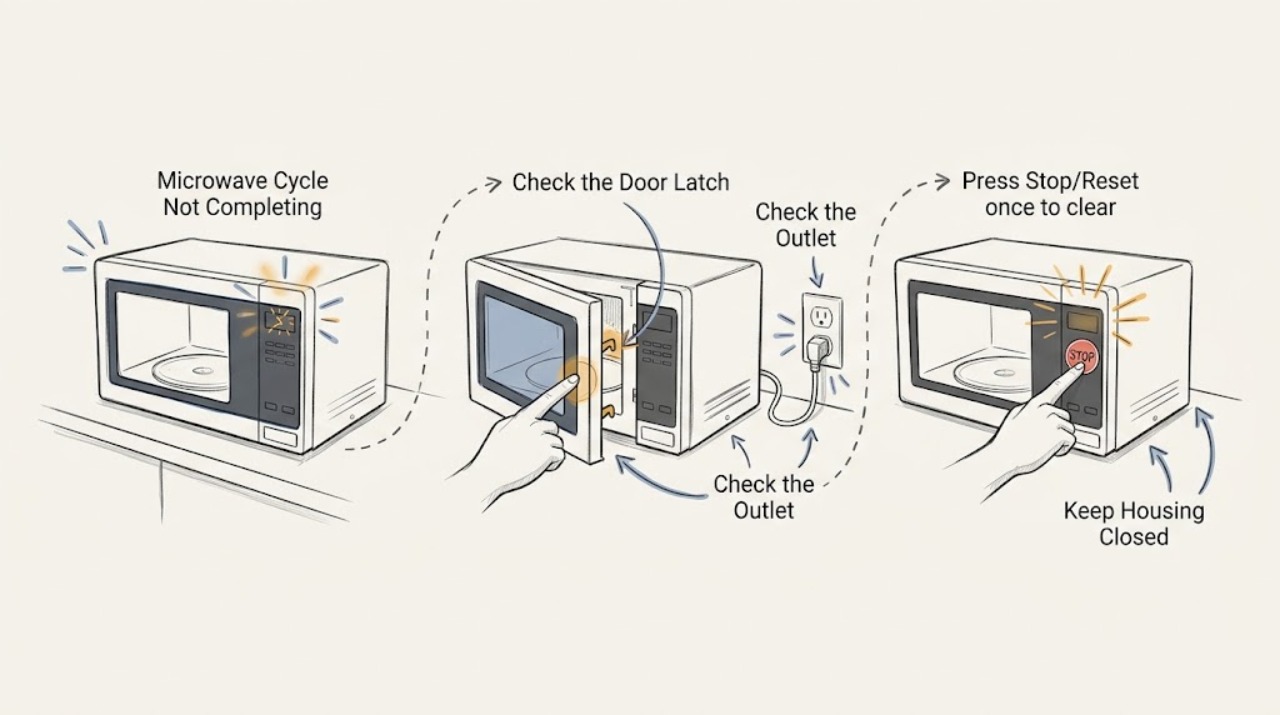
If a Panasonic microwave stops before its programmed cycle ends, check whether the door was opened, Stop/Reset was pressed, another programme is stored, or the oven entered standby or demo mode. Confirm the power connection and restart the exact model programme once. A recurring stop, frozen display, or operation with the door open needs service.
Work through in order
Diagnostic checks
Use only checks that match the exact appliance or system and its official guide.
-
Check 1
Check whether the door was opened or is fully latched, then close it securely and press Start or the model's resume control once.
Expected result: The cycle resumes, or it remains stopped after the door is closed.
Next step: If it resumes, let the cycle finish; otherwise continue with the programme and power checks.
Why this matters
Why: Panasonic identifies secure door closure and pressing Start after programming as prerequisites for cooking.
-
Check 2
Press Stop/Reset once to clear any stored programme, then enter a short test programme according to the model manual rather than pressing multiple keys repeatedly.
Expected result: The new programme counts down, or the timer never starts or immediately stops.
Next step: Stop use and arrange service if the timer remains inactive or the cycle repeatedly stops.
Why this matters
Why: A previously entered programme or an accidental Stop/Reset can make the oven appear not to complete a cycle; a timer that never counts down indicates an operating problem.
-
Check 3
Check the cord and breaker from a dry location and confirm the oven is on its required dedicated outlet; do not repeatedly reset a breaker that trips.
Expected result: Power was interrupted or the breaker trips again, or power remains stable.
Next step: Use an electrician for the household circuit and Panasonic service for an appliance that trips or fails on a sound circuit.
Why this matters
Why: Panasonic links a shared or interrupted supply with operation stops and treats a persistent power failure as a service condition.
-
Check 4
If the display is frozen, unplug the microwave for one minute, reconnect it, and test one model-approved programme; check for Demo or standby indications when applicable.
Expected result: The display accepts input and the cycle completes, or the display freezes or the cycle still stops.
Next step: Do not open the cabinet; arrange service for a recurring frozen display or cycle failure.
Why this matters
Why: Panasonic documents a brief power restart for a frozen display and notes that standby or demo behavior varies by model.
Use your observations
Decision map
Find the observation that best matches what you see, then follow the next safe action.
-
PATH 01Next step
What you see
The cycle resumes after the door is securely closed
Do this next
Let the programme finish and avoid opening the door during the remaining cycle.
-
PATH 02Next step
What you see
The timer does not count down or the same stop occurs after Reset
Do this next
Stop use and contact Panasonic service with the model and stopping point.
-
PATH 03Next step
What you see
The display is frozen but recovers after one power restart
Do this next
Run one normal programme; arrange service if the frozen display or stop returns.
Helpful context
Understand the symptom
The interruption point is the clue
A cycle that pauses after the door opens is different from one that stops after a few seconds, loses its display, or leaves the keypad frozen. Note the display and door state before pressing Reset.
When checks do not resolve it
Need a professional?
Contact Panasonic service for a recurring incomplete cycle, a timer that will not count down, a frozen display after one restart, operation with the door open, smoke, arcing, or repeated breaker trips.
Common questions
FAQ
Why does a Panasonic microwave stop before the cycle ends?
Check for a door interruption, an accidentally cleared programme, unstable power, standby or demo behavior, and a frozen display. A recurring stop needs service.
Should I keep restarting a microwave that stops?
No. Perform at most one model-appropriate reset after checking the door and power. Stop for repeat failures, a frozen timer, smoke, arcing, or breaker trips.
Read the exact guide
Official sources
- Panasonic - Troubleshooting - Microwave power, fan or motor problems.Panasonic · Panasonic microwave that stops after starting or will not start cooking
- Panasonic - Troubleshooting Questions related to Cooking, Heating and Programing operation.Panasonic · Panasonic microwave programming and control symptoms
Community feedback
Share a repair observation
Share a plain-text repair observation. Accepted observations are published automatically; this page may take a moment to update.