
On this page
Start here
Quick answer
First decide whether the KitchenAid microwave truly stops early or has reached END and is only running its post-cooking fan. If the display countdown stops when the door opens, press Start to resume a non-sensor cycle; if the display shows a timer rather than a cooking cycle, cancel the timer because it does not control cooking. A repeat stop with blocked vents, a returning code, no heat, smoke, or a breaker trip needs qualified service.
Before you begin
Safety first
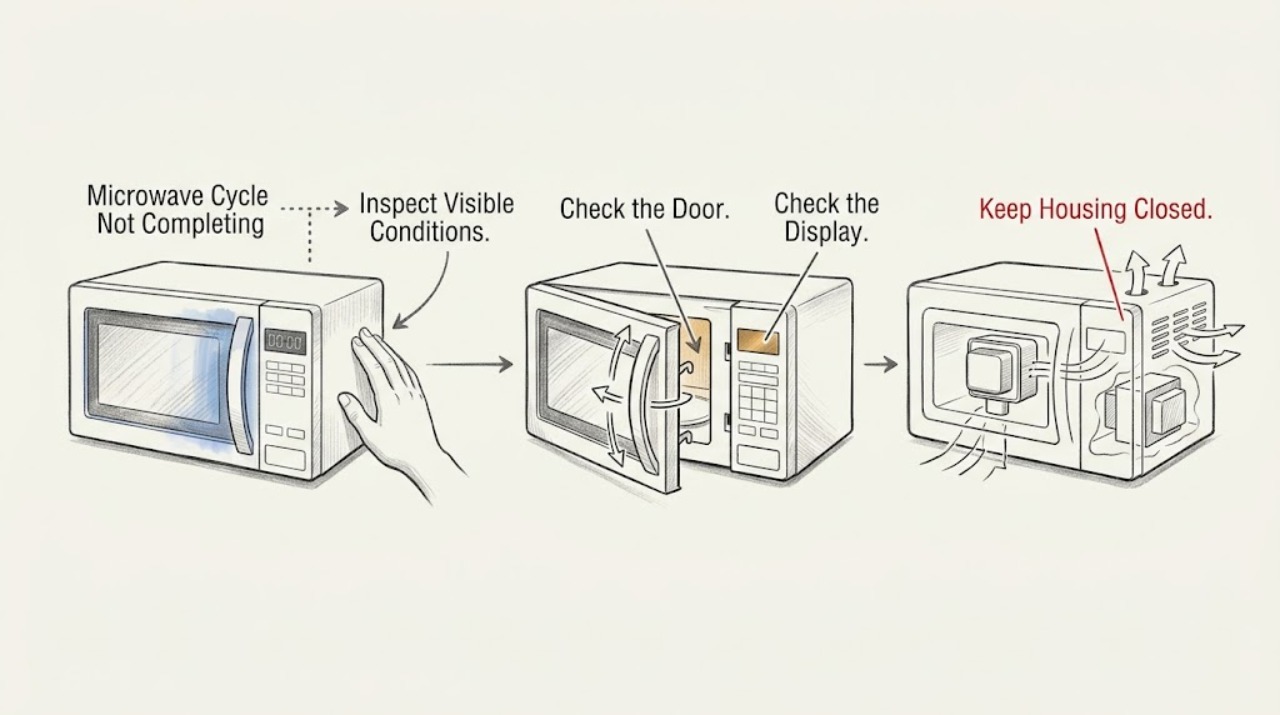
- Inspect only external controls, door closure, and vents. Do not bypass the door interlock or open the microwave cabinet; internal high-voltage work requires qualified service.
Work through in order
Diagnostic checks
Use only checks that match the exact appliance or system and its official guide.
-
Check 1
When the microwave appears to stop, look at the display before pressing any control and note whether time is still counting down, END is displayed, the timer icon is active, or a door/code message appears.
Expected result: END is displayed with a running fan, a timer is counting, the cooking countdown stopped, or a door/code message is shown.
Next step: Record the exact display and stop point before clearing it, then follow the matching check below.
Why this matters
Why: END plus fan can be normal cooling; the timer is a separate non-cooking function; a halted countdown or door/code message is a real interruption to investigate.
-
Check 2
If the door was opened during a non-sensor cooking cycle, close it firmly and press Start once; if a door message remains, open and close the door before starting again.
Expected result: The countdown resumes and completes, or the cycle will not resume and the door message returns.
Next step: Do not force the door or bypass its latch. Stop and arrange service if it will not latch or the message returns.
Why this matters
Why: A door interruption or the anti-unintended-start state is more likely when one Start after a firm closure restores the cycle; a recurring message points to a door/control issue.
-
Check 3
Cancel any active kitchen timer and verify the selected function, Stop/Unlock state, Control Lock, and Demo mode using the model's manual; then run one short test with one cup of water only if the door and cavity are intact.
Expected result: The timer icon clears and cooking completes, the oven runs with light/fan but the water stays cold, or the controls remain locked/unresponsive.
Next step: Do not repeat tests if the water remains cold, a code appears, or the appliance behaves erratically; record the result for service.
Why this matters
Why: A timer or setting can be mistaken for a failed cooking cycle; a running display with cold water supports a heating/operating fault; locked or unresponsive controls need model-specific help.
-
Check 4
Inspect the external exhaust vents and air-intake openings without removing covers, and confirm they are not blocked and the microwave's legs are in place where applicable.
Expected result: Air openings are blocked or the microwave has shut off during a longer run, or the openings are clear but the same stop recurs.
Next step: Restore the model-required clearance and allow the oven to cool; if the stop repeats with clear vents, leave it off and request service.
Why this matters
Why: KitchenAid says blocked airflow can activate a thermal device that turns the microwave off until it cools; recurrence with clear airflow is not explained by that accessible check.
Use your observations
Decision map
Find the observation that best matches what you see, then follow the next safe action.
-
PATH 01Next step
What you see
Display reads END and the fan continues briefly, while the food result is complete
Do this next
Wait for the cooling behavior to finish and do not restart solely because the fan is audible.
Why this path and its safety boundary
Why it matters: The cooking cycle has ended; the remaining fan is cooling behavior described by KitchenAid, not proof that the cycle failed.
-
PATH 02Next step
What you see
The countdown stopped after a door opening and one firm close plus Start resumes it
Do this next
Continue with the normal cycle; investigate the door only if it fails to latch or the interruption occurs without anyone opening it.
Why this path and its safety boundary
Why it matters: The observed interruption is consistent with the door-controlled pause behavior for a non-sensor cycle.
-
PATH 03Next step
What you see
The microwave shuts off mid-cycle, vents are blocked, and it works after cooling and restoring airflow
Do this next
Keep the external vents clear. If it shuts off again with clear openings, stop using it and request qualified service.
Why this path and its safety boundary
Why it matters: Restricted airflow and thermal protection are more likely than a random control failure.
-
PATH 04Next step
What you see
A countdown stops repeatedly with clear vents, no door interruption, a returning code, no heat, smoke, or a breaker trip
Do this next
Stop testing, do not open the cabinet, and provide the exact display and stop point to qualified service.
Why this path and its safety boundary
Why it matters: The external operating checks did not explain the failure and a control, interlock, power, or internal component fault remains possible.
Helpful context
Understand the symptom
A fan after END is not an unfinished cycle
KitchenAid's function guide says the display shows END when cooking is finished and, after longer cooking, cooling fans can remain on for several minutes. Judge the problem from the display and the food result, not from fan noise alone.
When checks do not resolve it
Need a professional?
Leave the microwave off and arrange service when external door, control, timer, and airflow checks do not explain the stop or when any smoke, arcing, no-heat, repeated code, or electrical symptom appears.
Safety scope: Inspect only external controls, door closure, and vents. Do not bypass the door interlock or open the microwave cabinet; internal high-voltage work requires qualified service.
Have this ready
- Provide the model number, exact display text, remaining time, selected mode, whether the door was opened, vent condition, and whether a cup of water heated.
Common questions
FAQ
Why is the fan still running after the microwave says END?
KitchenAid says cooling fans can remain on after longer cooking, so END plus a short cooling period does not by itself mean the cooking cycle failed.
Can the KitchenAid timer stop microwave cooking?
No. KitchenAid's function guide distinguishes the timer from cooking; the timer counts down and signals, but it does not start or stop the microwave oven.
Read the exact guide
Official sources
- Microwave is Not Starting or Operating - Countertop MicrowaveKitchenAid Product Help · KitchenAid microwave power, door, timer, control, water-heating, and service checks
- Non-Cooking Functions - MicrowaveKitchenAid Product Help · KitchenAid microwave display, door pause, timer, Stop/Unlock, and cooking-end behavior
- Microwave is Turning OffKitchenAid Product Help · KitchenAid microwave vent clearance and thermal shutoff guidance
Community feedback
Share a repair observation
Share a plain-text repair observation. Accepted observations are published automatically; this page may take a moment to update.