
On this page
Start here
Quick answer
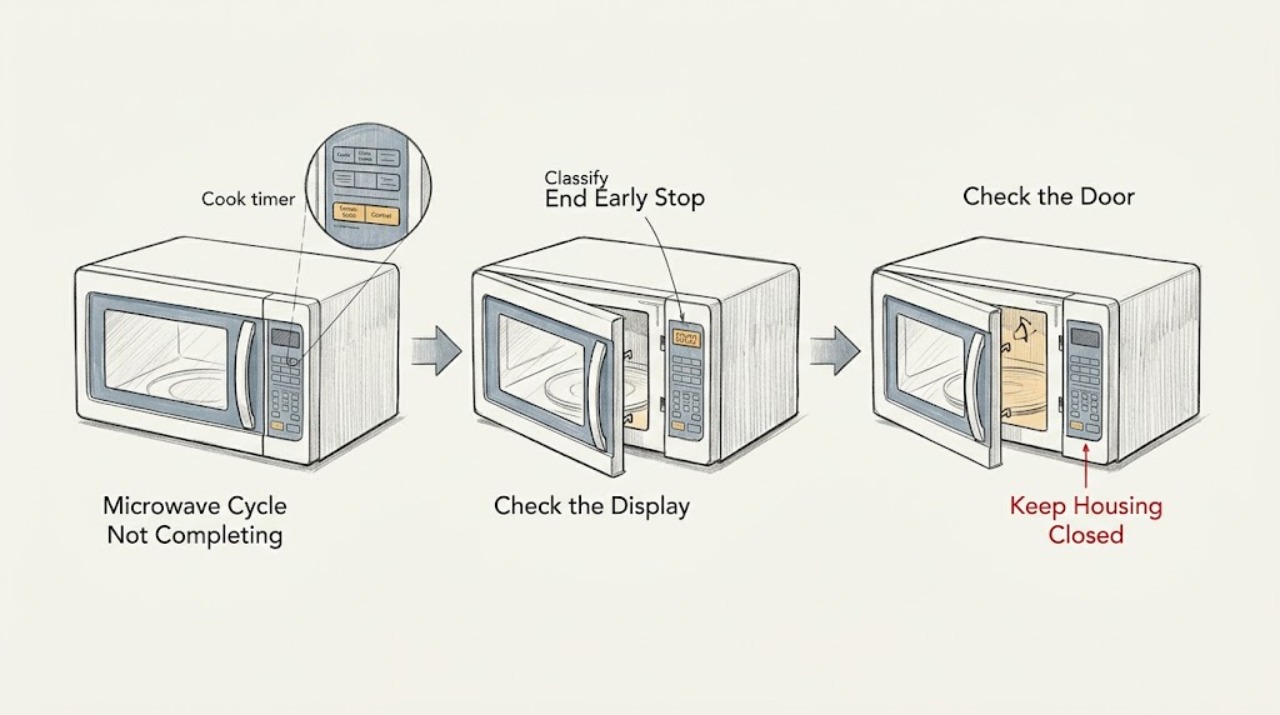
First determine whether the timer reaches End, stops early while the display stays on, or stops with the display or power gone. If the display and controls remain active, press Clear/Off or Reset once and use the exact Owner's Manual to check a paused door, control lock, sensor program, or model-specific mode; a door that is not fully closed cannot engage the safety interlocks. If a sensor cycle ends early or shows a sensor error after the door was opened, keep the door closed during the sensing phase and use Time Cook for additional time as the model manual permits. If the microwave loses power before the set time, GE says to check the household breaker or fuse and accessible outlet, clear blocked vents, and allow about 30 minutes for possible overheating recovery. A fan or relay sound after completion can be normal, but smoke, burning odor, sparks, repeated breaker trips, a damaged door or seal, or a microwave that still stops early after safe checks requires qualified service; never open the cabinet or work on high-voltage parts.
Before you begin
Safety first
- The user may record the mode and display behavior, use the exact model's Clear/Off, Reset, lock, and pause instructions, inspect the closed door and external vents, and check an accessible breaker, fuse, outlet, or switch when dry and safe. Qualified personnel must handle the cabinet, door interlocks, control housing, thermal components, heating system, high-voltage parts, live measurements, and repairs near damaged wiring or water.
Work through in order
Diagnostic checks
Use only checks that match the exact appliance or system and its official guide.
-
Check 1
Do not start another long heating run yet. Observe one occurrence closely and record whether the countdown reaches End, stops with time remaining, freezes while the display stays lit, or leaves the display and interior light dark. Note the selected mode and any message.
Expected result: The timer reaches End; the timer stops early but the controls remain lit; the display resets or becomes blank; or the display remains active but no controls respond.
Next step: Follow the sensor/program branch for an End result, the control-and-door branch for a lit but interrupted result, or the power-and-vent branch for a dark display.
Stop if: Stop immediately for smoke, burning odor, sparks, abnormal heat, a damaged door or seal, or a repeated breaker trip.
Why this matters
Why: End with an underheated result points toward the selected program, food or sensor conditions, or heating performance. An early stop with a lit panel points toward a paused program, door/control state, or internal fault; loss of display or power shifts the first check to household supply and overheating.
-
Check 2
If the display is lit but the program stopped or the pads do not respond, press Clear/Off or Reset once as shown on the exact GE model. Check for an L, LOC, LOCKED, or other lock indication and use only the model manual's unlock method; do not repeat random key combinations.
Expected result: The program clears and the pads respond; a lock indication disappears; the display remains lit but inactive; or the control does not recover after the documented reset.
Next step: Set a fresh short program only if the door, power, and safety conditions are normal. If the panel remains inactive, stop and arrange qualified microwave service.
Stop if: Do not pry the control panel, remove its housing, bridge a lock, or continue if the panel is wet, cracked, hot, or showing an error that returns.
Why this matters
Why: A retained program or control lock can imitate an incomplete cycle. Persistent inactivity after a documented reset and correct model-specific unlock procedure makes a keypad, control, or other fault more likely, but does not identify a replaceable part.
-
Check 3
With the microwave idle and cool, make sure no dish, rack, or residue prevents the door from closing normally and that the door, hinges, latch, and seal are not visibly damaged. If the cycle was paused, use the model's documented Start/Pause or door-and-Start procedure once to resume it.
Expected result: The door closes and latches normally and the cycle resumes; a visible obstruction or damaged seal is present; the door appears closed but the cycle still will not resume; or the door requires force.
Next step: Remove only an obvious external obstruction and retry the documented resume action once. Leave the microwave off and arrange service for latch, hinge, seal, interlock, or persistent resume problems.
Stop if: Do not operate with a bent door, loose hinge or latch, damaged seal, arcing, or a door that will not close without force; do not defeat or tamper with the interlocks.
Why this matters
Why: A door that does not fully close cannot engage the microwave safety interlocks, and opening or pausing a cycle can require a model-specific resume step. Damage or a door that needs force makes continued operation unsafe.
-
Check 4
If the timer reaches End but the food is not done, identify whether the selected function was Auto or Sensor Cook, Time Cook, Defrost, or a combination program. For an Auto or sensor function, follow the exact manual's covering, loading, and door-closed requirements; use Time Cook for additional heating only when the model instructions allow it.
Expected result: The display ended normally but the food is underheated; an Auto or sensor message ended early; an error appeared after the door was opened; or a Time Cook countdown stops before End.
Next step: Correct only the documented food or program setup and try one normal cycle when safe. If a correctly set Time Cook still stops early, or a sensor error repeats with the door closed, arrange service.
Stop if: Do not keep reheating food that is smoking, burning, boiling over, or arcing, and do not operate with metal or a damaged cavity, door, or seal.
Why this matters
Why: A normal End on a sensor program can reflect steam detection, food amount, covering, or program limits rather than a mechanical failure. An error after opening during sensing can require clearing and restarting. A Time Cook stop before End is not explained by ordinary sensor timing and needs the control, door, or power branches.
-
Check 5
If the microwave went dark during the cycle, and only when the area is dry and undamaged, check the appliance breaker or fuse and the accessible outlet or switch. Inspect the external ventilation openings for a cover, cloth, grease buildup, or installation obstruction; do not remove a panel or measure inside the appliance.
Expected result: The breaker or fuse was tripped; the outlet or switch is off; a vent was blocked; power returns after cooling; or the supply is normal but the microwave stops early again.
Next step: Restore only an accessible breaker, fuse, or switch once and allow the documented cooling interval. If power does not return or the early stop repeats, leave the microwave unplugged or switched off and arrange qualified service.
Stop if: Stop for a hot or damaged plug, receptacle, cord, smoke, burning odor, sparks, water, repeated trips, or any need to open the cabinet.
Why this matters
Why: GE identifies household power, blocked vents, and overheating as possible causes of a microwave that shuts down before its set time. A repeat failure with normal accessible power and clear vents is more consistent with an internal thermal, control, or power fault.
Use your observations
Decision map
Find the observation that best matches what you see, then follow the next safe action.
-
PATH 01Safety boundary
What you see
The countdown reaches End and the microwave signals normally, but the food is underheated or the selected Auto/Sensor program ends sooner than expected.
Do this next
Use the exact model manual to correct the sensor setup or add time with Time Cook. If a correctly set timed cycle stops before End or repeatedly produces no heat, arrange service.
Why this path and its safety boundary
Why it matters: The appliance completed its programmed sequence; food amount, covering, moisture, arrangement, or the sensor program is more likely than a cycle timer failure. A repeated underheat on a correctly set Time Cook is a different symptom.
Safety stop: Stop for burning, smoke, arcing, a damaged cavity, or a door or seal that is not intact.
-
PATH 02Safety boundary
What you see
The display remains lit, but the countdown stopped, the program was interrupted, or Start and other pads do not resume the cycle.
Do this next
Clear the program once, check the model-specific lock and pause/resume instructions, and verify normal door closure. Leave the unit off for persistent inactivity, repeated errors, or a door/interlock concern and arrange service.
Why this path and its safety boundary
Why it matters: A retained program, control lock, door interlock state, or model-specific pause procedure is more likely than household power loss; the panel symptom alone does not identify a control-board failure.
Safety stop: Do not bypass the lock or door interlocks, open the control housing, or keep retrying a damaged or hot microwave.
-
PATH 03Safety boundary
What you see
The microwave display or interior light goes dark before the set time, and the appliance appears to have lost power.
Do this next
Check only the accessible supply and external vents when dry and safe, then allow the GE-described cooling interval. Arrange qualified service for no recovery or a repeat early shutdown.
Why this path and its safety boundary
Why it matters: A breaker, fuse, outlet, blocked vent, or overheating condition is the safe first branch. If accessible power is normal and the microwave does not recover after cooling, an internal fault becomes more likely.
Safety stop: Stop for a hot or damaged cord or receptacle, smoke, odor, sparks, water, or repeated breaker trips; do not remove the cabinet.
-
PATH 04Safety boundary
What you see
The cooking timer reaches End, but a fan, relay click, hum, or electronics fan continues briefly or comes on around the cycle.
Do this next
Confirm whether the cooking timer actually ended and whether the sound stops as the model cools. If the sound is accompanied by smoke, burning odor, abnormal heat, sparks, or a repeated early stop, stop using the microwave and arrange service.
Why this path and its safety boundary
Why it matters: GE describes several fan, relay, and cooling sounds as normal, especially on over-the-range or combination designs. Sound alone does not show that the cooking cycle failed; a timer that is still counting down, heat, odor, or an electrical symptom changes the decision.
Safety stop: Do not reach behind the unit, block vents, or open the cabinet to identify a sound.
Helpful context
Understand the symptom
What “cycle not completing” actually looks like
A microwave that counts down to End but leaves food underheated has a different decision path from one whose countdown freezes, one whose display resets, or one that goes completely dark. Record the mode, remaining time, display message, whether the cavity light and fan change, and whether the door was opened. A cooling fan that continues after cooking is not by itself proof that the cooking cycle is stuck.
Sensor programs are not the same as a timed cook
Auto or sensor cooking estimates time from steam and the selected program, so its display and pauses do not behave like a simple countdown on every GE model. An older GE manual says opening the door during the sensing phase can affect performance and that a dense or undercooked result may need Time Cook. Current GE guidance also says the exact operating instructions belong to the model's Owner's Manual; do not borrow a sensor sequence from another microwave.
When an early stop is a power or heat-protection symptom
If the display goes dark during a long run, GE directs owners to the appliance breaker or fuse and the accessible outlet, then to clear blocked vents and wait for possible overheating recovery. If power does not return, or if the same early stop repeats with normal household power and clear vents, stop testing and arrange service rather than removing a cover.
Safety boundary
Stop conditions
- Stop immediately for smoke, burning odor, sparks, arcing, abnormal heat, water, a hot or damaged cord or receptacle, or a repeated breaker trip.
- Do not operate a microwave with a bent or loose door, damaged hinges or latches, damaged seals, or safety-interlock concerns.
- Do not remove the cabinet, control housing, door panel, waveguide cover, or any internal component, and do not perform live measurements or high-voltage work.
- Do not defeat or bridge door interlocks, repeatedly reset a failing unit, or block external ventilation openings.
- If the exact model procedure and safe external checks do not restore a normal completed cycle, leave the microwave off and arrange qualified service.
Only after diagnosis
Potential parts
- model-matched door interlock or latch assembly
Consider only if qualified diagnosis confirms that the door closes normally but its safety interlock does not register, or that the latch is damaged after external inspection.
Confirm the exact GE model and manufacturer fit information; do not select a latch from a different microwave family. - model-matched control keypad or control board
Consider only after the documented Clear/Off or Reset, model-specific lock procedure, door check, and accessible power checks fail and a qualified technician confirms a control fault.
The symptom does not identify a board or keypad; verify the exact model, revision, and fit before any part decision. - model-matched thermal protector or cooling-fan component
Consider only when qualified diagnosis links repeat early shutdown to an internal thermal or cooling fault after external vents are clear and household power is normal.
Internal microwave service is not a user repair; confirm the exact model and service documentation. - model-matched sensor or heating-system component
Consider only after the problem is reproduced on the correct program and a qualified technician distinguishes a sensor, control, or heating-system fault from normal sensor timing or food setup.
Do not infer a magnetron, sensor, capacitor, or other high-voltage part from an incomplete-cycle symptom; model-specific diagnosis is required.
When checks do not resolve it
Need a professional?
Arrange qualified GE microwave service when a correctly programmed Time Cook stops before End, the display remains inactive after the documented Clear/Off or Reset and model-specific lock checks, a door or interlock will not close normally, a sensor error repeats with the correct setup, or the unit stops early again after accessible power and ventilation checks. Use an electrician for a damaged, hot, wet, loose, or repeatedly tripping household supply. Stop immediately for smoke, burning odor, sparks, abnormal heat, water, arcing, a bent door, damaged hinges or latches, or a damaged seal. Give the technician the exact model and serial information, mode, remaining time, display message, door behavior, power observations, vent condition, and whether the timer reached End.
Safety scope: The user may record the mode and display behavior, use the exact model's Clear/Off, Reset, lock, and pause instructions, inspect the closed door and external vents, and check an accessible breaker, fuse, outlet, or switch when dry and safe. Qualified personnel must handle the cabinet, door interlocks, control housing, thermal components, heating system, high-voltage parts, live measurements, and repairs near damaged wiring or water.
Common questions
FAQ
Why does my GE microwave stop before the timer reaches zero?
Separate a lit display from a power loss. A lit panel can indicate a paused program, door-interlock state, control lock, or sensor mode. If the display goes dark, GE directs you to check the accessible breaker, fuse, outlet, blocked vents, and possible overheating recovery. A repeat stop after those safe checks needs service.
Is it normal for a GE microwave fan to keep running after the cycle?
Often, yes. GE describes internal and vent fans that can continue briefly or run automatically to cool the electronics or a warm over-the-range installation. Confirm that the cooking timer reached End. Smoke, burning odor, abnormal heat, sparks, or an early timer stop is not explained by normal fan behavior.
Why did my GE Auto Cook cycle end before the food was done?
Auto Cook uses a sensor program rather than a fixed Time Cook countdown on applicable models. GE's older manual explains that steam, covering, food amount, and door opening during sensing affect the result. Use the exact manual's setup and use Time Cook for additional heating when it permits; a correctly set timed cycle that stops early follows a different service branch.
What should I do if the GE microwave display is on but the cycle will not continue?
Press Clear/Off or Reset once as documented for the model, check for a control-lock indication, and verify that the door closes normally and the model's pause/resume step was completed. Do not force the door or use another model's key combination. Persistent inactivity needs qualified service.
Can I repair a GE microwave that stops during cooking?
Limit user checks to the documented controls, normal door closure, external ventilation, and an accessible household power reset when dry and safe. GE's microwave safety material says the oven should be adjusted or repaired only by properly qualified service personnel; the cabinet and high-voltage system are not a DIY repair area.
Read the exact guide
Official sources
- Microwave - Is Not Making SoundGE Appliances · Applies to GE microwaves with a lit display and unresponsive buttons; lock labels and unlock procedures vary by model.
- Microwave - Will Not StartGE Appliances · Applies to GE microwaves with a lit panel or button beeps but no start; the exact door design varies by model.
- Spacemaker Microwave OvenGE Appliances · Applies directly to the older Spacemaker model family covered by this manual; use only as conditional background for other GE models and defer to their exact manual.
- Microwave - Normal Operational CharacteristicsGE Appliances · Applies to GE microwave operating characteristics; exact sounds and fan behavior vary by model and installation.
- Microwave - Using the Cook Time FeatureGE Appliances · Applies to GE countertop, over-the-range, built-in, and drawer microwave operation where Cook Time is available; exact controls vary.
- Microwave - Power is OffGE Appliances · Applies to GE microwaves that shut down during cooking and appear to lose power; air-clearance requirements vary by model.
Community feedback
Share a repair observation
Share a plain-text repair observation. Accepted observations are published automatically; this page may take a moment to update.