
On this page
Start here
Quick answer
Check the breaker and outlet, confirm the water supply valve is open, clear control lock or delay/standby mode, and close the door firmly so the latch engages. If the controls remain dead, cycle power once for about 30 seconds and stop repeated resets; recurring trips, burning odor, or a failed latch need service.
Before you begin
Safety first
- Do not bypass the door latch or repeatedly reset a tripping breaker; keep hands away from exposed wiring.
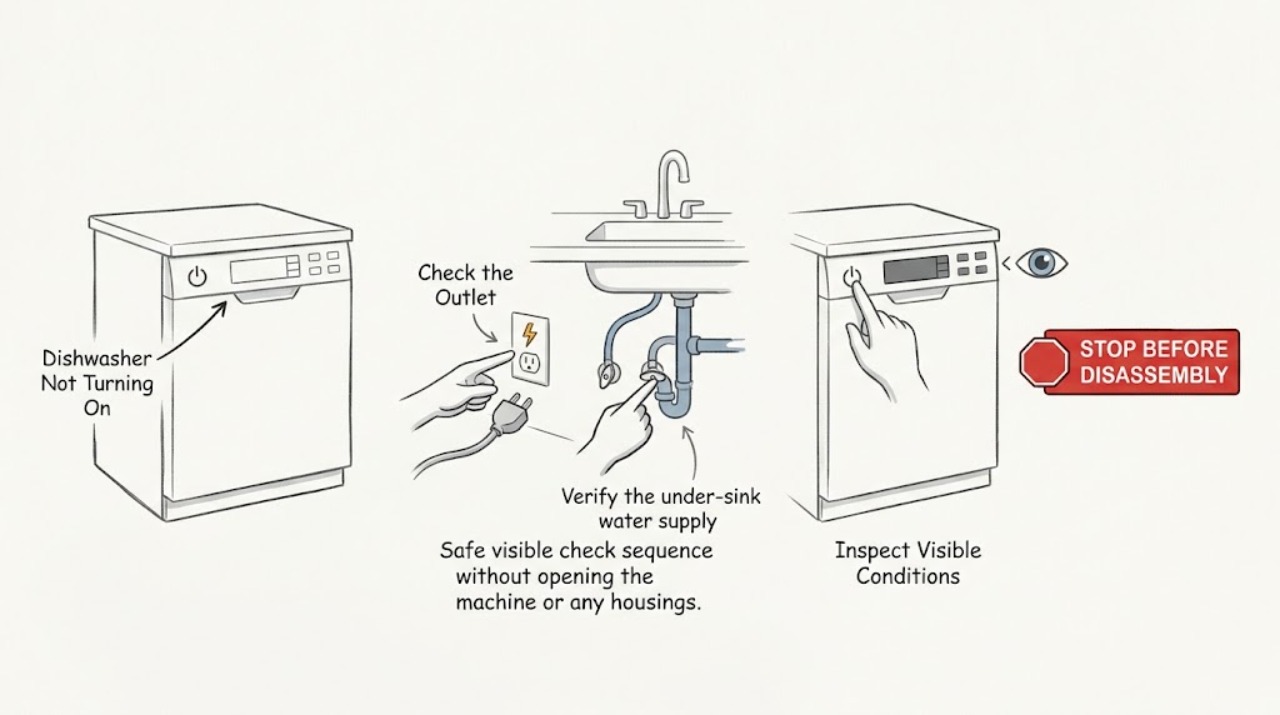
Work through in order
Diagnostic checks
Use only checks that match the exact appliance or system and its official guide.
-
Check 1
Check the dedicated breaker or fuse and test the dishwasher outlet with a small lamp if it is safely accessible; do not use an extension cord or open the appliance wiring.
Expected result: The outlet is dead, the breaker trips again, or the outlet has power.
Next step: Stop repeated resets and call an electrician or appliance service for a recurring trip; otherwise continue with operating checks.
Why this matters
Why: A dead or repeatedly tripping circuit is a supply or electrical safety issue; power at the outlet shifts attention to settings, latch, or controls.
-
Check 2
Verify the under-sink water supply valve is open and the inlet line is not visibly kinked.
Expected result: The valve is closed or the line is kinked, or water supply is available.
Next step: Restore only an obvious valve or line position, then try a normal cycle once.
Why this matters
Why: Some dishwasher controls will not proceed without the expected water supply; a normal supply makes a start interlock more likely.
-
Check 3
Look for a control-lock indicator, delay or sleep/standby status, and cancel those modes using the model instructions.
Expected result: A lock, delay, or standby indicator clears, or controls remain unresponsive.
Next step: Use the exact button sequence in the model manual; do not guess at a hidden reset combination.
Why this matters
Why: A mode can prevent normal input without a hardware failure; unresponsive controls after it clears need diagnosis.
-
Check 4
Close the door slowly and confirm racks, dishes, and the gasket are not preventing the latch from engaging. Then cycle power for about 30 seconds once.
Expected result: The cycle starts after the latch engages or power reset, or it still will not start.
Next step: Request service for a loose latch, dark display, burning smell, recurring breaker trip, or persistent no-start.
Why this matters
Why: A door-interlock or temporary control state can block starting; a persistent failure points to the latch, control, or power circuit.
Use your observations
Decision map
Find the observation that best matches what you see, then follow the next safe action.
-
PATH 01Next step
What you see
The outlet is dead or the breaker trips again
Do this next
Leave the appliance off and arrange electrical or qualified appliance service.
Why this path and its safety boundary
Why it matters: The dishwasher cannot be treated as a simple control-setting problem; the circuit or appliance has an electrical issue.
-
PATH 02Next step
What you see
The display works but lock, delay, or standby is active
Do this next
Clear the mode using the model instructions and retry once.
Why this path and its safety boundary
Why it matters: Power is reaching the controls, and an operating mode is preventing a normal start.
-
PATH 03Next step
What you see
The door will not latch or a normal reset does not restore starting
Do this next
Arrange service and report the display behavior, latch condition, and any code.
Why this path and its safety boundary
Why it matters: A door interlock or persistent control fault is still preventing the start command from completing.
Helpful context
Understand the symptom
Separate a control problem from a start condition
A dark display, a lit display that ignores commands, and a cycle that will not start after selection have different likely causes. Observe the display and latch before assuming a failed control.
Only after diagnosis
Potential parts
- door latch or interlock
Only after the door alignment and latch are diagnosed as the cause of the no-start.
When checks do not resolve it
Need a professional?
No-start remains after safe supply, mode, latch, and one power-cycle check.
Safety scope: Do not bypass the door latch or repeatedly reset a tripping breaker; keep hands away from exposed wiring.
Common questions
FAQ
Why does the dishwasher have lights but not start?
Check control lock or delay/standby mode and confirm the door latch engages. If the controls still ignore input, service may be needed.
Is it safe to keep resetting the breaker?
No. Stop if it trips again; recurring trips require electrical or appliance diagnosis rather than repeated resets.
Read the exact guide
Official sources
- Not Starting or Operating - DishwasherWhirlpool Product Help (Whirlpool Corporation) · Legacy Roper dishwashers using the documented Whirlpool-family control/latch layout; verify the exact Roper model manual before applying.
- Home | Roper AppliancesRoper Appliances · Roper appliances; exact product documentation is model-specific
Community feedback
Share a repair observation
Share a plain-text repair observation. Accepted observations are published automatically; this page may take a moment to update.