
On this page
Start here
Quick answer
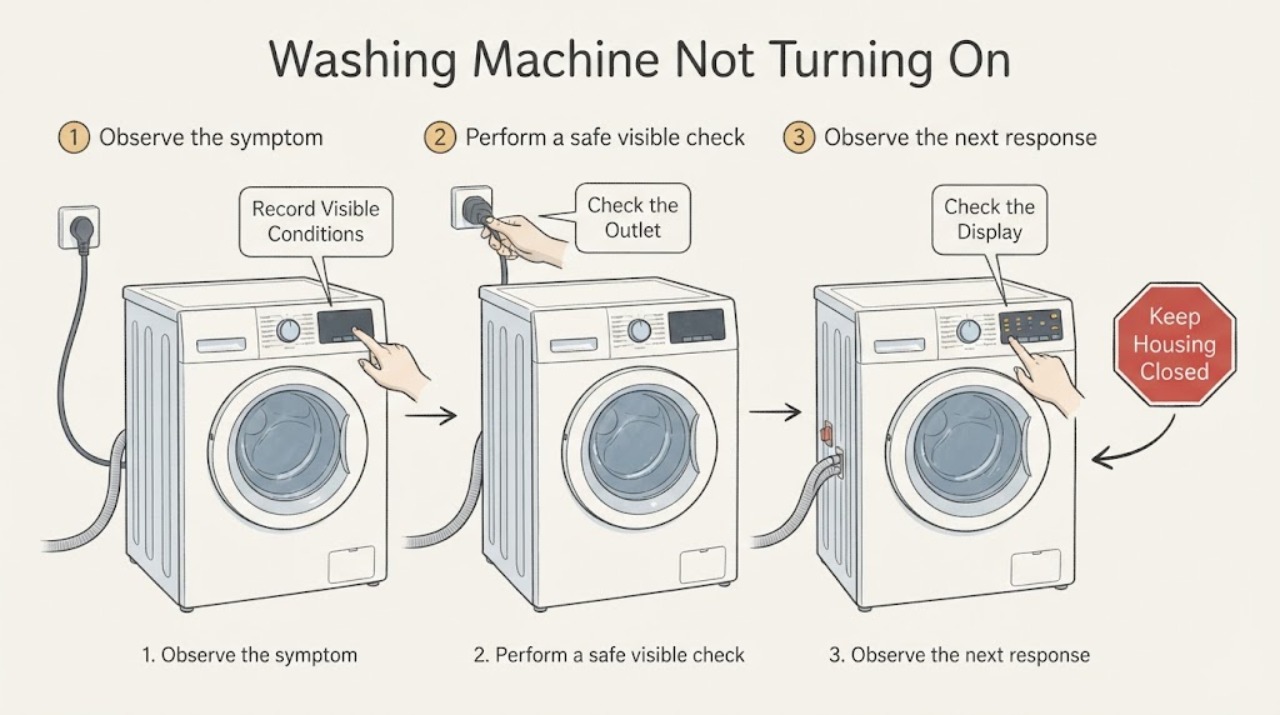
First separate a Russell Hobbs washer with no lights or sound from one that has a display but will not start. For a completely dark machine, check the wall connection and household supply without using an adaptor or damaged lead; do not open the appliance. For a lit machine, check that the programme is not at Stop, a delay or control lock is not active, Start or Pause has been pressed as the exact model requires, and the door or lid is fully closed. Record any code and use the exact Russell Hobbs manual for its meaning and reset sequence. Stop for a hot or damaged plug, smoke, burning odor, water near electrics, a leak, a door or lid that cannot latch, or a breaker that trips again, and arrange qualified service.
Before you begin
Safety first
- Keep the washer off for smoke, burning or electrical odor, arcing, hot connections, leaks near electrics, standing water, violent movement, damaged leads, or repeated supply trips. Do not open the cabinet, bypass the interlock, or repeat unsafe tests.
Work through in order
Diagnostic checks
Use only checks that match the exact appliance or system and its official guide.
-
Check 1
Stand clear of the washer and record the full model number, country or supply format, top-load or front-load style, selected programme, and the exact symptom. Note whether the display or any indicator is lit, whether a lock or delay symbol is shown, and whether there is a leak, hot connection, smoke, burning odor, unusual heat, or repeated breaker operation.
Expected result: The machine is completely dark, the display is lit but Start does nothing, a lock or delay symbol is present, a code flashes, or an electrical or water hazard is visible.
Next step: Stop immediately for smoke, burning odor, a hot or damaged plug or lead, water near electrics, a leak, arcing, or a repeated breaker trip. Otherwise continue only with the branch matching the exact symptom and model.
Why this matters
Why: A dark machine points toward supply or internal power; a lit machine points toward controls, programme, closure, or an interlock. A hazard makes further operation unsafe.
-
Check 2
If the washer is completely dark and the area is dry, verify that the plug is fully seated in its intended wall outlet and inspect only the visible lead and plug for cuts, scorching, looseness, or heat. Check the household breaker or residual-current device once from a dry safe position. Do not use an adaptor, extension lead, power strip, or a damaged connection.
Expected result: The outlet supply is absent, the breaker trips again, the plug or lead is damaged or hot, or the outlet is normal but the washer remains dark.
Next step: Leave the washer disconnected and obtain an electrician for a recurring supply fault or qualified appliance service for a washer that stays dark. Do not remove covers or test internal wiring.
Why this matters
Why: The first result is a household electrical issue; a damaged or hot connection is unsafe; normal supply with a dark control suggests an internal appliance fault.
-
Check 3
If the display or indicators are lit, turn the programme selector to a documented wash programme rather than Stop or an empty position. Check for Delay Start, Child Lock, Control Lock, or a key symbol and use only the exact model manual's unlock command. Keep the control area dry.
Expected result: The lock or delay clears and the controls respond, the selector was at Stop, or the controls remain unresponsive despite a normal programme selection.
Next step: Continue only if the manual confirms the selection and no safety symptom exists. If the control remains unresponsive or the lock returns, leave the washer off and arrange service rather than trying random key combinations.
Why this matters
Why: A programme position or intentional lock can make a powered washer appear not to start. Persistent unresponsiveness points to a control, selector, or model-specific fault.
-
Check 4
With the tub stationary and the washer safe, close the front door or top lid firmly and check only the visible seal, strike, and opening for clothing or debris. Do not push against a stuck latch, insert anything into the lock, or reach into a moving drum.
Expected result: The latch engages and the start command works, the door or lid cannot close fully, or it closes but the washer still refuses to begin.
Next step: Clear only a cool, visible obstruction and try one normal start. Leave the washer off for a damaged latch, a persistent closure fault, or any need to bypass the interlock.
Why this matters
Why: The interlock may be intentionally preventing operation. A damaged or misaligned latch, strike, gasket, or sensor needs model-specific service.
-
Check 5
Press or hold Start, Start/Pause, or the model-specific cycle button exactly as shown in the Russell Hobbs manual. Check whether a countdown, lock indicator, or fill sound appears. Do not repeatedly press buttons while the washer is filling, draining, or trying to lock.
Expected result: The cycle begins, the display shows a delay or lock state, no response occurs, or a code appears immediately after the start command.
Next step: Follow only the exact manual for the displayed state. If the command remains ineffective or the code returns, save the code and arrange service; do not use a different model's sequence.
Why this matters
Why: Some models require a deliberate start command, while a delay, closure state, or code can block the cycle before water or drum motion begins.
-
Check 6
Read the complete error code or flashing-light pattern and note when it appears: immediately on Power, after Start, during fill, or after the door or lid closes. Compare it with the exact Russell Hobbs manual; do not guess from a similar-looking code or from an unrelated model.
Expected result: The manual identifies a door or lid, water supply, drain, excess-water, power, or service condition, or the pattern is not listed for the model.
Next step: Perform only the corresponding visible check in the manual. Stop for water near electrics, a leak, a hot connection, or repeated code and arrange qualified service.
Why this matters
Why: A code may be the reason the washer will not begin, but the meaning and safe response are model-specific.
-
Check 7
Only when the washer is cool, dry, stationary, free of leaks or electrical symptoms, and otherwise safe, perform at most one power reset explicitly authorized by the exact model manual. Disconnect power from a safe location for the manual-specified interval, reconnect once, and do not open the cabinet.
Expected result: The washer starts normally, the same no-start symptom or code returns, or the supply device trips again.
Next step: Leave the appliance off and arrange qualified service for a returning fault, an unresponsive control, or a recurring supply trip. Do not repeat resets or perform energized electrical checks.
Why this matters
Why: A reset can clear a temporary control state but cannot repair a failed interlock, internal power circuit, water valve, drain fault, or control module.
Use your observations
Decision map
Find the observation that best matches what you see, then follow the next safe action.
-
PATH 01Next step
What you see
No indicator or display is present, and the visible plug, lead, and outlet appear normal.
Do this next
Leave the washer disconnected and arrange qualified Russell Hobbs appliance service. Do not open the cabinet or attempt a live electrical test.
Why this path and its safety boundary
Why it matters: An internal power or control fault is possible.
-
PATH 02Next step
What you see
The breaker or residual-current device trips again, or the plug, lead, or outlet is hot, scorched, loose, or damaged.
Do this next
Stop using the washer and obtain an electrician or qualified appliance professional. Do not reconnect it to test again.
Why this path and its safety boundary
Why it matters: Continued operation could cause shock, fire, or further electrical damage.
-
PATH 03Next step
What you see
The display is lit but a delay, child lock, control lock, or Stop position is active.
Do this next
Use only the exact model manual to clear the state and select a programme. If it returns, arrange service.
Why this path and its safety boundary
Why it matters: The washer has power but the selected state intentionally prevents a cycle from starting.
-
PATH 04Next step
What you see
The door or lid does not close or latch, or the washer reports a closure fault.
Do this next
Clear only a visible obstruction when cool. Do not pry, bridge, or insert tools into the interlock; arrange qualified service for damage or persistence.
Why this path and its safety boundary
Why it matters: The door or lid interlock is not confirming a safe closed state.
-
PATH 05Next step
What you see
A programme and Start command are accepted but the washer stops at fill, drain, or immediately after locking.
Do this next
Record the stage and code, inspect only visible hoses and taps if the manual allows, and stop for leaks, flooding, or wet electrics. Arrange service for a returning fault.
Why this path and its safety boundary
Why it matters: A water-supply, drain, water-level, door, or control condition may be preventing the cycle from proceeding.
-
PATH 06Next step
What you see
The exact Russell Hobbs model or its control symbols cannot be identified.
Do this next
Locate the model number and retrieve the matching Russell Hobbs manual before further testing. Use product support if the manual cannot be found.
Why this path and its safety boundary
Why it matters: A generic reset, lock command, code interpretation, or access instruction could be wrong for the appliance.
-
PATH 07Next step
What you see
Smoke, burning odor, arcing, a leak near electrics, standing water, unusual heat, violent movement, or a returning fault occurs.
Do this next
Stop immediately, keep clear, isolate power only from a safe dry location, close the water supply if safely reachable, and obtain qualified or emergency help. Do not restart.
Why this path and its safety boundary
Why it matters: Further operation could cause fire, shock, injury, or water damage.
Helpful context
Understand the symptom
No power and no start are different faults
If every lamp and display is dark, begin with the plug, outlet, fuse or breaker, and visible lead condition. If the display or indicators are lit, power is reaching at least part of the control system, so a programme, delay, child or control lock, door interlock, or code may be preventing the cycle. Do not assume that a Russell Hobbs model uses the same buttons, lock symbols, or reset interval as another model.
Model identity controls the next step
Russell Hobbs provides a model-manual search and asks owners to use product support for questions about washing machines. Record the model number, washer style, country or supply format, indicator pattern, selected programme, and exactly when the machine stopped responding. A top-load lid interlock and a front-load door interlock are not interchangeable, and a code from one model must not be applied to another.
Use only low-risk checks at home
A homeowner can observe the supply, controls, closure, visible hoses, and display without opening the cabinet. Do not bridge an interlock, remove a control panel, test live wiring, or reach into a wet or moving drum. Russell Hobbs directs large-appliance faults to its support route when the model manual does not resolve the problem.
Safety boundary
Stop conditions
- Do not use an adaptor, extension lead, power strip, damaged lead, or hot or loose outlet for the washer. Do not open covers or perform energized electrical checks.
- Stop for smoke, burning or electrical odor, arcing, a hot connection, a leak near electrics, standing water, violent movement, or a breaker or residual-current device that trips again. Isolate power only from a safe dry location.
- Do not pry the door or lid, bridge or insert tools into the interlock, reach into a moving drum, or bypass a safety sensor.
- Do not transfer an error meaning, button sequence, reset interval, fuse detail, or internal part claim from another Russell Hobbs model.
Only after diagnosis
Potential parts
- door or lid interlock assembly
Consider this only after qualified diagnosis confirms that the door or lid is aligned and intact but the model-specific interlock prevents a safe start.
Front-load door locks and top-load lid locks differ, and Russell Hobbs assemblies vary by model and region. Confirm the exact model and diagnosis before selecting a part. - control or power-entry assembly
Consider this only when the outlet and visible lead are safe and qualified diagnosis identifies an internal power or control failure behind a dark or unresponsive washer.
Do not choose a control or power component from a no-start symptom alone. Confirm model, supply format, and the documented repair diagnosis. - water inlet or drain component
Consider this only when the washer powers up but a model-documented fill or drain code or observation identifies a specific failed component after safe visible checks.
Water and drain components, access, and safety procedures vary by model. Confirm exact fit and use qualified service for internal work.
When checks do not resolve it
Need a professional?
Request service for persistent no-start behavior, an unresponsive display, a failed door or lid interlock, a returning or undocumented code, suspected internal power or control failure, or any leak or electrical symptom.
Safety scope: Keep the washer off for smoke, burning or electrical odor, arcing, hot connections, leaks near electrics, standing water, violent movement, damaged leads, or repeated supply trips. Do not open the cabinet, bypass the interlock, or repeat unsafe tests.
Common questions
FAQ
Why is my Russell Hobbs washing machine completely dead?
Check the visible plug, lead, intended wall outlet, and household supply from a dry safe position. If the outlet is normal but the washer remains dark, leave it disconnected and arrange qualified service. Do not open the cabinet or reconnect a hot, damaged, or repeatedly tripping appliance.
Why does my Russell Hobbs washer have lights but not start?
A Stop position, delay or control lock, required Start command, door or lid interlock, or displayed code may be blocking the cycle. Match the controls and code to the exact model manual. If the door will not latch or the fault returns, arrange service rather than bypassing the interlock.
Can I reset a Russell Hobbs washing machine that will not turn on?
Only perform a reset if the exact model manual authorizes it and the machine is cool, dry, stationary, and free of leaks or electrical symptoms. Do it once from a safe location. A reset cannot repair a damaged lead, failed interlock, water fault, or internal control problem.
What information should I have before requesting Russell Hobbs washer service?
Have the full model and serial information, washer style, country or supply format, selected programme, indicator or code pattern, door or lid behavior, and the point where the washer stops. Also record any leak, heat, odor, smoke, unusual sound, or supply-trip evidence without repeating an unsafe test.
Read the exact guide
Official sources
- Russell HobbsRussell Hobbs Help Centre · Brand support hub used to locate model documentation and support for Russell Hobbs appliances.
- My item is faulty.Russell Hobbs Help Centre · Official service-policy page used only for service escalation, not for model-specific repair steps.
- My item is faultyRussell Hobbs Help Centre · Official support article that specifically includes washing machines among large or medium appliances.
- Search User ManualsRussell Hobbs · Official manual search page; the exact manual controls any button, code, reset, and repair instruction.
- User ManualsRussell Hobbs Europe · Additional official manual route for markets where the UK manual search does not identify the product.
Community feedback
Share a repair observation
Share a plain-text repair observation. Accepted observations are published automatically; this page may take a moment to update.