
On this page
Start here
Quick answer
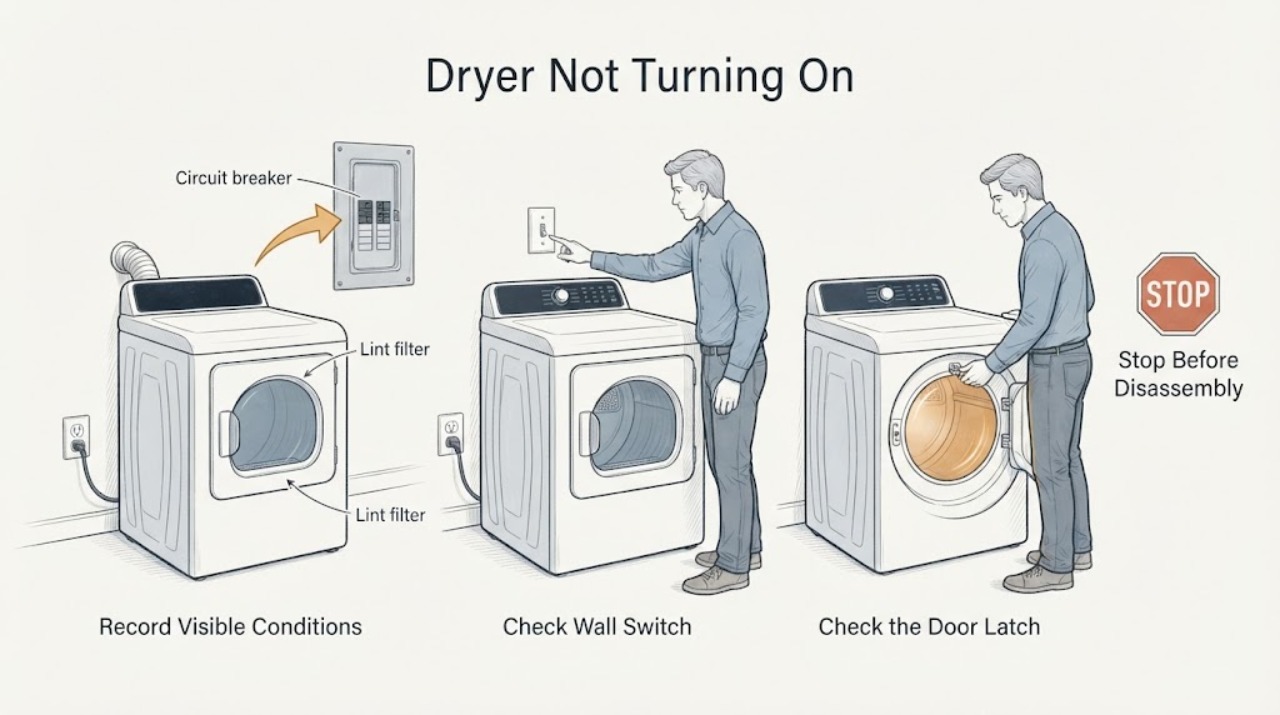
First separate a completely dead dryer from one with a display that will not start. Record the model, gas or electric type, display or blinking lights, door state, exact error, and whether the problem began after installation, a power event, a spill, or a previous cycle. From a dry, safe position, switch the breaker fully off before inspecting the plug, cord, and outlet; restore it once only if there is no damage. Confirm the door is latched, Child Lock is off, a cycle is selected, and Start is pressed as the model requires. Samsung error codes may represent voltage, door, temperature, vent, communication, motor, or gas-ignition issues, so do not apply another model's code table. Clean only the accessible lint filter and model-approved vent or heat-exchanger path; use a water or drain-hose check only on a dryer that actually has that feature. Stop for a damaged cord, repeated breaker trip, smoke, burning or electrical odor, unusual heat, sparks, or a gas smell. If the dryer remains blank, will not stay on, or a code returns after the documented single reset, arrange qualified service.
Work through in order
Diagnostic checks
Use only checks that match the exact appliance or system and its official guide.
-
Check 1
Record the model number, gas or electric type, whether the display or drum light is present, whether Power responds, and whether the symptom is blank, powered-but-not-starting, or a mid-cycle shutdown. Note the door position, recent move or installation, outage, moisture, load, and any code or blinking light.
Expected result: No display or light supports a supply or main-control branch. A display with an unresponsive Start button supports Child Lock, door, cycle, or error handling. A mid-cycle shutdown supports airflow, overheating, or component diagnosis rather than a simple no-power check.
Next step: Continue to the external power check only if the area is dry and there is no smoke, burning smell, gas odor, spark, or damaged wiring.
Why this matters
Why: Samsung uses different support paths for loss of power, failure to start, and stopping during a cycle; a single symptom label cannot identify the failed part.
-
Check 2
From a dry, safe position, switch the dryer circuit breaker fully off before interacting with the power cord. Inspect the accessible plug, cord, and outlet for burn marks, looseness, water, or other damage. If the installation is intact and has worked at this location, restore the breaker once as Samsung describes; do not use an extension cord or remove covers.
Expected result: A half-tripped or fully tripped breaker, damaged connection, or dead outlet can make the dryer appear dead. A burn mark, loose or incorrect electric cord installation, water, or a breaker that trips again is an electrical hazard.
Next step: Leave the dryer off and arrange qualified electrical or appliance service for damage, incorrect installation, a dead outlet, or a recurring trip. If power returns safely, continue with controls without opening the cabinet.
Why this matters
Why: Samsung distinguishes a safe external supply interruption from a damaged installation and directs damaged or repeatedly tripping conditions to electrical service.
-
Check 3
With power present, check that the door closes and latches without laundry caught in the seal. Check the Child Lock icon, select a cycle permitted by the model, and press or hold Start exactly as the control panel and manual show. Do not force the door or bypass its latch.
Expected result: A lit Child Lock icon can disable buttons and Start. A door code, loose latch, trapped fabric, or door that will not stay closed can prevent a cycle. If the timer does not count down or the display remains unresponsive after the correct sequence, the control or door circuit may need service.
Next step: Use the model manual once to clear Child Lock or correct the cycle. If the latch is damaged, the panel remains unresponsive, or Start still fails, stop and request service.
Why this matters
Why: Samsung states that Child Lock, door sensors, cycle options, and Start behavior vary by model and can look like a dead or non-starting dryer.
-
Check 4
Write down every displayed code or blinking-light pattern exactly, including capitalization, digits, and whether it appears at power-up, when the door closes, or when Start is pressed. Use only the exact Samsung model manual or official code guide; do not reset while a firmware-download indicator or other model instruction says to wait.
Expected result: Door-related codes point to the latch or sensor; voltage codes point to supply; temperature or heating codes point toward lint or vent restriction or an electrical heating condition; communication, motor, electronic-control, or gas-ignition codes indicate a component branch. An unlisted or recurring code needs service.
Next step: Follow one model-specific correction or reset only. If the code returns, leave the dryer off and provide the code and model to qualified service.
Why this matters
Why: Samsung publishes distinct code families and notes that some dryers show blinking lights instead of a digital code. The same-looking character can be interpreted differently by model.
-
Check 5
If the dryer can run and there is no hazard, clean the lint screen and inspect only the model-approved exhaust vent, heat exchanger, or condenser area. For a steam or ventless model, check a water container or drain hose only if the manual identifies one and the area is dry. Do not run a vent test when the dryer will not turn on at all.
Expected result: A clogged lint or vent path can cause temperature or heating errors and may make a dryer shut down mid-cycle. A full or disconnected water system can affect applicable steam or condenser models, but it cannot explain every Samsung dryer. A clean path with a no-start symptom points back to power, controls, door, or service.
Next step: Correct only an accessible, documented filter, vent, or water-container condition. Stop for heat, smoke, water near electrics, or a recurring error and arrange service.
Why this matters
Why: Samsung limits vent-blockage testing to a dryer that can operate and treats water connections and heat exchangers as model-dependent features.
-
Check 6
Before any further test, classify safety symptoms: gas odor or gas-dryer smoke; visible smoke; burning or electrical smell; sparks or arcing; unusually hot cabinet or cord; water near electrical parts; or repeated breaker trips. Do not restart the dryer to reproduce any of these symptoms.
Expected result: These are stop conditions, not normal explanations for a blank display or failed Start command. A faint first-use odor has a different context, but an electrical odor, continuing burning smell, smoke, gas smell, or heat that persists requires the dryer to remain off.
Next step: For gas odor or gas-dryer smoke, clear the building and do not operate appliances, switches, or phones inside; contact emergency help from safety. For electric smoke, burning odor, arcing, water, or damaged wiring, isolate power only if safely reachable and obtain qualified help.
Why this matters
Why: Samsung's safety guidance separates gas-smell or smoke emergencies from ordinary troubleshooting and sends persistent burning or electrical odor to power isolation and service.
Use your observations
Decision map
Find the observation that best matches what you see, then follow the next safe action.
-
PATH 01Next step
What you see
The display and drum light are blank, and the breaker, cord, or outlet cannot be restored safely.
Do this next
Leave the dryer off and arrange qualified electrical or appliance service. Do not remove covers or keep resetting the breaker.
-
PATH 02Next step
What you see
The display works, but Child Lock, a door/latch issue, or a cycle/Start sequence prevents the timer from counting down.
Do this next
Use the exact model manual to clear the lock, close the door correctly, select an allowed cycle, and press Start once. Arrange service for a damaged latch or persistent no-start condition.
-
PATH 03Next step
What you see
A voltage, temperature, heating, vent, communication, motor, electronic-control, gas-ignition, or other exact code is displayed.
Do this next
Follow the model-specific Samsung instruction once. Clean a documented lint or vent path only where applicable; if the code returns or the dryer will not start, leave it off and request service.
-
PATH 04Next step
What you see
The dryer stopped during a cycle and its model reports a vent-blockage or heat condition, but it can still power on and there is no safety hazard.
Do this next
Clean the lint screen and model-approved exhaust path, then use the Samsung vent test if the model provides it. Do not run that test on a completely dead dryer.
-
PATH 05Next step
What you see
The dryer has a documented steam, ventless, condenser, heat-exchanger, water-container, or drain-hose feature and moisture or a feature alert is present.
Do this next
Follow the exact manual for that feature from a dry, safe position. Stop if water reaches electrical parts or the feature leaks when not in use, and arrange service.
-
PATH 06Next step
What you see
There is gas odor, gas-dryer smoke, visible smoke, burning or electrical smell, sparks, arcing, unusual heat, water near electrics, damaged wiring, or a repeated breaker trip.
Do this next
Stop immediately. For suspected gas, do not operate appliances, switches, or phones inside; leave and contact emergency help from a safe location. For electrical or fire symptoms, isolate power only if safely reachable and obtain emergency or qualified service. Do not restart.
Helpful context
Understand the symptom
Blank display, no start, and mid-cycle shutdown are different faults
A Samsung dryer with no display or drum light needs a supply and control check first. A lit display that will not start more often leads to the door latch, Child Lock, cycle selection, Start command, or an error branch. A dryer that starts and then stops can instead involve overheating, restricted airflow, a vent alert, or a component fault. Record the exact behavior before changing settings.
Do not bypass a dryer safety circuit
Do not open the cabinet, test live voltage, bypass the door switch or thermal safety, or repeatedly reset a breaker. Do not run a gas dryer when gas is smelled, ignition is delayed, or the flame is abnormal. Clean only accessible filters and paths described for the exact model.
Steam, ventless, and condenser features are model-dependent
Some Samsung dryers have steam water connections, heat exchangers, drain hoses, or water containers; others do not. Use the model manual before checking or disconnecting any water path. Never add water, detach a hose, or run a heating cycle to diagnose a dryer that has water near electrical parts.
When checks do not resolve it
Need a professional?
Arrange qualified service when safe power is present but the Samsung dryer remains blank, will not stay on, will not accept a correct Start sequence, or a code returns., Arrange electrical service for burn marks, a damaged or loose cord, an outlet problem, incorrect electric-dryer cord installation, or a breaker that trips again., Do not open the cabinet, test live voltage, bypass a door or thermal safety, use an extension cord, repeatedly reset power, or diagnose a gas ignition system by repeated starts., For gas odor, smoke, burning or electrical odor, sparks, arcing, abnormal heat, water near electrical parts, or a damaged cord, stop immediately and obtain emergency or qualified help from a safe location.
Common questions
FAQ
Why is my Samsung dryer completely blank?
Switch the breaker fully off before checking the accessible cord and outlet for damage, then restore power once only if the installation is dry and intact. A blank display with confirmed power or a breaker that trips again needs qualified service.
Why does my Samsung dryer turn on but not start?
Check the door latch, Child Lock, allowed cycle, and the model's Start command. If the timer does not count down or an error appears, follow the exact model guide once and then arrange service if it persists.
Can a clogged vent stop a Samsung dryer from turning on?
Samsung says a blockage can contribute to heat errors or a mid-cycle shutdown, but a dryer that will not turn on at all cannot run its vent test. Do not confuse a no-power symptom with an airflow test result.
What should I do with a Samsung dryer error code?
Record every character or blinking-light pattern and use the exact model manual. Voltage, door, temperature, vent, motor, communication, electronic-control, and gas-ignition codes have different branches; a returning code needs service.
Should I check a water container on my Samsung dryer?
Only if your exact model has a documented steam, ventless, condenser, or drain feature. Do not add water or disconnect hoses on a model without that feature, and keep the dryer off if water is near electrical parts.
What if my Samsung gas dryer smells like gas or is smoking?
Clear everyone from the building. Do not operate appliances, electrical switches, or a phone inside; leave and contact emergency help from a safe location. Do not return to test the dryer until professionals clear it.
Read the exact guide
Official sources
- Samsung dryer smells or smokesSamsung Support · Samsung gas and electric dryer smoke, gas odor, burning odor, electrical odor, lint and vent, and stop/service guidance
- Samsung dryer displays an error codeSamsung Support · Samsung dryer error and blinking-light code families, door, voltage, temperature, heating, vent, communication, motor, gas ignition, and service guidance
- Samsung dryer loses power or won't turn onSamsung Support · Samsung dryer no-power, cord, outlet, breaker, gas/electric circuit, vent-test scope, and service guidance
- Samsung dryer turns on but will not start or spinSamsung Support · Samsung dryer door, Child Lock, cycle-start, Start-button, timer-countdown, and no-start service guidance
- Control buttons on Samsung dryer do not respondSamsung Support · Samsung dryer Child Lock, control-panel response, model-dependent cycle controls, and service escalation
- Samsung dryer is leakingSamsung Support · Samsung steam-dryer water hose, model-specific moisture, exhaust, ventless or drain-feature, and service guidance
Community feedback
Share a repair observation
Share a plain-text repair observation. Accepted observations are published automatically; this page may take a moment to update.