
On this page
Start here
Quick answer
If a Sharp dryer is completely blank, first look for smoke, a burning smell, a damaged cord, water near the outlet, or a breaker that trips again; stop using it and arrange qualified help if any is present. If there is no hazard, identify the exact model, confirm the dry plug and outlet are usable without an extension cord, close the door fully, select a programme, press Start or Pause, and check whether Child Lock is active. On models with a water tank or a model-specific heat-exchanger warning, follow that model's manual before checking those items. A blank display or a dryer that remains nonfunctional after the manual's normal checks needs authorized service; do not bypass the door lock or open the cabinet.
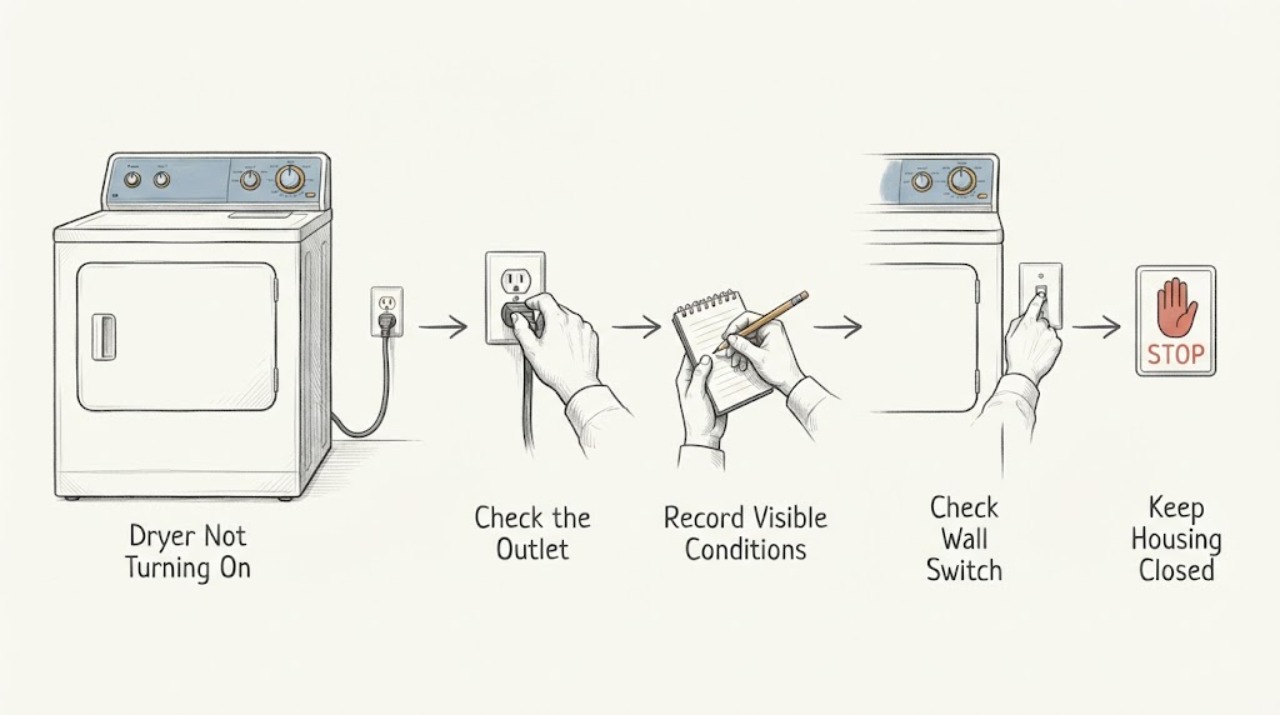
Work through in order
Diagnostic checks
Use only checks that match the exact appliance or system and its official guide.
-
Check 1
Stop and inspect from the outside for smoke, a burning or gas-like smell, a hot or discolored plug, a cracked cord, water at the outlet or under the dryer, sparks, or a breaker that trips again.
Expected result: There is any heat damage, odor, moisture near electrics, sparking, smoke, or repeated loss of power.
Next step: Stop using the dryer, keep clear of the hazard, and arrange qualified electrical or appliance service. If there is smoke or fire, follow local emergency guidance.
Stop if: Do not reconnect, run another cycle, remove panels, or repeatedly reset the breaker.
Why this matters
Why: This is a safety condition rather than an ordinary no-start symptom; energized or wet appliance parts should not be tested by the user.
-
Check 2
Record the full Sharp model number and check whether this dryer is vented, heat-pump or ventless, and whether the display is completely blank or shows lights, a lock symbol, or a code.
Expected result: The model and the exact panel behavior are known, or the model cannot be read.
Next step: Use the exact Sharp support/manual page for that model. If the model cannot be identified, limit checks to the external power, door, controls, and visible safety conditions described below.
Why this matters
Why: Sharp dryer controls and features differ by model; a model-specific manual is needed before assuming a tank, drain hose, heat exchanger, or error-code procedure applies.
-
Check 3
With dry hands and no visible damage, verify that the plug is fully seated in a suitable wall outlet and that the outlet is not controlled by a switched or tripped circuit; do not use an extension cord or power strip. If the model manual allows a reset, turn the control off, disconnect it safely, wait as directed, and reconnect once.
Expected result: The outlet powers another small appliance, the dryer display returns, or the display remains blank; note any breaker trip.
Next step: If the outlet itself is suspect, stop and have it checked by a qualified electrician. If the outlet is sound but the dryer stays blank, stop user testing and request Sharp-authorized service.
Stop if: Do not test a wet, loose, scorched, warm, or damaged outlet or cord, and do not work inside the dryer.
Why this matters
Why: A restored display points to the supply connection or a temporary control state. A blank display, a hot/damaged connection, or another trip points to a supply or internal fault that needs service.
-
Check 4
For a dryer with a live display, close the door firmly without forcing it, select a normal programme, press Start or Pause as the panel labels require, and check whether a lock symbol or Child Lock indication is active.
Expected result: The programme starts, the door-open or lock indication remains, or the controls light up but Start has no effect.
Next step: Remove only a visible obstruction from the door opening, close it again, and use the exact manual's Child Lock release. If the lock will not clear or the door/lock is damaged, arrange service rather than bypassing it.
Why this matters
Why: Starting after the door and controls are correctly set points to an interrupted selection. A persistent door or lock indication can mean the door is not being sensed or the lock mechanism/control has a fault.
-
Check 5
Only when the exact model has a water tank or drain system, check the user-accessible tank indicator and drain-hose arrangement described in that manual; do not pull panels or disassemble plumbing. On a heat-pump model, check only the user-accessible lint filter or heat-exchanger warning area after the appliance has cooled.
Expected result: The manual indicates a full tank, a kinked or incorrectly routed drain hose, or a heat-exchanger/lint warning; or none of those features exists on this model.
Next step: Follow the exact model manual's user-level emptying, hose, filter, or warning-clearing step. If the warning returns, water leaks, or a cover must be removed, stop and request service.
Stop if: Do not use sharp tools, touch sharp fins, defeat a sensor, or open a sealed panel to make the dryer start.
Why this matters
Why: Some Sharp models interrupt a programme for a full tank or maintenance warning, but this cannot be generalized to every Sharp dryer. Sharp's manual also requires the lint filter to be fitted and cleaned and cautions that heat-exchanger fins can be sharp.
-
Check 6
Write down every display code, flashing pattern, and the point at which the dryer stops responding; note whether the failure occurs immediately, after the door is closed, or after Start is pressed.
Expected result: A repeatable code or pattern appears, or there is no display response at all.
Next step: Give the exact model, code/pattern, and the checks already completed to Sharp support or an authorized technician; do not substitute a code from another model.
Why this matters
Why: A code is model-specific evidence, not a universal Sharp diagnosis. No response after the safe external checks is consistent with a control, interlock, or power fault that cannot be confirmed without the model manual and service testing.
-
Check 7
After the safe checks, decide whether the dryer now starts normally and completes a short supervised cycle without abnormal heat, noise, odor, or electrical behavior.
Expected result: It starts and behaves normally, or it remains dead, refuses to start, trips power, or develops an abnormal symptom.
Next step: For any recurrence or abnormal behavior, stop using the dryer and arrange authorized service with the model and observed pattern. Do not bypass a door switch or attempt live electrical diagnosis.
Stop if: Stop immediately for smoke, burning smell, sparking, damaged wiring, unusual overheating, or repeated breaker operation.
Why this matters
Why: Normal operation ends the no-start investigation, while recurrence indicates an unresolved power, door-interlock, control, or model-specific fault. An abnormal symptom raises the safety priority.
Use your observations
Decision map
Find the observation that best matches what you see, then follow the next safe action.
-
PATH 01Next step
What you see
Smoke, burning smell, sparks, moisture near electrics, damaged cord, or repeated breaker trips
Do this next
Stop using the dryer and obtain qualified help; handle a fire or gas emergency from a safe location under local emergency guidance.
-
PATH 02Next step
What you see
The panel is completely blank but the outlet is confirmed safe and powered
Do this next
Do not open the cabinet or keep resetting power; provide the model and blank-display behavior to authorized service.
-
PATH 03Next step
What you see
The panel is lit but the door, lock, programme, or Start control prevents operation
Do this next
Use only the exact manual's door and Child Lock instructions; a persistent indication or damaged latch needs service.
-
PATH 04Next step
What you see
A model-specific tank, drain, filter, or maintenance warning is shown
Do this next
Follow the user-accessible procedure in that model's manual; recurring warnings, leaks, or inaccessible parts require service.
-
PATH 05Next step
What you see
A code or flashing pattern appears
Do this next
Record it exactly and match it to the same model's manual or support channel; do not apply another model's code meaning.
-
PATH 06Next step
What you see
The dryer still will not turn on after safe external checks
Do this next
Stop troubleshooting and request authorized appliance service with the model, display state, and observed sequence.
Helpful context
Understand the symptom
What not turning on means
Separate a dead control panel from a programme that refuses to run. A panel with no lights points first to the supply path or an internal electrical fault. A lit panel that will not begin commonly reflects the door, programme, Start control, lock setting, or a model-specific full tank or warning. Sharp's instructions vary by model, so use the exact model manual for any feature that is not visibly present on your dryer.
Before you try another cycle
A dryer is a high-power appliance. Keep the lint filter installed and clean, keep ventilation openings clear, and do not continue testing if the cord, outlet, cabinet, or surrounding floor is hot, wet, scorched, or otherwise damaged. A single normal reset is reasonable only when the manual permits it and no hazard is present; repeated breaker trips are a stop signal, not a reason to keep resetting.
Only after diagnosis
Potential parts
- door interlock or door latch
Only consider this category if the display is live, the door is correctly aligned, and the exact model manual or technician diagnosis indicates that the dryer is not sensing a closed door.
Confirm the complete Sharp model number and manufacturer fit information before ordering; do not bypass the interlock. - power cord or power-entry component
Only consider this category after a qualified inspection finds a damaged cord or power-entry component; a no-start symptom alone does not identify it.
Electrical replacement and installation must match the exact model and local requirements and should be handled by qualified personnel. - control or power module
Only consider this category when the outlet and cord are safe, the display or controls remain nonfunctional, and model-specific service diagnosis points to the module.
Confirm exact model compatibility through Sharp or an authorized technician; do not perform live or cabinet-level testing.
When checks do not resolve it
Need a professional?
Have this ready
- The full model number, whether the display is blank or lit, any exact code or flashing pattern, the sequence that fails, and whether the outlet, door, tank, or filter checks changed the symptom.
Common questions
FAQ
Why is my Sharp dryer completely blank?
After checking for hazards, a safe outlet, and one manual-approved reset, a blank panel can indicate a supply connection or internal electrical fault. Do not open the cabinet; give the exact model and blank-display behavior to authorized service.
Why does my Sharp dryer have power but not start?
Check that the door is fully closed, a programme is selected, Start or Pause has been pressed, and Child Lock is not active. A persistent door or lock indication, recurring warning, or failed start needs the exact model manual or service diagnosis.
Should I keep resetting the breaker when the dryer will not turn on?
No. A repeated trip, heat damage, burning smell, sparks, or moisture near the outlet is a stop condition. Disconnect only when it is safe to do so, keep clear, and arrange qualified electrical or appliance help.
Read the exact guide
Official sources
- SupportSharp · Use to locate the support or manual for the exact Sharp dryer model; regional availability varies.
- SHARP DRYER KD-HD9S7GW-B V2108Sharp · Official manual for one Sharp dryer model; tank, heat-pump, control, and warning details must not be generalized to other Sharp models.
- Appliance and Electrical Fire SafetyU.S. Fire Administration · General safety guidance for household appliances and electrical connections in the United States.
- SupportSharp USA · Use only if the product and region are covered; provide the exact model to support.
Community feedback
Share a repair observation
Share a plain-text repair observation. Accepted observations are published automatically; this page may take a moment to update.