
On this page
Start here
Quick answer
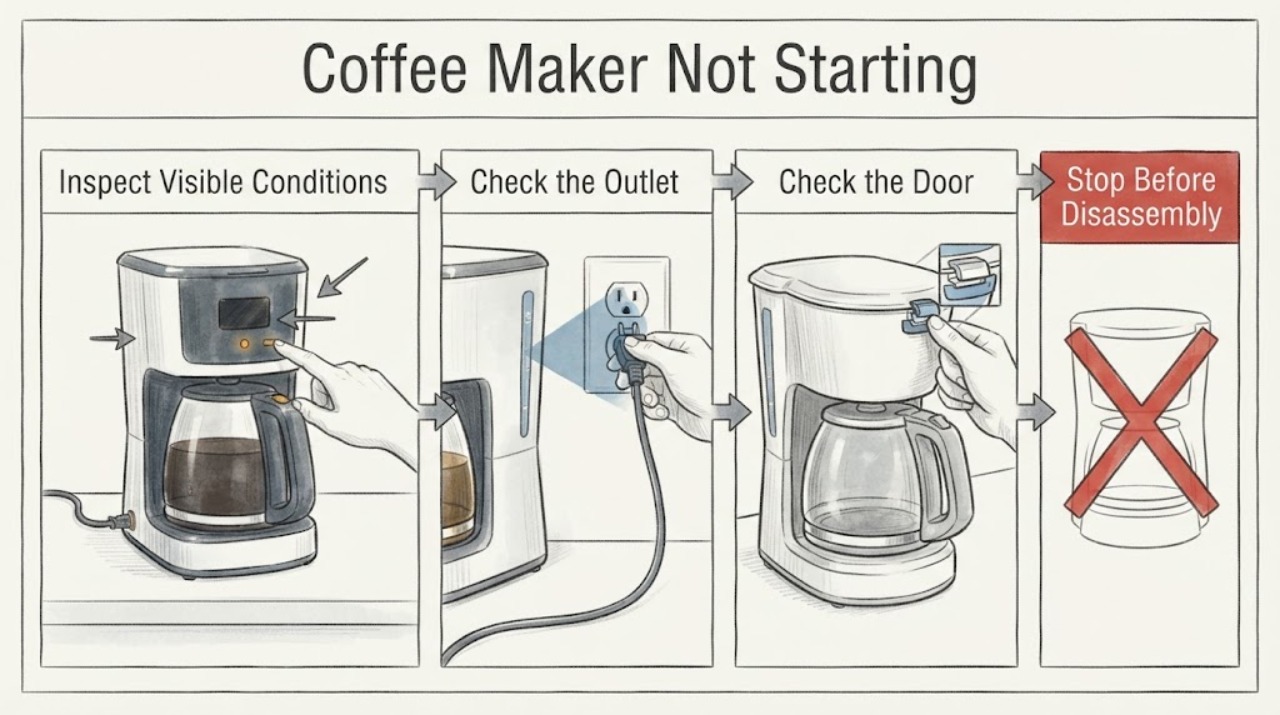
If a Siemens coffee maker is not starting, first note whether the display is blank, the display shows a message, or the machine powers on but will not begin a drink cycle. Check the outlet and plug, then make sure the water tank, drip tray, brewing unit, cover, and door or panel are seated as your model manual requires. A documented restart can clear a temporary fault, but the reset interval and button sequence vary by EQ model. If the machine stays unresponsive, becomes too hot, repeatedly faults, or requires internal access, disconnect it safely and contact Siemens Service.
Work through in order
Diagnostic checks
Use only checks that match the exact appliance or system and its official guide.
-
Check 1
Observe the Siemens coffee maker before touching controls: check the display, status lights, sounds, and whether any pump, grinder, or rinse movement begins.
Expected result: The display is blank, a message is visible, or the display is active but no drink cycle begins.
Next step: Record the exact message and model family, then follow the matching external check below and the model's Siemens support page.
Why this matters
Why: A blank display points toward supply or power loss; an active message points toward a model-specific condition; an active display with no cycle can involve a lock, inserted component, or appliance fault.
-
Check 2
Check the wall outlet, plug, and accessible power connection without opening the coffee maker.
Expected result: The outlet does not power another device, the plug is loose, or the cord is hot, cut, crushed, or scorched.
Next step: Use a known-good outlet only when the plug and cord are intact. Do not use a damaged cord or repeatedly reset a tripping circuit; arrange qualified service.
Why this matters
Why: A failed supply can leave the display blank, while cord or plug damage is an electrical hazard rather than a coffee-machine setting problem.
-
Check 3
If the display identifies a tank, tray, brewing unit, cover, or door condition, remove and reseat only that user-accessible item as shown in the exact Siemens manual.
Expected result: The message clears and the machine begins its normal startup, or the message remains despite correct seating and cleaning.
Next step: If the message clears, run one normal cycle. If it remains, stop forcing the component and contact Siemens Service with the message and model code.
Why this matters
Why: A missing, misinserted, locked, or soiled user-accessible component can block startup; a persistent message suggests a sensor, lock, or appliance fault that the symptom alone cannot identify.
-
Check 4
Apply one documented restart for the exact model, using the model manual or Siemens support page for the timing and controls.
Expected result: The machine returns to its normal display and starts, or it stays unresponsive or shows the same fault.
Next step: Use the machine only if it completes a normal cycle. If the fault returns or the machine remains unresponsive, disconnect it safely and arrange service rather than repeating resets.
Why this matters
Why: A restart can clear a temporary electronic state; recurrence after a documented restart makes an unresolved appliance fault more likely.
-
Check 5
If the specific symptom is a grinder that will not start and the appliance reports or feels too hot, disconnect power and allow the model's documented cooling period before one normal retry.
Expected result: After cooling, the grinder starts normally, or it remains stopped or the appliance becomes hot again.
Next step: If it remains stopped or overheats again, stop using the machine and contact Siemens Service. Do not open the housing to test the grinder or thermal parts.
Why this matters
Why: For the EQ900 guidance, excessive appliance heat is a documented reason for a grinder not to start; recurrence after cooling needs service and does not identify a replacement part.
Use your observations
Decision map
Find the observation that best matches what you see, then follow the next safe action.
-
PATH 01Next step
What you see
The display and status lights are blank, and the wall outlet fails an external check.
Do this next
Restore the outlet or have the electrical supply checked. If the outlet works but the machine remains blank, contact Siemens Service.
Why this path and its safety boundary
Why it matters: A household supply or power-connection problem is more likely than a coffee-machine menu or brewing-unit condition.
-
PATH 02Next step
What you see
The display is active and asks for a tank, tray, brewing unit, cover, or door correction.
Do this next
Reseat or clean only the named component according to the exact model manual. If the message persists or a part will not release, arrange Siemens Service.
Why this path and its safety boundary
Why it matters: The appliance is receiving power but is preventing a cycle until a user-accessible condition is resolved.
-
PATH 03Next step
What you see
The machine remains unresponsive after the model-documented restart, or the same fault returns on the next normal start.
Do this next
Disconnect it safely, record the model and display state, and contact Siemens Service. Do not keep cycling power or open the machine.
Why this path and its safety boundary
Why it matters: A persistent appliance fault is more likely than a temporary control state.
-
PATH 04Next step
What you see
The grinder-only no-start condition is accompanied by excessive heat, and the machine has not yet had the documented cooling period.
Do this next
Disconnect power and allow the documented one-hour cooling period, then make one normal retry. If heat or the no-start condition returns, contact Siemens Service.
Why this path and its safety boundary
Why it matters: Temporary thermal protection is possible for the EQ900 symptom described by Siemens.
-
PATH 05Next step
What you see
There is a burning smell, smoke, sparking, water near the power connection, a hot or damaged cord, or a repeated electrical trip.
Do this next
Stop using it immediately and disconnect power only if the plug can be reached safely. Keep it out of service and arrange qualified help.
Why this path and its safety boundary
Why it matters: The appliance presents an electrical, fire, or water-related hazard rather than a routine startup condition.
Helpful context
Understand the symptom
Identify the kind of start failure
A Siemens EQ coffee machine with no display is showing a different symptom from one whose display is active but reports a door, water tank, brewing unit, or other condition. Siemens organises coffee-machine support by model family and separates display messages from general problems, so record the exact message, indicator, sound, and whether the pump, grinder, or display reacts before repeating a start attempt.
Use the model's restart and component checks
Siemens' EQ900 troubleshooting table says an appliance that no longer responds can be unplugged, left disconnected for 60 seconds, and plugged back in. Other EQ families use different intervals and controls, so treat that as an example of a documented model procedure rather than a universal button sequence. Before restarting, check only the user-accessible water tank, drip tray, brewing unit cover, brewing unit lock, and any door or panel that the display identifies.
Resolve the condition shown on the display
A machine can appear not to start when it is waiting for a correctly inserted tank, tray, brewing unit, cover, or closed door. Siemens' EQ900 guidance links these conditions to insertion, locking, or cleaning checks. Follow the exact model manual for the displayed message; do not force a jammed brewing unit, defeat a sensor, or add a component based only on the symptom.
Treat an overheating or repeated fault as a stop condition
Siemens lists an overheated appliance as a reason that a grinder may not start and directs the user to disconnect it and let it cool for an hour. That instruction applies to the documented grinder symptom on the EQ900 page; it does not authorize opening the machine or assuming every no-start symptom has the same cause. If the appliance remains unresponsive, overheats again, or displays a fault after the model-approved external checks, use Siemens Service.
When checks do not resolve it
Need a professional?
Contact Siemens Service when the coffee maker stays unresponsive after its exact documented restart, a tank, tray, brewing-unit, cover, or door message persists after correct external seating, the grinder becomes hot again, or diagnosis would require opening the housing. Provide the full model code, display message, power result, component checks, and the timing of the failure.
Common questions
FAQ
What should I do if my Siemens coffee maker shows no response?
Check the outlet and cord, then follow the restart procedure for the exact EQ model. Siemens' EQ900 guidance documents unplugging the machine for 60 seconds before reconnecting it; other model families can use different instructions.
Why will the Siemens machine not start after I press a drink button?
Read the display for a tank, tray, brewing-unit, cover, door, lock, or maintenance condition. Reseat only the named user-accessible component using the model manual. If the message remains, do not force the mechanism; contact Siemens Service.
Can I replace a pump, grinder, sensor, or control board from a no-start symptom?
No. A no-start symptom does not establish a compatible part or the failed subsystem. Siemens provides model-family troubleshooting and directs unresolved faults to Siemens Service.
Read the exact guide
Official sources
- How to solve problems with your Siemens EQ900 coffee machineSiemens Home Appliances · Opened Siemens' official EQ900 troubleshooting page. Used for symptom-level examples: no response and documented restart, component insertion, and a grinder that will not start when the appliance is too hot. Exact model controls and timing remain model-specific.
- How to troubleshoot your Siemens coffee machineSiemens Home Appliances · Opened Siemens' official coffee-machine support overview. It distinguishes model families, display messages, general problems, and service, supporting the article's warning that control sequences and messages must be matched to the exact model.
Community feedback
Share a repair observation
Share a plain-text repair observation. Accepted observations are published automatically; this page may take a moment to update.