
On this page
Start here
Quick answer
A Breville coffee maker that will not start may be missing power, waiting for preheat, refusing a brew because the water tank or selected volume is not valid, or detecting that a tank, carafe, portafilter, or other model-specific part is not seated or locked. First identify whether yours is a drip brewer or espresso machine, check the plug and outlet from a dry position, read the display, fill and seat the water reservoir as the manual shows, and allow the ready indicator to finish. Breville's Precision Brewer manual says brew will not start with no water or a mode-incompatible water amount, and its espresso manuals require operating temperature and a fully inserted, locked tank on covered models. If the machine shows a recurring fault, says it is too hot, smells burnt, trips protection, or remains unresponsive after these checks, switch it off, unplug only when safe, let it cool, and contact Breville support. Do not open the housing or test internal wiring, fuses, heaters, pumps, or thermal cutoffs.
Before you begin
Safety first
- The user may identify the model, check the external power supply, fill and seat the water tank as directed, wait for normal preheat, and reseat an accessible brew assembly without force. Internal wiring, fuses, heaters, pumps, thermostats, sensors, thermal cutoffs, valves, and pressurized water circuits are for qualified service personnel.
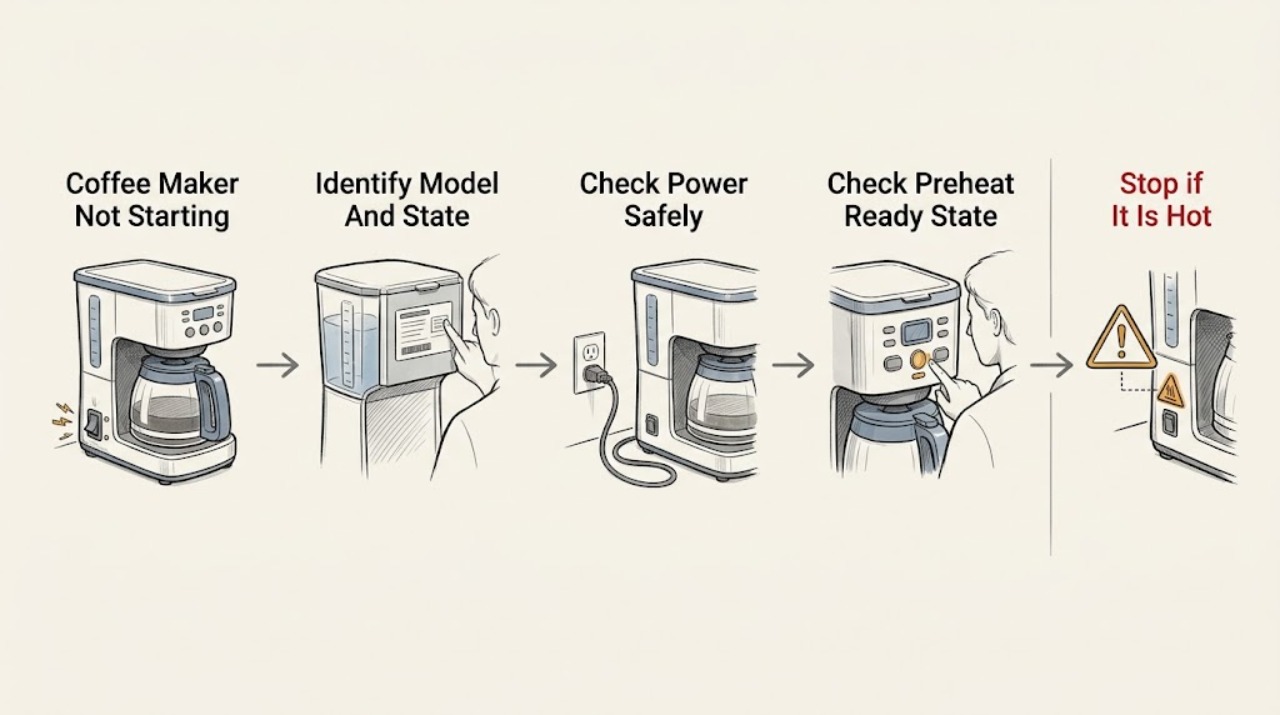
Work through in order
Diagnostic checks
Use only checks that match the exact appliance or system and its official guide.
-
Check 1
Read the model label and determine whether the appliance is a Breville drip coffee brewer, such as a Precision Brewer, or an espresso machine, such as a Barista/Oracle model. Record the exact display text, light pattern, button response, and whether the machine is completely dark, shows a ready state, says FILL TANK, says TOO HOT, or shows an error.
Expected result: The model and display state are known, or the machine and message cannot be identified.
Next step: Open the exact model's Breville product hub or manual and follow the matching state. If an error, burning odor, or abnormal heat is present, use the stop branch before any further start attempt.
Stop if: Do not open the machine or use another Breville model's button sequence to identify its fault.
Why this matters
Why: Breville start requirements and fault messages vary by product family. An unidentified model means a generic tank, lock, preheat, or reset instruction could be wrong.
-
Check 2
With dry hands and a dry counter, check that the power plug is fully seated and the outlet switch is on. If the appliance remains dark and the outlet is safely accessible, test the outlet with a small known-good device or try an appropriate independent outlet, then check the household breaker once. Inspect the external cord without bending or repairing it.
Expected result: The outlet is dead, the breaker opens again, the cord is damaged, or the Breville display and indicator now power on.
Next step: If the outlet or breaker is abnormal, stop and use a qualified electrician or Breville service. If the machine powers on, continue with the model-specific water and ready checks.
Stop if: Do not use an extension cord or adapter, open the plug or outlet, keep resetting a breaker, or operate with a damaged cord or wet base.
Why this matters
Why: A dead outlet is a household electrical problem; a repeatedly opening breaker or damaged cord is a stop condition. A powered display shifts attention to water, preheat, lock, or control state rather than total power loss.
-
Check 3
If the display is on but a brew or shot will not begin, check whether a preheat or ready indicator is still active. On covered Breville espresso models, allow the machine to reach operating temperature and wait for the POWER indicator to show ready; do not repeatedly press brew while it is still heating.
Expected result: The ready indication appears and the machine accepts the command, the unit remains in preheat, or it powers on and then ceases to operate.
Next step: When ready, issue the normal brew command once. If the espresso machine remains in preheat or ceases to operate, switch it off, allow it to cool as the model manual directs, and contact Breville if the symptom returns.
Stop if: Do not touch hot surfaces, bypass a ready/temperature control, or open the machine to test a heater or thermostat.
Why this matters
Why: A preheat state can intentionally defer water delivery. A machine that never reaches ready or stops after becoming ready is not explained by a normal warm-up delay and may require service.
-
Check 4
For a drip brewer, fill the reservoir with the amount of water allowed by the selected mode and check the exact model's MAX/minimum guidance. For an espresso machine, fill the tank with suitable water and push it fully into its dock; use the tank latch or lock only as the manual shows. If the display says FILL TANK, read the manual for that model's sensor and tank-seating check.
Expected result: The tank is empty, below the required volume, above the selected mode's limit, not fully seated/locked, or correctly filled and seated while the brew still will not start.
Next step: Correct only the water amount or tank seating described for the exact model, then retry once. If the message remains with a full, correctly seated tank, stop and arrange Breville support rather than probing the sensor.
Stop if: Do not overfill, force the tank or latch, remove a pressurized fitting, pour water into the housing, or bypass a tank sensor.
Why this matters
Why: Breville's Precision Brewer manual blocks brewing when the tank is empty or the selected mode's water amount is outside its limits. Covered espresso manuals identify an incompletely inserted or unlocked tank as a no-water-flow or FILL TANK condition.
-
Check 5
Inspect the accessible brew setup for a drip brewer's carafe, filter basket, showerhead, or drip stop, or an espresso machine's portafilter and group-head arrangement. Confirm that each model-required part is seated and that no visible coffee grounds or packaging prevents closure; do not force a lock or insert a tool into a valve.
Expected result: A carafe, basket, showerhead, portafilter, or drip stop is visibly out of position, or all prescribed parts are seated but the machine still refuses to start.
Next step: Reseat only the accessible part according to the exact manual and issue the normal start command once. If the part will not seat or the machine remains blocked, stop using it and contact Breville support.
Stop if: Do not defeat a carafe, basket, portafilter, lid, or interlock sensor, operate without the prescribed assembly, or open the pump/heater housing.
Why this matters
Why: Breville manuals describe model-specific assembly and drip-stop conditions that can prevent normal brewing. A correctly seated setup with no response points more toward a control, sensor, water circuit, or internal fault.
-
Check 6
If the machine reports TOO HOT, becomes unusually hot, has been run repeatedly back to back, emits a burning odor, trips protection, or shows an E-code, stop the current attempt. Unplug only from a safe, dry position and let it cool for the exact model's documented period; record the message and do not open the housing.
Expected result: The machine starts after a documented cool-down and no message returns, or the overheat/fault state recurs, the controls remain unresponsive, or smoke/odor/damage is present.
Next step: Keep the appliance out of service and contact Breville support with the model, code, selected function, and stopping point. If smoke, fire, or damaged wiring is present, isolate power only if safe and obtain urgent professional help.
Stop if: Do not defeat thermal protection, replace a fuse or heater, test live circuits, run the machine unattended, or continue after smoke, burning odor, or cord damage.
Why this matters
Why: A one-time thermal pause can be a model-documented protection response. A recurring message or hazardous symptom indicates a thermal, circuit, control, pump, or heater fault that cannot be safely localized by a user.
Use your observations
Decision map
Find the observation that best matches what you see, then follow the next safe action.
-
PATH 01Safety boundary
What you see
The display is dark, the outlet is dead, the breaker trips again, or the cord/base is damaged or wet.
Do this next
Stop resetting the circuit, isolate the appliance only from a safe, dry position, and use a qualified electrician or Breville service.
Why this path and its safety boundary
Why it matters: A household supply or electrical safety problem is more likely than a water-tank or preheat lock.
Safety stop: Do not open the plug, outlet, cord, or coffee maker, and do not operate it while wet or damaged.
-
PATH 02Safety boundary
What you see
The machine powers on but stays in a preheat/ready-not-yet state, or an espresso model's ready indicator never appears.
Do this next
Allow the exact manual's warm-up sequence once. If it never becomes ready or repeatedly stops, switch it off, cool it, and contact Breville support.
Why this path and its safety boundary
Why it matters: A normal warm-up sequence is possible, but a persistent failure to reach ready points to a heater, temperature-control, or other internal fault.
Safety stop: Do not bypass the temperature control or test the heater, thermostat, or wiring.
-
PATH 03Safety boundary
What you see
The display says FILL TANK, the tank is empty/underfilled, the selected drip mode has an invalid water amount, or an espresso tank is not fully seated and locked.
Do this next
Correct the water amount or tank seating exactly as the model manual shows, then retry once. Escalate if the message remains with a correct setup.
Why this path and its safety boundary
Why it matters: The brew is more likely being intentionally blocked by the model's water or reservoir checks.
Safety stop: Do not pour water into the housing, force the tank, or bypass its sensor.
-
PATH 04Safety boundary
What you see
The water and ready state are normal, but a carafe, basket, showerhead, drip stop, portafilter, lid, or other model-specific assembly is not seated or the control will not accept start.
Do this next
Reseat only the accessible component using the exact manual. If it cannot lock or the machine still refuses to start, stop and request service.
Why this path and its safety boundary
Why it matters: A mechanical seating or safety lock is more likely than a total power failure.
Safety stop: Do not hold a sensor closed, force a lock, or operate without the prescribed parts.
-
PATH 05Safety boundary
What you see
A TOO HOT or E-code state recurs, the machine stops after warm-up, remains unresponsive after the external checks, or shows smoke, burning odor, abnormal heat, or repeated protection trips.
Do this next
Keep it unplugged and out of service after safe isolation, then contact Breville support with the exact model and message history.
Why this path and its safety boundary
Why it matters: A thermal, control, pump, heater, fuse, or internal electrical fault is more likely; the user-visible checks cannot identify the component safely.
Safety stop: Do not open the housing, test live circuits, replace a thermal cutoff or fuse, or continue brewing unattended.
Helpful context
Understand the symptom
Start by identifying the Breville coffee product
Breville's coffee category includes drip brewers such as the Precision Brewer and espresso machines such as the Oracle. A drip brewer can block a brew when the chosen mode's water quantity is outside its limits; an espresso machine can remain in preheat until its ready indicator changes. These are different control paths, so use the exact model manual before pressing a reset or changing a setting.
A silent machine is not always a power failure
Check the display, lights, pump or heater sound, and any message before deciding that the machine is dead. A full power loss is different from a ready-state lock, empty-tank message, a brew-size restriction, a tank that is not seated, or a machine cooling after repeated use. Keep water and hands away from the outlet and control area.
Overheat and internal-fault messages end user troubleshooting
The Precision Brewer manual uses a 'too hot' state after repeated back-to-back operation and tells the owner to let the unit rest before starting another cycle. The BES980 manual similarly directs the owner to switch an operating machine off and allow a long cool-down if the symptom persists. These instructions are model-specific; a recurring thermal, circuit, or control fault belongs with Breville support.
Safety boundary
Stop conditions
- Stop using the coffee maker for smoke, burning odor, abnormal heat, a damaged cord/base, water near electrical parts, or repeated breaker trips; unplug only from a safe, dry position and contact Breville support.
- Do not open the housing, test live wiring, replace a fuse, heater, pump, thermostat, sensor, or thermal cutoff, or work on internal electrical or pressurized water parts.
- Do not bypass or hold closed a tank, carafe, basket, lid, portafilter, door, or other model-specific safety/assembly sensor.
- Do not force a reservoir or latch, overfill the selected brew mode, pour water into the machine body, or run without the prescribed brew assembly.
- Do not apply drip-brewer instructions to an espresso machine or vice versa; verify the exact model manual first.
When checks do not resolve it
Need a professional?
Contact Breville support or a qualified appliance service provider when the machine remains unresponsive after the exact model's power, ready-state, water, and assembly checks; when a TOO HOT or error message recurs; when it stops after preheat; or when any electrical, thermal, pump, heater, or control symptom is unsafe. A one-time empty-tank, invalid-volume, or preheat state may clear after the documented correction.
Safety scope: The user may identify the model, check the external power supply, fill and seat the water tank as directed, wait for normal preheat, and reseat an accessible brew assembly without force. Internal wiring, fuses, heaters, pumps, thermostats, sensors, thermal cutoffs, valves, and pressurized water circuits are for qualified service personnel.
Common questions
FAQ
Why won't my Breville coffee maker start brewing?
First identify whether it is a drip brewer or espresso machine. A Precision Brewer may block brew when its tank is empty or the selected mode's water amount is outside its limits; an espresso machine may still be preheating or may need a fully inserted and locked tank. Use the exact manual before assuming an electrical failure.
What does FILL TANK mean on a Breville coffee maker?
On the Precision Brewer, FILL TANK can mean the tank lacks enough water or its sensor needs the model-specific check. On covered espresso models, an incompletely inserted or unlocked tank can produce the same type of symptom. Fill and seat the tank exactly as the manual directs; do not bypass the sensor.
How long should a Breville espresso machine take before it starts?
It should be allowed to reach the operating temperature shown by the exact model's ready indicator. Breville's BES980 manual says water may not flow until the machine reaches operating temperature and the POWER button indicates ready. If it never becomes ready or repeatedly stops, contact support.
Why does my Breville coffee maker say TOO HOT?
The BDC455 Precision Brewer manual associates TOO HOT with repeated back-to-back use and instructs the owner to let the unit rest before another cycle. That message and recovery behavior are model-specific. If it returns, the machine remains unresponsive, or there is abnormal heat or odor, keep it unplugged and request service.
Can I open a Breville coffee maker to fix a no-start problem?
No. Check only the external plug/outlet, water reservoir, ready state, and accessible brew assembly described by the exact manual. Internal wiring, fuses, heaters, pumps, thermostats, sensors, and thermal cutoffs require Breville or qualified professional service.
What if my Breville machine powers on but stops when I press brew?
Check the model's ready state, tank amount and seating, and carafe/basket or portafilter assembly. If those are correct and the machine repeatedly stops, records an error, or becomes unusually hot, stop using it and provide Breville support with the model and exact stopping point.
Read the exact guide
Official sources
- Espresso machine problems and fixesBreville · Breville US espresso-machine guidance; exact controls and safe user checks depend on model.
- the Breville Precision Brewer ThermalBreville · Breville BDC450/BDC455 drip-brewer family; mode limits, displays, and controls may differ on other Breville coffee products.
- Product Hub – Find Support, Spare Parts & Service for Your MachineBreville · Breville US support navigation; product documentation and service availability depend on the model and market.
- the OracleBreville · Breville BES980 Oracle model family; espresso controls and messages differ across Breville machines.
Community feedback
Share a repair observation
Share a plain-text repair observation. Accepted observations are published automatically; this page may take a moment to update.