
On this page
Start here
Quick answer
If a coffee maker will not start, check the plug and outlet, press the model’s ON or START control as instructed, and confirm the water tank, filter basket, and carafe are correctly seated. If the display is lit but no cycle begins, use the model manual for preheat or delay behavior. Persistent failure needs service.
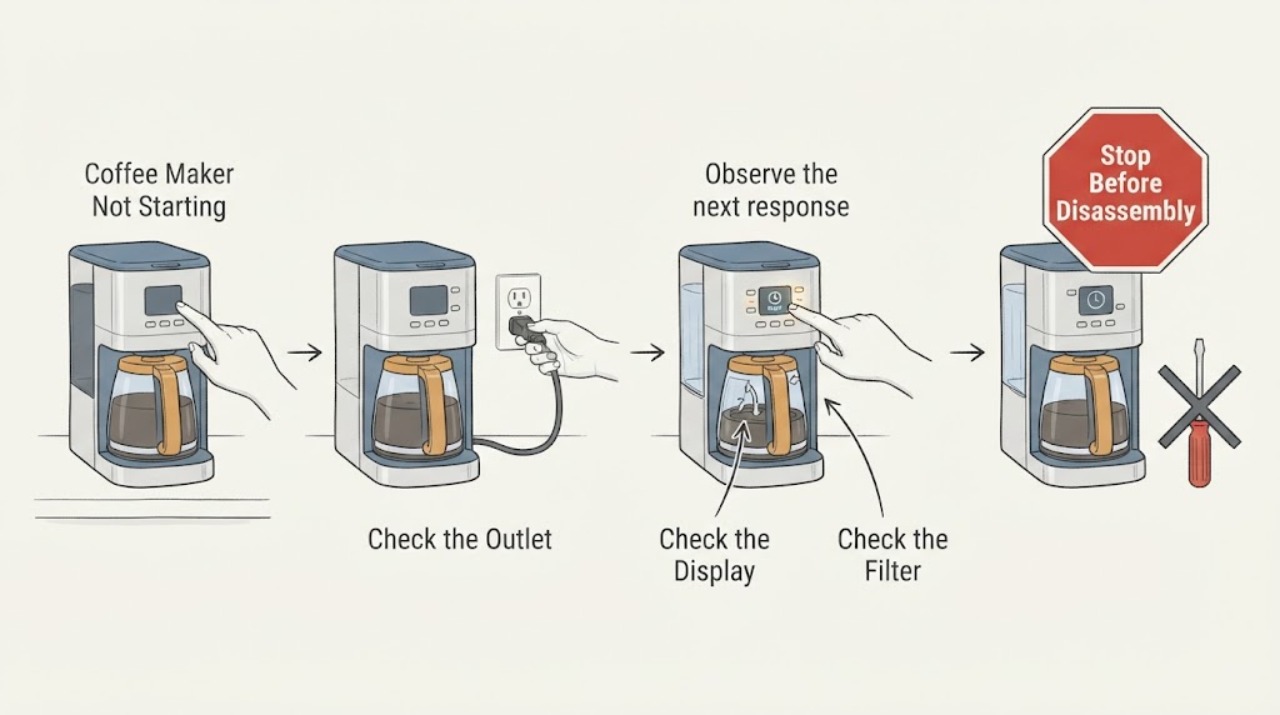
Work through in order
Diagnostic checks
Use only checks that match the exact appliance or system and its official guide.
-
Check 1
Check that the power cord is fully inserted, test the outlet with another appliance, and check the relevant fuse or breaker without increasing its rating.
Expected result: The outlet or protection is dead, or power is normal and the coffee maker display remains dark.
Next step: Restore a tripped device once only when safe and stop on repeated trips.
Why this matters
Why: A supply interruption explains a completely dead unit; normal outlet power with a dark display points to the appliance power path.
-
Check 2
Press the model-specific ON or START control and verify that a valid brew mode is selected rather than a delayed, clean, or standby state.
Expected result: The display responds and a cycle begins, or the panel stays idle or shows a mode or code.
Next step: Use the exact manual for cancel, delay, and preheat behavior.
Why this matters
Why: A control state can prevent a start command; a responsive panel with no start keeps vessel or sensor checks open.
-
Check 3
Fill and fully seat the water tank, then seat the filter basket and carafe as shown by the model manual.
Expected result: The tank, basket, and carafe were mis-seated, or all are correctly positioned.
Next step: Make one supervised start attempt and do not bypass a position switch.
Why this matters
Why: Coffee makers may require these vessels for a safe start; correct seating with no start suggests a sensor or control fault.
-
Check 4
Record whether the panel lights, the pump sounds, water moves, and any code or unusual heat appears during one start attempt.
Expected result: The unit starts, remains silent, or shows a hazard or recurring fault.
Next step: Provide the model and observations to service instead of selecting a part from “not starting.”
Why this matters
Why: The first response separates power and controls from water-path and heater diagnosis; a hazard ends testing.
Use your observations
Decision map
Find the observation that best matches what you see, then follow the next safe action.
-
PATH 01Next step
What you see
The outlet or breaker was the issue and the coffee maker starts after one safe correction.
Do this next
Monitor one complete cycle and do not overload the circuit.
Why this path and its safety boundary
Why it matters: The external supply was the leading cause.
-
PATH 02Next step
What you see
The panel is lit and vessels are seated, but START produces no pump or brew response.
Do this next
Arrange model-specific service and keep the exact display state.
Why this path and its safety boundary
Why it matters: A control, interlock, or internal power fault is more likely.
-
PATH 03Next step
What you see
A leak, smoke, burning odor, sparks, or repeated protection trip occurs during the start attempt.
Do this next
Leave the unit off and obtain qualified service.
Why this path and its safety boundary
Why it matters: This is a safety stop.
Helpful context
Understand the symptom
A completely dark coffee maker follows a power path. A lit panel that will not begin brewing follows control, vessel-detection, water, or preheat behavior.
Use the exact model manual for button timing and vessel placement; generic button combinations can leave a coffee maker in a different mode.
Only after diagnosis
Potential parts
- model-specific control, vessel sensor, pump, or power component
Consider a component only after outlet, mode, vessel seating, and start-response observations identify the likely fault.
No-start symptoms do not establish fit for a pump, board, or sensor.
When checks do not resolve it
Need a professional?
Contact qualified coffee-maker service when the outlet and breaker are sound, the panel or vessels are correctly set, and the unit still will not begin a cycle.
Common questions
FAQ
Why does a coffee maker have power but not start brewing?
Check the selected mode, water tank, filter basket, carafe, and model-specific preheat or delay state. If the panel responds but no cycle begins after those checks, service is needed.
Can I use a generic reset sequence for a coffee maker?
No. Reset, delay, and cleaning controls vary by model. Use the exact manual and do not bypass a vessel or lid interlock.
Read the exact guide
Official sources
- Won't Turn On - Automatic Coffee Maker - Product HelpKitchenAid · Opened official KitchenAid support; it covers plug, ON/OFF control, fuse or circuit breaker, and service.
- Will Not Brew - Personal Coffee - Product HelpKitchenAid · Opened official KitchenAid product help; it covers water-tank seating and brew readiness.
Community feedback
Share a repair observation
Share a plain-text repair observation. Accepted observations are published automatically; this page may take a moment to update.