
On this page
Start here
Quick answer
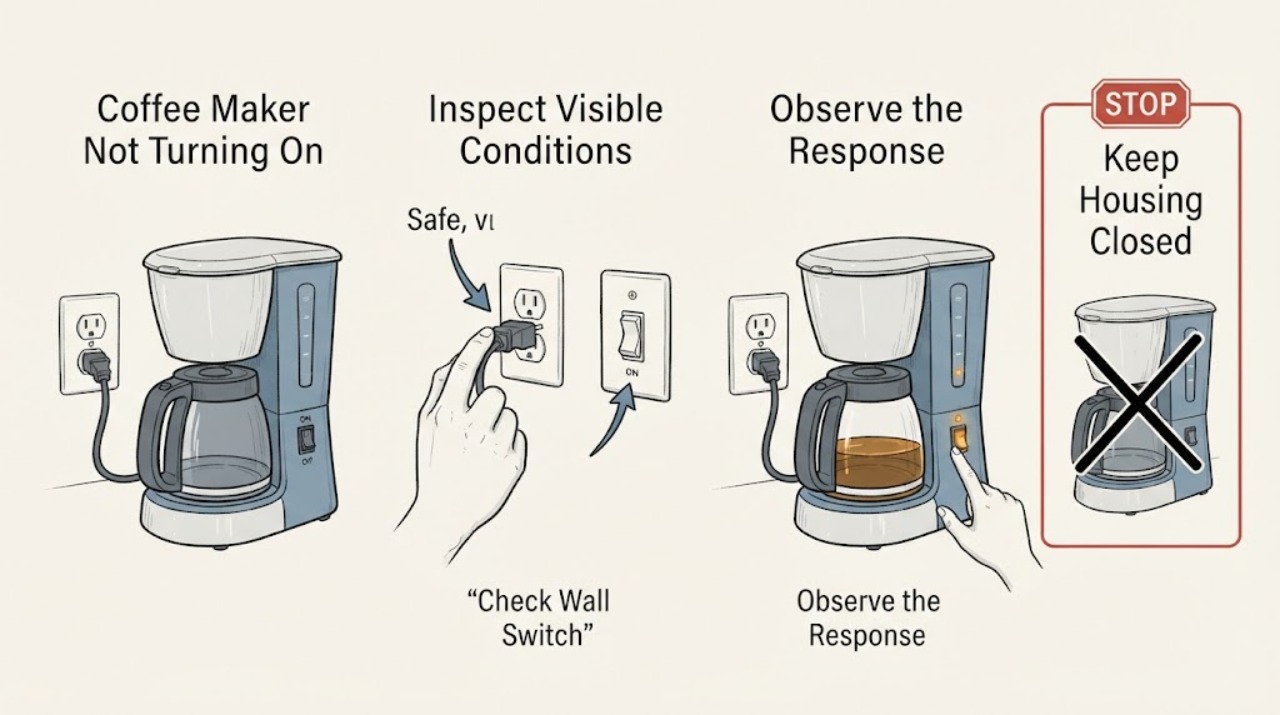
When a Siemens coffee maker will not turn on, first separate a completely dark display from a machine that has lights or a message but will not start. With dry hands, switch it off and unplug it before checking the cord, plug, and outlet. If the outlet and cord are safe, use the reset interval in the exact Siemens manual; Siemens' EQ900 guidance is to unplug the machine for 60 seconds and reconnect it. If there is still no display, the cord or outlet is damaged, the machine trips protection, or it smells hot or burnt, leave it disconnected and contact Siemens Service. A display that is on is a different startup or fault path and should be handled from the model-specific message or manual.
Work through in order
Diagnostic checks
Use only checks that match the exact appliance or system and its official guide.
-
Check 1
Press the power control once and observe the machine without opening it. Record whether the display and indicator lights stay completely dark, whether the display lights but the machine ignores the control, or whether a message, icon, or sound appears. Read the E-Nr. from the type plate if it is accessible without moving a wet or damaged appliance.
Expected result: There is no illumination, the interface is lit but unresponsive, or a specific message or icon appears.
Next step: Use the matching no-power or function path below and include the E-Nr. in any Siemens support request.
Stop if: Do not remove panels or reach inside to find the type plate.
Why this matters
Why: A dark machine is a power or internal-startup path. A lit interface has power and needs the message or model-specific function path; it should not be diagnosed as a dead mains supply.
-
Check 2
If the machine is dark, switch it off and unplug it with dry hands. Inspect the plug, mains lead, and visible casing for cuts, loose parts, scorching, heat damage, or moisture. Check that the outlet switch is on; if the area is dry and safe, verify the outlet with another known-working appliance rather than repeatedly reconnecting the Siemens machine.
Expected result: The outlet is dead, the Siemens plug or lead is damaged or wet, the casing is damaged, or the outlet powers another safe appliance and the coffee maker remains dark.
Next step: Leave the coffee maker unplugged for any damaged, wet, hot, or scorched condition. Have the outlet checked by a qualified person when needed, and contact Siemens Service for an appliance-side no-power fault.
Stop if: Do not open the plug, bypass a fuse or breaker, use a wet outlet, or test with a damaged extension lead.
Why this matters
Why: A dead outlet points to building supply or protection upstream. A damaged or wet lead, plug, or casing makes the appliance unsafe to energize. A working outlet with a dark Siemens machine makes an appliance-side fault more likely, but does not identify a board, fuse, or switch.
-
Check 3
If the cord, plug, outlet, and casing are dry and intact, follow the exact Siemens manual for a power reset. As one model-specific reference, Siemens' EQ900 troubleshooting page says to pull out the mains plug, wait 60 seconds, and reinsert it. Perform one reset only, then observe the display rather than repeatedly cycling the power.
Expected result: The display returns after the reset, or the machine remains completely dark or immediately loses power again.
Next step: If the display returns, use the model's normal startup sequence once and stop if a message or fault returns. If it stays dark or drops out again, leave it unplugged and request Siemens Service.
Stop if: Do not apply the EQ900 timing or controls to a different model when its manual specifies another procedure, and do not continue resetting a tripping appliance.
Why this matters
Why: A return to normal display is consistent with a temporary no-response state. A persistent dark display or immediate loss of power is not resolved by the reset and could involve the appliance or supply.
-
Check 4
If the display or lights are on but a drink cycle does not start, read the complete on-screen message and check only the accessible items named by the model manual, such as a correctly seated water tank, drip tray, door, or brewing unit cover. Do not force a locked brewing unit or guess that a lit machine has a power failure.
Expected result: A displayed prompt clears after the named removable item is correctly seated, or the display remains stuck, changes repeatedly, or shows an unverified fault.
Next step: Follow the exact E-Nr. troubleshooting page for the remaining message. If the interface stays unresponsive or the same fault returns, stop and contact Siemens Service.
Stop if: Do not defeat an interlock, pour liquid into the housing, or dismantle the brew unit, pump, heater, or control area.
Why this matters
Why: The machine has power; a seating, demo, interlock, or other model-specific function condition may be preventing startup. Clearing one prompt does not prove that an internal component is healthy.
-
Check 5
Before requesting service, record the E-Nr., whether the display was dark or lit, the outlet result, the reset performed, any exact message, and whether a fuse, breaker, or residual-current device tripped. Keep the machine disconnected if the no-power condition persists.
Expected result: The machine has a repeatable no-power symptom after the safe checks, or power protection trips when it is connected.
Next step: Use Siemens' model-number assistant or service route with the recorded E-Nr. and symptom. Arrange a qualified electrical assessment as well when the outlet or building protection is implicated.
Stop if: Do not keep operating an appliance that trips protection, emits a burning odor, gives a shock, or has visible heat or water damage.
Why this matters
Why: A repeatable no-power or protection-trip symptom needs appliance or electrical diagnosis beyond user-accessible checks; it does not establish a replaceable cord, fuse, board, or heater as the cause.
Use your observations
Decision map
Find the observation that best matches what you see, then follow the next safe action.
-
PATH 01Next step
What you see
The Siemens coffee maker and its display are completely dark, but the same dry outlet powers another safe appliance and the Siemens cord and plug look intact.
Do this next
Perform one reset allowed by the exact manual. If the display stays dark, leave the machine unplugged and contact Siemens Service with the E-Nr.
Why this path and its safety boundary
Why it matters: The external supply check has passed while an appliance-side no-power fault remains possible; the evidence does not identify a specific internal part.
-
PATH 02Next step
What you see
The outlet is dead, a breaker or residual-current device trips, or the plug, lead, or outlet is wet, hot, scorched, or damaged.
Do this next
Keep the Siemens machine disconnected and have the outlet or circuit assessed by a qualified person; do not reuse a damaged lead or wet outlet.
Why this path and its safety boundary
Why it matters: The immediate risk is in the electrical supply or a damaged appliance connection, so repeated coffee-machine resets are unsafe.
-
PATH 03Next step
What you see
The display lights or shows a prompt, but the coffee maker will not begin a cycle.
Do this next
Record the exact message and follow the matching E-Nr. Siemens guide for accessible tank, tray, door, or brewing-unit checks. Request service if the prompt persists or controls remain unresponsive.
Why this path and its safety boundary
Why it matters: Power is reaching the interface, so the problem is more consistent with a model-specific startup, interlock, or fault-message path than with no mains power.
-
PATH 04Next step
What you see
The machine briefly powers up after a reset, then goes dark again, trips protection, smells hot or burnt, or gives a shock.
Do this next
Stop using the coffee maker, disconnect it if safe to do so, and arrange Siemens or qualified electrical service before another power test.
Why this path and its safety boundary
Why it matters: The symptom is recurrent or hazardous and cannot be safely narrowed to a user-accessible setting or removable part.
Helpful context
Understand the symptom
First decide whether the machine has power
“Not turning on” can mean no display or illumination at all, or it can mean that a lit display does not start a drink cycle. Siemens' coffee-machine support selector treats No Power, Does not function, domestic-fuse trips, and other messages as different problem paths. The first check below keeps those paths separate so a user does not replace a part for a supply problem.
Use the exact E-Nr for model instructions
Siemens' online assistant starts with the appliance E-Nr. from the type plate and provides the matching troubleshooting and documentation. Siemens coffee-machine families use different controls and reset intervals, so the EQ900 one-minute reset is a model-specific example, not a universal timing rule for every Siemens coffee maker.
When checks do not resolve it
Need a professional?
Contact Siemens Service when the coffee maker remains dark after the safe outlet check and one model-appropriate reset, the display is lit but the controls or startup sequence remain unresponsive, a fault message returns, or diagnosis would require opening the machine. Use a qualified electrician for a dead, wet, hot, damaged, or repeatedly tripping outlet or circuit, and do not reuse an appliance with a damaged cord, burning odor, shock, or water ingress.
Common questions
FAQ
What should I do if my Siemens coffee maker has no display or lights?
With dry hands, switch it off and unplug it. Check the outlet and visible cord and plug for a safe, intact connection. If the outlet works but the Siemens machine stays dark, follow the exact model reset once and contact Siemens Service if it remains dark.
How long should I unplug a Siemens coffee maker to reset it?
Use the timing in the exact model manual. Siemens' EQ900 page specifies 60 seconds before reconnecting, while other Siemens families may use different instructions. Do not repeatedly cycle a machine that trips protection or shows damage.
What if the Siemens coffee maker lights up but will not start?
That is a powered startup or fault-message symptom rather than a completely dead machine. Record the exact prompt and E-Nr., then follow the matching Siemens guide for accessible tank, tray, door, or brewing-unit checks. Request service if the message or unresponsive controls persist.
Should I replace a fuse or power board when my Siemens coffee maker will not turn on?
No. A dark display does not identify a fuse, board, cord, switch, or heater as the failed part. Leave the machine disconnected after the safe external checks and let Siemens Service or a qualified electrical professional diagnose it.
Read the exact guide
Official sources
- How to solve problems with your Siemens EQ900 coffee machineSiemens Home · Manufacturer troubleshooting for Siemens EQ900; use the exact model manual when controls or timing differ.
- Coffee machines troubleshooting | Siemens HomeSiemens Home Appliances · Official Siemens coffee-machine troubleshooting entry point; the E-Nr. determines the applicable instructions.
- Siemens coffee machines with Home Connect supportSiemens Home · Official Siemens support selector showing separate coffee-machine symptom paths; exact options depend on product group.
Community feedback
Share a repair observation
Share a plain-text repair observation. Accepted observations are published automatically; this page may take a moment to update.