
On this page
Start here
Quick answer
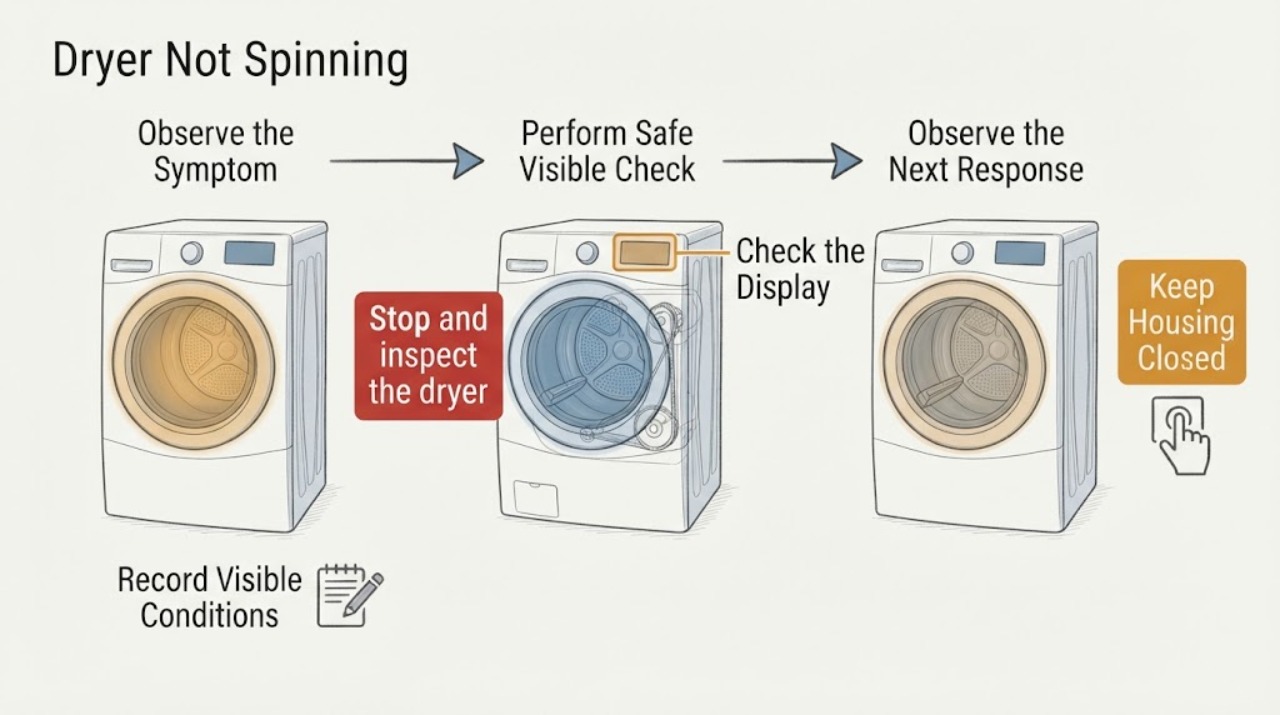
If a Siemens dryer will not spin, first stop for smoke, a burning smell, unusual heat, arcing, a wet electrical area, a damaged cord, or a repeated breaker trip. Otherwise identify the exact model and whether it is vented, condenser, or heat-pump, then check that a programme is selected, the door is fully closed, and Start has been pressed. Remove an obviously overloaded or tangled load and check only the user-accessible lint filter, water tank, or condensate warning that your model actually has. With power disconnected and the drum cool, turn it gently by hand: scraping, binding, a very loose or freely racing drum, or a new mechanical noise is a service clue, not a reason to open the cabinet. If the drum still will not turn, or the problem returns, stop using the dryer and arrange Siemens-qualified service.
Work through in order
Diagnostic checks
Use only checks that match the exact appliance or system and its official guide.
-
Check 1
Stop and inspect the dryer from the outside for smoke, a burning or electrical smell, unusual heat, sparking or arcing, a hot or damaged plug or cord, water near electrics, or a breaker that trips again.
Expected result: Any smoke, odor, heat damage, visible arcing, wet electrical area, or repeated breaker operation is present.
Next step: Stop using the dryer and keep clear. Disconnect power only if it is safe to do so, then arrange qualified appliance or electrical help. If there is smoke or fire, follow local emergency guidance.
Stop if: Do not reconnect, run another cycle, remove panels, or repeatedly reset a protective device.
Why this matters
Why: The issue is a safety event rather than an ordinary drive symptom. Continuing to run or repeatedly reset the dryer could increase fire or shock risk.
-
Check 2
Record the full Siemens model or E-Nr and determine whether the dryer is vented, condenser, or heat-pump; note whether the programme never starts, starts and stops, or runs while the drum stays still.
Expected result: The appliance type and the exact point of failure are known, or the model cannot be identified.
Next step: Use the exact Siemens support page or manual for the recorded model. If the model is unknown, limit checks to the visible programme, door, load, power, and drum observations below.
Why this matters
Why: Siemens dryer controls and maintenance features vary by model. A water tank, condensate route, heat exchanger, or particular warning must not be assumed from the brand alone.
-
Check 3
With no hazard present, confirm the door is fully closed, choose a programme that should rotate the drum, and press the model's Start or Pause control. Check the display for a door, lock, pause, delayed-start, or fault indication.
Expected result: The dryer starts spinning, the door or lock indication remains, the programme is delayed or paused, or the controls accept the programme but the drum remains still.
Next step: Use only the exact model manual to clear a pause, delay, or door indication. If the door does not close or the lock indication persists, stop and request service rather than bypassing the safety interlock.
Stop if: Do not defeat the door switch or reach into the drum while the appliance is energized.
Why this matters
Why: A dryer can appear not to spin when its programme has not actually started or a door safety condition prevents operation. A live programme with no movement moves the investigation toward load, obstruction, drive, or control diagnosis.
-
Check 4
Remove a tightly packed, heavy, or tangled load and inspect the drum opening for a visible garment or object that could prevent rotation. Reload loosely within the exact programme's stated limit and try one short supervised cycle.
Expected result: The drum spins with a smaller, balanced load, or it remains still and the motor hums, clicks, or stops.
Next step: If it spins normally, follow the model's load guidance. If it still will not spin or the sound is abnormal, stop testing and provide the sound and load conditions to Siemens service.
Why this matters
Why: A restricted or poorly distributed load can prevent a normal start or overload protection can stop movement. If the drum remains still with a suitable load, load size is not a sufficient explanation.
-
Check 5
After turning the dryer off, disconnecting it safely, and allowing hot parts to cool, turn the empty drum gently by hand through part of a rotation without forcing it.
Expected result: The drum turns smoothly with normal resistance, feels seized or catches, scrapes or knocks, or turns unusually freely with little resistance.
Next step: If movement is abnormal, stop using the dryer and arrange qualified service. If it feels normal but will not turn under power, record the result and continue only with the user-level filter, tank, and warning checks for the exact model.
Stop if: Do not use tools to pry the drum, remove the belt or panels, or perform a live motor or capacitor test.
Why this matters
Why: Smooth movement does not prove the drive is healthy. Binding or scraping can indicate an obstruction or drum-support problem; unusually free movement can be consistent with a belt or drive fault. These are clues only and are not a reason to open the cabinet.
-
Check 6
For a condenser or heat-pump model only, check the user-accessible lint filter, water tank or drain warning, and any filter or heat-exchanger maintenance indicator named in the exact manual; for a vented model, check only the visible filter and approved exhaust indication.
Expected result: A model-specific tank, filter, condensate, or maintenance warning is active, or the dryer has no such user-accessible feature.
Next step: Follow the exact manual's user-level emptying, cleaning, or hose-routing step. If the warning returns, water leaks, airflow is restricted, or access requires a panel removal, stop and request service.
Stop if: Do not touch hot heat-exchanger fins, enter a refrigerant circuit, poke through filters, or operate with a missing safety filter.
Why this matters
Why: Some condenser and heat-pump dryers can stop or interrupt operation when their water collection or maintenance condition requires attention, while a vented model follows a different air path. A warning absent from the manual is not evidence of a failed part.
-
Check 7
If the manual permits one power reset and there is no water or electrical hazard, disconnect power for the manual's stated interval, restore it, and observe one empty start. Record whether the motor runs, the drum turns, a code appears, or the same noise or stop returns.
Expected result: The drum turns normally once, remains still, stops again, or the dryer produces a repeatable code, click, hum, scraping sound, or abnormal heat.
Next step: Stop using the dryer for a recurring no-spin fault or any abnormal sound or heat. Give Siemens service the model or E-Nr, programme, display code, load state, hand-rotation result, and exact sound sequence.
Stop if: Do not keep cycling power or run a load with the drum stalled, overheating, or making a damaging noise.
Why this matters
Why: A single reset may clear a temporary control state but cannot repair a belt, motor, bearing, idler, lock, or power fault. Recurrence is evidence that user-level troubleshooting has reached its boundary.
Use your observations
Decision map
Find the observation that best matches what you see, then follow the next safe action.
-
PATH 01Next step
What you see
Smoke, burning smell, abnormal heat, arcing, wet electrical area, damaged cord, or a repeated breaker trip
Do this next
Stop immediately, keep clear, and obtain qualified help; do not reconnect or repeatedly reset the dryer.
-
PATH 02Next step
What you see
The programme never starts and the display shows a door, pause, delay, or lock indication
Do this next
Use the exact model manual to close the door or clear the setting; a persistent indication needs service and must not be bypassed.
-
PATH 03Next step
What you see
The drum spins after reducing or untangling the load
Do this next
Follow the programme's load limit and distribution guidance and monitor one normal cycle.
-
PATH 04Next step
What you see
The empty, cool drum binds, scrapes, knocks, or turns unusually freely by hand
Do this next
Stop using the dryer and arrange service for an obstruction, support, belt, or drive diagnosis; do not open the cabinet.
-
PATH 05Next step
What you see
A condenser or heat-pump model shows a tank, drain, filter, or maintenance warning
Do this next
Follow only the model's user-level procedure; recurring warnings, leaks, or inaccessible areas require service.
-
PATH 06Next step
What you see
The drum remains still under power after safe checks or the fault returns after one permitted reset
Do this next
Stop user troubleshooting and contact Siemens-qualified service with the model, programme, display, sound, and hand-rotation observations.
Helpful context
Understand the symptom
What a non-spinning drum tells you
A programme that has not started is different from a drum that starts and then stops. If the display is live, begin with the door, programme, Start control, load, and model-specific warnings. If the motor sounds but the drum does not move, or the drum feels abnormal by hand after the dryer is safely disconnected and cool, the likely decision is service rather than a guessed replacement part. Siemens support pages use the model number to separate these paths.
Vented, condenser, and heat-pump differences
A vented model routes moist air through an exhaust path. A condenser or heat-pump model may instead have a water tank, drain hose, filters, or a heat-exchanger maintenance area. These features are not interchangeable across Siemens dryers. Check only the parts named in the exact manual, and do not remove a cabinet panel, enter a refrigerant circuit, or reach into a moving drum.
Only after diagnosis
Potential parts
- drum belt or drive belt
Only consider this category if the exact model and qualified diagnosis indicate abnormal free drum movement or a failed belt or drive path.
Confirm the complete Siemens model or E-Nr and manufacturer fit information; cabinet access and belt work should be handled by qualified personnel. - drum support or idler component
Only consider this category if the cool empty drum binds, scrapes, or produces a repeatable mechanical noise and service confirms a support or idler fault.
Confirm model-specific fit and do not run the dryer with a binding drum or damaging noise. - drive motor or motor control component
Only consider this category when the programme starts but the motor hums, clicks, stops, or fails to drive a normally moving drum and qualified testing identifies the drive path.
Confirm exact model compatibility; electrical and motor testing is service work, not a live user check. - door interlock or door switch
Only consider this category if the door closes but the exact model repeatedly reports an open or unlocked door and service confirms the interlock fault.
Confirm the complete model and do not bypass the interlock to make the drum run.
When checks do not resolve it
Need a professional?
Have this ready
- The full Siemens model or E-Nr, dryer type, programme, load condition, display code or light pattern, whether the drum turns smoothly by hand when cool and disconnected, and the exact sound or stop sequence.
Common questions
FAQ
Why is my Siemens dryer running but the drum is not spinning?
After stopping for any hazard, check the door, programme, load, and model-specific warning. With power disconnected and the drum cool, abnormal free movement, binding, scraping, or knocking is a service clue; do not open the cabinet or keep running a stalled drum.
Can I turn the Siemens dryer drum by hand to check it?
Only after turning the dryer off, disconnecting power safely, and allowing it to cool. Turn the empty drum gently without forcing it. Smooth movement does not prove the drive is good; binding, scraping, or unusually free movement means stop and arrange service.
Could a full tank stop a Siemens heat-pump dryer from spinning?
Some condenser or heat-pump models show a water-tank or maintenance warning and may interrupt operation, but this is model-dependent. Check only the feature named in the exact Siemens manual; recurring warnings or leaks require service.
When should I stop using a Siemens dryer that will not spin?
Stop for smoke, burning odor, abnormal heat, arcing, a wet electrical area, damaged wiring, a repeated breaker trip, a binding or scraping drum, or a stalled motor. Do not bypass the door switch or keep resetting power; give Siemens service the model and observed sequence.
Read the exact guide
Official sources
- CPSC Urges Flood Victims to Take Steps to Prevent CO Poisoning, Electrocution, Explosion and FiresU.S. Consumer Product Safety Commission · General U.S. safety guidance used here only for the wet-electrical and gas-safety stop boundary.
- Siemens Customer Service | Siemens UKSiemens Home Appliances · General Siemens support entry point; exact model and region determine the available manual and procedure.
- Siemens service, user manuals, spare parts, accessories for WT43H082/01Siemens Home Appliances · Official support page for model WT43H082/01 used to verify model-based categories such as drum not turning, door function, domestic fuse, and water-tank warning; do not generalize its controls to other models.
- Siemens Repair Service | Siemens UKSiemens Home Appliances · Official Siemens service guidance; the booking flow requires the appliance model number or E-Nr and service availability is region-specific.
Community feedback
Share a repair observation
Share a plain-text repair observation. Accepted observations are published automatically; this page may take a moment to update.