
On this page
Start here
Quick answer
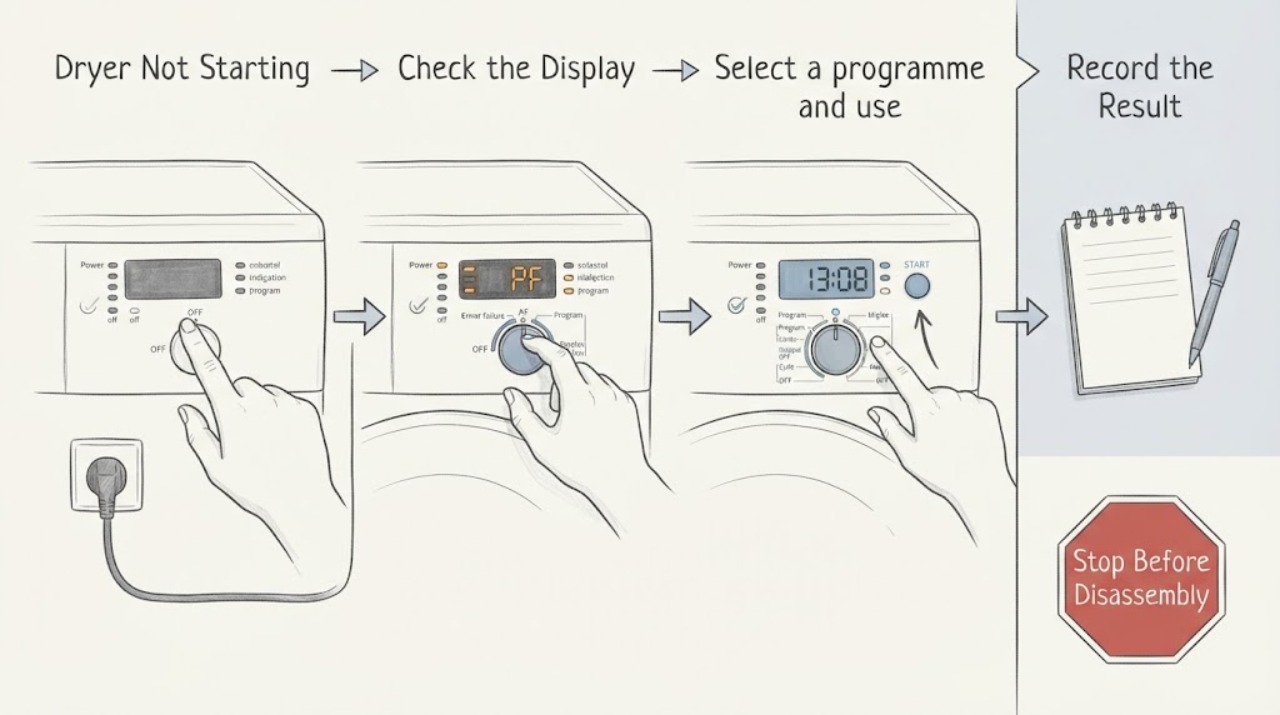
First separate a Siemens dryer with no display from one that lights up but will not start. For a blank display, check the accessible socket and breaker or fuse only; if power is absent or the protection trips again, stop and arrange electrical or appliance service. For a lit display, confirm that a programme is selected, the door is fully closed, Start has been pressed as the model requires, and a childproof lock, end-time or delayed-start setting, water-tank notice, or filter notice is not blocking the programme. Siemens dryers differ by model, so use the E-Nr. manual for button sequences and indicators. A burning smell, smoke, sparks, abnormal heat, water near electrics, or a repeated trip is a stop-use condition. If one safe model-supported reset does not restore operation, keep the dryer out of service and arrange qualified repair.
Work through in order
Diagnostic checks
Use only checks that match the exact appliance or system and its official guide.
-
Separate a blank display from a lit display
Look at the display, status lights, door light, and control response without opening the dryer. If the display is blank, check only the accessible socket with a known-safe lamp or similar appliance and look for a tripped breaker or residual-current device. Do not remove covers or touch wiring.
Expected result: The dryer and socket are both dead, the socket works but the dryer remains blank, or the display is lit.
Next step: If protection trips again or the supply remains abnormal, stop and arrange an electrician. If the dryer remains blank with a working socket, arrange Siemens service. If the display is lit, continue with the visible programme checks.
Why this matters
Why: A dead socket points to the supply or protection; a working socket with a blank dryer points toward the appliance connection or internal control; a lit display moves the check to programme and interlock conditions.
-
Select a programme and use the correct Start command
With the display active and no hazard present, select a normal drying programme and use the Start or pause control exactly as described for the E-Nr. manual. If an end-time, finished-in, remote-start, or standby state is displayed, identify that state in the manual before changing it.
Expected result: A programme is not selected, the display is waiting for a scheduled end time or remote-start condition, the Start indicator does not appear, or the programme begins.
Next step: Correct only the confirmed model-specific state and try one start. If the control will not accept a programme or returns to standby, keep the dryer out of service and arrange repair.
Why this matters
Why: A Siemens dryer can remain in a waiting or standby state when no programme or Start command has been accepted; timing and remote-control features are model-dependent.
-
Check the door and childproof lock indicators
Close the dryer door fully without force and check for a garment or object preventing the seal or latch from seating. Look for a key or lock symbol; if present, use only the E-Nr. manual's childproof-lock sequence. Do not defeat the latch or remove a door panel.
Expected result: The door closes and the lock indicator clears, the lock indicator remains, or the door will not close or be recognized.
Next step: If the manual clears the lock and the door is recognized, try one start. If the latch, hinge, or lock indicator remains abnormal, stop and arrange qualified service.
Why this matters
Why: The opened Siemens manual states that the childproof lock disables controls and remains active after switch-off or a power cut; a door or latch fault can also prevent a programme from starting.
-
Respond to filter and condensation-container notices
If the display shows a fluff-filter or condensation-container notice, switch the dryer off, let it cool, and perform only the external cleaning, emptying, drying, and reinsertion steps shown in the E-Nr. manual. Do not reach into moving parts or open a service panel.
Expected result: The notice clears after the accessible filter or container is correctly serviced, remains displayed, or the container cannot be inserted fully.
Next step: Try one start only after the notice clears and the appliance is dry. If the notice returns or cannot clear, keep the dryer out of service and arrange Siemens repair.
Why this matters
Why: Siemens manuals and model support identify filter and water-tank or condensation-container states as separate operating conditions; a persistent notice can indicate a sensor, pump, blockage, or fit problem rather than a start-button fault.
-
Perform one safe power reset
Only when there is no smoke, burning smell, water contact, abnormal heat, damaged cord, or repeated trip, turn the dryer off at its user-accessible control and isolate power at the accessible plug or protective device for the time specified by the E-Nr. manual. Restore power once and observe the display; do not repeatedly cycle a breaker.
Expected result: The display returns normally and accepts one programme, or the dryer remains blank, a fault returns, or protection trips again.
Next step: If the symptom returns or protection trips, leave the dryer disconnected through a safe accessible means and arrange qualified repair. Do not perform internal electrical work.
Why this matters
Why: A single reset can clear a temporary control state, but recurrence points to a supply, control, door, sensor, or drive fault that resetting cannot safely diagnose.
-
Record the failure and escalate
Write down the complete Siemens E-Nr., FD, and Z-Nr., display state, programme, lock or timing indicator, door result, filter or container notice, socket and protection result, and any error message. Include whether the dryer was wet, unusually hot, smoky, sparking, or smelled burnt. Do not open the cabinet to gather more evidence.
Expected result: The dryer remains unable to start, the same fault returns, or any smoke, scorching, sparks, abnormal heat, water contact, or protective trip occurred.
Next step: Keep the dryer out of service and provide the record to Siemens support or qualified repair. For fire, smoke, severe electrical danger, or a wet energized appliance, leave it alone and obtain emergency or professional help.
Why this matters
Why: Persistent no-start symptoms can involve the control, door lock, sensors, condensation system, motor, heater, or supply; the E-Nr. is needed to choose the correct service procedure.
Use your observations
Decision map
Find the observation that best matches what you see, then follow the next safe action.
-
PATH 01Next step
What you see
The dryer and socket are both dead, or a breaker or residual-current device trips again.
Do this next
Do not keep resetting the protection. Arrange an electrician or qualified Siemens technician to evaluate the supply and appliance.
-
PATH 02Next step
What you see
The display is active but no programme or Start command is accepted, or a scheduled end-time state is shown.
Do this next
Use the exact E-Nr. manual to select a programme and clear only the confirmed timing or standby state once. If it remains unresponsive, arrange repair.
-
PATH 03Next step
What you see
A key or childproof-lock indicator is present, or the door will not latch or be recognized.
Do this next
Use the model manual's lock procedure and check only for visible door obstructions. Do not defeat the latch; arrange qualified service for a persistent lock or door fault.
-
PATH 04Next step
What you see
A filter, condensation-container, or water-tank notice blocks the programme.
Do this next
After the dryer is cool and off, follow the model manual's accessible cleaning, emptying, drying, and reinsertion steps. Stop and arrange repair if the notice returns or cannot clear.
-
PATH 05Next step
What you see
Smoke, burning smell, scorching, sparks, abnormal heat, water contact, or a damaged cord is present.
Do this next
Stop using the dryer. Do not touch a wet energized appliance or open the cabinet; leave it isolated through a safe accessible means and obtain professional or emergency help as appropriate.
-
PATH 06Next step
What you see
The display and visible settings are normal but the dryer still will not start after one safe model-supported reset.
Do this next
Keep the dryer out of service and give Siemens support the E-Nr., FD, Z-Nr., programme, display state, and reset result for qualified diagnosis.
Helpful context
Understand the symptom
Read the display state before changing settings
A completely blank display points toward the socket, breaker or fuse, supply connection, or a control fault. A lit display means the dryer has at least some power; the likely decision then depends on the selected programme, Start command, door, childproof lock, end-time setting, filter, or condensation container. Siemens publishes model-specific manuals and support categories, so record the E-Nr. before trying a button sequence.
Use low-risk checks only
Keep the work to visible controls, the door, accessible filters or container notices, and an accessible supply point. Do not remove panels, probe terminals, or bypass an interlock. A single model-supported power reset is reasonable only when there is no smoke, burning smell, water contact, abnormal heat, or repeated protective trip.
When a no-start symptom needs service
If the dryer remains dead, a display fault returns, the door is not recognized, a filter or tank notice will not clear, or the programme stops before starting, the cause may be a supply, control, lock, sensor, pump, or drive issue. Siemens asks for the appliance data for repair routing; give the E-Nr., FD, and Z-Nr. rather than using a different model's instructions.
Safety boundary
Stop conditions
- Stop immediately for smoke, fire, a burning or electrical smell, sparks, scorching, abnormal heat, a damaged cord, water near electrics, or a breaker or residual-current device that trips again.
- Do not touch a wet dryer while it is electrically connected; do not open panels, probe terminals, defeat a door or safety interlock, or reach into moving parts.
- Do not repeatedly reset protective devices or run a cycle to reproduce a fault. Keep the dryer out of service when a notice or error returns after the model-specific low-risk check.
- If a suspected gas odor comes from the laundry area or another appliance, do not operate switches or electronics nearby; leave and obtain gas or emergency assistance from outside.
Only after diagnosis
Potential parts
- door latch or door-recognition component
Consider only if qualified model-specific diagnosis finds that the door closes but the control does not recognize the latch.
Confirm the complete Siemens E-Nr. and manufacturer fit information; do not defeat the interlock or replace it from a no-start symptom alone. - electronic control or user-interface component
Consider only when a persistent blank display or unresponsive control is linked to that component by qualified diagnosis.
Exact E-Nr. confirmation and qualified electrical service are required; do not perform live testing. - condensation pump, water-level sensor, or filter-sensing component
Relevant only if a recurring container or filter notice remains after the manual's accessible care steps and qualified testing identifies the cause.
Use the exact E-Nr. service documentation; do not open the hydraulic or electrical system as a home check. - motor, heater, or thermal-control component
Consider only when qualified diagnosis connects a no-start, abnormal heat, or protective-trip symptom to a specific component.
Do not order or replace a component based on the symptom alone; keep the dryer out of service if heat or electrical damage is suspected.
When checks do not resolve it
Need a professional?
Arrange qualified Siemens dryer service when the display stays blank, the dryer will not start after the visible model-specific checks and one safe reset, the door or childproof lock is not recognized, a filter or condensation-container notice will not clear, a fault returns, or a breaker trips again. Stop immediately and obtain emergency or professional help for smoke, fire, sparks, severe heat, water-contact electrical danger, or suspected gas exposure.
Common questions
FAQ
Why is my Siemens dryer not starting at all?
Separate a blank display from a lit display. A blank display points toward the socket, breaker or fuse, supply connection, or control. A lit display can be waiting for a programme or Start command, blocked by the door or childproof lock, or showing a filter or condensation-container notice.
What should I check when the Siemens dryer has power but will not start?
Check the selected programme, Start control, door closure, childproof-lock indicator, any end-time or standby state, and filter or condensation-container notice using the exact E-Nr. manual. Do not bypass the door lock or repeat a cycle if the fault returns.
Can a full water tank or dirty filter stop a Siemens dryer from starting?
Some Siemens models display filter or condensation-container and water-tank states. When the dryer is cool and off, follow the exact manual's accessible emptying or cleaning steps. If the notice remains, arrange service rather than opening the cabinet.
Should I reset the Siemens dryer breaker?
Only one model-supported reset is reasonable when there is no smoke, burning smell, water contact, abnormal heat, damaged cord, or repeated trip. If protection trips again or the dryer stays dead, stop and arrange qualified repair.
What information does Siemens service need?
Provide the complete E-Nr., FD, and Z-Nr., region, display state, programme, Start response, lock or timing indicator, door result, filter or container notice, socket and protection result, reset result, and any smell, smoke, spark, heat, water, or error details.
Read the exact guide
Official sources
- User manual and installation instructions WQ46B2C9GBSiemens Home Appliances · Opened Siemens tumble-dryer manual showing programme start, childproof lock, display states, fluff filter, condensation container, and model-dependent controls
- Siemens service, user manuals, spare parts, accessories for WT44A100RK/05Siemens Home Appliances · Siemens tumble-dryer model support categories for filter display, water-tank indicator, door function, domestic-fuse trips, and programme faults
- Siemens Repair Services for all Siemens DryersSiemens Home Appliances · Siemens dryer repair routing, model E-Nr./FD/Z-Nr. identification, manuals, and qualified service
- As Winter Storms Impact Millions CPSC Issues Safety Tips to Help Families Prevent Carbon Monoxide Poisoning and FiresU.S. Consumer Product Safety Commission · Wet-appliance electrical safety and professional evaluation before reuse
- Trockner hat keinen Strom: Woran kann es liegen?Siemens Home Appliances · Siemens dryer no-power checks involving the socket, residual-current protection, household fuse, repeated faults, and repair support
Community feedback
Share a repair observation
Share a plain-text repair observation. Accepted observations are published automatically; this page may take a moment to update.