
On this page
Start here
Quick answer
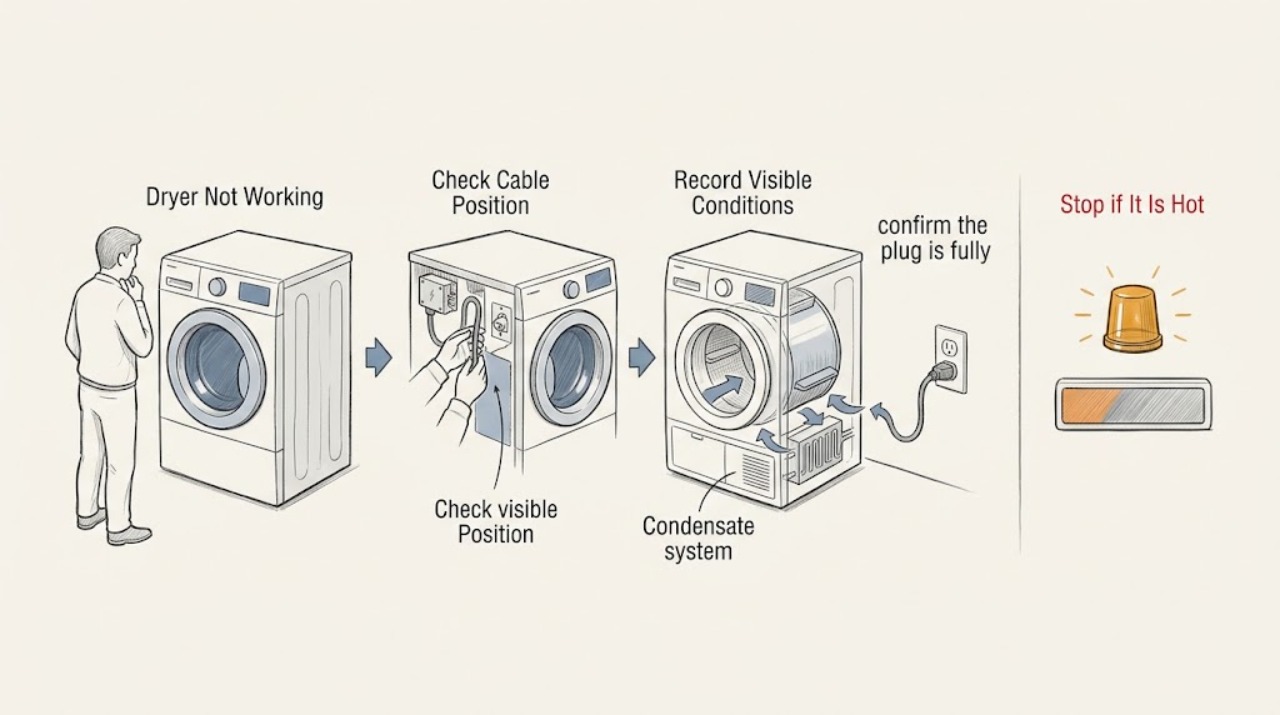
Treat “Siemens dryer not working” as several different symptoms: no display, a cycle that will not start, a drum that will not turn, no heat or poor drying, a full condensate or filter warning, or an error message. Find the dryer’s E-Nr. on its type plate and use it to open the matching Siemens support page or manual before interpreting a code or control. With the appliance cool and dry, check the accessible plug and circuit, door closure, selected programme, Start control, filter and water container where fitted, and visible airflow. Do not use an extension lead, operate with a damaged cord or filter, reach into a moving drum, defeat a door switch, or open the cabinet. Stop for burning smell, smoke, sparks, overheating, water near electrics, severe vibration, or a breaker that trips again. If the safe external checks do not restore a normal cycle, keep the dryer off and arrange Siemens or qualified appliance service.
Work through in order
Diagnostic checks
Use only checks that match the exact appliance or system and its official guide.
-
Check 1
Before touching the dryer, note any smoke, burning or melted-plastic smell, sparks, hot or discolored plug, damaged cable, water near the socket, severe overheating, violent movement, or a breaker that trips again.
Expected result: One of these hazards is present, or the machine stopped during a hot or abnormal event.
Next step: Stop using the dryer. If it is safe and dry to do so, isolate it at the plug or circuit without touching damaged parts; arrange qualified appliance or electrical service and do not restart it to reproduce the symptom.
Stop if: Stop immediately for smoke, fire, sparks, burning smell, heat-damaged wiring, water at electrics, severe vibration, or a repeated breaker trip.
Why this matters
Why: This is a safety stop, not a programme-selection problem. A dryer must not continue operating with damaged electrical parts, blocked airflow, missing filtration, or suspected water and electricity contact.
-
Check 2
Find the dryer’s E-Nr. on the type plate, usually around the door opening or on the appliance label, and record the complete model suffix; do not infer the model from appearance alone.
Expected result: The E-Nr. is available, incomplete, unreadable, or missing.
Next step: Enter the complete E-Nr. into Siemens support or provide it to service. If it cannot be read, photograph the label only from a safe, dry position and arrange help for model identification.
Stop if: Stop if locating the label requires moving a stacked or unstable appliance, touching a wet area, or removing a panel.
Why this matters
Why: Siemens uses the exact E-Nr. to select the correct manual, fault categories, symbols, and parts information. A generic code interpretation can send the diagnosis down the wrong branch.
-
Check 3
If the area is dry and the plug and cable are undamaged, confirm the plug is fully seated in the correctly installed protective-contact socket and that no extension cord, power strip, or multi-way coupler is used.
Expected result: The socket is dead, the plug is loose, the cable or socket is damaged, or the dryer is connected through an extension device.
Next step: Leave the dryer off and use a qualified electrician or installer for a dead, damaged, ungrounded, or unsuitable supply. If the socket is stable and safe, continue to the circuit and control checks.
Stop if: Stop for heat, scorch marks, cracks, looseness, moisture, exposed conductors, or a cable that is kinked, crushed, or altered.
Why this matters
Why: Siemens specifies an accessible, correctly earthed socket and warns that extension cords or power strips can overheat or short-circuit. The supply must be corrected before dryer diagnosis continues.
-
Check 4
If the circuit is clearly tripped and there is no damage, water, odor, or active overheating, restore the household breaker once using the normal panel control; do not repeatedly reset it or move the dryer.
Expected result: The display returns and the circuit stays on, or the breaker trips again immediately or during a programme start.
Next step: If stable, record that the display returned and continue with the door and programme checks. If it trips again, leave the dryer isolated and arrange qualified electrical or appliance service.
Stop if: Stop after one reset if the breaker trips again, the plug heats, the display flashes abnormally, or smoke or odor appears.
Why this matters
Why: A single trip can follow a supply interruption, but a repeat trip indicates an electrical fault, overload, or installation problem rather than a need for another start attempt.
-
Check 5
With the drum stopped, close the dryer door fully and check for an obvious item, lint, or misalignment preventing the latch from engaging; do not bypass or force the door switch.
Expected result: The door closes and the control recognizes it, or it remains open, misaligned, locked, or unrecognized.
Next step: Remove only an obvious cool obstruction. If the latch, hinge, seal, or switch remains faulty, leave the dryer off and request service rather than defeating the interlock.
Stop if: Stop if the door or glass is damaged, the latch is loose, the appliance is hot, or releasing the door needs force.
Why this matters
Why: A door-function fault can prevent a cycle from starting or stop it for safety. Siemens lists door function as a model-specific malfunction category.
-
Check 6
Select a normal programme listed for the exact E-Nr., confirm the display shows the expected cycle, and press the model’s Start control once; note whether the countdown, drum, or status indicator changes.
Expected result: The dryer does not accept Start, starts and stops, or begins a programme normally.
Next step: Use only the manual’s control instructions for a lock, delay, or pause. If Start remains unrecognized or a fault returns, record the display and use service rather than cycling through random programmes.
Stop if: Stop if the control is erratic, a warning appears, the dryer overheats, or the drum starts with scraping, violent movement, or a burning smell.
Why this matters
Why: A selection, pause, child lock, delayed start, or programme-sequence condition can look like a dead machine. The exact symbols and button behavior vary by E-Nr.
-
Check 7
If the programme is active but the drum is not turning, cancel or pause only through the model instructions, wait until all movement stops, and inspect the drum opening for a small, obvious obstruction without reaching behind panels.
Expected result: The drum remains still, turns normally after a safe control action, turns with scraping or severe resistance, or the machine stops with a drum-related message.
Next step: Remove only a loose visible item after the drum has stopped. For persistent non-rotation, scraping, resistance, or a fault message, leave the dryer off and arrange service.
Stop if: Stop for a moving drum, trapped item, scraping, severe resistance, sharp edges, or any need to remove a panel.
Why this matters
Why: Siemens treats drum-not-turning as a distinct malfunction category. A drive, belt, motor, bearing, overload, or control issue cannot be distinguished safely by reaching inside or removing covers.
-
Check 8
For a dryer that runs but does not dry properly, clean the user-accessible fluff filter as directed by the E-Nr. manual and check that the air inlet is not visibly blocked; use the correct filter and do not operate without it.
Expected result: The filter is blocked, missing, damaged, or clean while airflow and drying remain poor.
Next step: Replace or refit only the correct user-accessible filter and run the documented programme with a suitable load. If airflow, temperature, or drying remains abnormal, arrange service.
Stop if: Stop for a damaged or missing filter, blocked air inlet, smoke, overheating, or a cabinet obstruction that requires disassembly.
Why this matters
Why: Siemens explains that lint in filtration reduces airflow and warns not to operate without a complete, functioning fluff catcher. Poor drying after a clean filter can involve load, sensor, heat exchanger, airflow, or heating faults.
-
Check 9
If the dryer has a condensate container or water-level indicator, empty and refit the container as directed by the exact manual; if it is vented, follow the E-Nr. instructions instead of assuming a water-tank path.
Expected result: A water-container indicator clears, remains lit, the dryer stopped when the container was full, or the appliance has no condensate container.
Next step: Continue only with the matching E-Nr. instructions. If the indicator remains after correct emptying and refitting, or water leaks, keep the dryer off and arrange service.
Stop if: Stop for leaking water near electrics, a cracked container, a blocked internal drain, or any need to access a pump or hose inside the cabinet.
Why this matters
Why: Siemens model pages show that water-tank indicators and condensate systems are model-dependent. A full container can stop a drying cycle, while a vented model requires a different airflow path.
-
Check 10
Record the exact error code, symbol, audible signal, programme stage, load condition, and whether the drum, fan, heat, and condensate indicators changed; do not substitute a code from another Siemens model.
Expected result: The same code or indicator returns, the code clears after the documented external step, or no code is shown despite a persistent fault.
Next step: Give the E-Nr., code or symbol, cycle stage, and observed behavior to Siemens or qualified service. Keep the appliance off for recurring, unexplained, or safety-related faults.
Stop if: Stop if the display is accompanied by smoke, burning smell, overheating, water at electrics, severe vibration, or repeated breaker trips.
Why this matters
Why: Siemens model pages list different code sets and problem categories, so the E-Nr. and exact display are part of the diagnosis. A cleared indicator does not justify continued use if the dryer is unsafe or still not functioning.
-
Check 11
Prepare a service handoff when the dryer remains dead, will not start, will not turn, does not heat or dry, repeatedly fills a water container, or returns an error after the model-specific external checks.
Expected result: The fault persists, returns intermittently, or points to a heater, motor, sensor, pump, control, wiring, or internal airflow component.
Next step: Arrange Siemens or qualified appliance service, using an electrician for supply and cable faults. Provide the E-Nr., exact display, cycle stage, recent events, and all safety observations.
Stop if: Do not open the cabinet, bypass the door switch, probe live parts, or continue operating until the relevant professional clears the fault.
Why this matters
Why: These symptoms require model-specific testing and may involve live electrical or hot components. Siemens directs repairs and other technical work to customer service or an electrician.
Use your observations
Decision map
Find the observation that best matches what you see, then follow the next safe action.
-
PATH 01Safety boundary
What you see
Smoke, burning smell, sparks, water near electrics, overheating, severe vibration, damaged cable, or a breaker that trips again is present.
Do this next
Stop using the dryer and isolate it only if the plug and area are dry and safely reachable; do not restart or investigate inside. Arrange emergency, electrical, or qualified appliance service as appropriate.
Why this path and its safety boundary
Safety stop: Continue with E-Nr. identification and low-risk external checks.
-
PATH 02Safety boundary
What you see
The display and controls are completely dark.
Do this next
Check the dry accessible plug, socket, and household circuit once; a dead supply, damaged connection, or repeat trip needs qualified electrical or appliance service.
Why this path and its safety boundary
Safety stop: Use the no-start, door, programme, drum, drying, and error-message branches based on what the display shows.
-
PATH 03Safety boundary
What you see
The display works but Start is rejected, delayed, paused, or blocked by a symbol.
Do this next
Follow only the exact E-Nr. manual for programme, pause, delay, or lock controls and try the normal Start action once; persistent rejection needs service.
Why this path and its safety boundary
Safety stop: Continue to the door and running-cycle observations.
-
PATH 04Safety boundary
What you see
The door does not close or the dryer starts but the drum does not turn.
Do this next
Check only for an obvious cool obstruction and wait for all movement to stop. Do not bypass the door switch or remove covers; persistent door or drum faults need service.
Why this path and its safety boundary
Safety stop: Continue to airflow, water-container, heat, and error-code branches.
-
PATH 05Safety boundary
What you see
The drum runs but laundry stays damp, the dryer has no heat, or a filter or water-container symbol appears.
Do this next
Use the exact E-Nr. instructions for the filter, air inlet, condensate container, load, and programme; if the result remains abnormal, stop and arrange service.
Why this path and its safety boundary
Safety stop: Record the normal result and monitor only while the appliance remains cool, stable, and free of safety symptoms.
-
PATH 06Safety boundary
What you see
A code or symbol returns after the model-specific documented external step.
Do this next
Keep the dryer off and provide the exact E-Nr., display, cycle stage, and observed behavior to Siemens or qualified service; do not infer meaning from another model.
Why this path and its safety boundary
Safety stop: Continue only if the dryer completes a normal, safe cycle without heat, electrical, water, or movement warnings.
Helpful context
Understand the symptom
Start with the symptom, not a generic reset
A Siemens dryer with no display has a different path from one that powers on but will not start. A running programme that leaves the drum still, cold, or damp points to different checks again. The Siemens support pages show that model-specific categories include domestic fuse trips, door function, drum rotation, programme sequence, filter or water-tank indicators, and drying results. Record what the machine does before changing settings.
The E-Nr. controls what the symbols mean
Siemens uses the E-Nr. on the type plate to identify the exact dryer and show the applicable manual, error information, maintenance instructions, and spare-part context. Do not apply an E01, E02, filter symbol, water-tank symbol, or other display meaning from a different model. If the E-Nr. is not available, record the complete label information and use service rather than guessing.
Safety boundaries for a dryer that stops working
Keep the dryer off for smoke, burning smell, sparks, a hot or damaged plug, water near the electrical connection, unusual overheating, or a breaker that trips again. Disconnect power only by the plug when it is dry and safely reachable; never pull a cable or handle a plug with wet hands. Cabinet repairs, live testing, heating faults, drive faults, and damaged mains cables belong to Siemens service or an electrician.
Only after diagnosis
Potential parts
- fluff filter
Consider only if the exact E-Nr. manual or service diagnosis identifies a missing, damaged, or model-specific filter.
Confirm the complete E-Nr. and the manufacturer's fit information; do not operate the dryer without the correct filter. - condensate container or drain component
Relevant only for models that use condensate collection and only when the E-Nr. diagnosis identifies a damaged container or internal drain fault.
Vented and condensate models differ; verify the complete E-Nr. before ordering and leave internal drain work to qualified service. - dryer heating or drive component
Consider only after qualified model-specific testing confirms a heater, motor, belt, sensor, or related internal fault.
Do not infer part fit from a symptom or appearance; internal electrical and mechanical replacement requires isolated, qualified service.
When checks do not resolve it
Need a professional?
Arrange Siemens or qualified appliance service when safe external checks do not restore operation, the display remains dead, Start is not accepted, the door or drum is faulty, drying or heating remains abnormal, a filter or water indicator will not clear, or an error returns. Use an electrician for the socket, earthing, cord, or repeated-breaker path. Do not open the cabinet, bypass the door switch, or perform live testing.
Common questions
FAQ
Why is my Siemens dryer not working at all?
Determine whether the display is dark or whether the display works but Start is rejected. Check the dry accessible plug and circuit once, then use the exact E-Nr. manual for door and control states. A repeat breaker trip, damaged cable, smoke, odor, or water at electrics requires the dryer to stay off.
Why does my Siemens dryer turn on but not start?
A door that is not recognized, a pause or delay, a locked control, an invalid programme state, or an error can prevent Start. Use the exact E-Nr. instructions and press the normal Start control once; persistent failure needs service.
Why is the drum not turning?
Siemens lists drum-not-turning as a distinct malfunction category. Check only for a loose visible obstruction after all movement stops. Persistent non-rotation, scraping, resistance, or severe movement can involve the drive system and requires qualified service.
Why is my Siemens dryer running but not drying?
Use the E-Nr. manual to check the user-accessible fluff filter, air inlet, load, programme, and condensate path where fitted. A clean filter with continued poor drying can indicate a sensor, heat, airflow, or internal fault; do not open the cabinet.
What does a Siemens dryer filter or water symbol mean?
The meaning is model-specific. Siemens service pages show separate filter and water-tank categories, and vented and condensate dryers use different paths. Use the complete E-Nr. and matching manual; if the indicator remains after the documented external step, arrange service.
Can I use an extension cord with a Siemens dryer?
No. The Siemens manual warns against extension cords, power strips, and multi-way couplers because of overheating or short-circuit risk. Use the correctly installed accessible socket specified for the appliance, and use an electrician for supply concerns.
When should I call a Siemens dryer technician?
Call when safe external checks do not restore operation, an error returns, the drum will not turn, the dryer will not heat or dry, a door or water indicator remains faulty, or the machine is noisy, hot, wet, smoky, or electrically abnormal. Provide the complete E-Nr. and exact symptom sequence.
Read the exact guide
Official sources
- Installation and operating instructions — Tumble dryer WT47W4E9DNSiemens Home Appliances · Siemens tumble dryer WT47W4E9DN manual; other E-Nr. models require their own instructions
- Siemens service, user manuals, spare parts, accessories for WT34V180FF/02Siemens Home Appliances · Siemens vented tumble dryer model WT34V180FF/02; use the exact E-Nr. for another model
- Siemens service, user manuals, spare parts, accessories for WT47W4E9DN/01Siemens Home Appliances · Siemens tumble dryer model WT47W4E9DN/01; use the exact E-Nr. for another model
- How to improve the results of your Siemens tumble dryer?Siemens Home Appliances · Siemens tumble dryers; exact model programme and manual determine applicable controls
Community feedback
Share a repair observation
Share a plain-text repair observation. Accepted observations are published automatically; this page may take a moment to update.