
On this page
Start here
Quick answer
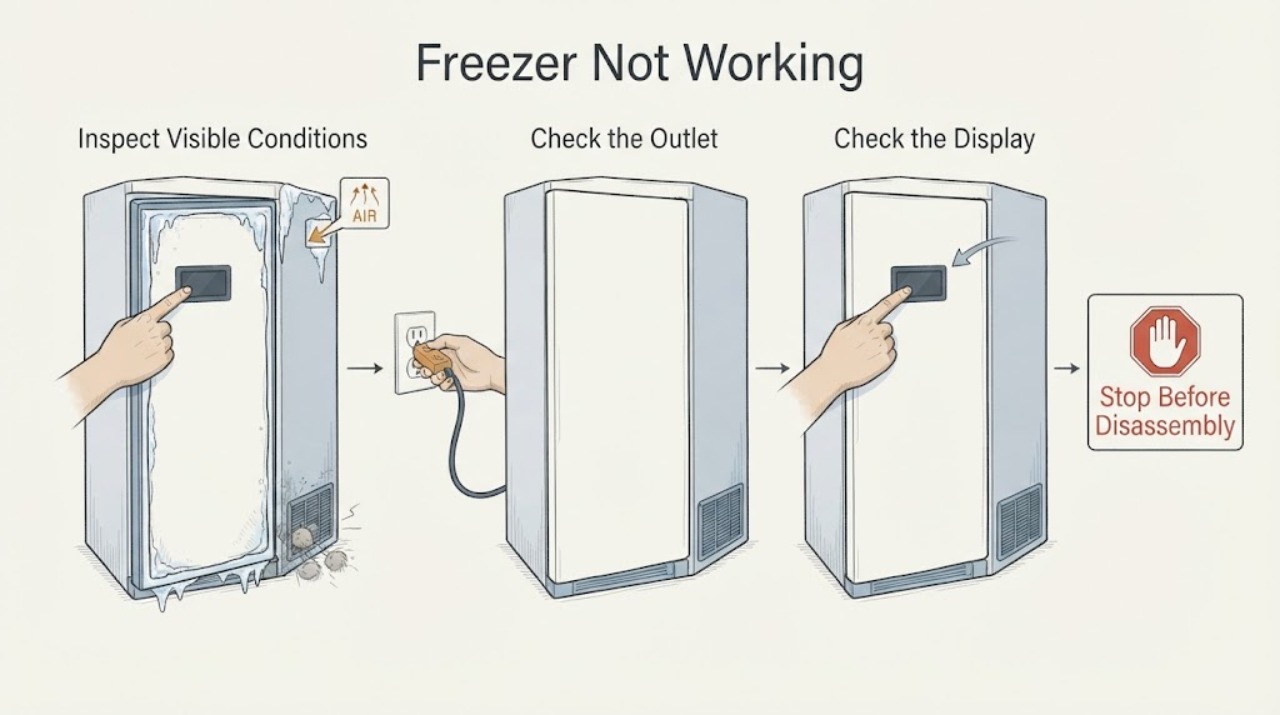
First separate a completely dark freezer from one whose display is on but which is not cooling. For a dark display, check the plug, the household outlet, and the relevant fuse or breaker without opening the appliance. For a lit display, check the model's temperature setting and whether Eco or showroom mode is active, then check that the door closes, the external ventilation openings are clear, and food is not blocking the rear air path. A flashing temperature warning means the freezer may be too warm and frozen food may be at risk. Protect the food while you check the door, airflow, and visible frost; do not refreeze food that has thawed. Stop immediately for smoke, burning odor, sparks, unusual heat, a damaged cord, water near electrical parts, or a repeatedly tripping breaker, and arrange qualified service.
Work through in order
Diagnostic checks
Use only checks that match the exact appliance or system and its official guide.
-
Check 1
If it is safe to approach, look for smoke, scorching, sparks, a burning smell, an unusually hot plug or cabinet, water reaching electrical areas, a damaged cord, or a breaker that trips again. Then note whether the interior light and display are dark, whether the display is lit, whether the compressor or fan can be heard, and whether a temperature or door warning is flashing.
Expected result: Any electrical or fire symptom, unsafe heat, water at electrical parts, or repeated trip is present; or the appliance is simply dark, lit but warm, or warning about temperature or the door.
Next step: If any hazard is present, stop and use the stop conditions below. Otherwise continue to the power/display check for a dark unit, or to the controls and temperature checks if the display is lit.
Why this matters
Why: The first group indicates an unsafe condition that should not be tested by repeated operation. The symptom group identifies the correct low-risk branch: power, settings/cooling, or door/temperature.
-
Check 2
For a dark display or light, verify that the freezer plug is fully seated in its own wall socket and that the household outlet has power. Check the relevant fuse or breaker from the electrical panel, but do not repeatedly reset a breaker that trips again; do not use a multiple socket or extension as a workaround.
Expected result: The outlet or fuse was off and the display returns after power is safely restored; or the outlet is powered and the freezer remains dark; or the breaker trips again.
Next step: If power returns, allow the freezer time to regain its set temperature and watch for a temperature alarm. If it stays dark or the breaker trips again, stop using it and arrange qualified service.
Why this matters
Why: A restored display points to a supply interruption. A powered outlet with a dark appliance points to an appliance-side fault. A repeat trip indicates an electrical problem rather than a normal freezer setting issue.
-
Check 3
With the display lit, read the shown temperature and inspect the selected mode using the exact Siemens manual for the freezer's E-Nr. Check whether Eco mode or a showroom/demo mode has been selected. If the display is lit but there is no cooling, use the manual's showroom-mode exit sequence; do not assume that a lit display proves the cooling system is running.
Expected result: The setpoint or mode is unsuitable, showroom mode is active, or the displayed setting appears normal but the cabinet remains warm.
Next step: Correct only the setting or mode combination supported by the exact manual, then allow the appliance a reasonable recovery period. If it remains warm with a normal mode, continue to the door and airflow check and protect the food.
Why this matters
Why: An unsuitable setting or showroom mode can make the freezer appear not to work without a failed refrigeration system. A normal setting with persistent warmth needs airflow, door, frost, and service checks instead.
-
Check 4
Close the door slowly and check that no package, drawer, or ice is preventing the gasket from meeting the cabinet. Look at the visible gasket for an obvious gap or deformation, keep packages from touching the rear panel, and clear the appliance's external ventilation openings. Do not push food tightly against the rear air path.
Expected result: The door was held open or blocked, the gasket does not meet evenly, the rear air path was blocked, or the cabinet is overloaded; or the door closes and the visible airflow path is clear.
Next step: Remove only the obstruction, close the door, and monitor the temperature. If the gasket still cannot seal or the alarm returns despite a closed, clear cabinet, arrange service rather than forcing the door or replacing a part without model confirmation.
Why this matters
Why: A poor seal or blocked airflow can raise the freezer temperature and trigger the door or temperature alarm. A clear, closed cabinet makes a persistent warm condition more likely to need frost or professional cooling diagnosis.
-
Check 5
Inspect only the visible interior for a thick frost blanket, ice around the door, or frost concentrated at an opening. If the exact model is a NoFrost appliance and it has thick ice, or if its manual calls for manual defrosting, move food to safe cold storage and follow that model's defrost instructions. Before cleaning or defrosting, disconnect power at the plug or breaker; use no steam, sharp tool, flame, or uncontrolled heat.
Expected result: Thick visible ice is restricting storage space or airflow; the model requires a manual defrost; or there is no abnormal visible frost.
Next step: Complete only the safe, model-supported defrost procedure, dry the cabinet, restore power, and allow it to stabilize. If thick ice returns, the NoFrost system fails to clear it, or the freezer remains warm, stop troubleshooting and call a qualified appliance technician.
Why this matters
Why: Ice can keep the freezer from reaching temperature and can result from a door left open or a defrost fault. No visible frost does not rule out a sealed-system or control fault, and internal panels should not be removed by the user.
-
Check 6
If the temperature or door alarm is flashing, close the freezer and check whether the condition followed power-on, a large fresh load, or a door left open. Keep the door shut while the appliance recovers, and move food that is soft or thawing to a safe cold appliance. If food has thawed, follow local food-safety guidance and do not refreeze it unless the food-safety guidance for that food permits it.
Expected result: The alarm clears after the door is closed and the freezer recovers; it continues with a normal load and closed door; or the temperature remains unsafe.
Next step: Allow a normal recovery period after the known event and check again. If the alarm persists, the display reports a fault, or the freezer cannot hold temperature, stop relying on it for food storage and arrange qualified service.
Why this matters
Why: A temporary alarm can follow a known warm event, but a continuing alarm with a closed door and clear airflow indicates that the freezer is not reaching temperature. Siemens warns that frozen food may be at risk during a warm alarm.
Use your observations
Decision map
Find the observation that best matches what you see, then follow the next safe action.
-
PATH 01Next step
What you see
The display and interior light are dark.
Do this next
Check the plug, outlet, fuse, and breaker once from a safe position.
Why this path and its safety boundary
Why it matters: If power is present but the freezer stays dark, or the breaker trips again, stop using it and arrange electrical/appliance service.
-
PATH 02Next step
What you see
The display is lit but there is no cooling.
Do this next
Check the exact model's temperature setting and showroom/demo mode, then check the closed door, visible gasket, external ventilation, and rear air path.
Why this path and its safety boundary
Why it matters: If the mode and accessible airflow checks are normal but the cabinet remains warm, the fault may be inside the control or refrigeration system; stop and arrange qualified service.
-
PATH 03Next step
What you see
A temperature warning is flashing or food is becoming soft.
Do this next
Keep the door closed, protect the food, and distinguish a recent power-on, large load, or long-open-door event from a continuing warm condition.
Why this path and its safety boundary
Why it matters: If the alarm does not clear after recovery or returns with a closed door and normal load, stop using the freezer for food storage and call a qualified technician.
-
PATH 04Next step
What you see
Thick frost or ice is visible.
Do this next
Use only the exact model's safe defrost procedure after disconnecting power; never chip, heat, or steam the ice.
Why this path and its safety boundary
Why it matters: If the ice returns or the freezer remains warm after a safe defrost, professional diagnosis is required.
-
PATH 05Next step
What you see
There is smoke, a burning smell, a spark, water near electrical parts, unusual heat, a damaged cord, or a repeated breaker trip.
Do this next
Stop operating the freezer. If it can be done without touching a hot or damaged component, isolate power from a safe location; leave fire or smoke emergencies to emergency services.
Why this path and its safety boundary
Why it matters: Do not reconnect or test the appliance until it has been assessed by a qualified professional.
Helpful context
Understand the symptom
What ‘not working’ can mean
A freezer that appears dead has a different first check from one that has lights but is not making cold. Siemens manuals also describe a temporary warm condition after power-on, after loading a large amount of fresh food, or after the door has been open for too long. Treat the temperature alarm as a food-safety signal while you diagnose the cause, not as proof that a compressor or control board has failed.
Keep the checks external and model-specific
Siemens freezer features vary by model. Use the manual for the exact E-Nr. for button combinations and temperature limits. The checks below are limited to accessible controls, the plug and fuse, the closed door, visible gasket condition, external ventilation, and visible frost. Do not remove panels, probe live wiring, open the sealed refrigeration circuit, or attempt a refrigerant repair.
When checks do not resolve it
Need a professional?
Stop and arrange qualified service if the freezer stays dark with a confirmed powered outlet, the display is lit but cooling does not return after accessible checks, or a fault indication persists., Stop immediately for smoke, burning odor, sparks, an unusually hot plug or cabinet, a damaged cord, water near electrical parts, or a breaker that trips again. Do not remove electrical or refrigeration panels., Protect or discard food according to applicable food-safety guidance if it has thawed or the freezer cannot hold a safe temperature. Do not refreeze thawed food unless the applicable food-safety guidance permits it.
Read the exact guide
Official sources
- Instructions for UseSiemens · Siemens freezer Instructions for Use; exact features and button sequences vary by model
- Built-in Fridges and Freezers SupportSiemens Home Appliances · Siemens Home Appliances built-in fridge and freezer support category; select the exact model for model-specific instructions
- Information for Use KI86V.., KI87V..Siemens · Siemens KI86V.. and KI87V.. appliance family; use the exact model manual when features differ
Community feedback
Share a repair observation
Share a plain-text repair observation. Accepted observations are published automatically; this page may take a moment to update.