
On this page
Start here
Quick answer
A Siemens washing machine that does not complete a cycle is usually waiting for one stage to finish, so first note whether it is filling, washing, heating, draining, or spinning. A longer displayed time can be normal while the machine redistributes an unbalanced load or responds to excess foam, but a fixed stage with an error symbol, no water movement, standing water, a leak, or repeated stopping needs a targeted check. Check the visible inlet and drain paths, the load and detergent, and the exact model manual. If water is present near electrics, the machine is leaking, walking violently, smells hot, trips power, or remains stuck after one safe, manual-authorized restart, stop using it and arrange qualified service.
Work through in order
Diagnostic checks
Use only checks that match the exact appliance or system and its official guide.
-
Check 1
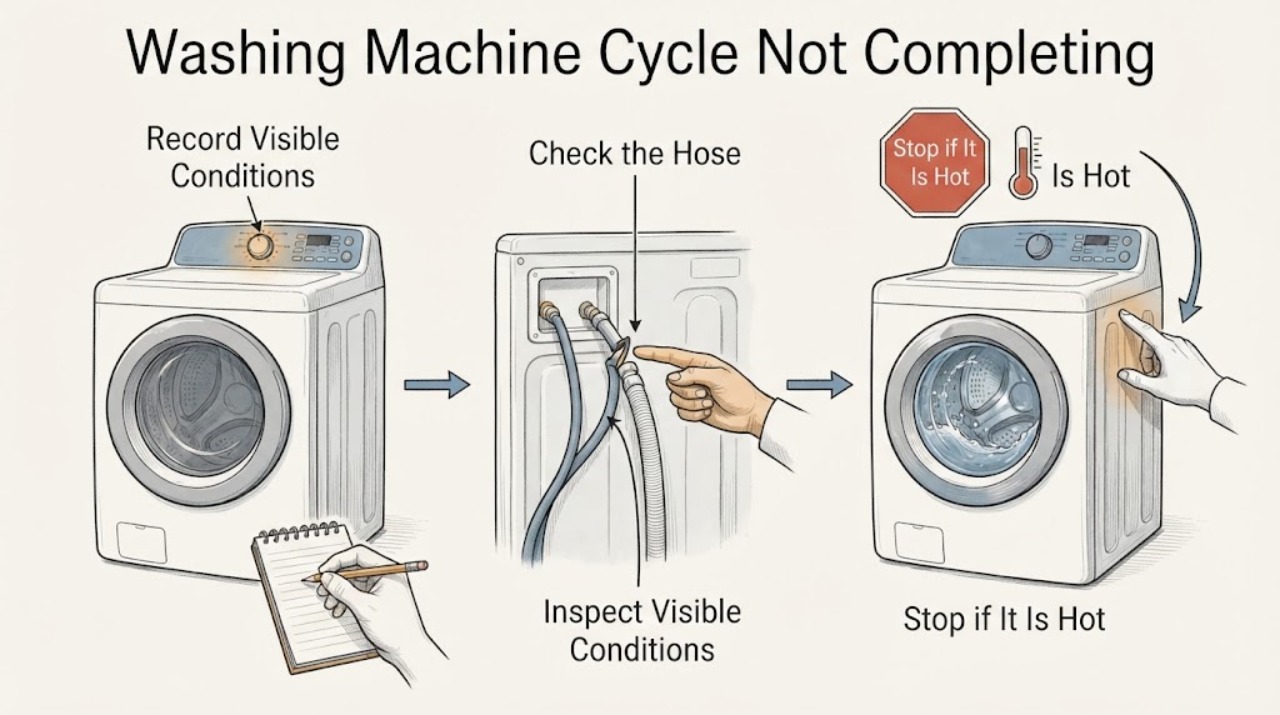
Record the program name, displayed time or stage, every symbol or complete error code, whether the drum is turning, and whether water is visible in the drum or on the floor.
Expected result: The display advances while the machine redistributes the load, or it remains fixed at fill, wash, heat, drain, rinse, or spin with a code or unusual sound.
Next step: Follow the matching fill, drain, foam, balance, heating, door, or error branch below. Stop immediately for a leak, hot smell, smoke, power trip, or severe movement.
Why this matters
Why: A changing time can be an adaptive program sequence; a fixed stage identifies the next system to inspect instead of making the whole machine the diagnosis.
-
Check 2
If the cycle is stuck while filling, verify that the water tap is open and inspect the visible cold-water inlet hose for a kink or crushing; do not loosen a pressurized connection.
Expected result: The tap is closed or the hose is bent, versus water still fails to enter with the tap open and the hose clear.
Next step: Correct only a visible kink and retry the same program once if no safety issue is present. If there is still no fill, record the symbol or code and use Siemens support or service rather than opening the inlet valve or wiring.
Why this matters
Why: A closed supply or kink can prevent the required fill stage; a clear external path with no fill points to an inlet, filter, door, or control issue that needs model-specific evidence.
-
Check 3
If water remains when the machine stops, select or observe the drain stage only when the floor and electrical connection are dry and the water is not likely to be hot; inspect the external waste hose for a kink or obvious blockage.
Expected result: The drain pump runs and water leaves, the pump is silent, water backs up, or the drum still contains water after the drain stage.
Next step: Do not open the filter or drain hose if water may be hot, the area is wet near electrics, or the manual does not authorize the procedure. If the external path is clear and water remains, stop and arrange service.
Why this matters
Why: Rinse-hold or a drain-path restriction can prevent the final spin and completion; a silent pump, continued standing water, or a leak may indicate a pump or control fault.
-
Check 4
Check the load without starting a new cycle: look for one heavy item, a tightly packed drum, or excessive suds, and confirm that the selected program and spin option are appropriate for the load.
Expected result: The load is bunched or oversized, foam is visible, or the load and settings are reasonable but the machine repeatedly pauses before spin.
Next step: If safe, redistribute or reduce the load and use the manual’s appropriate program. Do not add more detergent or repeatedly force a spin; escalate if the machine walks, bangs, or still cannot complete.
Why this matters
Why: Siemens describes load redistribution, overload protection, and foam detection as reasons a program may take longer or reduce or repeat spinning; persistent pauses with a balanced load need further diagnosis.
-
Check 5
If the machine stops during heating or shows an overheating or heating-related indication, note the point in the program and whether the water or cabinet feels unusually hot from a safe distance; do not touch the water or heater area.
Expected result: The cycle pauses at the heating stage with no abnormal heat, versus a hot smell, excessive heat, smoke, or a returning error.
Next step: Stop the machine for excessive heat, smoke, or a hot electrical smell. Otherwise record the code and consult the exact Siemens manual; arrange service if the heating stage repeatedly prevents completion.
Why this matters
Why: Heating is a controlled program stage and the exact model determines the relevant sensor, heater, and error response. Excessive heat or a returning code is not a user-level part diagnosis.
-
Check 6
Check the door or lid from outside for a fully closed position and an active lock symbol; do not force the door, bypass the lock, or reach into a moving drum.
Expected result: The machine reports a door or key condition, the door stays locked with water inside, or the door is closed and no related indication is shown.
Next step: Follow the exact manual’s door and child-lock procedure. If the lock remains after the drum is stationary and water is safely absent, or the door area is damaged, stop and call service.
Why this matters
Why: The safety lock can prevent a program from advancing or opening while water or motion remains. A locked door with residual water is evidence to resolve drainage safely, not to force the latch.
-
Check 7
Read the full error code or symbol exactly as shown and match it only to the Siemens manual for the machine’s E-Nr.; note whether it appears during filling, draining, heating, or spinning.
Expected result: The code has a documented user check, disappears after the stage completes, or returns immediately after the same program is selected.
Next step: Perform only the manual’s documented user check. If the code returns, stop repeating the program and provide the E-Nr., code, stage, and water condition to Siemens support or a qualified technician.
Why this matters
Why: Siemens publishes multiple code and symbol families across models, so a partial code or a code borrowed from another model cannot identify the failed component.
-
Check 8
When there is no leak, hot water hazard, smoke, power trip, or violent movement, carry out one restart authorized by the exact manual: select Off, isolate the appliance from a dry accessible position, and restore power only as the manual directs.
Expected result: The same program completes normally, the display remains frozen, or the cycle stops at the same stage again.
Next step: Leave the machine unused and arrange qualified service if the problem recurs. Do not repeatedly cycle power, operate a wet connection, or continue a program that leaks or moves violently.
Why this matters
Why: A single restart can clear a temporary control state, but recurrence shows that the underlying fill, drain, lock, heating, balance, or control condition remains.
-
Check 9
Prepare a service note with the Siemens E-Nr., program and options, stage where it stopped, code or symbol, water level, hose observations, load and foam condition, and whether the machine leaked, tripped power, or moved violently.
Expected result: The note separates normal time adaptation from a repeatable stop at a particular stage and preserves the evidence before the display changes.
Next step: Give the note to Siemens support or a qualified appliance technician and keep the washer out of use until the safety-related fault is resolved.
Why this matters
Why: Stage-specific information lets support choose the correct model procedure and avoids unsafe replacement of a pump, valve, lock, heater, or control without diagnosis.
Use your observations
Decision map
Find the observation that best matches what you see, then follow the next safe action.
-
PATH 01Next step
What you see
The remaining time changes, the drum moves normally, and there is no leak, code, or abnormal sound
Do this next
Allow the programmed sequence to continue and monitor it; load balancing or foam handling may extend the displayed time.
-
PATH 02Next step
What you see
The display is fixed at filling and no water enters
Do this next
Check the open tap and visible inlet hose for a kink, then use the model manual; persistent no-fill requires service.
-
PATH 03Next step
What you see
Water remains at the drain or final-spin stage
Do this next
Treat the drain path and any rinse-hold selection as the priority, with hot-water and wet-electrics precautions; service a clear-path failure.
-
PATH 04Next step
What you see
Foam, an unbalanced load, or repeated reduced spin is observed
Do this next
Use the manual’s load and detergent guidance and stop if the machine bangs or walks; persistent imbalance needs qualified inspection.
-
PATH 05Next step
What you see
A door or key symbol remains, or the door stays locked with water inside
Do this next
Do not force or bypass the lock. Resolve the safe drain or model-specific lock branch and call service if the lock remains with the drum stationary.
-
PATH 06Next step
What you see
A code returns, the machine overheats, leaks, trips power, smells hot, or stops after one restart
Do this next
Stop using the machine, isolate it only from a safe dry position when appropriate, and arrange qualified service with the recorded evidence.
Helpful context
Understand the symptom
Start with the stage, not the part
A cycle can appear stuck because the machine is waiting for a water-level condition, rebalancing the load, managing foam, heating water, draining, or waiting for a door-safety condition. Siemens describes some duration changes and repeated spin attempts as part of the programmed process. The display stage, remaining water, drum movement, and any symbol or code provide more useful evidence than guessing at a pump or control board.
What a delayed finish means
If the remaining time changes while the drum still moves normally, the machine may be adapting the sequence. A program that never advances, repeatedly refills, leaves water in the drum, or stops after a loud imbalance is different. Keep the model number and the exact program visible while you compare the behavior with the Siemens manual for that appliance.
Keep water and electricity separate
Do not reach through standing water to operate a plug, socket, or control. Do not open a pump filter while water may be hot, and do not tilt the appliance or remove panels to force the cycle to finish. A safe external observation is enough to choose between an inlet, drain, load, error, or service branch.
Safety boundary
Stop conditions
- Stop immediately for a leak that reaches electrical parts, standing water around the connection, smoke, a hot electrical smell, a repeated power trip, or a damaged cord or socket.
- Stop for scalding water, an overheating indication, violent banging, walking, or a drum that appears mechanically damaged; keep people away until the appliance is safe.
- Do not force the door, bypass a door lock, open a filter with hot or uncontrolled water, tilt the machine, remove panels, or probe live wiring.
- Do not repeatedly restart a cycle that stops at the same stage or continue using the machine after a safety-related code or symptom.
Only after diagnosis
Potential parts
- drain pump or pump filter assembly
Consider only after a safe drain-path check shows that water remains or the pump is diagnosed as unable to drain.
Confirm the full Siemens E-Nr. and model-specific fit information before any part decision. - water inlet valve or inlet filter
Consider only when the tap and visible hose are correct but a qualified diagnosis finds that the machine cannot fill.
Do not infer fit from appearance; verify the exact Siemens model and inlet configuration. - door lock or control component
Consider only after the door, residual water, program, and error-code checks point to a persistent lock or control fault.
A lock or control part must be selected by exact E-Nr. and qualified diagnosis.
When checks do not resolve it
Need a professional?
Arrange Siemens or qualified appliance service when a cycle repeatedly stops at one stage, a code returns, the drain path is clear but water remains, or the door lock will not release safely., Provide the exact E-Nr., complete code or symbol, program, stopped stage, water level, load and foam observations, and any leak, heat, vibration, or power-trip evidence., Use urgent local help for an active leak near electricity, smoke, fire, or a dangerous electrical condition; do not touch a wet connection.
Common questions
FAQ
Why does my Siemens washing machine cycle take longer than the display first showed?
Siemens manuals describe time changes while the program optimizes the sequence, redistributes an unbalanced load, or responds to foam. A changing time with normal movement is different from a fixed stage with an error, standing water, or a leak.
What should I check if the cycle stops while filling?
Confirm the tap is open and inspect the visible inlet hose for a kink. If the hose and tap are correct but no water enters, record the symbol or code and use the exact manual or service path.
Why is my Siemens washer stuck before the final spin?
Rinse hold, standing water, a blocked drain path, foam, or an imbalanced load can prevent or delay final spin. Keep water and electricity safe, check only the external drain path and load when appropriate, and call service for a clear-path failure.
Can I open the Siemens washing machine door when the cycle has not finished?
Do not force it. The safety lock may remain active while the drum is moving or water is present. Follow the exact manual procedure and arrange service if the drum is stationary, water is safely absent, and the lock still will not release.
Should I keep restarting a Siemens washing machine that stops?
No. Perform at most one restart authorized by the exact manual when there is no leak, hot-water hazard, smoke, power trip, or severe movement. If the same stage or code returns, stop using the machine and arrange qualified service.
When is a Siemens washing machine cycle problem unsafe to troubleshoot at home?
Stop for a leak near electricity, standing water at the connection, hot smell, smoke, a repeated trip, scalding water, violent walking or banging, or a damaged cord, socket, door, or cabinet. Do not open panels or bypass safety devices.
Read the exact guide
Official sources
- Support for Siemens washing machinesSiemens Home Appliances · Siemens washing machine support categories, manuals, codes, and repair assistance
- Washing machine operating instructionsSiemens Home Appliances · Siemens washing-machine fill, drain, door, spin, foam, and troubleshooting examples
- Washing machine is not spinningSiemens Home Appliances · Siemens washing-machine drain, hose, filter, load-balance, and service checks
- Washing machine operating instructionsSiemens Home Appliances · Siemens washing-machine operating instructions and troubleshooting examples
Community feedback
Share a repair observation
Share a plain-text repair observation. Accepted observations are published automatically; this page may take a moment to update.