
On this page
Start here
Quick answer
A locked Siemens washer door is often holding because the programme is still running, the drum has not stopped, water remains inside, the child lock is active, laundry is caught at the seal, or the door-lock fault is model-specific. Do not pull the door or insert a tool. Press pause or cancel as the exact manual describes, wait until all motion and hot water have stopped, and check whether water remains. If the display shows a key or child-lock symbol, use only the model's documented command. If the door stays locked after a safe drain or documented reset, or the latch, glass, seal, or hinge is damaged, leave the machine off and arrange Siemens service.
Before you begin
Safety first
- User checks are limited to normal controls and safe visible observations. Do not force or pry the door, bypass the interlock, tilt the washer, open a drain part with residual water, remove panels, or access live wiring.
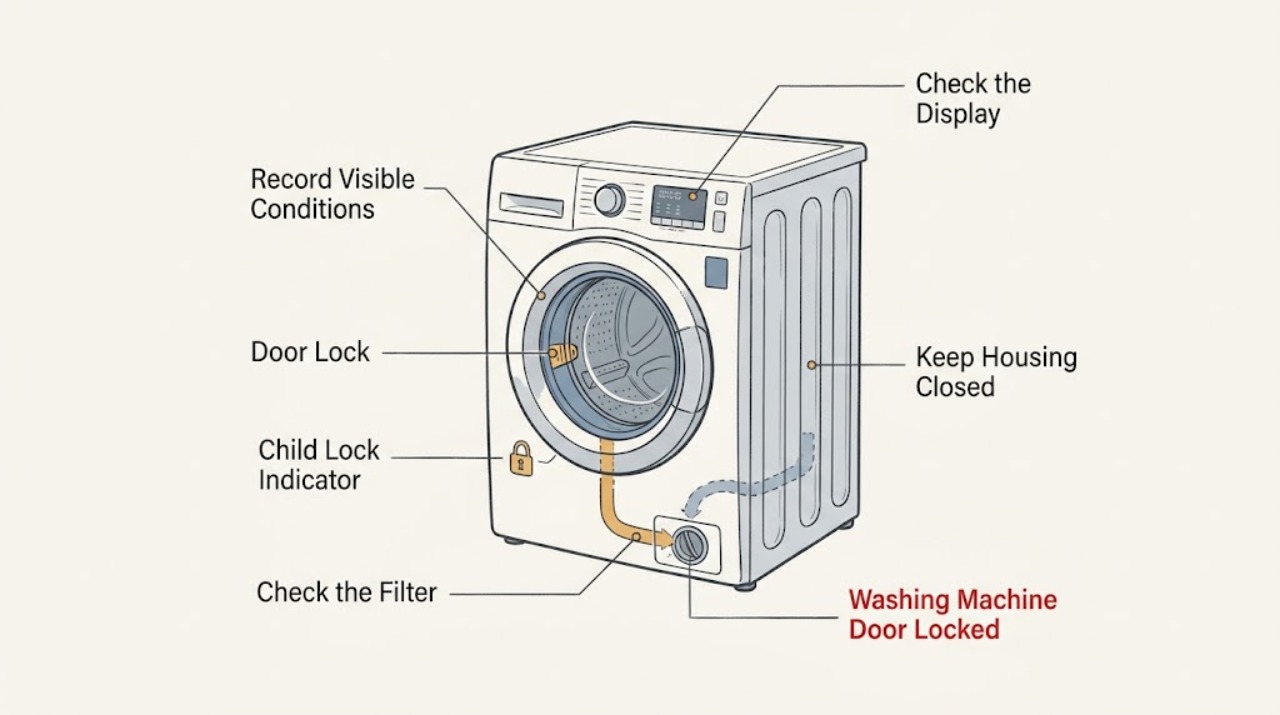
Work through in order
Diagnostic checks
Use only checks that match the exact appliance or system and its official guide.
-
Check 1
Press Pause or the normal programme-cancel control once, keep hands away from the opening, and wait until the drum is completely still. Record the model, programme, key or lock symbol, displayed code, and whether water is visible through the door; do not pull the handle while the lock indicator remains on.
Expected result: The drum is still moving, the machine is draining, water is visible, the lock clears after a normal pause, or the lock stays on after motion has stopped.
Next step: Follow the matching branch below. Keep the door closed while water or motion remains, and do not restart a cycle merely to test the lock.
Stop if: Stop for hot water, a moving drum that does not stop, smoke, burning odor, a leak, or a damaged door or glass.
Why this matters
Why: Siemens uses the door lock to control access during motion and some water or temperature states. A lock that remains after a safe pause may reflect residual water, a control lock, or a fault rather than a stuck handle.
-
Check 2
If a key, CL, or child-lock symbol is present and the drum is stopped, locate the exact model manual and use only its documented child-lock command. Do not press random combinations or remove the control panel.
Expected result: The symbol clears and the controls respond, the symbol remains, or the controls work but the physical door lock remains engaged.
Next step: If the child lock clears, use the normal door-control sequence once. If it remains or the door is still locked, continue to the water and code checks; arrange service if the manual procedure does not work.
Stop if: Stop if the control is wet or cracked, buttons activate without touch, or clearing the lock would require opening the console or bypassing the interlock.
Why this matters
Why: Siemens states that the child lock can remain active even after the appliance is switched off, while a physical door lock can have a separate programme, water, or hardware cause.
-
Check 3
Look through the glass and at the visible lower area for water, foam, or a failed-drain indication. If the exact manual provides a Drain or Drain/Spin programme and the area is dry and safe, use that control without opening the door; do not loosen a filter cap or hose while water may be hot or pressurized.
Expected result: Water remains, the machine shows a drain-related code, no water is visible but the lock remains, or the drain programme cannot be selected.
Next step: If the model manual permits safe user drainage, follow it exactly after the water is cool. If water cannot drain, the machine is hot, or the door remains locked, stop and arrange service; do not tip the washer.
Stop if: Stop for hot water, flooding, wastewater backup, a leak near electrics, or any need to tilt the machine or open a drain component without model instructions.
Why this matters
Why: A washer may keep the door locked until water has been removed. Siemens lists blocked filters or drain hoses for some drain codes, but access and emptying procedures vary by model.
-
Check 4
With the drum stopped and no pressure on the handle, inspect the visible gap around the door for a sock, fabric edge, detergent residue, damaged seal, bent hinge, cracked glass, or an overloaded drum. Remove only loose clothing that is clearly accessible without pulling the door or seal.
Expected result: Fabric is trapped, the drum is overloaded, the seal or hinge is visibly damaged, the door closes unevenly, or the opening looks clear and undamaged.
Next step: If loose fabric can be removed without force, reduce the load and close the door normally once. If the seal, glass, hinge, or latch is damaged, leave the machine off and arrange service.
Stop if: Stop for broken glass, a torn seal, a bent hinge, a door that is under tension, or any need to pry, pull hard, or bypass the lock.
Why this matters
Why: Siemens identifies trapped laundry and an overloaded drum as causes of door-opening or door-closing problems. Damage or a clear opening with a continuing lock points toward a latch or control fault.
-
Check 5
Transcribe the complete code or symbol exactly, including punctuation and any letter that resembles a number, then compare it with the manual for the precise model and region. Do not apply a code meaning from another Siemens series or from a different appliance.
Expected result: The guide identifies a door code, child-lock symbol, drain or water condition, a temporary state, or an unlisted code.
Next step: Follow one model-documented remedy and then observe the lock once. If the same code returns, the remedy is unavailable, or the manual directs service, keep the washer off and provide the code to Siemens service.
Stop if: Stop for a code linked to leakage, an electrical fault, persistent heating, smoke, burning odor, or an instruction that would require internal access.
Why this matters
Why: Siemens publishes different remedies for door, water, drain, sensor, and control conditions. A matching code can narrow the branch, while an unlisted or recurring code needs service rather than guesswork.
-
Check 6
Only after the drum is still, the water situation is safe, and no hazard is present, perform at most one model-documented restart or power cycle. If the exact manual says to switch off and wait briefly for a code, follow that instruction; do not repeatedly cycle power or tug the door.
Expected result: The lock clears once, the code returns, the controls remain unresponsive, or the door stays locked despite a stopped, empty-looking drum.
Next step: Leave the washer off and arrange qualified Siemens service when the lock persists after the documented steps. Give the technician the model, programme, code, water level, door-edge findings, and restart result.
Stop if: Stop for any spark, hot plug, wet electrical connection, smoke, burning smell, repeated breaker trip, or need to open the cabinet.
Why this matters
Why: A restart can clear a temporary control state but cannot repair a latch, drain, sensor, or wiring fault. A returning lock or code is useful evidence for service.
Use your observations
Decision map
Find the observation that best matches what you see, then follow the next safe action.
-
PATH 01Next step
What you see
The drum is moving, water is visibly hot, or the programme has not safely paused.
Do this next
Keep the door closed, wait for the documented stop and cooling state, and do not force access. Escalate if motion or heat does not end normally.
-
PATH 02Next step
What you see
A key or child-lock symbol is shown and the machine is otherwise stopped and safe.
Do this next
Use the exact model manual's child-lock command once. If the symbol or lock persists, keep the machine off and request service rather than bypassing it.
-
PATH 03Next step
What you see
Water remains in the drum or a drain-related code is displayed.
Do this next
Use only the exact manual's safe drain procedure after water is cool. Do not open a filter or hose without model instructions; arrange service for a blocked or failed drain path.
-
PATH 04Next step
What you see
Laundry, an overloaded drum, seal material, or another visible object prevents the door from sitting correctly.
Do this next
Remove only loose accessible fabric without force, reduce the load, and close the door normally once. Damaged glass, seal, hinge, or latch requires service.
-
PATH 05Next step
What you see
A door code such as E16, F16, or E34 appears, or the door is closed but the lock is not recognized.
Do this next
Follow the model-specific door-code instructions once. If the code returns, leave the washer off and arrange Siemens service for the lock or sensing system.
-
PATH 06Next step
What you see
The drum is stopped, water is safe, the door edge is clear, and the lock remains after the documented control and restart steps.
Do this next
Do not use an emergency release unless the exact manual confirms the model, water state, and safe conditions. Otherwise keep the door closed and arrange qualified Siemens service.
Helpful context
Understand the symptom
A locked door may be protecting against motion or water
The lock can remain engaged while the drum turns, while a programme drains, or while water is too hot to access safely. Identify whether this is a front-load door, whether the drum is moving, and whether water is visible through the glass. Never force a locked door: a handle, glass, seal, or interlock can be damaged and hot water can escape.
Child lock and door safety lock are different
A key or child-lock symbol can disable controls even after the washer has been switched off. A door safety lock, by contrast, may remain engaged because the programme, drum motion, water level, or temperature has not reached a safe state. Use the exact manual for the model's button command instead of trying a sequence from another Siemens series.
Drainage and emergency release are model-specific
Residual water can keep the door locked, and a blocked filter or drain hose can prevent the machine from reaching its unlock state. Some Siemens models have a documented emergency release, but its location and conditions differ. Only use that procedure after the exact manual confirms the machine is isolated, the water is cool, and the method is safe; do not improvise with a cable, screwdriver, or force.
Safety boundary
Stop conditions
- Never pull hard on a locked door, insert a tool, pry the seal, bypass the latch, or defeat the child lock.
- Stop for moving parts, hot water or steam, broken glass, a damaged seal or hinge, or a door under mechanical tension.
- Stop for flooding, a leak near electrical parts, wastewater backup, or any need to tilt the washer or open a drain part without the exact manual.
- Stop for smoke, burning odor, a spark, a hot plug or outlet, exposed wiring, or repeated breaker trips; isolate power only from a safe dry position.
- Do not improvise an emergency-release cable or use a procedure from another Siemens model.
Only after diagnosis
Potential parts
- door lock or interlock assembly
Consider this only if qualified diagnosis confirms that the door-lock or interlock assembly fails after the door, water, child-lock, and control checks.
Confirm the exact Siemens model and manufacturer fit information before ordering; do not infer fit from a similar washer. - door seal or hinge hardware
Consider this only when inspection finds a torn seal, bent hinge, or door alignment fault and qualified service confirms the required component.
Seal and hinge design varies by model. Do not force alignment or select a part from a different Siemens series.
When checks do not resolve it
Need a professional?
Arrange Siemens or qualified appliance service when the door remains locked after the safe pause, water check, child-lock check, and one model-documented restart; when a door code returns; or when the latch, hinge, seal, glass, drain, or controls appear damaged. Seek urgent help for hot water, flooding, smoke, burning odor, sparks, a wet electrical connection, or repeated breaker trips.
Safety scope: User checks are limited to normal controls and safe visible observations. Do not force or pry the door, bypass the interlock, tilt the washer, open a drain part with residual water, remove panels, or access live wiring.
Common questions
FAQ
Why is my Siemens washing-machine door still locked after the programme ended?
The machine may still be draining or cooling, or water may remain inside. Wait for the documented safe state, check the display and water level, and do not force the door. A continuing lock after safe checks needs Siemens service.
How do I turn off the Siemens child lock?
Use the exact manual for the model because button commands vary. A key or child-lock symbol can remain active after the washer is switched off. Do not guess at combinations or bypass the lock.
What does E16 or E34 mean on a Siemens washer?
Siemens lists some E16 or E34 variants as door-lock or door-closure conditions, but the exact model and displayed code control the remedy. Check for accessible fabric or an overloaded drum, then use the model guide; a returning code needs service.
Can I use the emergency release on a locked Siemens washer?
Only when the exact model manual confirms the release, the drum is still, the water is cool and safely managed, and the procedure is intended for your model. Never improvise with a tool or pull against a locked door; arrange service when conditions are uncertain.
What if there is water in the drum and the Siemens door will not open?
Keep the door closed. Use only the model manual's safe drain or Drain/Spin procedure after the water is cool and the floor is dry. A blocked drain or recurring code is a service condition, not a reason to tilt the washer or open a filter blindly.
Read the exact guide
Official sources
- La porte du lave-linge ne s’ouvre pasSiemens Home Appliances · Siemens washing-machine door opening, child lock, trapped laundry, overload, and door-lock service guidance
- Error codes and messages of washing machinesSiemens Home Appliances · Siemens washing-machine symbols, door codes, water and drain codes, and service escalation
Community feedback
Share a repair observation
Share a plain-text repair observation. Accepted observations are published automatically; this page may take a moment to update.