
On this page
Start here
Quick answer
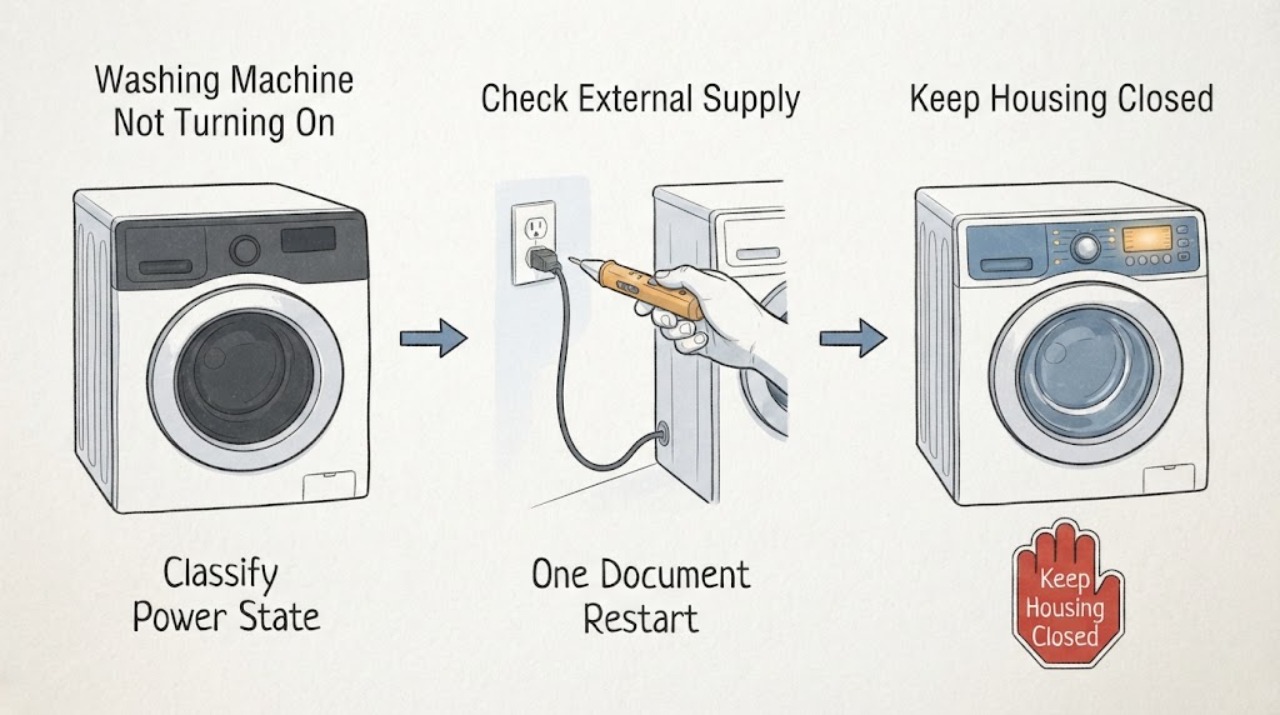
First separate a Siemens washing machine with no display at all from one whose display is lit but will not start. With dry hands and no water around the outlet, check the accessible plug, wall switch, socket, and circuit status without opening the appliance; do not use an extension lead or repeatedly reset a tripped protection device. If the panel lights, check the key or child-lock symbol, close the door without forcing it, select a normal programme, cancel any delay, and use the model's documented Start control. Record any exact E or F code before carrying out the one Siemens-recommended power-off restart. A leak, water near electrical parts, smoke, burning smell, sparking, a hot plug, or a breaker that trips again means stop using the machine and arrange qualified service.
Before you begin
Safety first
- This article supports ordinary-access observation and one model-relevant restart only when the appliance is dry, cool, and free of hazard symptoms. It does not authorize live testing, internal disassembly, door-lock bypass, hose disconnection, hot-water draining, or repeated power restoration.
Work through in order
Diagnostic checks
Use only checks that match the exact appliance or system and its official guide.
-
Check 1
From a dry, stable position, observe the machine before touching controls: check whether the display, selector lights, key or tap symbol, beeps, or any code appears, and note whether water is present in or under the appliance.
Expected result: Classify the symptom as a completely dark panel, a lit panel that ignores Start, a programme that starts and then stops, or a code or symbol accompanied by water, noise, or heat.
Next step: Write down the exact display and programme state, photograph the E-Nr. and code if visible, then follow the matching branch. Do not run a test cycle when there is a leak, water near electrical parts, smoke, burning smell, or unusual heat.
Stop if: Stop for water on the floor or outlet, exposed or damaged cable, smoke, burning smell, sparking, a hot plug, or any sign that the appliance is energized unsafely.
Why this matters
Why: A dark panel directs the next safe check toward the external supply and an electrical service boundary. A lit panel directs the diagnosis toward controls, child lock, door latch, water, drain, or a displayed code; a start-then-stop event is not the same as no power.
-
Check 2
If the panel is completely dark and the area is dry, visually check that the plug is fully seated, the accessible wall switch is on, and the cable and plug show no cuts, crushing, scorching, looseness, or heat damage; check the socket only with a separate low-risk lamp or other known-good appliance if doing so is safe.
Expected result: Record whether the other appliance works, whether the machine's circuit protection is off, whether the plug or socket is warm or damaged, and whether the Siemens panel returns after the supply is restored without opening the washer.
Next step: Have a qualified electrician address a dead, damaged, wet, or repeatedly tripping supply; arrange appliance service when the known-good supply is available but the Siemens panel remains dark. Never use an extension lead or multiple adaptor.
Stop if: Do not touch wet electrical equipment, handle a damaged plug or cable, remove the socket cover, open the washer, or keep resetting a breaker or earth-leakage device.
Why this matters
Why: A dead socket or switched-off circuit points outside the washer. A working socket with a dark or damaged washer connection suggests an appliance or wiring fault. A warm, scorched, loose, wet, or repeatedly tripping connection is an immediate service boundary.
-
Check 3
Only when the machine is dry, cool, free of smoke or odor, and the external supply looks safe, switch the appliance off normally and wait five seconds before switching it on once, as Siemens specifies for selected E:00/E:10 and other recurring codes; do not repeat the cycle as a test.
Expected result: Record whether the display returns normally, the same code returns, a different code appears, or the panel remains dark; also note whether the machine was already holding water.
Next step: Use the E-Nr., full code, symbol, and state before and after this one restart when requesting qualified Siemens service. Do not bypass a lock or reconnect after a trip to force a cycle.
Stop if: Skip the restart and stop for a leak, standing water at electrical parts, smoke, burning smell, sparking, abnormal heat, damaged supply, or a protection device that trips again.
Why this matters
Why: A normal return with no code supports a transient control state, but it does not clear a safety symptom. A returning code or dark panel means the fault remains and needs the exact model and code for service; retained water may require a drain-specific procedure rather than another start attempt.
-
Check 4
If the display is lit, set the selector to the intended programme, cancel a visible delay or paused state according to the model controls, and close the door gently until it latches; inspect only the visible seal and opening for a trapped item or obvious overload, then use the Start control exactly as the panel or manual describes.
Expected result: Record whether a key or CL symbol remains, the door gives a normal latch indication, Start is accepted, the display counts down, or an E16/F16/E34-type door indication appears.
Next step: Use the exact Siemens manual for the E-Nr. to release child lock or select the correct Start action. Remove only a visibly trapped item or a small amount of excess laundry without force; if the door will not latch, the lock symbol persists, or the code returns, request service.
Stop if: Do not force the door, defeat the interlock, insert tools into the latch, or reach inside a machine with water, heat, movement, or an unknown electrical state.
Why this matters
Why: A key or CL symbol points to an active child lock; a door that does not latch or a door code points to load, alignment, visible obstruction, or a lock fault. A valid latch with an unresponsive Start control points to the programme or controls rather than the household supply.
-
Check 5
If the controls accept Start but the machine remains idle or shows a tap, E17, or E29-type indication, stop the programme and, only after safe isolation, inspect the household tap position and the visible inlet hose for a closed valve, sharp kink, crushing, or an obvious external leak; do not disconnect the hose.
Expected result: Record whether the tap is open, the hose is visibly kinked or leaking, other fixtures have normal supply, and whether the tap symbol or inlet code clears after the visible condition is corrected.
Next step: Restore only a clearly closed tap or visible hose position from ordinary access, then make at most one normal start attempt when there is no leak. Arrange plumbing or appliance service for weak supply, leaks, or a returning code.
Stop if: Do not open a leaking connection, clean a hidden inlet screen, pull the appliance through a wet area, or continue if water reaches electrics or the floor is unstable.
Why this matters
Why: A closed tap, visible kink, weak household supply, or inlet indication can prevent the washer from progressing even though its panel is on. A normal supply with a returning code points to a valve, inlet protection, sensor, or control issue that requires model-specific service.
-
Check 6
If the drum contains water or the display shows an E18/F18-type drain indication, do not select repeated start attempts; identify the E-Nr. and follow only the model's documented drain procedure, keeping the machine isolated and allowing hot water to cool before any user-accessible draining step.
Expected result: Record whether water remains, the drain hose is visibly kinked, the floor or base is wet, and whether the exact drain code returns after a permitted, completed procedure.
Next step: Keep the supply tap closed when a leak is suspected and request appliance service for a persistent drain code, inaccessible water, or any base leak. Do not resume normal operation until the cause is assessed.
Stop if: Do not open a filter with hot or pressurized water behind it, tilt the appliance, reach into the drum or pump, or connect power while water is near electrical parts.
Why this matters
Why: Retained water or a blocked or kinked drain path can prevent a new programme or spin from proceeding. A leak, water in the base, hot water, or a code that remains after the manual procedure indicates a service boundary.
Use your observations
Decision map
Find the observation that best matches what you see, then follow the next safe action.
-
PATH 01Safety boundary
What you see
The Siemens washer has no display, selector light, or response, and there is no visible water or electrical damage.
Do this next
Perform the dry-hand, ordinary-access plug, switch, socket, and circuit observation once, then arrange electrician or appliance service according to the result.
Why this path and its safety boundary
Why it matters: The external supply path is the first safe distinction; a known-good socket with a dark appliance points to an appliance-side fault.
Safety stop: Stop immediately for a warm or scorched plug or socket, wet floor or outlet, damaged cable, smoke, burning smell, sparks, or repeat protection trips.
-
PATH 02Safety boundary
What you see
The panel is lit, but pressing Start does not begin the selected programme.
Do this next
Check the selected programme, visible delay or pause state, lock symbol, door latch, and exact display code using the model manual, then request service if a safe start condition cannot be established.
Why this path and its safety boundary
Why it matters: A valid programme, delay state, child lock, door latch, water condition, or code may be blocking the start; this is not proof of a power failure.
Safety stop: Do not defeat the interlock, force the door, or run another programme when water, heat, smoke, odor, or electrical damage is present.
-
PATH 03Safety boundary
What you see
A key or CL symbol remains, or the door will not latch and a door code or no-start response appears.
Do this next
Use only the E-Nr.-specific Siemens instructions for child-lock release, remove a visibly trapped item or a small amount of load without force, and arrange service for a persistent lock or latch fault.
Why this path and its safety boundary
Why it matters: The child lock or door interlock is intentionally preventing control changes or an unsafe start; caught laundry or excess load can also prevent latching.
Safety stop: Do not pry, bypass, bridge, or force the lock, latch, door, or control buttons.
-
PATH 04Safety boundary
What you see
The controls accept Start but the machine waits, shows a tap symbol, or reports an inlet-related code.
Do this next
Check only the visible tap and hose condition after safe isolation; use Siemens service or a plumber for low pressure, leaks, or a recurring code.
Why this path and its safety boundary
Why it matters: A supply tap, pressure, visible hose condition, inlet protection, or model-specific inlet fault may prevent programme progress.
Safety stop: Do not disconnect a pressurized hose, open a leak, or handle wet electrical equipment.
-
PATH 05Safety boundary
What you see
Water remains in the drum, the washer will not advance, or an E18/F18-type drain indication appears.
Do this next
Keep the machine isolated, let hot water cool, follow the exact manual's drain procedure only, and request service if water cannot be safely managed or the indication returns.
Why this path and its safety boundary
Why it matters: A drain path or pump condition may be holding the safety interlock or preventing the next programme stage.
Safety stop: Do not open a hot or pressurized filter, tilt the washer, or reconnect it near standing water.
-
PATH 06Safety boundary
What you see
A code returns after the one documented restart, or there is a leak, smoke, burning smell, sparking, abnormal heat, or another protection trip.
Do this next
Stop operating the appliance; from a dry safe position isolate supply only if safe, close the water tap for a suspected leak, and arrange qualified electrical or appliance service.
Why this path and its safety boundary
Why it matters: The fault remains unresolved or has become an immediate water, fire, mechanical, or electrical hazard.
Safety stop: Do not touch wet equipment, approach smoke or fire, restore power repeatedly, run another cycle, or perform internal diagnosis.
Helpful context
Understand the symptom
Use the panel state to choose the first branch
No lights or sounds points to the supply path or an internal power fault. A lit display with no drum movement is a different problem: the machine may be waiting for a valid programme, a closed and locked door, the Start control, water, or a condition shown by a symbol or code. If water, heat, damage, or an electrical hazard is present, isolate it only from a dry, safe position and seek service.
A lock symbol or door that will not latch blocks the programme
On Siemens machines, a key symbol can indicate the child lock, while a door that has not latched can prevent a programme from starting. Child-lock controls vary by model, so use the exact manual for the E-Nr. Check only the visible door seal and latch area for caught laundry or an overloaded drum; never bypass, force, or defeat the interlock.
Water and drain conditions can look like a start failure
A programme may remain idle or stop after selection when the machine cannot fill or still holds water. Record whether the tap symbol, an inlet code, or a drain code is shown. Visible hose kinks and ordinary controls can be checked after safe isolation, but do not loosen a pressurized connection, open a hot or blocked filter with water behind it, or reach into the machine.
Use the E-Nr. and exact code for the service decision
Siemens error meanings and child-lock procedures vary with the appliance. Photograph the display, symbol, selector position, and rating-plate E-Nr. before changing settings. A code that returns after the documented single restart, a blank panel with a known-good supply, or any suspected internal fault needs qualified service rather than repeated testing.
Safety boundary
Stop conditions
- Stop using the washer for a leak, water near electrical parts, smoke, burning smell, sparking, a hot or scorched plug, damaged cable, violent movement, or a protection device that trips again.
- Do not touch wet electrical equipment, open appliance panels, test live parts, replace internal fuses, or bypass the door interlock.
- Do not force the door, insert tools into the latch, disconnect a pressurized inlet hose, tilt the appliance, or open a hot or water-filled drain filter.
- Do not repeatedly reset a breaker or run repeated cycles after a fault; perform at most the single model-relevant Siemens off/wait/on restart when the appliance is dry, cool, and free of hazard symptoms.
- Keep the water tap closed when a leak is suspected and leave the appliance disconnected when electrical damage or recurring trips occurred until qualified service assesses it.
Only after diagnosis
Potential parts
- door interlock assembly
Consider this category only if the exact E-Nr. and a qualified diagnosis confirm that the door closes correctly but the lock does not report a safe latch or a door code persists.
Confirm the full Siemens E-Nr. and manufacturer fit information before any replacement; do not bypass the interlock or infer fit from appearance. - inlet valve or water-protection assembly
Consider this category only after the visible tap, pressure, hose, and inlet path are checked and a qualified diagnosis links a recurring water-supply indication to the appliance assembly.
Confirm the exact model, water-protection configuration, electrical specification, and manufacturer fit information; do not open or alter a pressurized water connection. - drain pump assembly
Consider this category only when retained water or a recurring drain indication remains after the model-approved external checks and service diagnosis identifies the pump assembly.
Confirm the exact E-Nr. and pump configuration with Siemens or a qualified professional; drain work may involve residual or hot water and is not a blind user replacement. - control or power module
Consider this category only when a known-good external supply is confirmed and a qualified diagnosis identifies an appliance-side control or power fault.
Confirm the exact E-Nr., revision, programming requirements, and manufacturer fit information; do not test or replace an energized internal module.
When checks do not resolve it
Need a professional?
Request qualified Siemens or appliance service when the known-good external supply is available but the panel stays dark, a child lock or door indication persists, an inlet or drain code returns, an unlisted code appears, the machine starts and stops without a clear user-level cause, or any internal fault is suspected. Use an electrician for a dead or damaged socket, cable, plug, or repeated circuit trips; use plumbing help for unsafe or weak water supply. Provide the E-Nr., exact code or symbol, programme state, photos, and any leak, heat, odor, noise, or trip history.
Safety scope: This article supports ordinary-access observation and one model-relevant restart only when the appliance is dry, cool, and free of hazard symptoms. It does not authorize live testing, internal disassembly, door-lock bypass, hose disconnection, hot-water draining, or repeated power restoration.
Common questions
FAQ
Why is my Siemens washing machine completely dark?
First distinguish a dark panel from a lit panel that will not start. If the area is dry and undamaged, observe the plug, wall switch, socket, and circuit from ordinary access, using a separate low-risk appliance only when safe. A dead socket points to the electrical supply; a working socket with a dark washer needs qualified appliance service. Do not touch wet or damaged equipment, open panels, or keep restoring a tripping circuit.
Why does my Siemens washer have lights but not start?
A lit panel can still be waiting for a valid programme, a cancelled delay, the Start control, a closed door, child-lock release, water, or a code-specific condition. Check the visible key symbol, door latch, programme state, and exact display using the E-Nr.-specific manual. Do not bypass the door lock or force another cycle when a safety symptom is present.
What does the key symbol mean on a Siemens washing machine?
Siemens uses the key symbol to indicate that child lock is active. The release method varies by model, so use the manual for the machine's E-Nr. A key symbol that persists after the documented control sequence, or a door that will not latch, needs service rather than a lock bypass.
Should I reset a Siemens washing machine that will not turn on?
Only when the appliance is dry, cool, and free of smoke, odor, sparks, leaks, damaged wiring, or repeated trips, follow the Siemens code guidance for one off/wait/on restart. The official error table specifies a five-second wait for selected codes and service if the code returns. Repeated resets or repeated cycles are not a diagnosis.
Can a water or drain problem stop a Siemens washing machine from starting?
Yes. A tap or inlet indication can prevent programme progress, and retained water or a drain indication can block the next stage. Check only visible tap and hose conditions after safe isolation, let hot water cool, and use the exact model procedure. Do not loosen a pressurized hose, open a hot filter, tilt the appliance, or reconnect power near water.
Read the exact guide
Official sources
- Washing machine trips the electrics | Siemens Home AppliancesSiemens Home Appliances · Official Siemens Home Appliances troubleshooting guidance for a Siemens washing machine that trips electrical protection; local electrical requirements and a qualified electrician control the installation assessment.
- Error codes and messages of washing machines | Siemens HomeSiemens Home Appliances · Official Siemens Home Appliances troubleshooting guidance for Siemens washing machines; exact symbols, code meanings, and controls can vary by E-Nr.
Community feedback
Share a repair observation
Share a plain-text repair observation. Accepted observations are published automatically; this page may take a moment to update.