
On this page
Start here
Quick answer
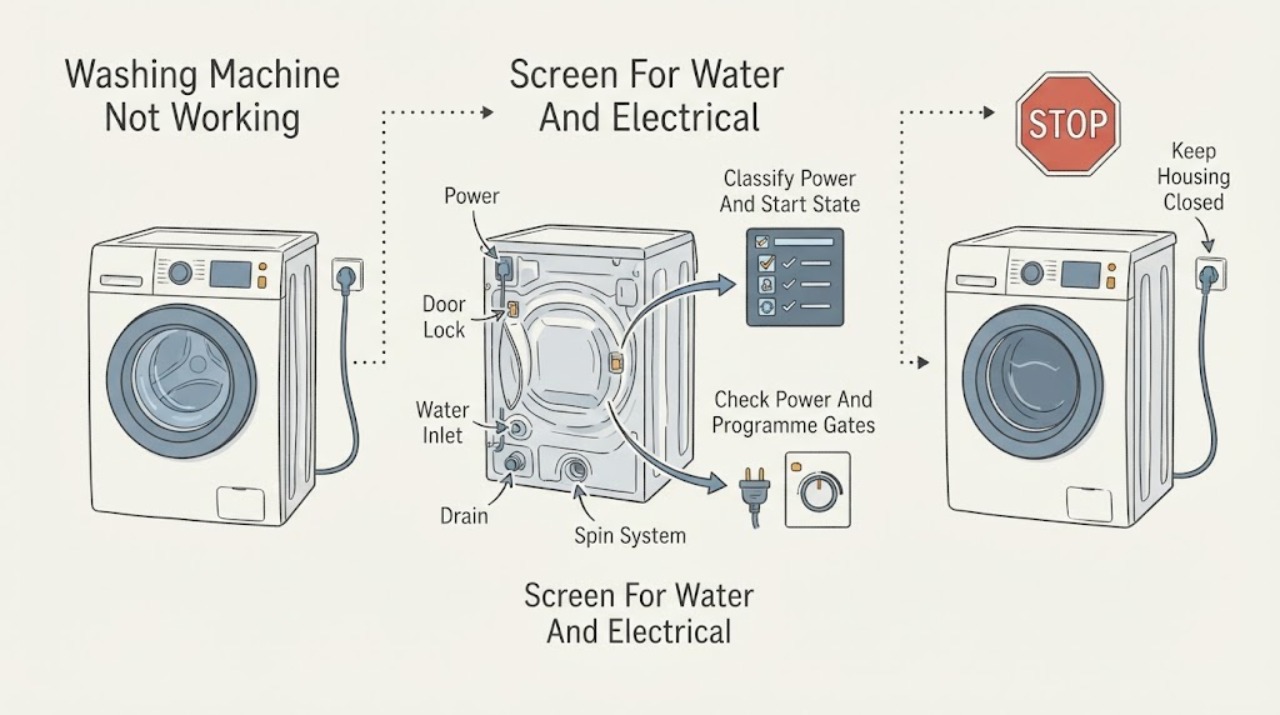
First separate a completely dead Siemens washing machine from one that powers on but will not start, fill, drain, spin, or finish. Check only safe external items: the plug and household circuit, whether the display or indicators work, the Start control, door closure, childproof lock, delayed-start setting, water tap and inlet hose, and the drain hose for an obvious kink. Siemens manuals identify power loss, an unclosed door, childproof lock, delayed start, blocked water inlet or drain paths, excess water, and unbalanced loads as different branches. If there is a leak, damaged cord, water near electrics, smoke, burning odor, repeated breaker operation, violent movement, or metal-on-metal noise, stop immediately, isolate water or power only when safe, and arrange qualified service. Record the exact E-Nr., display message, cycle stage, and water state rather than guessing a part.
Before you begin
Safety first
- This article supports ordinary-access observation and exact-manual controls only. Do not open the appliance, touch wet electrics, disconnect pressurised hoses, bypass locks, or work on wiring.
Work through in order
Diagnostic checks
Use only checks that match the exact appliance or system and its official guide.
-
Check 1
Before restarting the Siemens washing machine, look from ordinary access for active leaking, water near a plug or electrical connection, a damaged cord, smoke, burning odor, sparks, repeated breaker operation, violent movement, or loud metal-on-metal contact.
Expected result: Record whether water is entering the floor or electrical area, whether the drum is moving dangerously, and whether any smoke, odor, spark, heat, or damage is present.
Next step: Stop the programme. If safe without touching wet electrics, turn off the water tap and isolate power at the normal disconnect; keep clear of the machine and arrange qualified appliance, electrical, or emergency help as appropriate.
Stop if: Do not touch a wet plug or appliance, reach into a moving drum, repeat a breaker reset, or run another cycle after a hazard sign.
Why this matters
Why: A water-to-electricity hazard, fire or electrical sign, uncontrolled movement, or mechanical contact is outside a normal user check and can worsen injury or property damage.
-
Check 2
With the machine stopped and safe, record the E-Nr. from its rating plate if it can be read without moving the appliance, then note whether the display and indicators work, the selected programme, the door state, and whether Start or Start / Reload is accepted.
Expected result: Classify the symptom as no display, powered but not starting, locked, filling but not washing, washing but not draining, draining but not spinning, or stopping with an error; record the complete message and stage.
Next step: Use the exact Siemens manual or product support entry for the E-Nr. and carry the recorded state into any service request.
Stop if: Do not guess a code meaning from another model or bypass the door lock to make the programme run.
Why this matters
Why: A blank display supports a power path; a start refusal supports door, lock, childproof, delayed-start, or control settings; a later-cycle failure points toward water, drain, spin, heating, load, or a model-specific fault.
-
Check 3
From a safe position, check the plug and household circuit, whether nearby kitchen or laundry lighting also lost power, whether the door closes without trapped laundry, whether Childproof Lock is active, and whether Ready In or another delay is selected.
Expected result: Note whether the display returns, the door indicator changes, the lock clears through the documented control, Start begins the programme, and the circuit remains on.
Next step: Clear only the documented setting and press Start once; if the machine still will not start or the lock returns, leave it off and arrange qualified service.
Stop if: Do not repeatedly reset the circuit, pull a damaged cord, force the door, or bypass a safety lock.
Why this matters
Why: A power cut, unclosed door, trapped clothing, childproof lock, or delay can stop the programme before water or drum motion begins. A circuit that opens again or a damaged connection requires service.
-
Check 4
If the machine powers on but does not fill, inspect only the visible water tap and inlet hose for an off tap, kink, crush, or obvious damage, and follow the exact manual if it identifies an accessible inlet-filter check.
Expected result: Record whether the tap is open, the hose is unobstructed, water enters after a normal start, an inlet warning appears, or the machine remains dry with no visible hose issue.
Next step: Restore only an accidentally closed tap or visible hose position when dry and safe, then try the programme once. If the inlet warning remains or no water enters, stop and request service.
Stop if: Do not disconnect pressurised hoses, open the appliance, add water manually, or continue when a hose leaks or water reaches electrics.
Why this matters
Why: An off tap, kinked hose, blocked inlet filter, low supply, or valve fault can prevent filling; the external observation cannot identify a valve or internal sensor fault.
-
Check 5
If water remains or spin does not complete, note the water level and use only the model's safe drain or cancellation procedure; inspect the visible drain hose for a kink and observe whether the load is severely uneven without reaching into a moving drum.
Expected result: Record whether water drains, the drain warning clears, the pump sounds without moving water, the machine repeatedly redistributes the load, or the appliance walks, bangs, or scrapes.
Next step: For a safe, dry, model-authorized load adjustment, redistribute the load and use the documented drain or spin programme once. If water remains, the pump is blocked, or movement is severe, isolate the machine and arrange service.
Stop if: Do not open a pump or filter with water present unless the exact manual procedure makes the area safe, do not reach into a moving drum, and do not run another cycle after violent movement or metal scraping.
Why this matters
Why: A blocked or kinked drain path, pump condition, rinse-hold state, or unbalanced load can prevent normal completion. Violent movement or scraping is not a normal load adjustment and needs a stop boundary.
-
Check 6
Compare the complete error or indicator state with the exact Siemens E-Nr. manual, then stop troubleshooting if the message returns, the machine leaks, heating does not occur, the cycle cannot drain or spin, or the circuit opens again.
Expected result: Provide the E-Nr., complete code, selected programme, display and door state, power result, inlet and drain observations, water level, load or vibration symptom, and any single manual-authorized reset or drain step attempted.
Next step: Arrange Siemens after-sales service or an appropriately licensed electrical or plumbing professional, and keep the washer unused when the fault involves water, heat, smoke, odor, severe movement, or recurring codes.
Stop if: Do not operate through a recurring error, bypass a lock, or repeat a cycle after a leak, electrical sign, or violent movement.
Why this matters
Why: This record lets service distinguish power, door, inlet, drain, spin, load, heating, and electronics paths without asking the user to open the machine.
Use your observations
Decision map
Find the observation that best matches what you see, then follow the next safe action.
-
PATH 01Safety boundary
What you see
There is active leaking, water near electrics, a damaged cord, smoke, burning odor, sparks, repeated breaker operation, violent movement, or metal scraping.
Do this next
Stop the programme, isolate water and power only when safe without touching wet electrics, keep clear, and arrange qualified or emergency help.
Why this path and its safety boundary
Why it matters: The machine is outside a safe user-diagnosis boundary.
Safety stop: Do not touch wet electrical parts, reach into motion, or retry the cycle.
-
PATH 02Safety boundary
What you see
The display and indicators are blank and the controls give no response.
Do this next
Check ordinary household power status from a safe position and request service if power is available or the display remains blank.
Why this path and its safety boundary
Why it matters: A power cut, plug, circuit, switch, or internal power condition is possible; the symptom does not yet identify a wash-system fault.
Safety stop: Do not open the machine or repeatedly reset a circuit that opens again.
-
PATH 03Safety boundary
What you see
The display works but Start does not begin the programme, or a door, childproof, or delayed-start indication is present.
Do this next
Close the door without force, remove only visibly trapped clothing, clear the documented lock or delay, and press Start once; arrange service if the state remains.
Why this path and its safety boundary
Why it matters: A programme gate is blocking the cycle before filling or drum motion.
Safety stop: Do not bypass the lock or force the door.
-
PATH 04Safety boundary
What you see
The programme starts or attempts to start but no water enters and an inlet symptom or message appears.
Do this next
Check the tap and visible hose as the exact manual permits; if the warning remains or water does not enter, request service.
Why this path and its safety boundary
Why it matters: The tap, visible hose, inlet filter, supply, valve, or water-level system may be involved.
Safety stop: Do not disconnect pressurised hoses or open the machine.
-
PATH 05Safety boundary
What you see
Water remains, the drain warning appears, the pump moves no water, or the machine cannot reach spin.
Do this next
Use the documented safe drain or spin path and inspect only a visible hose kink; arrange service for a blocked pump, persistent water, or failed spin.
Why this path and its safety boundary
Why it matters: A drain path, pump, rinse-hold, water-level, or load-balance condition may be preventing completion.
Safety stop: Do not open a wet pump area, reach into motion, or continue after walking, banging, or scraping.
-
PATH 06Safety boundary
What you see
The cycle completes poorly because water does not heat, a heating-related code appears, or any error returns after the model's allowed step.
Do this next
Keep the machine off, record the exact code and programme stage, and arrange Siemens professional service.
Why this path and its safety boundary
Why it matters: A heater, sensor, control, or other model-specific fault needs trained diagnosis; it is not a user part-replacement decision.
Safety stop: Do not open the electrical area or keep running cycles through a recurring warning.
Helpful context
Understand the symptom
Define which part of the wash cycle has failed
Not working can mean no display, no response to Start, a door that will not lock, no water entering, no drainage, no spin, or a cycle that stops with a message. Note the display, selected programme, door state, water level, and stage of the failure. A Siemens machine may show a normal pause, load detection, foam handling, or rinse-hold state, so the visible symptom needs to be identified before a repair path is chosen.
Power, door, and delay settings come first
A tripped circuit, power cut, unclosed door, trapped laundry, childproof lock, or Ready In setting can prevent a programme from starting. Check these from ordinary access and use the exact manual's controls. Do not bypass the door lock, pull on a damaged cord, or keep resetting a circuit that opens again.
Water inlet and drainage are separate branches
If the machine powers on but does not fill, check the tap, visible inlet hose condition, and the model's external inlet-filter guidance. If water remains, look for an obvious drain-hose kink and use only the matching drain procedure. A blocked pump or filter may require controlled access with the machine isolated and residual water managed; stop if there is flooding, hot water, or any risk of electrical contact.
Spin, vibration, and heating symptoms need different decisions
A machine may repeatedly redistribute an unbalanced load, while severe walking, impact, or metal scraping is not a normal reason to continue. A temperature or heating message, a persistent error, or a machine that cannot complete a cycle needs the exact Siemens manual and often service. Do not infer a motor, heater, pump, or lock part from a broad not-working description.
Safety boundary
Stop conditions
- Stop immediately for active leaking, water near a plug or electrical connection, damaged cord, smoke, burning odor, sparks, repeated breaker operation, violent movement, or metal scraping.
- Do not touch wet electrical parts, reach into a moving drum, open the machine, disconnect pressurised hoses, or bypass a door or childproof lock.
- Do not repeatedly reset a circuit, clear a recurring error, or keep running cycles after a leak, abnormal heat, or electrical sign.
- Do not open a pump or filter area with water present unless the exact manual procedure makes it safe and the appliance is isolated; arrange service when uncertain.
- Do not infer a heater, pump, motor, valve, or lock replacement from a broad symptom; use the exact E-Nr. manual and qualified service.
Only after diagnosis
Potential parts
- model-specific drain pump or filter assembly
Consider this category only when the exact model diagnosis confirms a drain-path or pump fault; a full drum can also result from a hose, rinse-hold, or programme state.
Match the exact E-Nr. and pump design through qualified service; do not open a wet pump area as a guess. - model-specific inlet valve or filter assembly
Consider only after the tap, visible hose, and model-authorized inlet checks do not explain a no-fill condition and service confirms the component.
Confirm the exact model, water connection, and safety procedure through qualified service; do not disconnect pressurised hoses. - model-specific door lock, heater, or control assembly
Consider only when the exact error, programme stage, and trained diagnosis identify the relevant assembly; a broad no-working symptom is not enough.
Do not bypass the lock or open the electrical area; match the exact E-Nr. and safety design through Siemens service.
When checks do not resolve it
Need a professional?
Arrange Siemens after-sales service when power is available but the panel stays blank, the programme will not start, the door or lock state cannot be resolved, water does not enter or drain, spin repeatedly fails, the machine leaks, heating is absent, an error returns, or the circuit opens again. Use a licensed electrical or plumbing professional for household wiring, supply, or drainage issues, and emergency services for smoke, fire, or immediate electrical danger.
Safety scope: This article supports ordinary-access observation and exact-manual controls only. Do not open the appliance, touch wet electrics, disconnect pressurised hoses, bypass locks, or work on wiring.
Common questions
FAQ
Why is my Siemens washing machine completely blank?
Check the ordinary household circuit and whether nearby lighting or another appliance also lost power. Siemens manuals identify a power cut, plug, or circuit as possible causes. If power is available but the display remains blank, leave the machine off and request service.
Why does my Siemens washing machine have power but not start?
Check that the door closes without trapped laundry, Start was pressed, Childproof Lock is not active, and Ready In or another delay is not selected. Use the exact model controls once; never bypass the door lock.
What should I do if my Siemens washer will not fill?
From a dry, safe position, check that the water tap is open and the visible inlet hose is not kinked or damaged. Follow the exact manual for any accessible inlet-filter check. If no water enters or the hose leaks, stop and arrange service.
Why is water left in my Siemens washing machine?
A kinked or blocked drain path, blocked pump, rinse-hold state, or a high water level can prevent completion. Use only the model's safe drain procedure and do not open a wet pump area unless the manual makes it safe. Persistent water needs service.
Why does the Siemens washer shake or fail to spin?
The machine may be redistributing an uneven load, but severe walking, banging, or metal scraping is a stop condition. Stop the cycle, keep clear, and arrange service when movement is violent or the symptom returns.
What information does Siemens service need?
Provide the exact E-Nr., complete code or indicator state, programme, door and lock state, power result, inlet and drain observations, water level, load or vibration symptom, and any single manual-authorized step already attempted.
Read the exact guide
Official sources
- Service Assistance - Siemens washing machine supportSiemens Home Appliances · Official Siemens product-support page; select the exact appliance and country before applying a manual or repair route.
- User manual and installation instructions WM14N202GBSiemens Home Appliances · Official Siemens manual for WM14N202GB; use the exact E-Nr. manual for another model or country.
- User manual and installation instructions WM14N2W3Siemens Home Appliances · Official Siemens manual for WM14N2W3; procedures and indicators vary by exact E-Nr.
- Washing machine is not heating waterSiemens Home Appliances · Official Siemens troubleshooting page; heating behavior and codes vary by exact washing-machine model.
Community feedback
Share a repair observation
Share a plain-text repair observation. Accepted observations are published automatically; this page may take a moment to update.