
On this page
Start here
Quick answer
Smeg oven not working is too broad to diagnose as one failed part. First record the exact model, country or market, built-in or range configuration, fuel type, and whether the display is blank, the controls are lit but a program will not start, the oven starts but does not heat, or an error or lock is shown. With the oven cool and free of smoke, gas odor, burning smell, arcing, water near electrical parts, damaged glass, or repeated breaker trips, check only the external supply, the correct function and timer or clock state, the closed door, and the exact model manual. Smeg says its oven families and features differ, and its support pages direct users to the supplied manual for model-specific functions. Pyrolytic models can keep the door locked until they cool, and a cooling fan can continue after switch-off. If the oven remains dead, will not heat, shows a returning error, stays locked when cool, or has a gas, fire, electrical, or overheating symptom, stop using it and arrange qualified Smeg service.
Before you begin
Safety first
- This article supports model identification and ordinary-access observation only. Gas work, electrical diagnosis, internal heating or fan work, lock or door repair, panel removal, and component replacement belong to qualified service.
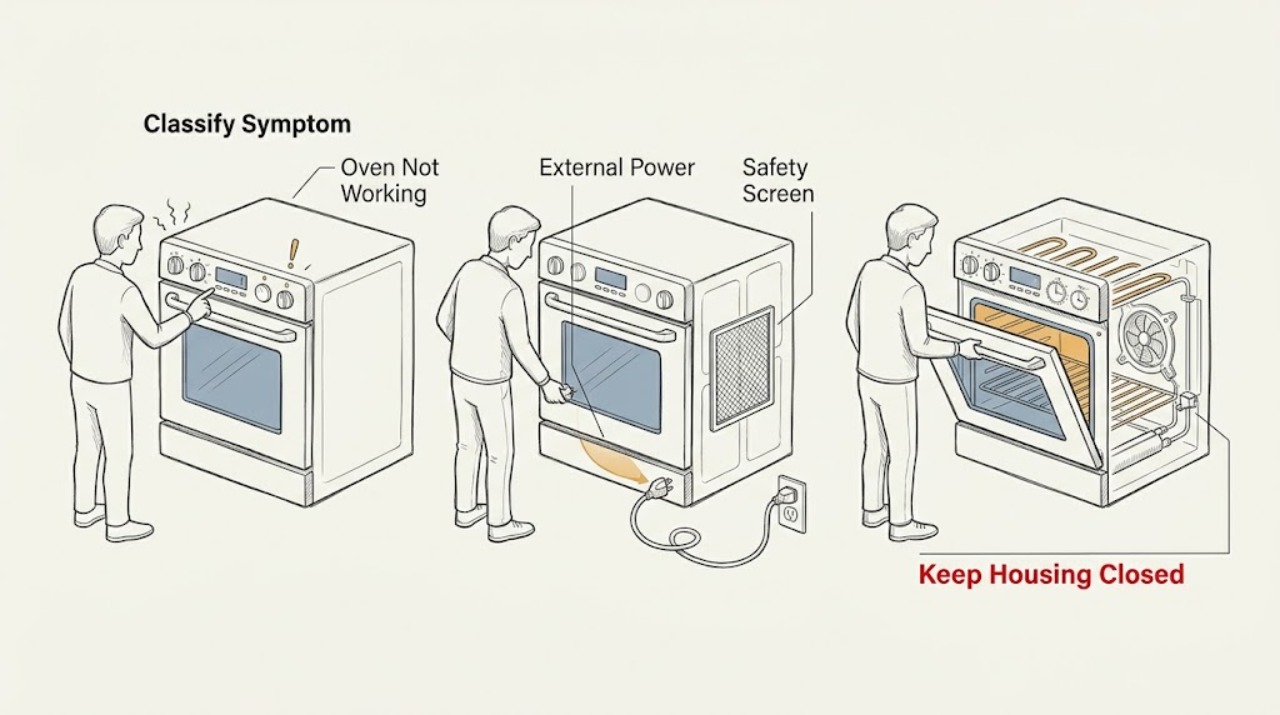
Work through in order
Diagnostic checks
Use only checks that match the exact appliance or system and its official guide.
-
Check 1
Stop the oven from a safe position and screen for immediate fire, gas, electrical, heat, and glass hazards before pressing controls or resetting power.
Expected result: Look and listen only from ordinary access for smoke, gas odor, abnormal flame, sustained hiss, burning smell, arcing, a hot or discolored outlet or cord, water near electrical parts, broken glass, uncontrolled heat, or a breaker that has opened.
Next step: Keep the oven off and request qualified appliance, electrical, or gas help when a hazard is present. If none is present, record the model, fuel type, and symptom state.
Stop if: Do not relight a gas oven, operate switches near gas odor, touch wet electrical equipment, open a panel, or keep resetting a breaker while a hazard remains.
Why this matters
Why: Any of these signs changes a general no-work complaint into a safety and qualified-service response. The absence of these signs permits only cool, external, model-guided checks.
-
Check 2
Use the display and controls to classify the failure without repeatedly starting the oven.
Expected result: Record whether the display is completely blank, the display lights but Start or a function does not respond, the program starts but there is no heat, the oven remains in a cleaning or lock state, or an error message or warning appears.
Next step: Photograph any message and continue only to the actions matching the observed state. If the model, display, or symptom cannot be identified, request service rather than guessing.
Stop if: Do not treat a blank display, no-heat symptom, lock, or error as proof of a particular failed part.
Why this matters
Why: Blank supports an external power check; a lit but inactive panel supports timer, mode, lock, door, or control checks; no heat supports fuel, heating, or setting checks; an error or lock requires its exact manual branch.
-
Check 3
If the display is blank, inspect only the visible plug, outlet, breaker, and appliance isolation switch from a dry, safe position.
Expected result: Record whether the plug appears seated, the outlet or switch has ordinary power by a safe external check, the breaker is open, or the cord, outlet, or switch is hot, discolored, wet, or damaged; do not move a built-in or hard-wired oven.
Next step: Use the exact model installation guidance and a qualified installer or electrician for any connection issue. If the supply is normal but the display remains blank, keep the oven off and request Smeg service.
Stop if: Do not open an outlet or junction box, measure live wiring, move a hard-wired appliance, bypass grounding, or repeatedly reset the breaker.
Why this matters
Why: An external supply interruption can explain a blank panel, while heat, damage, water, an inaccessible connection, or a breaker that opens again makes this an electrical-service boundary.
-
Check 4
If the display is lit but the oven will not start, use the exact model manual to check the selected function, clock or timer state, Start control, and any control or child lock.
Expected result: Record whether the display accepts a function and temperature, shows a delayed or timed program, indicates a lock, responds only after a documented start gesture, or remains unresponsive after the panel is clean and dry.
Next step: Follow only the model manual's documented way to cancel a timer, unlock controls, select a function, and start. If the state is unclear or unchanged, stop and request service.
Stop if: Do not spray liquid into controls, use sharp objects, bypass a control lock, or remove the console.
Why this matters
Why: A timer, lock, or unavailable function can prevent a program from starting without proving a failed heating component. A panel that remains unresponsive after the model-approved setting check needs service.
-
Check 5
If the door is locked or a program will not start, allow the oven to cool and check visible door closure and the exact manual's cleaning or lock state without force.
Expected result: Record whether a pyrolytic or other cleaning cycle is active or recently finished, whether the oven is still hot, whether the door closes normally, and whether the lock remains after the model's documented cool-down state.
Next step: Wait for the model-documented cool-down, then use only its normal unlock or power procedure. If the lock persists, the latch or hinge is damaged, or the door will not close, keep the oven off and request service.
Stop if: Do not pry, lift, remove, or force the door; do not bypass the lock or run the oven with damaged glass, hinge, latch, or seal.
Why this matters
Why: Smeg says pyrolytic doors stay locked during the cycle and until the oven has cooled; a door that remains locked when cool or a door that will not close normally is not resolved by forcing it.
-
Check 6
If a program starts but the oven does not heat, confirm the model-appropriate function, temperature, preheat indicator, and fuel configuration from the manual without opening the appliance.
Expected result: Record whether the function is fan-assisted, conventional, grill, steam, microwave-combination, or gas where fitted; whether a preheat indicator changes; whether the display shows a timer or error; and whether a gas model has normal ignition, no ignition, gas odor, delayed ignition, or an abnormal flame.
Next step: Follow the exact manual's normal function and preheat guidance once. For persistent no heat, any gas symptom, or any smoke, burning smell, arcing, or abnormal heat, keep the oven off and request qualified service.
Stop if: Do not open the oven to test an element or igniter, adjust gas pressure, repeat ignition tests, or bypass a thermostat or safety device.
Why this matters
Why: Smeg offers different oven technologies and functions, so a selected mode or preheat state can change expected behavior. No heat after a correct model-specific selection may involve a heating, control, fan, or fuel fault; gas odor or abnormal ignition is an immediate safety issue.
-
Check 7
If an error, warning, blinking display, or unusual lock message appears, record the exact characters and the model's operating state before changing settings.
Expected result: Photograph the complete display and note the function, timer, cleaning state, door state, recent power interruption, and whether the message clears or returns after the exact manual's documented action.
Next step: Use the exact model manual or Smeg support path. If the message returns, the door remains locked when cool, or the oven stays unusable, keep it off and request service.
Stop if: Do not borrow a code table from another model, clear a safety lock by force, or order a part from the display alone.
Why this matters
Why: A code or lock message is model-specific and may describe an operating state rather than a replaceable component. A recurring or unlisted message remains unresolved without the model manual or service diagnosis.
-
Check 8
Only when the oven is cool, dry, stable, and free of gas, smoke, burning, electrical, water, glass, and overheating signs, perform one restart exactly as the model manual permits.
Expected result: Record whether the display returns, the controls respond, the door unlocks normally, the selected function starts, and the original no-work symptom remains or returns; do not run a prolonged cooking or ignition test.
Next step: Stop troubleshooting and request qualified Smeg service with the model, fuel type, symptom classification, display or lock record, and restart result.
Stop if: Do not repeatedly cycle power, continue after a breaker trip, or operate when smoke, gas odor, abnormal flame, burning smell, arcing, severe heat, or water contact appears.
Why this matters
Why: A restart can clear a temporary control state but does not prove the oven is repaired. A returning fault or abnormal behavior is evidence for service rather than another reset.
Use your observations
Decision map
Find the observation that best matches what you see, then follow the next safe action.
-
PATH 01Safety boundary
What you see
There is gas odor, abnormal flame, smoke, burning smell, arcing, severe heat, water near electrical parts, broken glass, or a breaker event.
Do this next
Keep the appliance off; leave the area for gas odor or smoke and seek qualified gas, emergency, electrical, or appliance help from a safe location.
Why this path and its safety boundary
Why it matters: The oven is outside ordinary user troubleshooting and may present a gas, fire, burn, shock, or injury hazard.
Safety stop: Do not operate switches near gas odor, relight, keep testing, touch wet equipment, or reset repeatedly.
-
PATH 02Safety boundary
What you see
The oven display and controls remain completely blank.
Do this next
Inspect only visible external power from a dry position and use the exact installation guidance; request qualified service if the supply is normal, inaccessible, damaged, or the display remains blank.
Why this path and its safety boundary
Why it matters: External supply, isolation, breaker, or model-specific power is the first branch, but a persistent blank display may require service.
Safety stop: Do not move a built-in or hard-wired oven, open an electrical enclosure, or test live wiring.
-
PATH 03Safety boundary
What you see
The display is lit but a function will not start or the controls do not respond as expected.
Do this next
Use the exact manual to check the clock or timer, selected function, lock, and door closure; request service if the panel or start state remains abnormal.
Why this path and its safety boundary
Why it matters: Timer, function availability, control lock, cleaning state, or door closure may be preventing start; a failed control is not established.
Safety stop: Do not bypass a lock, force the door, or remove the control panel.
-
PATH 04Safety boundary
What you see
The oven is locked during or shortly after pyrolytic cleaning and is still hot.
Do this next
Wait for the model-documented cool-down and use its normal unlock behavior; request service if the door stays locked when cool.
Why this path and its safety boundary
Why it matters: Smeg says the cleaning door lock remains engaged until the appliance has cooled to a safe level.
Safety stop: Do not pry, lift, or force the door or bypass the lock.
-
PATH 05Safety boundary
What you see
The program starts but the oven does not heat after the correct model-specific function and preheat behavior are confirmed.
Do this next
Keep the oven off and request qualified Smeg service, especially if the fault is accompanied by smoke, burning smell, abnormal heat, gas odor, abnormal flame, or a breaker event.
Why this path and its safety boundary
Why it matters: A heating, control, fan, or fuel issue is possible, but the exact component cannot be identified without diagnosis.
Safety stop: Do not open the cavity or control area to test elements, wiring, igniters, thermostats, or safety devices.
-
PATH 06Safety boundary
What you see
A gas-equipped Smeg model has gas odor, sustained hiss, delayed ignition, repeated ignition attempts, or an abnormal flame.
Do this next
Leave the area for gas odor or uncontrolled flame, avoid electrical switches and ignition, and seek local gas or emergency help from a safe location. Arrange qualified service before use.
Why this path and its safety boundary
Why it matters: This may be a gas or combustion hazard and is not a normal no-heat or sound branch.
Safety stop: Do not relight, adjust gas pressure, inspect fittings, or move the appliance.
-
PATH 07Safety boundary
What you see
An error or warning returns, remains unlisted for the exact model, or the oven remains unusable after one documented restart.
Do this next
Keep the oven off and request Smeg service with the exact model, fuel type, display, function, timer, door, and restart record.
Why this path and its safety boundary
Why it matters: The public checks have not established a safe user repair or a compatible part.
Safety stop: Do not borrow another model's instructions, repeatedly reset power, or order a component from the symptom alone.
Helpful context
Understand the symptom
Define what not working means
A blank display is a power-path question. A lit display that ignores Start is usually a control, timer, door, lock, or mode question. An oven that starts but stays cold is a heating, fuel, or setting question. An error, locked door, smoke, gas odor, or abnormal heat is its own safety branch. Write down the exact model and the symptom before trying a reset, because Smeg has separate convection, steam, speed, microwave, built-in, and range configurations.
Check settings without assuming a component failure
Use the exact model manual to confirm the selected cooking function, clock or timer state, start control, child or control lock if fitted, and whether a previous cleaning cycle is still cooling. Smeg notes that cooking functions and controls differ between models. A cooling fan that continues after switch-off can be normal, and a pyrolytic door can remain locked while hot; neither behavior alone proves the oven is broken.
Keep external checks separate from internal repair
From ordinary safe access, inspect the visible plug, breaker, door closure, display, and vent area only. Do not remove panels, test live wiring, open a gas connection, or replace a heating element, thermostat, fan, igniter, lock, or control board from a generic symptom. If the external checks do not restore normal operation, preserve the model and symptom record for service.
Gas and electric models need different boundaries
Some Smeg ranges use gas, while many Smeg ovens are electric or dual-fuel. If a gas-equipped model has gas odor, sustained hissing, delayed ignition, or an abnormal flame, do not continue testing or attempt to relight it. Leave the area and seek qualified help from a safe location. For an electric model, smoke, arcing, burning smell, water near electrical parts, or a breaker event is likewise a stop condition.
Safety boundary
Stop conditions
- Stop immediately for gas odor, abnormal flame, sustained hiss, smoke, burning smell, arcing, severe heat, water near electrical parts, broken glass, or a breaker event.
- Do not operate switches near a gas odor, relight or repeatedly ignite a gas oven, adjust gas pressure, inspect gas fittings, or move the appliance.
- Do not open electrical or control panels, test live wiring, bypass a lock or safety device, or replace an internal heating, fan, igniter, thermostat, or control part as a user test.
- Do not force a hot or locked door, continue a pyrolytic cycle with abnormal smoke or fire signs, or operate with damaged glass, hinge, seal, or door latch.
- Request qualified Smeg service when the display stays blank, the oven will not start or heat after exact-model checks, an error returns, the door stays locked when cool, or any gas, fire, electrical, water, or overheating symptom appears.
When checks do not resolve it
Need a professional?
Request qualified Smeg appliance service when the display stays blank, the controls will not start a documented function, the oven does not heat after the exact model's setting and preheat checks, an error returns or remains unexplained, the door stays locked when cool, or any gas odor, abnormal flame, smoke, burning smell, arcing, severe heat, water near electrical parts, broken glass, or breaker event is present.
Safety scope: This article supports model identification and ordinary-access observation only. Gas work, electrical diagnosis, internal heating or fan work, lock or door repair, panel removal, and component replacement belong to qualified service.
Common questions
FAQ
Why is my Smeg oven completely blank?
Check only the visible external supply, plug, outlet, breaker, and isolation switch from a dry, safe position. Do not move a built-in or hard-wired oven or open wiring. If the supply is normal or inaccessible but the display remains blank, request qualified service.
Why does my Smeg oven have power but not start?
Use the exact model manual to check the clock or timer, selected function, control lock, cleaning state, Start control, and door closure. Smeg functions differ by model, so a lit panel does not prove a heating component has failed.
Why is my Smeg oven not heating?
Confirm the exact model's function, temperature, timer, and preheat behavior without opening the oven. Persistent no heat can involve heating, control, fan, or fuel systems and needs qualified diagnosis. Gas odor, delayed ignition, abnormal flame, smoke, burning smell, arcing, or severe heat requires immediate shutdown and a safe-location service response.
Why is my Smeg oven door locked?
A pyrolytic cleaning cycle can keep the door locked until the oven has cooled. Wait for the model-documented cool-down and use its normal unlock procedure. Never pry or force the door; a lock that remains engaged when cool needs service.
When should I stop troubleshooting a Smeg oven?
Stop for gas odor, abnormal flame, smoke, burning smell, arcing, water near electrical parts, broken glass, severe heat, or a breaker event. Also request service for a persistent blank display, recurring error, no heat after model checks, unresponsive controls, or a door that stays locked when cool.
Read the exact guide
Official sources
- Oven FAQSmeg · Official Smeg USA oven FAQ; individual controls, cleaning systems, and fuel behavior vary by model, so the supplied manual controls.
- CPSC News Feature: Getting Ready For Cold WeatherU.S. Consumer Product Safety Commission · General CPSC gas-appliance safety guidance used only for the gas-odor stop boundary; it is not a Smeg product manual.
- User manualsSmeg · Official Smeg USA manual lookup; the installed product code and language must be used to obtain the applicable manual.
- FAQ CookersSmeg · Official Smeg cooker FAQ; it gives general configuration context and does not replace the exact model manual or local safety rules.
- Customer Service | Smeg COM - Customer ServiceSmeg · Official Smeg USA customer-service page; regional service routes and availability vary.
- OvensSmeg USA · Official Smeg USA oven family page used to distinguish convection, steam, speed, and combination configurations; it does not prove a specific model's fault.
Community feedback
Share a repair observation
Share a plain-text repair observation. Accepted observations are published automatically; this page may take a moment to update.