
On this page
Start here
Quick answer
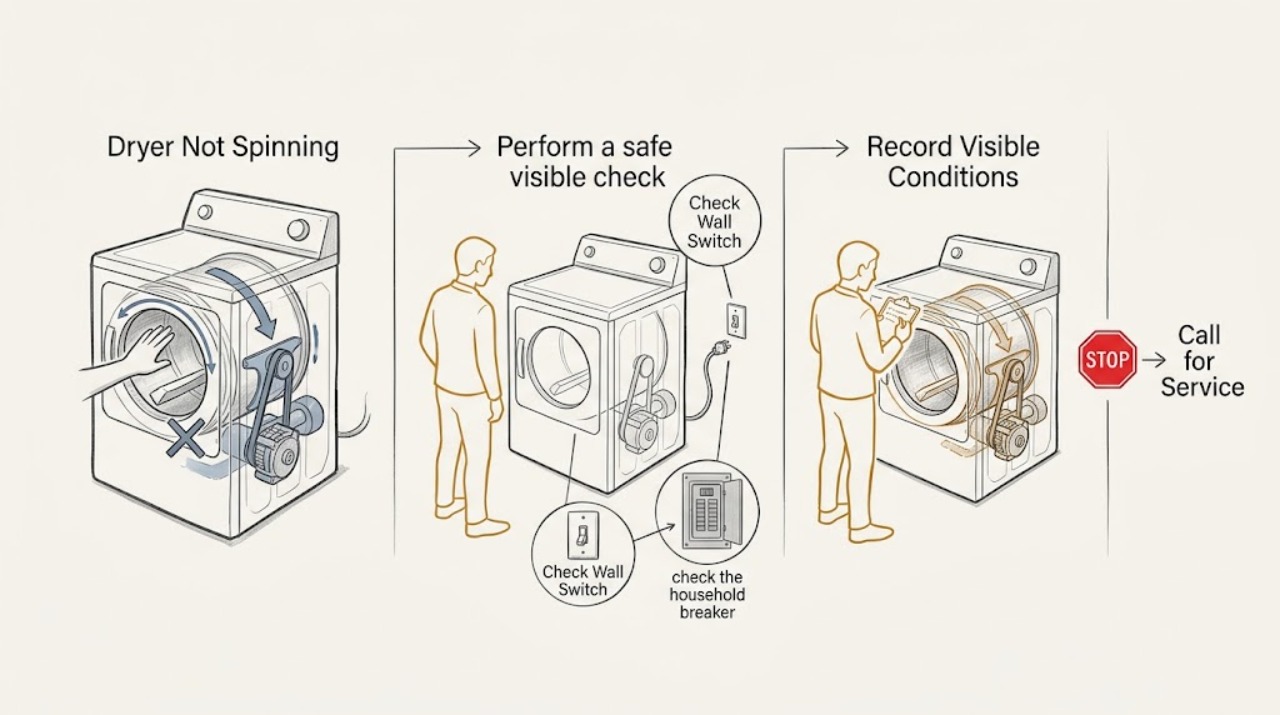
Stop the dryer and do not reach into a moving drum. Confirm the complete Speed Queen model from its nameplate, then check that the door is fully closed, the selected cycle and Start control are correct, and the household supply or breaker is on. Disconnect power only from a dry, safe position, wait for the dryer to cool, and turn the empty drum by hand only when the model instructions allow that user-level observation. A drum that turns freely but will not start points toward the door switch, start control, motor, or supply; a drum that is tight, scraping, or seized points toward an obstruction or drive problem. A motor that hums, starts and stops, or stops after warming can involve overload protection or a failing drive component. Stop immediately for smoke, burning smell, sparks, gas odor, grinding or metal-on-metal noise, abnormal heat, a drum that starts without the Start control, or a circuit that trips again. Do not remove panels or bypass the door safety switch.
Work through in order
Diagnostic checks
Use only checks that match the exact appliance or system and its official guide.
-
Check 1
Stop the cycle, remove any reachable controls from operation, and record the complete model number, electric or gas configuration, whether the display or timer responds, whether the drum is still moving, the cycle selected, and the exact sound or smell that preceded the failure.
Expected result: The dryer is completely unresponsive, the controls respond but the drum does not turn, the motor hums or clicks, the drum stops only after warming, or smoke, burning smell, sparks, gas odor, or grinding is present.
Next step: Use the no-start, empty-drum, overload, or hazard branch below. Keep the model and symptom record for the exact manual and service request.
Why this matters
Why: No response follows a supply and start-control path, while a responsive dryer with no drum motion follows a door, motor, drive, or control path. Smoke, fuel odor, arcing, severe heat, or grinding is a stop condition rather than a diagnostic invitation.
-
Check 2
With the area dry and safe, verify that the loading door closes fully and that no garment or visible object blocks the door edge. Confirm the exact model's Start control and cycle selection, then make one normal start attempt without holding the door switch or forcing the controls.
Expected result: The door was ajar, the selected control was not the model's Start function, the drum starts normally, the drum remains still, or the dryer runs with the door open or starts without a Start command.
Next step: Stop after one normal attempt. If the door is correctly closed but the drum remains still, continue only with power isolation and the next observation. If it runs with the door open or without a command, disconnect it safely and arrange service.
Why this matters
Why: A door interlock or incorrect start control can prevent tumbling. A dryer that runs with the door open or starts without a command has an unsafe control condition; Speed Queen's safety guidance requires removal from use rather than a bypass.
-
Check 3
If the dryer has no response, check the household breaker or fuse state from a dry, safe position and confirm the power cord is fully seated if it is user-accessible. Do not open the cabinet, handle a damaged cord, or reset a circuit that trips again.
Expected result: A breaker or fuse is open, the supply appears normal but the dryer is dead, the breaker operates again, or the power connection is loose or damaged.
Next step: Restore a household breaker or fuse only once when there is no hazard. If it operates again or the dryer remains unresponsive, leave the dryer off and arrange qualified electrical or appliance service.
Why this matters
Why: The Speed Queen guide lists the supply connection and household protection among no-start checks. A repeated trip or damaged connection indicates an electrical fault and is not corrected by repeated resets.
-
Check 4
Disconnect power using the dry, safe method in the exact manual, wait until the dryer is cool, and turn the empty drum gently by hand only if the manual permits this user-level check. Do not reach through openings, remove panels, or continue if the drum is hot, wet, or damaged.
Expected result: The drum turns smoothly, feels tight or seized, makes a scrape or rumble, has a visible foreign object at the opening, or cannot be checked safely.
Next step: Remove only a loose, visible object without disassembly. For a tight, noisy, or damaged drum, leave the dryer disconnected and arrange service; do not lubricate or force the drum.
Why this matters
Why: Free movement makes a severe mechanical bind less likely but does not prove that the belt, motor, switch, or control is good. Tight movement, scraping, rumbling, or a visible obstruction points to a drive or foreign-object branch; unsafe access ends the check.
-
Check 5
Check the load only after safe isolation: remove an obviously overpacked load, look for a garment caught at the door or drum opening, and note whether the failure occurs with an empty drum as well as with laundry. Never test by holding the door switch closed.
Expected result: The drum starts with a smaller load, remains still when empty, the load is tangled or caught, or the dryer stops after a brief run and becomes available again after cooling.
Next step: Run no more than one supervised empty or small-load check after the manual permits it. If the motor stops again, the drum does not start empty, or heat or smell rises, remove the dryer from use and arrange service.
Why this matters
Why: A packed or caught load can increase starting resistance. A failure with an empty drum points away from load distribution. Speed Queen documents a motor overload protector that can stop the motor and reset after cooling; recurrence is a service condition, not a reason to keep cycling it.
-
Check 6
For an electric or gas dryer, identify whether the drum stops while heat is present, whether the motor only hums or clicks, and whether the drum starts without a Start command. Keep gas controls and electrical panels closed; do not perform live measurements or attempt a belt, motor, idler, roller, or switch replacement.
Expected result: The motor hums without turning, the drum turns briefly and stops, the drum binds or scrapes, an overload symptom repeats, or the dryer starts or continues with the door open.
Next step: Keep the dryer isolated and give the technician the exact sound, timing, load, and temperature observations. Do not use the dryer again until the safety and drive fault is diagnosed.
Why this matters
Why: These observations can be consistent with a drive component, motor, overload path, door switch, or control fault, but the same symptom can have different causes across Speed Queen models. The user guide reserves tool disassembly and repairs for suitably qualified service.
Use your observations
Decision map
Find the observation that best matches what you see, then follow the next safe action.
-
PATH 01Next step
What you see
The dryer is unresponsive or a breaker or fuse is open
Do this next
Check the household supply once from a dry, safe position. If the circuit operates again or the dryer remains dead, leave it off and arrange qualified electrical or appliance service.
-
PATH 02Next step
What you see
The controls respond but the drum will not turn
Do this next
Confirm the door and Start control, then isolate power and perform only the model-permitted empty-drum movement check. A freely moving drum with no start still needs service if the fault persists.
-
PATH 03Next step
What you see
The drum is tight, scraping, rumbling, or a foreign object is visible
Do this next
Remove only a loose visible object without disassembly. Keep the dryer disconnected and arrange service for binding, abnormal noise, or any internal obstruction.
-
PATH 04Next step
What you see
The drum runs with a small load but stops with a large load or after warming
Do this next
Do not overload or repeat cycling. A recurring overload or thermal stop requires qualified diagnosis of the motor and drive system.
-
PATH 05Next step
What you see
The dryer starts without Start, runs with the door open, or the door safety behavior is abnormal
Do this next
Disconnect power safely and remove the dryer from use. Do not hold the door switch closed or bypass any safety device; arrange service.
-
PATH 06Next step
What you see
Smoke, burning smell, sparks, gas odor, abnormal heat, metal grinding, or a repeated circuit trip occurs
Do this next
Stop using the dryer, keep clear of the hazard, isolate power or gas only when safe, and seek appropriate emergency or qualified help. Do not restart it.
Helpful context
Understand the symptom
First identify what stopped
A dryer can have power and heat while the drum does not rotate, or it can fail to start at all. Note whether the display or timer responds, whether the motor hums, whether the drum stopped with a load inside, whether the drum turns smoothly by hand only after safe isolation, and whether the failure follows a loud noise or overheating. Record the full model number before using a manual because Speed Queen has electric, gas, and stacked configurations with model-specific controls.
Do not defeat the safety boundary
Keep hands out of the drum whenever it could move. Do not hold a door switch closed, operate the dryer with a panel removed, probe live wiring, or open a gas system. A belt, motor, roller, idler, switch, or control may require service diagnosis; a loose sock or visible object is the only obstruction that should be considered at user level, and only after power is safely disconnected.
Safety boundary
Stop conditions
- Do not reach into the drum while it could move or while the dryer is hot.
- Do not hold the door switch closed, bypass a safety device, or run the dryer with panels removed.
- Do not open the cabinet, probe live electrical parts, or work on a gas connection.
- Do not force, lubricate, or repeatedly cycle a tight, scraping, or overheating drum.
- Do not restart after smoke, burning smell, sparks, gas odor, abnormal heat, metal grinding, or a repeated circuit trip.
Only after diagnosis
Potential parts
- drum belt or idler assembly
Consider only when the drum turns freely by hand but the drive does not transmit motion and qualified service confirms a belt or idler fault.
Confirm the complete model and drive configuration before ordering; do not remove panels or assume cross-model fit. - drive motor
Consider only when service confirms a motor that hums, stalls, or repeatedly trips its overload path after supply and load causes are ruled out.
Motor and mounting details are model-specific and require qualified diagnosis and installation. - door safety switch or start control
Consider only when the exact model's door closure and Start behavior show a confirmed switch or control fault.
Do not bypass the safety switch. Verify the exact model and approved component before replacement.
When checks do not resolve it
Need a professional?
Use qualified Speed Queen or appliance service for a persistent no-tumble fault, a motor or overload symptom, a tight or noisy drum, suspected belt or drive damage, an abnormal door switch, or any gas or electrical concern. Provide the exact model and configuration rather than ordering a cross-model part.
Have this ready
- complete model number and serial information
- electric or gas configuration
- whether the display or timer responds
- door and Start-control behavior
- whether the drum turns freely when safely isolated
- load size and whether an empty check differed
- motor sound and when the drum stopped
- any smoke, burning smell, sparks, gas odor, abnormal heat, grinding, or circuit operation
Common questions
FAQ
Why is my Speed Queen dryer not spinning?
First separate a no-start problem from a no-tumble problem. Check the closed door, Start control, and household supply, then isolate power and perform only the exact model's safe empty-drum observation. A tight, scraping, humming, or repeatedly stopping drum needs qualified service.
Can an overloaded Speed Queen dryer stop the drum?
A packed load can increase starting resistance, and the Speed Queen guide documents motor overload protection. Remove excess load only after safe isolation, make no more than one supervised check if the manual allows it, and arrange service if the overload symptom returns.
What if the dryer drum turns freely but will not start?
A freely moving drum makes a severe mechanical bind less likely, but it does not prove the belt, motor, door switch, start control, or supply is good. Confirm the door and Start command once, then keep the dryer off and arrange model-specific service if it still will not tumble.
Is it safe to run a Speed Queen dryer with the door switch held closed?
No. Do not hold the door switch closed, bypass a safety device, or operate the dryer with panels removed. If it runs with the door open or starts without a Start command, disconnect it safely and arrange service.
When should I stop using the dryer immediately?
Stop for smoke, burning smell, sparks, gas odor, abnormal heat, grinding or metal scraping, a drum that starts without a command, or a circuit that trips again. Isolate power or gas only when safe and seek appropriate qualified help.
Read the exact guide
Official sources
- Speed Queen | Manuals & DownloadsSpeed Queen by Alliance Laundry Systems · Speed Queen residential and commercial washer and dryer model-specific manuals, installation documents, and support literature.
- User's GuideAlliance Laundry Systems / Speed Queen · Speed Queen ADE3TR and ADG3TR dryer user guide only; use the exact model guide for other dryers.
- Speed Queen | DryerSpeed Queen by Alliance Laundry Systems · Speed Queen residential dryer product families and model-dependent controls and cycle features.
Community feedback
Share a repair observation
Share a plain-text repair observation. Accepted observations are published automatically; this page may take a moment to update.