
On this page
Start here
Quick answer
First separate a Speed Queen dryer with no power from one that has lights or a hum but does not start tumbling. With the dryer cool and free of smoke, gas odor, scorching, water, or electrical damage, confirm the cord is fully seated, check the accessible breaker or fuse once, close the loading door, select a valid cycle, and use the model's Start mechanism. Older timer models may require pushing the timer knob; electronic models use their documented Start control. A motor overload protector may reset after cooling on applicable models, but a repeated stop is a service condition. Gas models need the equipment and main gas valve on; electric models may have multiple supply breakers or fuses. Stop for smoke, burning or gas odor, a hot connection, arcing, overheating, repeated trips, or a dryer that tumbles with the door open. If one safe model-approved check does not restore operation, keep the dryer off and arrange qualified Speed Queen service.
Before you begin
Safety first
- This article supports cool external observation, one safe supply check, normal door and control use, one documented overload cool-down, and model-approved fuel-supply observation only. A qualified professional should handle panels, wiring, door interlocks, overload devices, motors, heaters, gas valves, ignition systems, and ducts requiring disassembly.
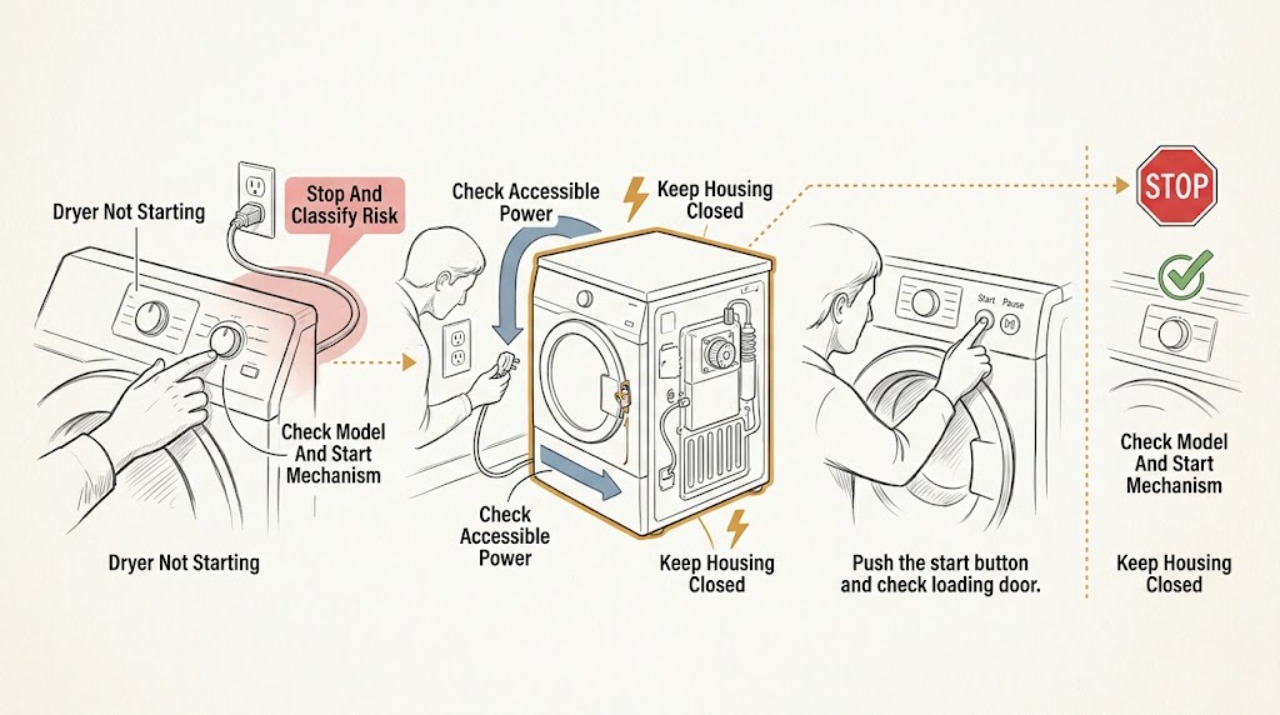
Work through in order
Diagnostic checks
Use only checks that match the exact appliance or system and its official guide.
-
Check 1
Stop the dryer and let it cool before touching the controls or load; classify the symptom as no display, display on but no response, a hum or click without tumbling, or a motor that stopped after running.
Expected result: Record smoke, a burning or melting odor, gas odor or hissing, scorching, unusual cabinet or plug heat, water, arcing, a damaged cord, a breaker trip, and whether the drum tumbles or stops when the door opens.
Next step: For smoke, active fire, or suspected gas, leave as appropriate and contact emergency or gas professionals from a safe location. For a safe inactive dryer, record the model and proceed with external checks.
Stop if: Do not restart to reproduce smoke, gas odor, scorching, overheating, arcing, a repeated trip, or unsafe drum behavior.
Why this matters
Why: A fire, gas, thermal, or electrical symptom overrides routine start checks. Without a hazard, the symptom class determines whether to check supply, door and controls, or motor protection.
-
Check 2
With the dryer off, record the exact model and serial information, identify whether it uses a timer knob or electronic Start control, and select a normal cycle and heat option permitted by the user guide.
Expected result: Note whether the panel lights, the timer or display changes, the control accepts the selection, the dryer makes a click or hum, or the control shows an error or overload indication.
Next step: Use the exact guide to issue one normal Start command. If the control is unresponsive or the model instruction is unclear, keep the dryer off and arrange service rather than pressing controls repeatedly.
Stop if: Do not bypass the Start mechanism, tamper with controls, or use a cycle or heat setting that the exact model does not support.
Why this matters
Why: Speed Queen models do not all use the same actuation. A timer-style model may need the knob pushed in, while an electronic model needs its documented Start control; a valid command with no motor response shifts concern to door sensing, supply, or overload protection.
-
Check 3
For a cool dryer with no hazard sign, verify from outside that the power cord is fully seated and inspect the accessible outlet, fuse, or breaker status once; do not open an electrical enclosure or test live wiring.
Expected result: Record a blank panel, an off breaker or blown fuse, a breaker that trips again, a loose or warm plug, discoloration, moisture, or a stable supply with the panel still inactive.
Next step: If the supply is stable and the dryer remains safe, continue to the door check. If a breaker trips again or any cord, plug, or outlet is damaged, wet, hot, or discolored, keep the dryer off and obtain qualified electrical or appliance service.
Stop if: Do not repeatedly reset a breaker, use an extension cord or adapter as a workaround, touch a hot connection, or perform live measurements.
Why this matters
Why: A disconnected cord or interrupted supply can explain no display or no motor. A repeat trip or damaged or warm connection indicates a supply fault and is not safe to test by repeated resets.
-
Check 4
With the dryer cool, remove any visible obstruction from the door opening, close the loading door fully, select the intended cycle, and use the exact model's documented timer-push or Start control once.
Expected result: Note whether the door aligns and latches, the control responds, the timer or display starts, the drum begins turning, a door indication remains, or the dryer hums without movement.
Next step: If the door closes normally and the dryer still does not start, proceed to the overload and fuel-specific branch only once. If the door cannot latch or the dryer tumbles with it open, remove it from use and arrange service.
Stop if: Do not force the door, bypass the door safety switch, reach into a moving drum, or operate with missing guards or broken parts.
Why this matters
Why: The manual requires a closed door, and a door switch or latch can prevent motor operation. A valid door and command with a hum or no movement shifts concern to supply, overload, motor, belt, or control service.
-
Check 5
If the dryer stopped after running and there is no smoke, odor, scorching, or electrical danger, allow it to cool for the interval specified by the exact manual, then make one normal Start attempt; do not repeatedly cycle it.
Expected result: Record whether the motor restarts, whether the same stop occurs quickly, whether the drum is hard to turn only when powered off, whether a code or overload indication appears, and whether the dryer had been heavily loaded or poorly ventilated.
Next step: If the protector cycles again or the dryer stops without a normal explanation, remove it from use and arrange qualified service with the timing and load history.
Stop if: Do not bypass or replace the overload protector, run repeated tests, open panels, or continue when the cabinet or motor area is unusually hot.
Why this matters
Why: A one-time recovery can be consistent with a thermal overload response, but a repeated protective stop indicates an underlying fault or excessive load and requires service. Do not infer a motor or belt failure from a hum alone.
-
Check 6
After the door and controls are normal, identify the fuel type. On a gas dryer, check only from a safe external position that the equipment and main gas-line valve are on; on an electric dryer, check the required supply fuses or breakers without opening connections.
Expected result: Record gas odor or hissing, a recently moved or serviced appliance, a stable or interrupted electric supply, one or more open breakers or fuses, a warm cord, and whether the drum runs without heat.
Next step: If supply is normal and the dryer still will not start, keep it off and arrange service. If gas odor, hissing, or electrical damage appears, stop immediately and follow the safety branch.
Stop if: Do not adjust gas fittings, test for a leak with flame, move the dryer, use an extension cord, or reset a tripping circuit repeatedly.
Why this matters
Why: The Speed Queen guide separates gas and electric starting and heating conditions. An uncertain gas supply needs qualified gas service; an unstable or damaged electrical supply needs qualified electrical service.
-
Check 7
After safe power, door, control, overload, and applicable fuel checks are normal, make at most one supervised start attempt with a suitable load and stay nearby; stop if the dryer behaves abnormally.
Expected result: Record whether the drum starts only after the normal command, whether it stops when the door opens, whether there is normal airflow and heat, whether a code returns, and whether any odor, smoke, noise, or trip occurs.
Next step: Keep the Speed Queen dryer off and arrange qualified service with the model, fuel type, start behavior, door result, overload history, and any error or safety symptom.
Stop if: Do not run unattended, allow continued tumbling with the door open, repeat a failing test, or continue after smoke, gas odor, scorching, overheating, arcing, or a breaker trip.
Why this matters
Why: A normal commanded start and correct door-safety behavior support a transient control or overload event, but a repeat failure, self-start, no heat, code, or safety symptom needs professional diagnosis.
Use your observations
Decision map
Find the observation that best matches what you see, then follow the next safe action.
-
PATH 01Safety boundary
What you see
Smoke, burning or gas odor, hissing, scorching, abnormal heat, a hot or damaged cord or outlet, arcing, water near electrical parts, or a repeated breaker trip is present.
Do this next
Stop use. Leave for active smoke, fire, or suspected gas and contact emergency or gas professionals from a safe location; use qualified electrical or appliance service before reuse.
Why this path and its safety boundary
Why it matters: This is a fire, gas, thermal, or electrical hazard rather than a routine no-start problem.
Safety stop: Do not restart, reset a breaker repeatedly, pull a hot plug, test gas with flame, or return to an unsafe area.
-
PATH 02Safety boundary
What you see
The display or controls are blank and there is no sound after the dryer is connected.
Do this next
Perform one safe external cord and supply check. If the supply is stable but the panel stays inactive, keep the dryer off and arrange qualified service.
Why this path and its safety boundary
Why it matters: An interrupted outlet, cord, breaker or fuse, or internal power fault is possible.
Safety stop: Stop for a hot, loose, wet, cracked, or discolored connection, or a breaker that trips again.
-
PATH 03Safety boundary
What you see
The panel is active, but the timer or Start command does not begin the cycle, a door indication remains, or the door will not latch.
Do this next
Use the exact model's timer-push or Start command once and close the door normally. If the indication remains or the door is damaged or misaligned, arrange service.
Why this path and its safety boundary
Why it matters: A wrong actuation sequence, incomplete cycle selection, door obstruction, latch, or door-safety switch may be blocking operation.
Safety stop: Do not bypass the door switch, force the door, or operate with missing guards or broken parts.
-
PATH 04Safety boundary
What you see
The dryer stopped after running, then restarts after cooling, or the manual's overload indication appears.
Do this next
Allow the documented cool-down once and make one normal start attempt. If the protector cycles again, remove the dryer from use and call service.
Why this path and its safety boundary
Why it matters: A motor overload response is possible on applicable models, but recurrence indicates an underlying problem or excessive load.
Safety stop: Do not bypass the protector, repeatedly restart, or continue with unusual heat, noise, smoke, or a burning smell.
-
PATH 05Safety boundary
What you see
The dryer starts or hums but will not heat, or the fuel-specific supply is uncertain after the start controls work.
Do this next
Check only the external gas-valve or electric-supply condition described by the exact guide. Keep the dryer off and arrange service if supply is normal or uncertain.
Why this path and its safety boundary
Why it matters: A gas valve or ignition path may matter on a gas model; supply fuses, breakers, heating, or controls may matter on an electric model.
Safety stop: Do not adjust gas parts, inspect live wiring, or use the dryer with a gas odor, abnormal heat, smoke, or repeated trip.
-
PATH 06Safety boundary
What you see
The dryer tumbles without the normal Start command, continues tumbling when the door is opened, or has removed guards or broken parts.
Do this next
Remove the dryer from use and arrange qualified Speed Queen service; do not attempt to defeat or repair the interlock as a household check.
Why this path and its safety boundary
Why it matters: The door safety or control system is not protecting the operator and the dryer is unsafe to use.
Safety stop: Do not operate, reach into the drum, or restore power to repeat the behavior.
Helpful context
Understand the symptom
No power is different from a no-start command
A blank panel and no sound point first toward the outlet, cord, breaker or fuse, or internal power path. A lit panel, click, or hum with no drum movement means the dryer may be waiting for a closed door, a cycle selection, a timer or Start command, or an overload protector to cool. Speed Queen control layouts vary by model, so record the model and use its user guide before assuming that every dryer starts the same way.
Fuel type changes the safe next check
An electric dryer can have more than one supply fuse or breaker, while a gas dryer also needs its equipment and main gas-line valve available. These are external observations only. Do not move the dryer, adjust gas fittings, open a control panel, or perform live electrical work. Any gas odor, smoke, scorching, severe heat, or damaged connection ends testing.
An overload reset is not a repair
On the documented Speed Queen family, an overload protector can stop the motor and reset after the dryer cools. If the same protection cycles again, the manual directs the owner to remove the dryer from use and call service. A dryer that starts by itself, keeps tumbling with the door open, or has missing guards is also unsafe and must remain out of use.
Safety boundary
Stop conditions
- Stop immediately for smoke, a burning or gas odor, hissing, scorching, abnormal heat, a hot or damaged cord or outlet, arcing, water near electrical parts, or a repeated breaker trip.
- Remove the dryer from use if the motor overload protector cycles again, the dryer starts without the normal command, or it continues tumbling when the loading door is open.
- Do not bypass the door switch, overload protector, or another safety device; do not open panels, perform live electrical work, or adjust gas fittings.
- Do not operate without the lint filter, with missing guards or broken parts, with combustible vapors nearby, or with a cord or connection that is wet, hot, loose, or damaged.
- Arrange qualified Speed Queen service when one stable external supply check, normal door closure, exact Start command, one documented cool-down, and applicable fuel checks do not restore safe operation.
Only after diagnosis
Potential parts
- dryer door switch or door latch
Consider this category only when the door closes normally but a qualified diagnosis confirms that the safety signal is not recognized.
Confirm the exact Speed Queen model and diagnosis; never bypass the door safety or select a part from the no-start symptom alone. - dryer motor overload or motor component
Consider this category only after a qualified diagnosis confirms recurring overload or motor failure following safe load and supply checks.
Confirm the exact model and diagnosis; overload and motor access require qualified service. - dryer timer or electronic control
Consider this category only when the exact control design and professional testing confirm that the Start command is not being passed to the motor.
Confirm the exact model, control type, and diagnosis; do not open the panel or order a control from a symptom alone.
When checks do not resolve it
Need a professional?
Arrange qualified Speed Queen service when a stable external supply and normal door and Start command do not restore operation; when the motor overload protector cycles again; when the dryer starts by itself, runs with the door open, hums without movement, or has a recurring code. Use qualified electrical service for hot connections, arcing, or repeated breaker trips and qualified gas or emergency help from a safe location for gas odor, hissing, abnormal combustion, smoke, or fire.
Safety scope: This article supports cool external observation, one safe supply check, normal door and control use, one documented overload cool-down, and model-approved fuel-supply observation only. A qualified professional should handle panels, wiring, door interlocks, overload devices, motors, heaters, gas valves, ignition systems, and ducts requiring disassembly.
Common questions
FAQ
Why does my Speed Queen dryer have power but not start?
Confirm the door is fully closed, select a valid cycle, and use the exact model's timer-push or Start control once. If the motor stopped after running, a documented overload protector may need one cool-down. A recurring no-start or overload response needs service.
What should I check if my Speed Queen dryer has no power?
Check the cord is fully seated and inspect the accessible outlet, fuse, or breaker once when the dryer is cool and safe. A repeat trip or hot, wet, loose, or damaged connection is a stop condition and needs qualified service.
Does a gas Speed Queen dryer need electricity to start?
The exact model determines its controls, but the user guide separates gas and electric supply checks. A gas model still needs its electrical control supply and its equipment and main gas-line valve available. Do not adjust gas parts; use qualified service for uncertain supply.
Can I bypass the door switch if my Speed Queen dryer will not start?
No. Speed Queen warns not to bypass the door safety switch and says the dryer must not operate with the loading door open. Keep it out of use if it tumbles with the door open or starts without the normal command.
When should I stop testing a Speed Queen dryer?
Stop for smoke, a burning or gas odor, hissing, scorching, abnormal heat, a hot or damaged connection, arcing, water near electrical parts, or a repeated breaker trip. Leave for active smoke, fire, or suspected gas and seek help from a safe location; arrange qualified service for other faults.
Read the exact guide
Official sources
- User's Guide for DryersSpeed Queen by Alliance Laundry Systems · Official Speed Queen user guide for a documented dryer family; exact model instructions control where the control layout or construction differs.
Community feedback
Share a repair observation
Share a plain-text repair observation. Accepted observations are published automatically; this page may take a moment to update.