
On this page
Start here
Quick answer
“Not working” is not one fault on a Speed Queen washer. First note whether the machine has no display or power, has power but will not start, fills incorrectly, stops with water, will not agitate or spin, leaks, or pauses during a normal stage. With no leak, burning smell, smoke, arcing, or repeated breaker trip, confirm the lid or loading door is closed, the controls and Start/Pause command are correct, the power connection and breaker are normal, and the hot/cold taps and hoses are open and not kinked. A Speed Queen guide says pauses can be part of normal operation and that a motor-overload protector may reset after a short cool-down, but a repeat stop, drain failure, leak, electrical warning, or unexplained error requires service. Do not bypass the lid/door lock, open panels, or work near energized parts and standing water.
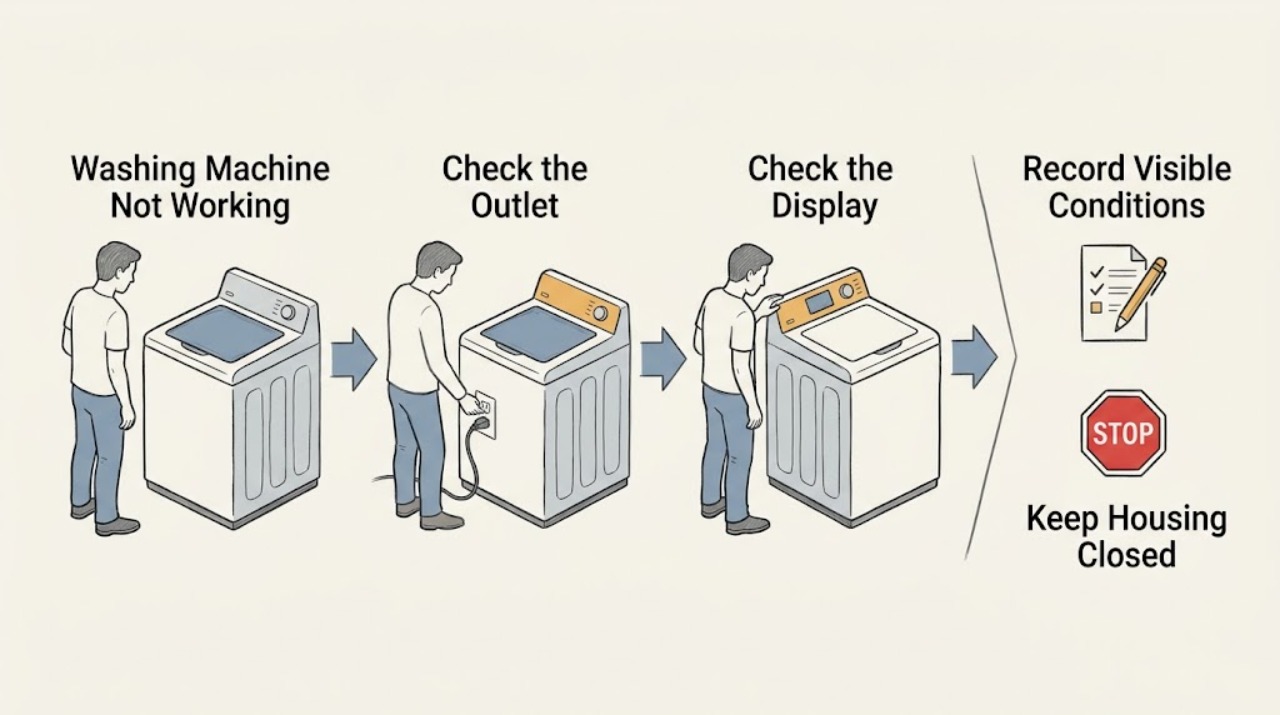
Work through in order
Diagnostic checks
Use only checks that match the exact appliance or system and its official guide.
-
Check 1
Stop and inspect for immediate hazards before restarting: standing or spraying water near the washer or outlet, a hot or damaged plug/outlet, smoke, arcing, burning odor, severe vibration or impact, or repeated breaker/fuse trips.
Expected result: Any hazard is present, or the washer cannot be stopped normally.
Next step: Stop using the washer. Keep clear of wet electrical areas, isolate water or power only when safe and accessible, and arrange qualified appliance/electrical service or emergency help as appropriate. Do not reset repeatedly.
Stop if: Smoke, arcing, burning odor, hot connection, standing water near energized equipment, violent movement, or repeated trips means stop immediately.
Why this matters
Why: This is an electrical, water, fire, or mechanical safety issue rather than a simple start or cycle selection problem.
-
Check 2
Record the exact model and serial, top-load or front-load design, display or indicator state, selected cycle/options, and the point of failure: no display, no start, no fill, stops while washing, no drain, no agitation, no spin, leak, or error code.
Expected result: The washer has no power, has power but no response, or responds and stops at a repeatable stage.
Next step: Use the Speed Queen manuals portal with the exact model and keep the full display message for service. Do not interpret an indicator from another model.
Stop if: Stop if the model plate is inaccessible without moving the washer, if the machine is hot/wet, or if a warning sign appears.
Why this matters
Why: The symptom separates supply/control problems from lid/door, fill, drain, motor, balance, or error-code branches.
-
Check 3
For a washer with power, confirm the lid or loading door is fully closed, the controls are set to a valid cycle, and the model's Start or Start/Pause command is held or pressed exactly as its guide requires.
Expected result: The washer starts after the documented command, or the controls respond but the washer remains idle.
Next step: Run one normal start attempt with the door/lid closed. Do not bypass or force the lock; arrange service if the command is accepted but the washer remains idle.
Stop if: Stop for a damaged latch/lock, door or lid that will not close, smoke, burning odor, arcing, or controls that cannot turn the washer off.
Why this matters
Why: A door/lid interlock or start-sequence condition can look like a dead washer; persistent idle behavior points toward the lock, control, or power path.
-
Check 4
Check the accessible supplies without moving the appliance: confirm the cord is fully seated in the intended outlet, the laundry breaker/fuse has not tripped, both water taps are open, and the fill hoses are not visibly kinked or damaged.
Expected result: Power is absent, a breaker has tripped, a hose is kinked, a tap is closed, or the accessible supplies look normal.
Next step: For a simple one-time breaker state with no heat, odor, water, or damage, follow the home's normal reset procedure once. Correct only an obvious tap or hose position; arrange service for repeat trips, damaged wiring, or internal supply faults.
Stop if: Stop for a hot/damaged plug or outlet, wet electrical parts, repeated trips, a burst hose, or any need to remove an electrical cover.
Why this matters
Why: A supply condition can prevent starting or filling, but a hot/damaged connection, repeat trip, or hose leak requires professional attention.
-
Check 5
If the washer starts but will not fill, fills slowly, or stops at the fill stage, observe the water flow from both taps and inspect only the accessible hose ends and screens when the water is off and the exact guide permits cleaning.
Expected result: One tap is closed, a hose is kinked, flow is weak, a visible screen is dirty, or water enters normally but the cycle still does not advance.
Next step: Restore an obvious tap or hose position and clean only user-accessible screens as directed by the model guide. Do not dismantle the valve or continue if water leaks or the fill never stops.
Stop if: Stop for uncontrolled filling, a leaking/burst hose, electrical contact with water, hot water causing a burn risk, or a valve/control that needs disassembly.
Why this matters
Why: A supply or inlet restriction can stop a cycle before washing; normal filling shifts attention to door/lid sensing, controls, or another stage.
-
Check 6
If water remains or the washer will not drain or spin, observe whether the drain hose and receptacle are visibly kinked, blocked, or installed outside the model's instructions, and whether the load is severely unbalanced. Do not reach into a moving tub or pump.
Expected result: The hose/receptacle is blocked or kinked, the load is unbalanced, the machine pauses and resumes, or the tub remains full despite a clear visible drain path.
Next step: Stop the cycle, wait for moving parts to stop, redistribute only a safe accessible load, and correct an obvious external hose issue. Arrange service for a full tub, recurring drain failure, pump noise, or any internal access requirement.
Stop if: Stop for standing water near electricity, a leak, violent movement, metal grinding, burning odor, or a need to remove a pump cover while water or power is connected.
Why this matters
Why: Drain restrictions and unbalanced loads can prevent spin or extend a cycle; a full tub with a clear external path points toward a pump, lock, control, or internal blockage diagnosis.
-
Check 7
If the washer pauses, will not agitate/spin, or shows an error, capture the exact code and stage and allow only the model-described protective pause or one authorized reset. Observe whether it resumes normally or stops again.
Expected result: The washer resumes after a documented pause/cool-down, or the error, no-motion state, or stop repeats.
Next step: Remove excess load only when the model guide says it is safe, then make one normal attempt. If the issue returns, leave the washer off and give service the code and stage; do not bypass protection or replace a belt/motor from the symptom alone.
Stop if: Stop for repeated overload stops, hot motor smell, smoke, arcing, violent movement, or any need to open the cabinet or reach moving parts.
Why this matters
Why: Normal pauses or a motor-overload protector can explain one temporary stop, but repetition indicates an overload, drive, motor, lid/door, drain, or control fault requiring diagnosis.
Use your observations
Decision map
Find the observation that best matches what you see, then follow the next safe action.
-
PATH 01Next step
What you see
The washer has no display or response and the accessible outlet/breaker check finds a supply issue without damage
Do this next
Correct only the obvious supply state and make one normal start attempt; service a repeat trip, damaged connection, or dead washer with normal supply.
Why this path and its safety boundary
Why it matters: A household power or connection issue is more likely
-
PATH 02Next step
What you see
The washer has power but will not start until the lid/door is closed or Start is held as documented
Do this next
Use the model-specific start command once; do not bypass the lock, and arrange service if the latch or control still prevents starting.
Why this path and its safety boundary
Why it matters: A start sequence or lid/door interlock condition is more likely
-
PATH 03Next step
What you see
The washer stops before filling or fills slowly while a tap is closed, a hose is kinked, or an accessible screen is restricted
Do this next
Correct the visible supply condition as directed by the exact guide; service a leak, uncontrolled fill, or persistent no-fill.
Why this path and its safety boundary
Why it matters: An external water-supply restriction is more likely
-
PATH 04Next step
What you see
The washer pauses briefly near agitation or spin and then resumes without a hazard
Do this next
Allow the documented pause or cool-down once and avoid overloading; service a repeat stop, hot odor, or no restart.
Why this path and its safety boundary
Why it matters: Normal operation or a temporary load/motor-protection pause is possible
-
PATH 05Next step
What you see
Water remains because the visible drain path is kinked/blocked or the load is unbalanced
Do this next
Correct only the safe visible condition and make one normal drain/spin attempt; arrange service if water remains or the fault recurs.
Why this path and its safety boundary
Why it matters: An external drain or balance condition may be stopping spin
-
PATH 06Next step
What you see
The code, no-motion condition, leak, or stop repeats after the model-specific safe checks
Do this next
Leave the washer off and arrange qualified service with the model, code, cycle stage, and observations; do not open the cabinet.
Why this path and its safety boundary
Why it matters: An internal lock, pump, motor, drive, sensor, or control diagnosis is required
Helpful context
Understand the symptom
Define what “not working” means
A Speed Queen washer may appear dead when the issue is a control state, closed lid/door requirement, delayed start command, water supply, drain restriction, unbalanced load, or a protective pause. The exact model matters: Speed Queen's manuals portal asks for the model number, and its user guides differ between top-load and front-load controls. Use the closest symptom and do not transfer a code or reset from another model.
Normal pauses versus a failed cycle
Pauses around agitation or spin can be part of a normal wash sequence. Some Speed Queen guides also describe a motor-overload protector that can stop the motor and reset after a short cool-down. That is not permission to keep loading or restarting a washer that stops again, smells hot, leaks, or trips protection.
Keep checks external and dry
Do not remove panels, defeat a lid or door lock, reach into a moving tub, probe live wiring, or work with wet hands or standing water. Speed Queen's care guidance recommends visible hose and fill-screen checks, while internal pumps, motors, belts, locks, and controls should be diagnosed by qualified service.
Only after diagnosis
Potential parts
- lid or loading-door lock
Consider only if qualified diagnosis finds that the exact model's interlock prevents an otherwise valid start or spin sequence.
Confirm the complete model and manufacturer fit information; never bypass an interlock. - drain pump or drain-path component
Consider only after a qualified diagnosis confirms a pump or internal drain-path fault following safe external hose and receptacle checks.
Verify model-specific fit and water/power isolation requirements before any replacement. - drive belt or motor component
Consider only when qualified service links repeated no-agitate/no-spin or overload behavior to the exact model's drive system.
Do not select a belt or motor from a symptom alone; model, revision, and diagnosis must be confirmed.
Common questions
FAQ
Why is my Speed Queen washer not working when the display is on?
A closed-lid/door requirement, incorrect Start command, control state, water supply, drain condition, or protective pause can leave a powered washer idle. Record the stage and use the exact model guide rather than assuming the motor has failed.
Is a pause during a Speed Queen wash cycle normal?
Some pauses around agitation or spin are normal, and a motor-overload protector may stop and later reset on certain models. A repeat stop, hot odor, no restart, or error needs service.
What should I check if a Speed Queen washer will not fill?
With no leak or electrical hazard, check that both taps are open, hoses are not kinked, the controls and Start command are correct, and accessible screens are clean when the model guide permits it. Persistent no-fill or uncontrolled filling needs service.
Why will my Speed Queen washer not spin?
The lid/door may not be closed, the cycle may still be paused, the load may be unbalanced, water may not have drained, or the motor may be protected from overload. Check only the safe external conditions; a repeat no-spin needs diagnosis.
When should I stop using a Speed Queen washer?
Stop for a leak, standing water near electricity, smoke, arcing, burning odor, hot or damaged electrical connections, violent movement, repeated breaker trips, or any need to bypass a lock or open the cabinet.
Read the exact guide
Official sources
- How to Properly Care for Your Top Load WasherSpeed Queen by Alliance Laundry Systems · Official top-load washer care guidance; exact model and installation instructions control.
- User's GuideSpeed Queen by Alliance Laundry Systems · A specific regional/model user guide used as an example; exact model documentation takes precedence.
- Guidelines for Cleaning Safely After a DisasterCenters for Disease Control and Prevention · General public safety guidance; local emergency and electrical instructions apply.
- How Much Water Does A Washing Machine Use? It Depends.Speed Queen by Alliance Laundry Systems · Official Speed Queen educational guidance; model manual controls exact fill behavior.
- Guide to Home Wiring HazardsU.S. Consumer Product Safety Commission · General household electrical safety guidance, not a Speed Queen repair manual.
- Speed Queen | Manuals & DownloadsSpeed Queen by Alliance Laundry Systems · Official document portal; the exact washer model is required for model-specific instructions.
Community feedback
Share a repair observation
Share a plain-text repair observation. Accepted observations are published automatically; this page may take a moment to update.