
On this page
Start here
Quick answer
First separate a steam oven with no display or interior response from one that has power but will not start a selected mode. Record the exact model, region, display message, lock symbol, and whether the door is closed. Check the accessible breaker or residual-current device only from a safe dry position, then use at most one power interruption or reset exactly as the model manual permits. A door that is not fully closed, system lock, demo mode, delayed or incomplete input, an incorrectly seated water tank, or a model-specific fault can prevent operation. Do not force the door, pour water into an unknown opening, reach into a hot steam cavity, open the housing, or continue after smoke, burning odor, arcing, water near electricity, or a repeated breaker trip; arrange qualified appliance service.
Before you begin
Safety first
- This article supports normal controls, safe external power observation, model-authorized single reset, cool-door inspection, exact-message recording, and model-authorized water-tank handling only. Internal electrical, heating, lock, pump, valve, steam, and housing work requires qualified service.
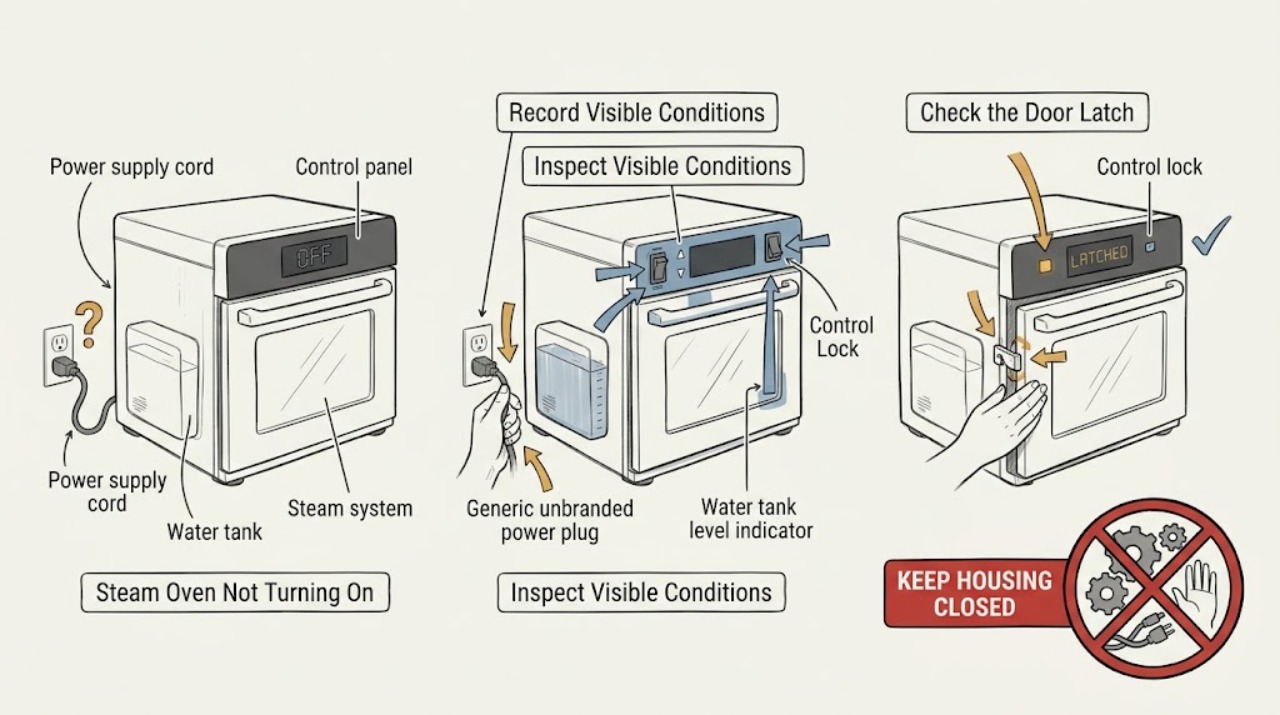
Work through in order
Diagnostic checks
Use only checks that match the exact appliance or system and its official guide.
-
Check 1
From a dry, safe position, record the steam oven model and region, whether the display, interior light, fan, and controls respond, and whether nearby room lighting or another appliance has power. Do not move the appliance or remove a panel.
Expected result: The oven is completely dark, the display is on but buttons do not respond, the display shows a lock or fault, or a mode can be selected but the cycle will not start.
Next step: Follow the no-power or powered-no-start branch and preserve the exact display state. Use only normal controls and the model manual.
Stop if: Stop for smoke, burning odor, sparks, arcing, a hot plug, water near electricity, exposed damage, or a breaker that has operated repeatedly.
Why this matters
Why: A completely dark appliance keeps supply, breaker, plug, and internal power in focus. A powered but unresponsive oven points toward lock, controls, door, demo, water, or a model-specific fault rather than simple loss of supply.
-
Check 2
If there is no active hazard, look at the accessible breaker, fuse indication, or residual-current device without opening the panel. If the model manual authorizes it and the appliance is cool and dry, perform no more than one power interruption or reset using the documented sequence; do not keep restoring power.
Expected result: The protective device is visibly open, it stays set after the model-authorized reset, it operates again, or the appliance remains dead with the supply apparently normal.
Next step: If the device operates again or the oven stays dead, leave it isolated and arrange qualified electrical or appliance service. If power returns without a repeat event, continue with door and control checks rather than starting a hot-steam cycle immediately.
Stop if: Do not repeatedly reset protection, change a fuse or breaker rating, open the panel, or approach a wet, hot, smoking, or damaged electrical area.
Why this matters
Why: A protective-device operation can reflect an appliance, supply, or wiring fault. A single successful reset does not clear the cause, and a repeat operation means the appliance must remain out of use.
-
Check 3
After the cavity is cool, inspect the closed door from the outside for an obstruction, a visibly displaced seal, or an incomplete latch. Look for a system-lock or child-lock symbol and use only the exact model manual's normal unlock command; do not force the door or defeat an interlock.
Expected result: The door is not fully closed, the display shows a lock, the latch or seal looks damaged, or the door and lock state appear normal but the mode still will not start.
Next step: Remove only an obvious loose obstruction, close the door normally, or clear the documented lock once. If the lock returns or the door needs force, leave the oven off and arrange service.
Stop if: Do not pry, slam, lift, bypass, or disassemble the door, hinge, seal, latch, or interlock.
Why this matters
Why: Miele identifies an incompletely closed door and active system lock as reasons a steam-oven mode cannot be selected. A damaged or normal-looking latch cannot be diagnosed safely from outside and may still block operation.
-
Check 4
Read the full display message, lock icon, demo or showroom indication, selected mode, timer, delay, and any error code. Record the message exactly and use the model manual to select a normal steam or oven mode and its required start command; do not interpret a code from another model.
Expected result: Demo mode, a lock, delay, incomplete setting, an error message, or a normal ready screen is shown.
Next step: Clear only the documented non-fault mode and attempt one normal start when the cavity is cool and dry. If the message returns or the oven still does not start, arrange service and provide the exact code.
Stop if: Do not guess at hidden menus, bypass a lock, repeatedly cycle a fault, or continue if the display is erratic, hot, wet, or accompanied by smoke or odor.
Why this matters
Why: A control state can make an oven appear dead or unable to start even when power is present. A repeated or unfamiliar error keeps a control, sensor, heating, or steam-system fault in focus and needs model-specific service guidance.
-
Check 5
For a model that uses a removable water tank, wait until the oven is cool and inspect the tank from its normal access position for a correct seat, visible damage, or a manual-required fill indication. Do not pour water into an unknown opening, use unapproved water, or reach into the steam generator.
Expected result: The tank is missing, not fully seated, leaking, marked empty, or the oven does not use a removable tank; alternatively, the tank appears correctly seated but the oven still will not start.
Next step: Follow only the model manual's tank-fill and seating instruction, then make one supervised start attempt if the area is dry and the manual permits it. Arrange service for a leak, repeated water message, or failure after the documented check.
Stop if: Do not operate with a leaking tank, spill water into the cabinet, touch hot steam or water, or remove the steam generator, pump, valve, or sensor.
Why this matters
Why: A steam program may require the model's water tank to be present and recognized. A leak, sensor message, or unknown water path is not a reason to improvise; a correct tank state shifts attention toward controls, door, power, or internal steam hardware.
-
Check 6
Prepare a service report with the model and region, no-display or powered-no-start state, breaker or residual-current event, door and lock state, exact display message, mode and timer, water-tank state, recent cleaning or descaling, and any heat, water, odor, or noise. Photograph only cool, dry exterior labels and display text.
Expected result: The record points to supply, door or lock, demo or mode state, water tank, an error message, or remains ambiguous.
Next step: Leave the steam oven out of use and arrange qualified appliance or electrical service. Tell the technician whether the cavity was hot, wet, pressurized with steam, or holding water.
Stop if: Do not open the housing, bypass an interlock, perform live electrical measurements, force the door, or restart an abnormal appliance.
Why this matters
Why: A precise record lets qualified service separate household power, controls, door safety, water handling, heating, and steam-system faults without asking the homeowner to open the appliance or repeat a hazardous start.
Use your observations
Decision map
Find the observation that best matches what you see, then follow the next safe action.
-
PATH 01Safety boundary
What you see
The display and normal controls are completely dark and the accessible supply or breaker state is abnormal or uncertain.
Do this next
Use only the model's safe power guidance once, then leave the oven off and arrange qualified electrical or appliance service if it remains dead.
Why this path and its safety boundary
Why it matters: Supply, protective-device, plug, or internal power trouble is more likely than a water-tank or mode setting.
Safety stop: Do not open the panel, remove the oven, change protection, or restore power repeatedly.
-
PATH 02Safety boundary
What you see
The display is lit but a lock icon is shown, the door is not fully closed, or a mode cannot be selected.
Do this next
Close the door normally and clear only the exact model's lock command. Arrange service if the lock or door problem returns.
Why this path and its safety boundary
Why it matters: Door state or system lock may be preventing operation, as shown in official steam-oven support guidance.
Safety stop: Do not force the door, pry the latch, bypass the interlock, or dismantle the seal or hinge.
-
PATH 03Safety boundary
What you see
The display shows demo or showroom mode, a delay or timer state, an incomplete input, or a normal ready screen but the cycle does not start.
Do this next
Use the exact manual to clear the non-fault state and select one normal mode. If the oven still refuses to start, arrange service.
Why this path and its safety boundary
Why it matters: The appliance may be powered but held in a model-specific control state; a normal ready screen with no start still leaves a control or hardware fault possible.
Safety stop: Do not guess at service menus, copy another model's code sequence, or repeatedly cycle the controls.
-
PATH 04Safety boundary
What you see
The model uses a removable water tank and shows an empty, missing, unseated, or water-related message.
Do this next
Follow only the manual's fill and seating instruction when the cavity is cool and dry, then make one supervised attempt. Arrange service for a leak or recurring message.
Why this path and its safety boundary
Why it matters: The steam program may require the tank to be correctly recognized before starting, but a leak or sensor fault remains a service issue.
Safety stop: Do not spill water into the cabinet, use an unknown water path, touch hot steam, or remove the pump, valve, generator, or sensor.
-
PATH 05Safety boundary
What you see
An error message returns, the breaker or residual-current device operates again, the oven stops during startup, or controls remain unresponsive after the documented safe check.
Do this next
Leave the oven isolated and provide the exact message, model, and timing to qualified appliance or electrical service.
Why this path and its safety boundary
Why it matters: A persistent electrical, control, door, heating, or steam-system fault is present or cannot be distinguished safely at home.
Safety stop: Do not keep resetting protection, repeat the start, open the housing, or bypass a safety control.
-
PATH 06Safety boundary
What you see
Hot steam or water, smoke, burning odor, arcing, exposed damage, a hot plug, or water near electrical equipment is present.
Do this next
Keep clear, stop normal use, and use local emergency or qualified service guidance; isolate power only from a safe dry position if doing so does not approach the hazard.
Why this path and its safety boundary
Why it matters: This is an immediate safety boundary, not a door, mode, or water-tank troubleshooting branch.
Safety stop: Do not touch the appliance, enter the steam path, use water near electricity, open panels, or attempt another start.
Helpful context
Understand the symptom
No display and no start are different symptoms
If the display, light, and controls are completely dead, begin with safe power and breaker observations. If the display is lit but a mode cannot be selected or started, the likely path changes to door closure, system lock, demo mode, water-tank or program requirements, or a displayed fault. Steam ovens and combi-steam ovens vary by model, so record the identity before copying a control sequence.
Water and heat add a separate safety boundary
A steam oven can leave hot water, hot surfaces, and residual steam after a cycle or failed start. Keep the door and water tank closed until the cavity is cool and the manual permits access. Water near a plug, outlet, control, or cabinet can create a shock risk; do not operate the appliance while wet or use a wet cloth near energized controls.
Use the exact manual for locks, demo mode, and messages
Miele support pages show that a system lock and a door state can prevent mode selection, while another Miele page identifies demo mode as a reason a combi-steam oven can be operated without heating. A Bosch steam-oven manual likewise separates power, door, notification, water tank, and settings issues. These are examples of model-dependent states, not universal code meanings.
Safety boundary
Stop conditions
- Stop immediately for hot steam or water, smoke, burning odor, arcing, a hot plug, exposed damage, water near electricity, or repeated breaker or residual-current operation; keep clear and use appropriate emergency help.
- Do not force, pry, slam, or bypass the door, latch, hinge, seal, system lock, or safety interlock.
- Do not open the housing, remove panels, touch internal wiring or heating parts, perform live electrical measurements, or repair the steam generator, pump, valve, or sensor.
- Do not pour water into an unknown opening, operate with a leaking tank, reach into hot steam or water, or use unapproved water or cleaning products.
- Do not guess at error-code meanings, hidden service menus, demo-mode commands, or a reset sequence from another model; use the exact manual or qualified service.
Only after diagnosis
Potential parts
- steam-oven water tank
Consider this category only when the exact model's documentation and professional inspection confirm that the tank is cracked, leaking, missing, or not being recognized after correct seating.
Confirm the exact steam-oven model, tank design, seals, sensor features, and manufacturer fit information; do not substitute a generic tank or operate with a leak. - steam-oven door seal or latch assembly
Consider this category only when qualified inspection confirms that a damaged seal or latch prevents closure or safe operation after visible obstruction and normal lock checks.
Confirm the exact door design, heat and steam rating, hinge or latch arrangement, and manufacturer instructions; do not force or bypass the interlock.
When checks do not resolve it
Need a professional?
Arrange qualified appliance service when the steam oven stays dead after the model-authorized power check, has power but will not start after the door, lock, mode, message, and water-tank checks, shows a recurring error, leaks, or has a suspected internal control, heating, pump, valve, or steam fault. Arrange qualified electrical service for repeated breaker or residual-current operation, a hot plug, damaged supply, smoke, arcing, or wiring concerns. Treat hot steam, smoke, burning odor, and water near electricity as urgent stop-use conditions.
Safety scope: This article supports normal controls, safe external power observation, model-authorized single reset, cool-door inspection, exact-message recording, and model-authorized water-tank handling only. Internal electrical, heating, lock, pump, valve, steam, and housing work requires qualified service.
Common questions
FAQ
What should I check if my steam oven has no display?
Record the model and check the accessible breaker or residual-current device from a dry, safe position. Use at most one model-authorized power interruption or reset if the appliance is cool and dry; if it remains dead or protection operates again, leave it off and arrange qualified electrical or appliance service.
Why is my steam oven powered but not starting?
An open door, system lock, demo mode, delay or incomplete input, water-tank requirement, or model-specific error can prevent a cycle. Read the exact display and use the installed manual; do not guess a code meaning or force the door.
Can an empty or misplaced water tank stop a steam oven?
On models that use a removable tank, a tank that is missing, empty, leaking, or not seated can prevent a steam program from starting or can produce a water message. Handle it only when cool and as the manual describes; do not spill water into the cabinet.
Is it safe to open a steam-oven panel when it will not turn on?
No. Internal electrical, heating, pump, valve, and steam components require qualified service. A dark display does not prove that internal parts are de-energized, and a steam cavity may still contain heat or water.
When is a steam oven not turning on an emergency?
Stop immediately for hot steam or water, smoke, burning odor, arcing, a hot plug, exposed damage, water near electricity, or repeated breaker or residual-current operation. Keep clear, avoid another start, and use local emergency or qualified service guidance.
Read the exact guide
Official sources
- User manual and installation instructions CSG7584.1BSH Home Appliances Corporation (Bosch) · Bosch manual for the named model family, used for clearly identified examples of model-specific steam-oven behavior; it does not establish universal controls.
- Oven does not heat upMiele USA · Miele support guidance used as a clearly labeled example of a model-dependent demo state; it is not a universal steam-oven code or command.
- Operating and Installation Instructions DGC6705/6805Miele USA · Miele manual for a named combination steam-oven family, used for safety and model-variation examples; the exact installed manual controls.
- Cannot switch on steam oven/combi-steam ovenMiele USA · Miele support guidance used as a clearly identified manufacturer example; exact model instructions control another steam oven.
- No operating mode can be selectedMiele USA · Miele support guidance used as a model-specific example; lock commands and hardware vary across steam ovens.
Community feedback
Share a repair observation
Share a plain-text repair observation. Accepted observations are published automatically; this page may take a moment to update.