
On this page
Start here
Quick answer
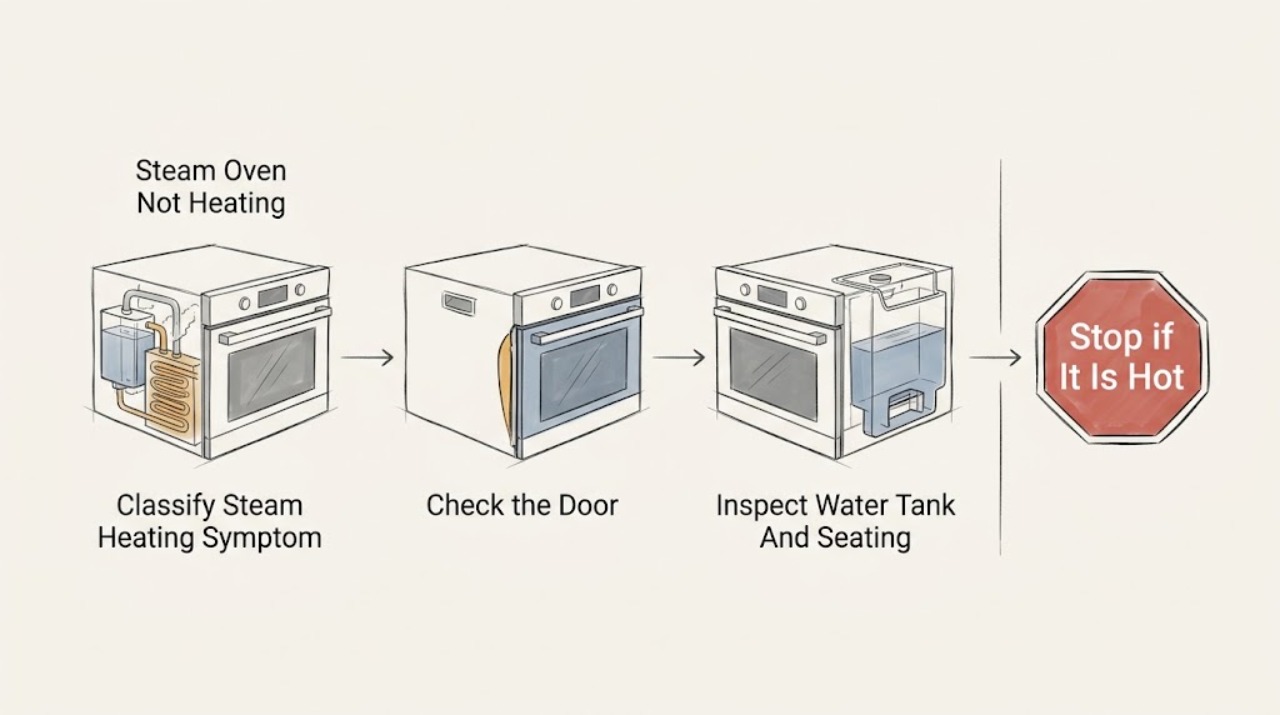
If a steam oven is not heating, first determine whether the display is blank, a cooking mode will not start, the oven warms but produces no steam, or the heating phase never reaches temperature. With the appliance cool, check the selected mode, temperature, door position, water-tank level and seating, and any exact message or error code. Water-based steam systems can pause or refuse a steam cycle when the tank is empty, not engaged, dirty, or affected by scale; Demo mode, a lock, a hot cavity, a door interlock, or a power fault can also prevent heating. Do not open a hot door into escaping steam, use unapproved liquids, bypass a door or water sensor, open panels, or repeat a reset after a trip. If the safe model-specific checks do not restore heat or steam, arrange qualified appliance service.
Before you begin
Safety first
- A qualified technician can assess the steam generator, heater, water inlet and level detection, tank coupling, door interlock, temperature sensor, control, and power path without the user opening a hot or energized appliance.
Work through in order
Diagnostic checks
Use only checks that match the exact appliance or system and its official guide.
-
Check 1
With the steam oven off and safe to approach, record whether the display is blank, a mode will not start, the heating-up phase is prolonged, the cavity warms without steam, or a code or water symbol appears. Record the selected mode and when the symptom occurs.
Expected result: There is no power, a control or mode response is missing, a water-related message appears, or heating begins but does not reach the expected state.
Next step: Use the matching branch and preserve the exact code or wording for the model manual or service technician.
Why this matters
Why: The first result separates power and control checks from water-path, door, heating, or steam-generation checks. An exact message is more useful than guessing a failed component.
-
Check 2
Read the model manual and confirm that the intended steam or combination mode, temperature, time, and Start confirmation are selected. With the oven cool, verify that the door or panel is fully closed and no lock, Demo, hot-cavity, delay, cleaning, or maintenance state is shown.
Expected result: A mode, temperature, door, lock, Demo, delay, cleaning, or confirmation state explains the missing start, or all visible settings appear normal.
Next step: Correct only a clearly identified setting under the exact manual, then make one normal start attempt. If the state returns or the oven remains cold, stop changing settings and continue with the water check.
Why this matters
Why: A matching setting or safety state can prevent heating without a failed heater. Normal settings with a continuing failure shift attention toward water detection, power, sensors, or service-level heating faults.
-
Check 3
When the appliance is cool, inspect the accessible water tank, lid or coupling, and tank recess. Check the level required by the model, obvious damage or scale, and whether the tank sits flush or engages as the manual describes. Do not reach into a hot evaporator dish or add unapproved liquid.
Expected result: The tank is empty or low, not seated, leaking, visibly damaged, unusually scaled, or appears correctly filled and engaged.
Next step: If the manual permits it, correct the tank level or seating once and retry the documented mode. Stop for a leak, hot water, repeated water warning, or unresolved no-heat condition and arrange service.
Why this matters
Why: A low or mis-seated tank can stop or pause steam generation. Damage, a leak, persistent false water detection, or a correctly seated tank with no steam points to a service-level water path, sensor, valve, or generator issue.
-
Check 4
Look for a descaling, rinse, clean-tank, or maintenance message and check the manual's maintenance schedule and approved product instructions. Do not start a descaling sequence unless the exact model authorizes it, and do not mix products or pour cleaner into a tank that is not intended for it.
Expected result: A maintenance or descaling state is displayed, visible scale or residue is present in an accessible tank area, or no such indication is present.
Next step: Follow only the exact manual's cool-appliance descaling or rinse procedure. If the message persists, the process cannot complete, or the oven remains cold, request service.
Why this matters
Why: Scale and an incomplete maintenance state can affect steam output or lock out steam functions on some models. A clean, correctly maintained accessible path with no heat still requires deeper diagnosis.
-
Check 5
Run one model-approved test mode only when the oven is cool, dry, correctly filled, and free of any hazard. Observe the display's heating-up indication, whether the temperature changes as expected, whether the program pauses for water, and whether steam begins without opening the door.
Expected result: The display remains in heating-up, a water prompt pauses the cycle, the temperature rises but steam is absent, or neither heat nor steam begins.
Next step: Stop the cycle for smoke, odor, abnormal noise, leakage, excessive heat, or an electrical symptom. Otherwise record the phase and arrange service if the expected heating or steam response does not occur.
Why this matters
Why: A water prompt points back to tank seating or water detection. A prolonged heating-up phase or no temperature rise after correct setup can indicate a heater, sensor, generator, control, or power fault; no visible vapor alone is not proof of no steam.
-
Check 6
From a dry, safe location, check whether the appliance has a stable display and whether the building breaker or residual-current device has tripped. If the exact manual authorizes one power recovery and there is no odor, smoke, water, or damage, perform no more than that single documented recovery and record the result.
Expected result: The display is dead or abnormal, the protective device has tripped, the oven returns to normal after one authorized recovery, or the no-heat fault returns.
Next step: Do not repeat the reset or open the appliance. Keep it off and arrange qualified appliance or electrical service, providing the display, water, mode, and code history.
Why this matters
Why: A power event can explain a dead or frozen control, but a repeated trip or persistent failure indicates an electrical, control, heater, or installation fault. A temporary recovery does not prove the appliance is repaired.
Use your observations
Decision map
Find the observation that best matches what you see, then follow the next safe action.
-
PATH 01Next step
What you see
There is escaping hot steam or water, a hot evaporator area, smoke, burning odor, arcing, a hot plug, damaged wiring, or a repeated protective-device trip.
Do this next
Stop the cycle and keep clear. Do not open the hot door, touch water near electrical parts, or handle damaged equipment.
-
PATH 02Next step
What you see
The display is blank, frozen, abnormal, or the appliance will not switch on.
Do this next
From a dry, safe location, observe the building protective device and follow the model manual's external power guidance.
-
PATH 03Next step
What you see
A Demo, lock, hot-cavity, delay, maintenance, or unavailable-function message is present, or the mode will not accept Start.
Do this next
Use only the exact model manual to exit the identified state after the oven is safe and cool; do not copy a control sequence from another model.
-
PATH 04Next step
What you see
A low-water symbol, tank prompt, no-water condition, false tank warning, leak, or tank-seating issue appears.
Do this next
With the appliance cool, inspect and seat the tank only as the manual describes, using the specified water. Do not open plumbing, dismantle the coupling, or use unapproved liquid.
-
PATH 05Next step
What you see
A descaling or maintenance message appears, scale is visible in an accessible area, or the steam program stops during its maintenance state.
Do this next
Use only the exact model's approved cool-appliance descaling or rinse procedure and products; do not mix chemicals or improvise a treatment.
-
PATH 06Next step
What you see
The mode, door, tank, and maintenance checks are normal but the heating-up phase never reaches temperature, no steam is generated, or the same fault returns.
Do this next
Stop using the oven and do not open panels, bypass sensors, access the heater or generator, or make electrical measurements.
Helpful context
Understand the symptom
First identify which part of the cycle fails
“Not heating” can mean the control panel is dead, the steam program will not begin, the heating-up phase never reaches its target, or the cavity warms while no steam is generated. Note the exact display text, symbol, code, selected mode, and whether the failure happens before or after water is requested. Do not infer a fault from the absence of visible vapor alone: steam may be hard to see, and a hot door or evaporator dish can cause a burn.
The water tank is part of the start sequence
Many steam ovens use a removable tank or a plumbed water path. A tank that is empty, not fully seated, not closed, dirty, or affected by scale can prevent steam production or pause a program. With the appliance cool and the manual in hand, inspect only the accessible tank and its seating. Use only the water and fill method specified for the model; do not pour cleaning chemicals or other liquids into the tank.
Mode, door, and maintenance states matter
Demo mode, a lock, a hot-compartment warning, a door that is not closed, an unfinished rinse or descaling state, or a required Start confirmation can change whether heating begins. These states are not interchangeable between brands or models. Follow the exact owner manual and do not copy a button sequence from another steam oven.
Keep the heater and water system closed
Steam generators, heating elements, sensors, valves, and control wiring are not ordinary-user service points. Do not open panels, bypass the door or tank detection, remove a cover from a hot evaporator area, or make electrical measurements. If the cavity remains cold after safe setup checks, or a fault returns, stop and arrange service.
Safety boundary
Stop conditions
- Stop for escaping hot steam or water, a hot evaporator area, smoke, burning odor, arcing, a hot plug, damaged wiring, water near electrical equipment, or a repeated protective-device trip.
- Do not open a hot door into escaping steam, reach into a hot evaporator dish, touch hot water, or remove covers while the appliance is warm or connected to power.
- Do not bypass the door, tank, water-level, or temperature sensor; do not open panels, make electrical measurements, or access the heater, generator, valve, or wiring.
- Do not pour unapproved liquids into the water tank, mix descaling chemicals, or use a generic button sequence from another brand or model.
- Stop if a code returns, the water tank leaks or cannot seat, the oven remains cold after the safe model-specific checks, or the exact manual does not match the appliance.
Only after diagnosis
Potential parts
- steam-oven water tank or tank coupling
Consider only when the exact model's service diagnosis confirms a damaged tank, coupling, seal, or water-level detection issue after correct filling and seating.
Tank and coupling designs are model-specific; confirm the exact appliance and approved service procedure before replacement. - steam generator or heating element
Consider only when service confirms that the unit has correct setup and power but the generator or heater does not produce the required heat or steam.
Heating and steam-generation parts involve hot water and electrical hazards and require exact model matching and qualified installation. - temperature or water-level sensor
Consider only when a qualified technician confirms a sensor or detection fault from a recurring code or inconsistent tank and heating behavior.
Sensor calibration and fit vary by model; do not bypass or substitute a sensor without the model service procedure. - steam-oven door seal or interlock
Consider only when the door does not seal or the interlock does not recognize a closed door after external seating and cleaning checks.
Door seals and interlocks differ by model and must be confirmed by the manual or qualified service.
When checks do not resolve it
Need a professional?
Request qualified appliance service when the exact mode, door, tank, maintenance, and power observations do not restore heating or steam, or immediately for hot water, escaping steam, leaks, smoke, odor, arcing, damaged wiring, or repeated trips.
Safety scope: A qualified technician can assess the steam generator, heater, water inlet and level detection, tank coupling, door interlock, temperature sensor, control, and power path without the user opening a hot or energized appliance.
Have this ready
- Provide the make and model, steam or combination mode, selected temperature and time, exact display text or code, heating phase, water-tank level and seating, maintenance or descaling history, door state, power events, sounds, odors, and water location.
Common questions
FAQ
What should I check first when a steam oven is not heating?
Identify whether the display is dead, the mode will not start, the heating phase stalls, or steam is missing. Then check the mode, door, water tank, exact message, and manual-approved maintenance state while the appliance is cool.
Can an empty or mis-seated water tank stop a steam oven from heating?
Yes. Many models pause or refuse steam operation when the tank is low, not engaged, or not detected. With the oven cool, correct the tank only as the exact manual describes; a recurring warning or leak needs service.
Can Demo mode make a steam oven appear not to heat?
Yes, on some models Demo mode allows controls to operate while heating is disabled. Look for the exact Demo indication and use only the model manual's deactivation instructions; do not copy another model's button sequence.
Should I open the steam-oven door to see whether it is heating?
Do not open a hot door just to inspect heating. Hot steam may be invisible and can escape suddenly. Observe the display and cycle from outside, and let the appliance cool before any permitted tank or cleaning check.
When should a steam-oven heating problem be serviced?
Arrange service when the oven remains cold after the safe mode, door, tank, maintenance, and power checks, or when a code returns. Stop immediately for hot water or steam danger, smoke, burning odor, arcing, damaged wiring, leaks near electrics, or a repeated protective-device trip.
Read the exact guide
Official sources
- DEMO and steam oven does not heat upMiele · Steam-oven Demo mode symptoms and model-specific deactivation guidance
- Low water symbol on display and audible signalMiele · Steam-oven water-tank level, seating, coupling, and service guidance
- Operating and Installation InstructionsMiele · Combination steam-oven water refill, door-open heating interruption, hot-steam warnings, drying, and descaling
- Cannot switch on steam oven/combi-steam ovenMiele · Steam-oven breaker, power-supply, limited external reset, electrician, and service guidance
- User manual and installation instructions CDG914X.1WBosch · Steam-oven water tank, steam heating start, hot-steam safety, heating-up, descaling, and troubleshooting examples
- Descaling steam ovensBosch · Steam-oven scale and model-manual descaling guidance
- Oven does not heat upMiele · Steam and combi-steam oven Demo mode, hot compartment, and service guidance
Community feedback
Share a repair observation
Share a plain-text repair observation. Accepted observations are published automatically; this page may take a moment to update.