
On this page
Start here
Quick answer
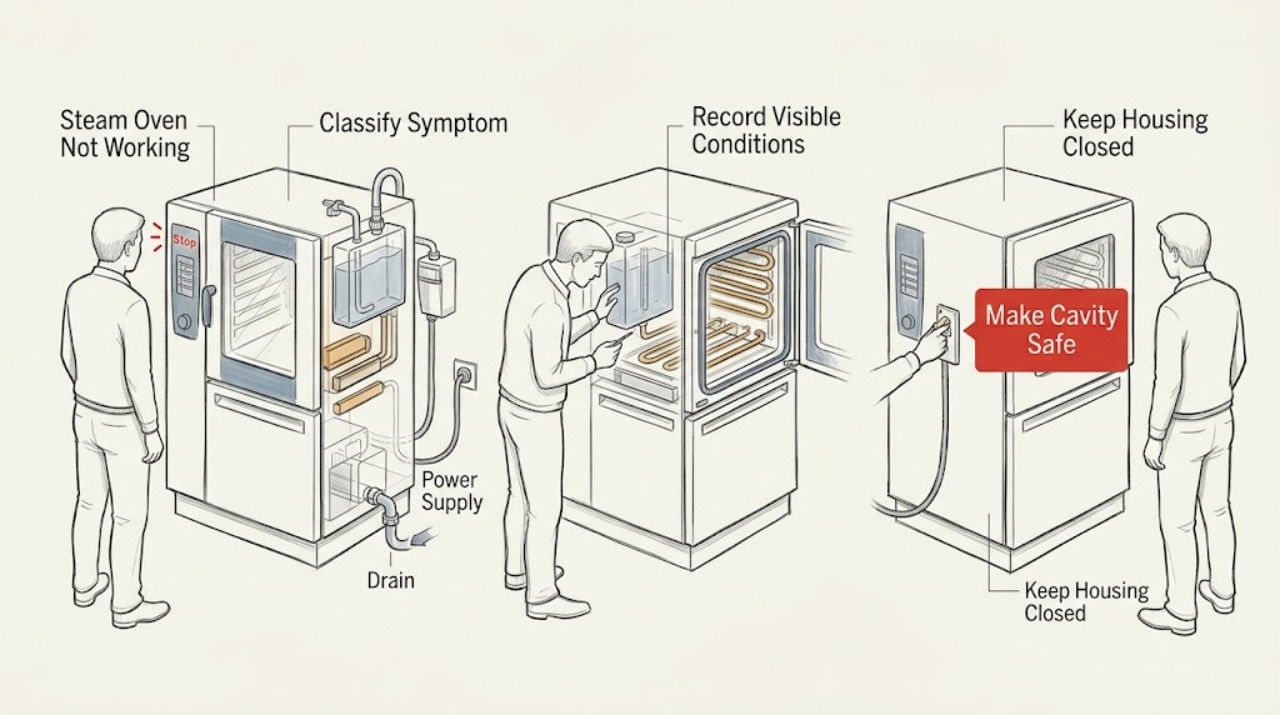
A steam oven that is not working should first be classified as no power, powered but not starting, not heating or steaming, unable to fill or drain, locked at the door, or showing an error. Record the exact model, region, complete display message, selected mode, and point in the program before clearing anything. If the cavity is hot, pressurized with steam, or contains hot water, stop and follow the model's safe cooling procedure before opening the door, tank, tray, or filter. When cool and dry, use only the exact manufacturer's instructions for visible controls, water-tank seating, accessible filters, or hoses. Miele's F12 and F196 pages illustrate that water-intake and drainage meanings are model-family-specific, not universal codes. Use one manual-authorized reset only when there is no leak or electrical, heat, smoke, odor, or door hazard; a returning fault or unresolved no-heat/no-steam condition needs qualified appliance service.
Before you begin
Safety first
- This article supports symptom classification, exact model and message recording, safe cooling, and only visible checks expressly authorized for the exact model. It does not authorize hot-cavity access, door bypass, panel removal, live electrical work, pump or hose dismantling, gas work, chemical drain treatment, or repeated resets.
Work through in order
Diagnostic checks
Use only checks that match the exact appliance or system and its official guide.
-
Check 1
From a safe position, classify the symptom as a blank display, powered controls that will not start, no heat, no steam, water not entering, water not draining, a locked door, or an error message. Record the selected mode, program stage, door state, and whether the cavity is hot.
Expected result: The display is blank, the display is active but Start does nothing, the oven heats without steam, it produces neither heat nor steam, the program stops during water movement, or a code or lock symbol appears.
Next step: Continue only with the matching branch below and the exact owner's manual. If the symptom is accompanied by smoke, burning odor, sparking, shock, leakage near controls, or uncontrolled heat, stop instead of testing.
Stop if: Stop for hot steam or water, an unsafe door, active leakage, smoke, fire, burning odor, sparking, shock, or a breaker that trips again.
Why this matters
Why: Each observation points to a different branch: external power and controls, mode or door interlock, water intake, drainage, heating, or model-specific error handling. The symptom alone does not identify a failed part.
-
Check 2
Photograph or transcribe every display character, symbol, and flashing indicator before clearing it. Record the model, region, steam or combi-steam type, and the exact stage when the fault appeared; do not borrow a code explanation from another brand or model.
Expected result: A complete code and model match an official support result, only a plain-language message or symbol is present, the model is unknown, or the display changes between messages.
Next step: Use the exact manual or manufacturer support result for the recorded identity. If there is no exact match, keep the oven off and arrange service with the record rather than guessing.
Stop if: Do not change hidden settings, clear an unknown message repeatedly, or continue operation when the appliance behaves abnormally.
Why this matters
Why: A matching official scope can authorize a conditional visible check. An incomplete, changing, or unmatched message cannot safely be mapped to a heater, pump, valve, or control board.
-
Check 3
Determine whether the cavity, door, tray, water tank, or drain area is hot or releasing steam. Follow the model's normal stop and cooling sequence and approach only when cool and dry; do not force the door or remove a container while hot steam or water may escape.
Expected result: The oven is cool and accessible, the door remains locked, hot water or steam remains, or the door, seal, glass, and controls show damage or moisture.
Next step: Leave the oven off and arrange qualified service for a persistent lock, damaged door, leak, residual hot water, or moisture near controls. Continue only with external model-authorized checks when safe.
Stop if: Do not reach into a hot cavity, touch wet controls, force the door, or operate with a damaged seal or glass, smoke, odor, or sparking.
Why this matters
Why: Heat, pressure, water, and a damaged door create burn or electrical risk. A lock can be an intentional interlock, so forcing it can worsen the hazard.
-
Check 4
When the oven is cool and dry, check the visible supply state, display brightness, clock or control-lock status, selected mode, door closure, and the manual's normal Start sequence. Inspect the plug, cord, and accessible control area without opening the cabinet or using test instruments.
Expected result: The display is still blank, the clock or lock prevents starting, the door is not recognized as closed, the mode is incompatible with the appliance, or the controls appear normal but Start still fails.
Next step: Follow the exact manual for the control-lock, clock, door, and mode correction. If the supply or cord is damaged, a breaker trips, or the controls remain unresponsive, stop and call qualified service rather than opening the panel.
Stop if: Stop for a hot panel, damaged cord or plug, wet controls, smoke, burning odor, sparking, shock, or repeated breaker operation.
Why this matters
Why: A blank display suggests an external power or service branch; a lock, clock, mode, or door condition can inhibit operation; normal visible controls with no response leave an internal control or interlock fault unresolved.
-
Check 5
Only when the exact model manual identifies a water-intake issue, and only with the appliance cool and dry, check visible water-tank seating, the stated water supply state, and an accessible intake hose or filter. Do not dismantle the inlet or continue if a hose or fitting is damaged.
Expected result: The tank is not seated, the visible supply is closed, an accessible filter is blocked, the hose is visibly faulty, or the external water path appears normal.
Next step: Make only the normal visible correction authorized by the exact manual. If water does not enter, the fault returns, or a hose is damaged, turn the oven off and arrange appliance or plumbing service.
Stop if: Stop for a leak, wet electrical equipment, hot water, a damaged hose or fitting, an unmatched model, or any need to open the appliance.
Why this matters
Why: On the Miele models covered by F12, a closed intake valve or blocked intake filter can prevent water entry, while a faulty hose is a service boundary. The same code or symptom can mean something else on another model.
-
Check 6
When the exact model manual permits it and the oven is cool, distinguish no steam from no heat and inspect only the visible tank, floor filter, drain-hose routing, and cavity condition named by that manual. Do not access a hidden pump, heater, wiring, or gas or water connection.
Expected result: The oven has heat but no steam, has neither heat nor steam, retains water, shows a specified drain code, has a visibly misplaced or dirty model-specific filter, or has normal visible water and drainage conditions.
Next step: Follow only the exact cool-appliance cleaning or placement step authorized for the model. A persistent no-heat/no-steam result, recurring code, or internal component suspicion needs qualified appliance service.
Stop if: Do not handle hot water, run a steam cycle to reproduce a fault, pour chemicals into the drain, open panels, or continue with a leak, smoke, odor, sparking, or uncontrolled heat.
Why this matters
Why: Heat without steam points toward the model's water or steam-generation path; retained water points toward drainage; neither heat nor steam can involve control, supply, heater, or interlock conditions. On specified Miele families, F196 is a drainage example with floor-filter and drain-hose checks.
-
Check 7
If the exact manual authorizes a power cycle or restart, the oven is cool and dry, and no safety symptom exists, perform no more than that single documented reset. Record whether the message clears, returns, or changes, then prepare the model-specific service handoff.
Expected result: The oven returns to normal, the same fault returns, a new fault appears, or the reset causes abnormal behavior or a breaker event.
Next step: Keep the oven unused and give the technician the model, region, full display, program stage, water and door state, visible observations, and reset result. Use emergency or electrical response for fire, smoke, carbon-monoxide danger, or immediate electrical hazard.
Stop if: Do not reset repeatedly, restore a tripped breaker, run a hot test cycle, bypass an interlock, or continue after smoke, gas odor, sparking, leakage, or uncontrolled heat.
Why this matters
Why: A cleared display does not prove the cause is repaired. A returning or changing fault, abnormal behavior, or a breaker event requires service and should not be chased with repeated resets.
Use your observations
Decision map
Find the observation that best matches what you see, then follow the next safe action.
-
PATH 01Safety boundary
What you see
The display is blank or controls remain unresponsive after safe visible checks.
Do this next
Follow only the exact manual's external power and reset guidance. If the plug, cord, panel, or supply is damaged, or the oven remains dead, arrange qualified appliance or electrical service.
Why this path and its safety boundary
Why it matters: The problem may be external power, a cord or control issue, or an internal fault that cannot be distinguished safely without service.
Safety stop: Do not open panels, use test instruments, repeatedly reset a breaker, or operate with smoke, heat, odor, water, or sparking.
-
PATH 02Safety boundary
What you see
The display works but Start is inhibited by a lock, clock, door, mode, or unresolved message.
Do this next
Match the complete model and message to the official manual, correct only visible settings it documents, and arrange service if the door or control still is not recognized.
Why this path and its safety boundary
Why it matters: A user setting or safety interlock may be blocking the program, but an unrecognized message must not be decoded generically.
Safety stop: Do not bypass the door interlock, force the door, alter hidden settings, or repeatedly clear an unknown error.
-
PATH 03Safety boundary
What you see
The program stops while filling, the tank is not detected, or the exact code matches a model-specific water-intake instruction.
Do this next
When cool and dry, make only the visible correction named by the exact manual. A damaged hose, leak, or returning fault needs appliance or plumbing service.
Why this path and its safety boundary
Why it matters: A closed supply, tank seating, accessible filter, or intake path can be involved on some models; the exact manual controls applicability.
Safety stop: Stop for leaking or hot water, moisture near controls, a damaged fitting, or any need to dismantle the water path.
-
PATH 04Safety boundary
What you see
The oven heats without producing steam, retains water, or the exact model instruction identifies a drainage fault.
Do this next
Follow only the exact cool filter or visible hose instruction. If water remains, the model does not match, or the fault returns, keep the oven off and call service.
Why this path and its safety boundary
Why it matters: The water-generation or drain path is more relevant than a generic heater replacement. On specified Miele combi-steam families, F196 concerns water not being pumped away.
Safety stop: Do not handle hot water, access a pump, open panels, pour chemicals into the drain, or run another hot test.
-
PATH 05Safety boundary
What you see
The model or message cannot be matched exactly, the symptom persists after one authorized reset, or the oven still does not heat or steam.
Do this next
Keep the appliance out of service and contact the manufacturer or qualified appliance technician with the complete record.
Why this path and its safety boundary
Why it matters: The cause may involve a model-specific control, sensor, heater, pump, valve, door, or installation issue that cannot be selected safely from a broad symptom.
Safety stop: Do not substitute another brand's code table, repeatedly reset, or continue operating an unresolved abnormal oven.
Helpful context
Understand the symptom
Classify what not working means before testing
Separate a blank display from a display that will not start, and separate a dry or cold result from a program that stops while filling or draining. Note whether the oven is a tank-fed steam oven, a plumbed steam oven, a combi-steam oven, or a convection steam model. Record the model and region, selected mode, door state, water state, and any exact message or symbol. A broad symptom is not enough to select a part or apply another model's code meaning.
Make heat, steam, and water safe first
Steam and hot water can burn, and a sealed or locked door may be a safety state. Do not force the door, reach into a hot cavity, or remove a tank, tray, filter, or hose while steam or hot water may escape. Wait for the exact manual's cooling sequence. If water is near controls, a door is damaged, or smoke, odor, sparks, shock, or uncontrolled heat is present, leave the oven off and use the appropriate professional or emergency service path.
Use water examples only within their documented model scope
On the Miele models covered by its F12 page, the fault concerns water not entering and can involve the intake valve, an accessible intake filter, or a faulty hose. On the specified Miele combi-steam families covered by F196, water could not be pumped away and the page names a floor filter and, for a stated family, drain-hose routing. These are examples of model-specific diagnosis; they do not decode an unbranded or different-model steam oven.
Safety boundary
Stop conditions
- Stop and stay clear for hot steam, hot water, active leakage, water near controls, a forced or damaged door, smoke, fire, burning odor, sparking, shock, uncontrolled heating, or a breaker that trips again.
- Do not force the door, reach into a hot cavity, move a built-in appliance, open panels, access wiring, pumps, heaters, or gas and water connections, or run a steam cycle to reproduce an unresolved fault.
- Do not apply another brand's or model family's code meaning, change hidden settings, repeatedly reset power, use drain chemicals, or dismantle a water inlet.
- Keep the steam oven out of service for an unknown or returning fault, persistent no-heat/no-steam condition, damaged hose or door, unresolved water problem, or any abnormal behavior; arrange qualified service.
- Use the exact manufacturer's manual for safe cooling, water handling, cleaning, code scope, and reset behavior. Official examples such as Miele F12 and F196 are not universal decoders.
When checks do not resolve it
Need a professional?
Arrange qualified appliance service when the exact model or message cannot be matched, a fault returns after one authorized reset, the oven will not heat or steam, water will not enter or drain, a hose or door is damaged, the display remains abnormal, or the controls stay unresponsive. Stop immediately for hot-steam or hot-water danger, a leak near electrical controls, smoke, fire, burning odor, sparking, shock, uncontrolled heating, or a breaker that trips again; use emergency, electrical, plumbing, or appliance response from a safe location.
Safety scope: This article supports symptom classification, exact model and message recording, safe cooling, and only visible checks expressly authorized for the exact model. It does not authorize hot-cavity access, door bypass, panel removal, live electrical work, pump or hose dismantling, gas work, chemical drain treatment, or repeated resets.
Common questions
FAQ
Why is my steam oven not working even though the display is on?
Record the model, mode, door state, full display message, and program stage. A lock, clock, door interlock, water-intake condition, drain fault, or model-specific error can inhibit operation; use only the exact manual and do not bypass an interlock or repeatedly reset.
What should I check if the oven heats but produces no steam?
When the oven is cool and dry, follow the exact model's visible tank, water-supply, filter, and drain guidance. Do not assume a universal steam generator or pump fault; a returning water problem, leak, or need to open the appliance belongs with qualified service.
Can I use a generic steam-oven error-code list?
No. Record the complete code, model, region, appliance type, and program stage, then use the exact manufacturer's support result. Miele's F12 and F196 articles apply to different water paths and specified model families, so they are examples rather than universal definitions.
When is a steam-oven failure an emergency?
Stop and stay clear for hot steam or water danger, a leak near controls, a forced or damaged door, smoke, fire, burning odor, sparking, shock, uncontrolled heating, or a breaker that trips again. Use emergency, electrical, plumbing, or qualified appliance service from a safe location as appropriate.
Read the exact guide
Official sources
- Owner’s Manual Convection Steam OvenPanasonic Appliances Microwave Oven (Shanghai) Co., Ltd. · Official Panasonic NU-SC180B convection steam-oven manual; exact model and region control operating details.
- Miele Steam Oven | Fault F12Miele USA · Miele official F12 guidance for applicable steam and combi-steam ovens; it must not be generalized to other models or codes.
- Miele Steam Oven | Fault F196 (DGC 6xx5, DGC 7xxx)Miele USA · Miele official F196 guidance only for the specified DGC model families; do not generalize the code or filter instruction.
- Troubleshooting for Display messages & light indicators problem with Miele Steam OvenMiele USA · Miele official steam-oven support index; the exact model and linked article control any code or setting interpretation.
Community feedback
Share a repair observation
Share a plain-text repair observation. Accepted observations are published automatically; this page may take a moment to update.