
On this page
Start here
Quick answer
A 315W that was left open can run for a long time while it pulls the cabinet back toward its set temperature, and Sub-Zero says some fan noise during operation is normal. Reclose the door, check for a rack or gasket preventing a seal, and allow the cabinet time to recover. Repeated loud clicking is not identified as normal by the 315W guide: if the noise remains excessive, the unit does not cool, frost builds, or you hear rubbing or vibration, stop trying to identify an internal part and arrange Sub-Zero factory-certified service.
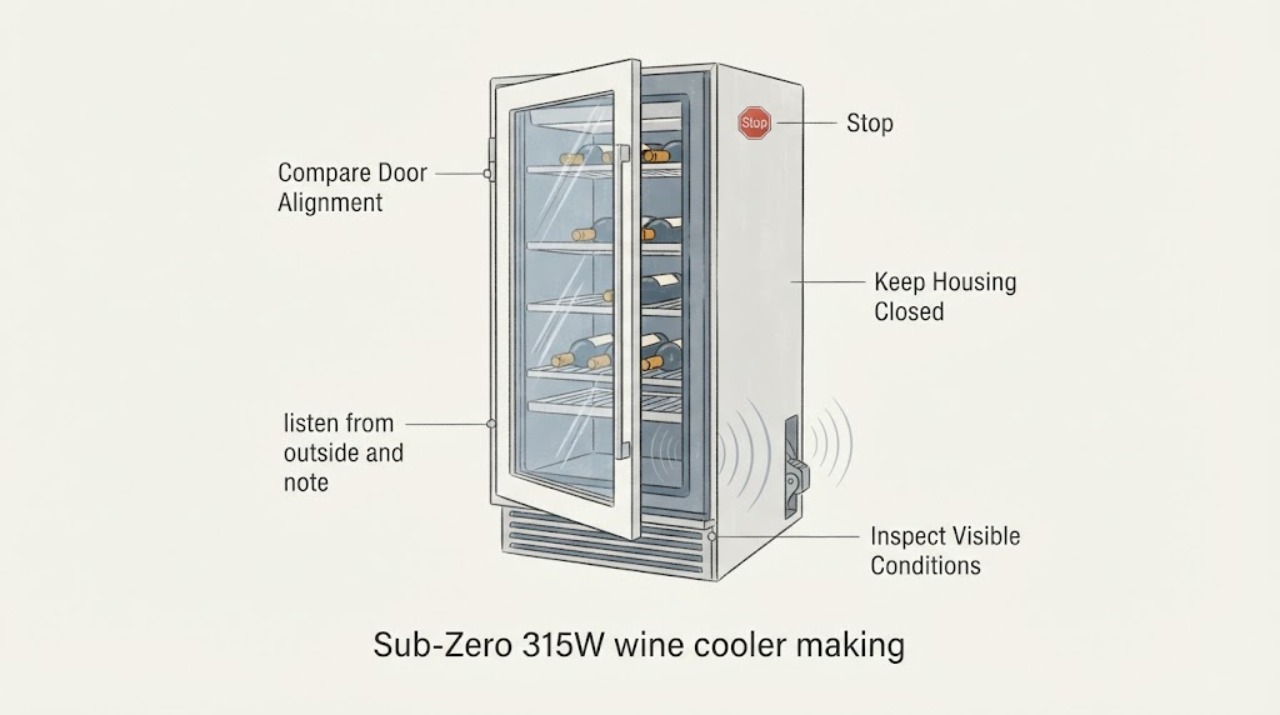
Work through in order
Diagnostic checks
Use only checks that match the exact appliance or system and its official guide.
-
Check 1
Close the 315W door and inspect the visible door path. Make sure no wine rack or bottle is obstructing closure, the door sits squarely, and the gasket contacts the cabinet around its perimeter. Do not force the door or remove hinges or panels.
Expected result: The door closes flush and the gasket contacts evenly, or there is a rack obstruction, a visible gap, a misaligned door, hinge movement, or a gasket that does not seal.
Next step: Remove only an obvious rack or bottle obstruction and close the door. If the door, hinge, or gasket still does not seal, stop at this external check and request factory-certified service; do not adjust or replace a door part based only on the clicking sound.
Why this matters
Why: The exact 315W troubleshooting guide lists a door left ajar, rack obstruction, door adjustment, hinge trouble, and a gasket that is not tight as causes to check when the unit runs too long or warms. A sealed door makes the door-open condition less likely to be the continuing cause.
-
Check 2
With the door closed and the unit otherwise undisturbed, listen from outside and note whether the sound is a normal low fan or operating hum, a repeated loud click, or a rubbing or vibration sound. Do not remove the kickplate, reach toward a fan, or open the cabinet to locate the click.
Expected result: The sound is limited to ordinary fan or operating noise while the unit cools, or it remains repeatedly loud, is accompanied by rubbing or vibration, or is followed by loss of cooling.
Next step: If the sound is quiet and the cabinet is recovering, continue the recovery observation. If it is persistently excessive, rubbing, vibrating, or paired with poor cooling, record when it occurs and arrange factory-certified service rather than testing an internal component.
Why this matters
Why: Sub-Zero says some fan noise during operation can be normal and its 315W noise table says vibration may be normal. The same table separately identifies a fan blade contacting the shroud as a service-level cause, so the documentation does not support calling every clicking sound normal or naming a compressor from sound alone.
-
Check 3
If the unit is safe to access, turn the temperature control knob to OFF before inspecting the kickplate/grille and the accessible condenser area. Look for lint or an obstruction at the airflow path. Clean only accessible dust as the Use and Care Guide describes, vacuuming in the direction of the fins and avoiding the sharp fins; do not remove covers or work on the fan.
Expected result: The kickplate or condenser area is visibly blocked or dusty, or the airflow path is clear and the clicking remains.
Next step: Restore power only after the external area is clear and dry. If the sound or poor cooling remains, stop cleaning and request service; do not access the compressor, fan wiring, relay, or sealed system.
Why this matters
Why: Sub-Zero warns that obstructed kickplate airflow can reduce performance and cause damage, and says condenser cleaning can be needed every three to six months. Clearing accessible lint can address an airflow-related long-run condition, but it cannot establish the source of a repeated click.
-
Check 4
Note when the door was closed, the control setting, whether the cabinet is cooling, whether frost is visible, and whether the noise occurs continuously or only during a cooling cycle. Allow time for the cabinet and any warmed wine to cool after the open-door event.
Expected result: Cooling returns and the noise settles as the cabinet recovers, or the noise stays excessive, the temperature remains high, frost thickens, or the unit does not cool.
Next step: If the unit recovers and the sound settles, monitor it without opening the cabinet. If it does not recover or the clicking remains excessive, provide the observations and model 315W information to Sub-Zero factory-certified service; do not attempt internal electrical, fan, compressor, or sealed-system diagnosis.
Why this matters
Why: The 315W material says to allow time to cool after a warm condition and notes that warm wine can require many hours, up to 24 hours in the Use and Care Guide. Persistent excessive noise, a fan motor problem, compressor nonoperation, or thick frost are service conditions in the model guidance; they do not identify which internal part has failed.
Use your observations
Decision map
Find the observation that best matches what you see, then follow the next safe action.
-
PATH 01Next step
What you see
The door now closes flush, the gasket seals, cooling is returning, and the sound is limited to a quiet operating or fan noise.
Do this next
Allow the cabinet time to recover and monitor. Request service if the noise becomes excessive or cooling does not return.
Why this path and its safety boundary
Why it matters: This pattern is consistent with recovery after the open-door event and with the 315W guide's statement that some fan noise during operation is normal; it does not prove a component diagnosis.
-
PATH 02Next step
What you see
The door still has a visible gap, a rack or bottle blocks closure, the gasket does not contact evenly, or frost appears after the door was left open.
Do this next
Remove only the visible obstruction and close the door. If the seal, hinge, or frost problem remains, request factory-certified service instead of adjusting the door or replacing a part by guesswork.
Why this path and its safety boundary
Why it matters: The exact 315W troubleshooting guide treats door-ajar, rack, hinge, and gasket conditions as continuing causes of warm temperature or extended operation.
-
PATH 03Next step
What you see
The click remains repeatedly loud or is accompanied by rubbing, strong vibration, poor cooling, or thickening frost after the door is closed and the cabinet has had time to recover.
Do this next
Stop troubleshooting at the external checks, record the sound and cooling behavior, and arrange Sub-Zero factory-certified service. Do not call it a compressor failure without a technician's diagnosis.
Why this path and its safety boundary
Why it matters: The observed pattern exceeds the guide's limited normal-noise statement. The model documentation provides fan, airflow, thermostat, compressor, and sealed-system service paths but does not support selecting one from the sound alone.
-
PATH 04Next step
What you see
The kickplate or accessible condenser area is blocked or dusty, but the unit has no electrical, smoke, or refrigerant emergency signs.
Do this next
Turn the control knob OFF, clean only the accessible condenser area as documented, then stop if the clicking or poor cooling persists and request service.
Why this path and its safety boundary
Why it matters: Sub-Zero says obstructed airflow can reduce performance and cause damage, so accessible airflow maintenance is a reasonable external check; it is not an explanation for every click.
Helpful context
Understand the symptom
First let the 315W recover from the open door
Leaving the door open can make the wine cooler run longer and can introduce warm, humid air. Close the door fully and check the simple external causes before treating a loud clicking sound as a failed compressor or another specific part. The 315W documentation supports door, gasket, rack, airflow, vibration, and fan checks; it does not identify a particular internal failure from the word clicking alone.
A normal operating sound is still different from persistent excessive noise
The Use and Care Guide says some fan noise during operation is normal, and the service troubleshooting table says noise may be normal when it comes from vibration. That is not a blanket finding that repeated loud clicking is normal. Use the recovery and external checks below, then use the cooling result and whether the sound persists to decide whether service is needed.
When checks do not resolve it
Need a professional?
Request Sub-Zero factory-certified service when the 315W door or gasket cannot be made to seal, the noise remains excessively loud or rubbing after the door is closed and airflow is clear, cooling does not return, frost thickens, or the unit stops operating. Give the technician the model, when the door was left open, the sound pattern, and the cooling result.
Common questions
FAQ
Can leaving the Sub-Zero 315W door open make it click?
It can make the unit run longer while it recovers from the warm, open-door condition, but the 315W guide does not identify repeated loud clicking as automatically normal. Close and seal the door, allow recovery, and escalate persistent excessive noise or poor cooling rather than guessing a part.
How long should the 315W take to recover after the door was left open?
The model guidance says to allow time to cool after a warm condition. The Use and Care Guide says a fully loaded unit with room-temperature wine may operate for up to 24 hours to reach its set temperature; use that as a recovery context, not as permission to ignore persistent excessive noise.
Is fan noise normal on a Sub-Zero 315W?
Sub-Zero says some fan noise during operation is normal and its troubleshooting table says vibration may be normal. A loud repeated click, rubbing sound, poor cooling, or thickening frost needs service evaluation because the documents do not identify one internal cause from sound alone.
Should I replace the compressor because the wine cooler clicks?
No. The 315W service material lists several possible noise and cooling paths and reserves internal electrical, fan, compressor, and sealed-system work for service. Record the sound and cooling result and request factory-certified diagnosis.
Can I clean the condenser while troubleshooting the clicking?
Only use the documented external check: turn the temperature control to OFF first, remove accessible dust in the condenser area in the direction of the fins, and avoid the sharp fins. Do not remove covers or work on the fan or compressor; request service if the sound or cooling problem remains.
Read the exact guide
Official sources
- Sub-Zero Model 315W Wine Storage Use and Care GuideSub-Zero · Exact 315W Use and Care Guide. Supports the normal fan-noise statement, operating-time and door-gasket checks, recovery after warm contents, and external condenser cleaning; it does not identify a specific internal cause for a clicking sound.
- Technical Service and Parts Manual for Wine Cooler Model 315WSub-Zero Service Central · Exact 315W technical service manual. The manual is explicitly for authorized service personnel; this article uses only its external door, airflow, recovery, noise classification, and service-boundary information and does not expose internal repair procedures.
- 315W Wine StorageSub-Zero · Official Sub-Zero product-library page confirming the 315W wine-storage identity and linking the official installation, use-and-care, and design guides. Used for exact model identity and source routing, not for unseen technical claims.
- Wine Cooler (Model 315W) TroubleshootingSub-Zero Service Central · Exact 315W troubleshooting pages. Supports the distinction between potentially normal vibration/fan noise and fan-blade contact, without authorizing a consumer to access or repair the fan.
Community feedback
Share a repair observation
Share a plain-text repair observation. Accepted observations are published automatically; this page may take a moment to update.