
On this page
Start here
Quick answer
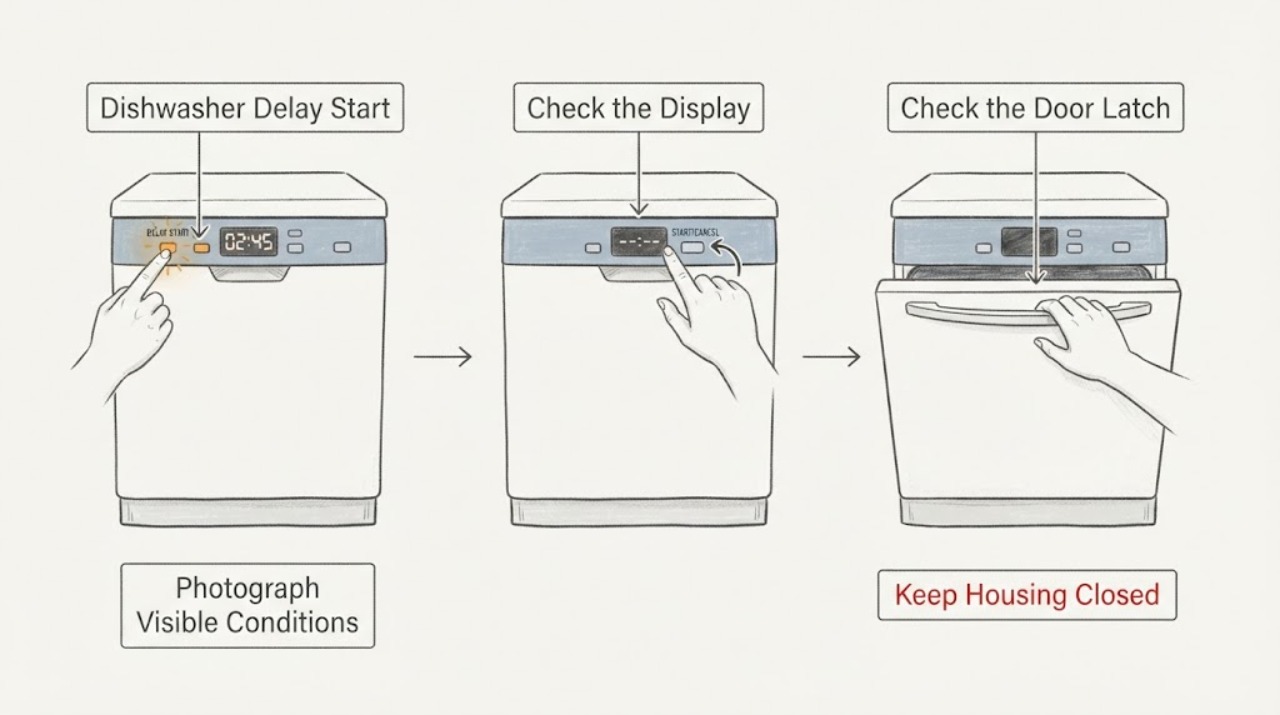
For a Thermador DWHD660WFP that does not start after Delay Start was selected, first determine whether the dishwasher is still showing a delay, a paused cycle, or a completed/previous cycle. The opened DWHD650W/DWHD660W manual says Delay Start can be set up to 24 hours and canceled by opening the door, setting the delay back to the zero-delay display, and pressing Start to save it. It also says the door must be closed within four seconds after Start or the cycle pauses. Select a cycle, cancel the delay using that model-specific sequence, press Start once, and close the door normally. If the display remains dark, a breaker trips, a door will not latch, a water or error indication appears, or the dishwasher still fails after these external checks, stop repeated resets and arrange qualified Thermador service.
Before you begin
Safety first
- Keep the dishwasher installed and enclosed. Do not bypass the door latch or sensor, open electrical covers, perform live voltage tests, disconnect pressurized water, or repeatedly reset a breaker or error state. Turn off water for a leak and isolate power safely for smoke, sparks, burning odor, wet electrical parts, or a repeated trip.
Work through in order
Diagnostic checks
Use only checks that match the exact appliance or system and its official guide.
-
Check 1
From a dry, safe position, record the exact model from the rating plate and photograph the display before changing anything. Note whether the panel is completely dark, shows a remaining delay or cycle time, shows the zero-delay display, shows a door or water indication, or shows another code. Do not pull the built-in dishwasher out of its cabinet.
Expected result: The panel is dark, a delay value is visible, a cycle-time value is visible, the zero-delay display is visible, or a door/water/error indication is present.
Next step: Keep the exact indication with the model number and follow the matching branch below. Do not infer a control board, latch, valve, or pump from the display alone.
Stop if: Stop for a wet or hot connection, damaged cord, smoke, burning odor, sparks, or a breaker that trips again.
Why this matters
Why: A visible delay or cycle value is a control-state clue, not proof of a failed component. A dark panel or repeated electrical indication moves the problem toward power or service; a door, water, drain, or other code needs the exact model documentation.
-
Check 2
If the controls are lit, open the door only as needed for the documented control sequence. Press the Delay button until the display reaches the manual's zero-delay setting, then press Start once to save the setting. Do not substitute a generic reset sequence from another Thermador line.
Expected result: The delay value clears and the display returns to the normal cycle state, or the delay cannot be changed, the controls do not respond, or an error appears.
Next step: If the delay clears, continue with one normal start attempt. If it does not clear or a code appears, record the full display and arrange model-specific support rather than repeatedly pressing buttons.
Stop if: Do not hold arbitrary button combinations, enter service mode, bypass the door sensor, or repeatedly reset the appliance.
Why this matters
Why: The opened DWHD650W/DWHD660W manual treats Delay Start as a setting that must be returned to zero and saved with Start. Failure to change that setting can explain a no-start without proving an internal part failure.
-
Check 3
Select a valid wash cycle, press Start once, and close the door firmly within four seconds. Observe whether the door remains latched, the display advances, and the dishwasher begins its initial drain or fill. Do not force the door or test with the door interlock bypassed.
Expected result: The cycle starts, the display pauses, the door does not latch, or the door was left open longer than four seconds after Start.
Next step: If it paused, press Start again and close the door within the documented interval. If the latch will not engage or a door indication returns, stop and request qualified Thermador service.
Stop if: Do not slam, tape, wedge, or bypass the door latch or sensor.
Why this matters
Why: The manual says opening the door during Delay Start or leaving it open for more than four seconds after pressing Start can pause operation. A door that will not latch normally is a separate interlock/alignment service clue, not evidence that the delay is still active.
-
Check 4
From outside the cabinet, check the accessible dishwasher switch or plug, outlet, and household breaker only if they are dry and undamaged. Look at the visible water-supply valve and inlet hose for a closed valve, kink, damage, or moisture; do not open a junction box or disconnect a pressurized hose.
Expected result: The panel returns after a safe supply correction, the breaker is tripped, the outlet/connection is damaged or wet, the water valve is closed, or the visible supply is normal but the dishwasher still does not start.
Next step: Correct only an accessible dry valve or breaker condition once, then make one supervised start attempt. Stop for heat, moisture, damage, another trip, or persistent no-start and arrange qualified service.
Stop if: Do not repeatedly reset a tripping breaker, perform live voltage measurements, remove covers, or pull an integrated dishwasher from the cabinet.
Why this matters
Why: Thermador's troubleshooting guidance lists power, door closure, water supply, and active Delay Start as separate no-start causes. A normal-looking valve or outlet does not prove the appliance-side supply circuit or inlet system is healthy.
-
Check 5
If Home Connect or a remote-start indicator is in use, compare the local display with the app's appliance status, then open the door normally and observe whether remote control is disabled as the manual describes. Do not assume that an app command has canceled the local delay or that a network status proves a cycle is running.
Expected result: The app reports a pending delay, the local remote-start indicator is not active, opening the door ends remote control, or the local panel still shows a no-start state after the app and panel agree.
Next step: Use the local model-specific Delay cancellation and Start sequence once, with the door closed normally. If the app and local display disagree or the no-start repeats, save the status and contact Thermador support.
Stop if: Do not repeatedly send remote commands, factory-reset the network, or use remote control to operate a machine with a leak, damaged connection, or unresolved error.
Why this matters
Why: The exact-family manual says remote control requires the remote-start button to be activated and that opening the door deactivates remote control. Thermador's product page identifies DWHD660WFP as a Wi-Fi Smart Appliance, but connectivity does not establish that the dishwasher accepted a local Start command.
-
Check 6
After one permitted correction, make one supervised start attempt and record whether the machine drains, fills, remains latched, and completes the first part of the cycle. If a code or leakage-related indication appears, stop and preserve the full display, timing, and door/power observations for service.
Expected result: The dishwasher starts normally, the same delayed/no-start condition returns, a water/drain code appears, water leaks, the panel resets, or the breaker trips.
Next step: Stop repeated attempts and request qualified Thermador service with the exact model, display code, delay value, door behavior, power result, and water/drain observations.
Stop if: Turn off the water supply and leave the appliance out of use for a leak or overflow; isolate power safely for smoke, sparks, burning odor, wet electrical parts, or repeated breaker trips.
Why this matters
Why: A successful start supports a delay, door-close, or external supply state as the immediate explanation. A repeat failure after the documented sequence leaves an internal control, latch, supply, drain, wiring, or installation fault possible without identifying which part failed.
Use your observations
Decision map
Find the observation that best matches what you see, then follow the next safe action.
-
PATH 01Next step
What you see
A delay value is visible and the controls respond; the zero-delay setting can be selected and saved with Start.
Do this next
Select the zero-delay setting using the exact DWHD650W/DWHD660W manual sequence, press Start once, and close the door within four seconds. If it still does not begin, continue with the door and supply observations rather than repeating resets.
Why this path and its safety boundary
Why it matters: The stored Delay Start state is the leading explanation for the apparent no-start, rather than a confirmed failed Start button or control module.
-
PATH 02Next step
What you see
The delay is cleared, but the cycle pauses after Start, the door does not latch, or a door-open indication returns.
Do this next
Press Start once more and close the door normally within the documented interval. Do not force or bypass the latch; arrange qualified service for a recurring door indication or failed latch.
Why this path and its safety boundary
Why it matters: The next decision is the door-close/interlock state. The manual's four-second rule can pause a valid Start, while a latch that will not engage points to alignment or door-sensor service.
-
PATH 03Next step
What you see
The panel is dark or resets, the breaker trips, the cord/outlet is hot or wet, or a water-supply indication remains after the delay is canceled.
Do this next
Stop use; isolate the appliance only from a safe dry location, turn off water for a leak, and arrange qualified electrical or Thermador appliance service. Do not keep resetting the breaker or open the cabinet.
Why this path and its safety boundary
Why it matters: This pattern is not explained by Delay Start alone. Electrical supply, installation, water entry, or an appliance-side fault needs qualified assessment.
-
PATH 04Next step
What you see
The exact Delay cancellation and door-close sequence succeeds once, but the same no-start or an error returns, or the local display and Home Connect status disagree.
Do this next
Stop repeated local or remote attempts and give Thermador service the exact model, full display, delay value, door state, app status, and the result of the one supervised attempt.
Why this path and its safety boundary
Why it matters: An internal control, latch, sensor, supply, wiring, installation, or communication fault remains possible; the evidence does not identify a replacement part.
Helpful context
Understand the symptom
A dishwasher that appears not to start after a delay is not automatically a failed Start button. On the DWHD660W family covered by the opened Thermador manual, Delay Start is a stored operating state: the delay can be set for up to 24 hours, and canceling it requires selecting the zero-delay display and saving that setting with Start. A door opened during the delay or left open for more than four seconds after Start can also leave the operation paused. Read the display and door state before treating the symptom as an internal fault.
This model also has Home Connect/remote-start controls, but a network or app state is not proof that the local cycle was accepted. Use the exact model controls and observe whether the machine drains, fills, and latches after one supervised start. Do not enter a service mode, remove panels, bypass the door interlock, or keep resetting a machine with a code, leak, power trip, or damaged connection.
The useful decision is whether the delay was actually canceled and the door-close sequence was completed, whether a safe external power or supply condition blocks the start, or whether the same failure returns after those model-specific checks. That distinction avoids replacing a control or latch based only on a delayed display.
When checks do not resolve it
Need a professional?
Request qualified Thermador service when the model-specific delay setting cannot be canceled, the door will not latch, the display remains dark or resets, a code returns, the app and local controls disagree, or one supervised external-check attempt does not start the cycle.
Safety scope: Keep the dishwasher installed and enclosed. Do not bypass the door latch or sensor, open electrical covers, perform live voltage tests, disconnect pressurized water, or repeatedly reset a breaker or error state. Turn off water for a leak and isolate power safely for smoke, sparks, burning odor, wet electrical parts, or a repeated trip.
Have this ready
- Provide DWHD660WFP and the full suffix from the rating plate, the complete display or indicator pattern, delay value, selected cycle, whether the door latched within four seconds, local and Home Connect status, breaker/outlet result, and any water, leak, odor, heat, or noise observation.
Common questions
FAQ
How do I cancel Delay Start on a Thermador DWHD660WFP dishwasher?
Open the door, press Delay until the manual's zero-delay setting appears, then press Start to save it. Select a cycle and close the door normally; if the display or controls do not respond, record the full indication and arrange model-specific support instead of trying random button combinations.
Why does my Thermador dishwasher still not start after I canceled the delay?
Check whether Start was pressed once and the door was closed within four seconds, as the opened DWHD650W manual says a longer-open door pauses operation. Then check only safe, accessible power, breaker, water-valve, and hose conditions. A recurring no-start, code, leak, or door-latch problem needs qualified service.
Does opening the door cancel Delay Start?
Opening the door is part of the documented cancellation sequence, but the delay must be returned to the zero-delay setting and saved with Start. Opening the door alone does not establish that the delay was canceled; it can also pause a pending operation.
Can Home Connect start the DWHD660WFP if the local dishwasher does not start?
The DWHD660WFP product page identifies Wi-Fi capability and the manual describes remote control, but an app status is not proof that a local Delay Start was canceled or that the door interlock accepted the cycle. Compare the local display and app once, then use the model-specific local sequence and service boundary.
Should I keep resetting the Thermador dishwasher until it starts?
No. Use the documented Delay cancellation and one normal Start attempt. Stop for a dark or resetting panel, repeated breaker trip, water, smoke, burning odor, unusual heat, door-latch failure, or recurring code, and arrange qualified service.
Read the exact guide
Official sources
- How to Use the Controls of Your Thermador DishwasherThermador · Supports that Thermador publishes separate control guidance for dishwasher families, including canceling a wash cycle and setting Delay Start; exact button behavior is taken from the matching DWHD650W/DWHD660W manual.
- Permanent Remote Start | Thermador Connected AppliancesThermador · Supports the remote-start distinction only; the exact DWHD660WFP manual and product page establish that the assigned family has remote/Wi-Fi controls, while this page does not prove a particular user's app state.
- Topaz Dishwasher 24'' Stainless Steel | DWHD660WFPThermador · Exact product identity and Wi-Fi/Home Connect capability for DWHD660WFP; it does not by itself define a fault or prove that remote start is enabled.
- Appliance Information - Dishwasher | DWHD660WFP/15Thermador · Exact-family identity and manuals/support routing for the assigned DWHD660WFP model; the /15 service revision is used only to verify the product family and model identity.
- Use and Care Manual DWHD650W** DWHD660W**Thermador / BSH Home Appliances · Directly supports the assigned DWHD660WFP family's Delay Start, Start, door timing, reset, remote-start, and no-start guidance; exact suffix-specific differences still defer to the rating plate and current model manual.
- Troubleshooting | Dishwashers Support | ThermadorThermador · Supports the external distinction among active delay, power, door, water supply, drain, and filter checks; exact model documentation remains controlling for the assigned unit.
Community feedback
Share a repair observation
Share a plain-text repair observation. Accepted observations are published automatically; this page may take a moment to update.