
On this page
Start here
Quick answer
For a Thermador dishwasher that will not turn on, first check the accessible power connection and the control-panel state, then wake the unit, clear Control Lock or Delay Start, and confirm the door is fully latched. Thermador says some models show the display only with the door open or closed, so a dark display is not enough to prove no power. If the breaker trips, the unit remains dead after the model-specific reset, or water is present in the base, stop and arrange Thermador service or qualified electrical help.
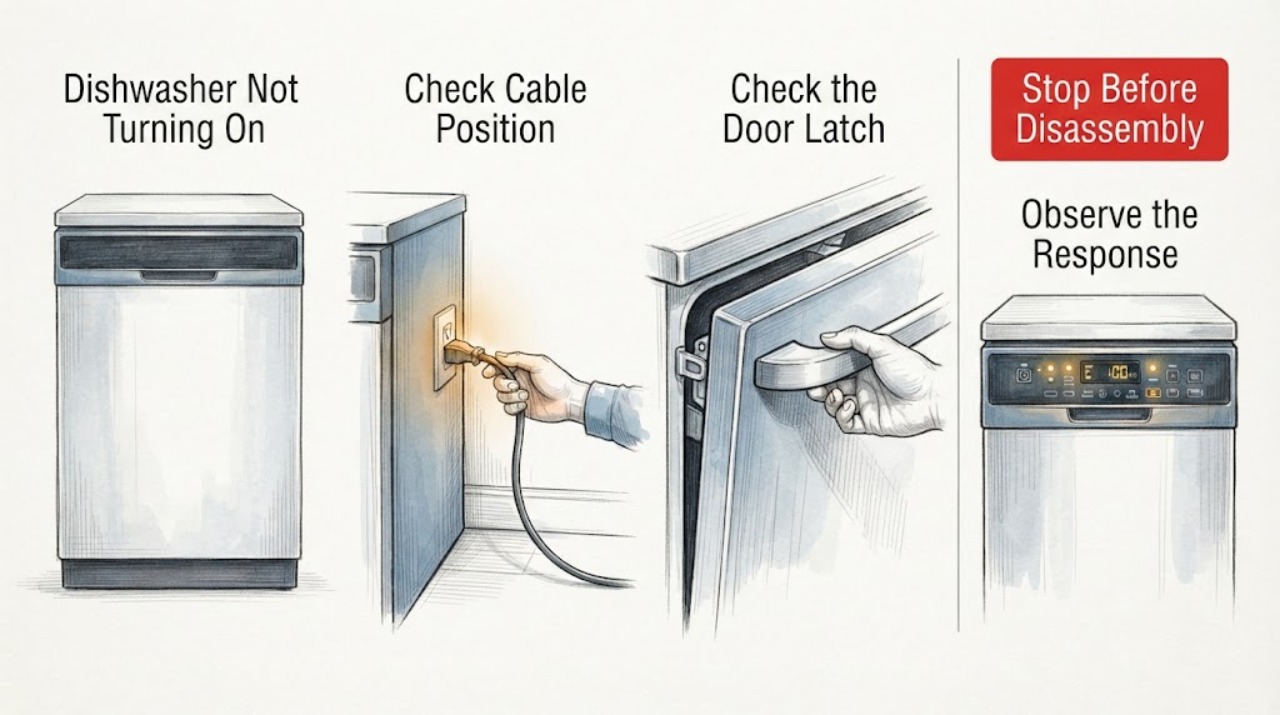
Work through in order
Diagnostic checks
Use only checks that match the exact appliance or system and its official guide.
-
Check 1
Check the dishwasher's accessible power connection and household breaker. For a plug-in model, confirm the plug is seated; for a hard-wired model, do not open the junction box.
Expected result: The outlet or breaker has no power, the connection is damaged, or power is present but the dishwasher remains unresponsive.
Next step: Have a qualified electrician address a dead outlet or wiring issue. If the supply is sound, continue with door and control-state checks and stop repeated breaker resets.
Why this matters
Why: A supply problem can leave every control dark, while power at the unit shifts attention to controls, door state, or a fault code. A tripped breaker that trips again is not a normal reset result.
-
Check 2
Open and close the door once, then observe the control panel in the position specified by the model. Check for Control Lock, Standby/Sleep, or Delay Wash indications; do not force the latch.
Expected result: The panel wakes when the door changes position, a lock or delay is active, or no display/indicator responds.
Next step: Clear only the user-selectable lock or delay according to the owner manual. If the panel remains dead, use the model reset once and arrange service if it does not recover.
Why this matters
Why: Thermador notes that display visibility depends on model and that lock, sleep, and delay states can prevent an expected start. No response in the correct display position makes a supply or control fault more likely.
-
Check 3
Confirm the door closes squarely and the latch engages without a rack, dish, or panel obstruction.
Expected result: The latch clicks and the door stays closed; the door will not latch; or the panel responds but a cycle will not start.
Next step: Rearrange only an accessible item blocking closure. Do not bypass the latch or remove panels; arrange Thermador service for a damaged latch, misalignment, or persistent no-start.
Why this matters
Why: A dishwasher will not start a cycle when its door safety state is not satisfied. A responsive panel with a failed latch path is different from a completely dead console.
-
Check 4
If there is no immediate hazard and the appliance is safely accessible, use the exact owner-manual reset procedure. Do not repeatedly cycle a breaker or continue after a trip.
Expected result: The controls return after one reset, an error code appears, or the unit stays dead or trips protection again.
Next step: Record the code and keep the dishwasher out of use if it remains dead, trips again, or cannot latch. Arrange service or electrical evaluation as indicated.
Why this matters
Why: A reset can clear a control state but does not prove a repair. Thermador lists model-specific codes and directs recurring or unresolved conditions to service; not every model has the same codes.
-
Check 5
Read the model number from the rating plate and compare the symptoms with the matching Thermador manual and error-code page.
Expected result: A matching manual identifies the controls; the model is unknown; or a code such as a safety-switch or power-supply code appears.
Next step: Give the model, code, indicator pattern, breaker behavior, and door-latch result to Thermador support or an authorized servicer.
Why this matters
Why: Model identity controls the display position, reset method, and code meaning. An unknown model or unlisted code does not justify guessing at the control board or latch.
Use your observations
Decision map
Find the observation that best matches what you see, then follow the next safe action.
-
PATH 01Next step
What you see
The display appears when the door is positioned as that model expects, and a lock, sleep, or delay state is shown.
Do this next
Clear the state using the exact manual and try one normal start. If the panel still fails or the cycle will not begin, arrange service.
Why this path and its safety boundary
Why it matters: The dishwasher may be powered but held in a user-selectable control state rather than truly dead.
-
PATH 02Next step
What you see
The door will not latch or a rack/panel prevents closure while the controls otherwise respond.
Do this next
Remove only the accessible obstruction and close the door normally. Do not bypass the latch; service is needed for damaged alignment or latch parts.
Why this path and its safety boundary
Why it matters: The door-safety state is more likely than a no-power fault.
-
PATH 03Next step
What you see
The console remains dark with a confirmed supply, or the breaker trips again after a reset.
Do this next
Stop resetting, isolate power when safe, and arrange Thermador service or qualified electrical diagnosis.
Why this path and its safety boundary
Why it matters: An internal control, wiring, or supply fault is more likely and cannot be safely identified by a homeowner.
-
PATH 04Next step
What you see
A safety, water-in-base, or low-power error appears.
Do this next
Record the code, follow only the official code instruction, and contact Thermador support if it recurs or requires access behind panels.
Why this path and its safety boundary
Why it matters: The displayed code narrows the model-specific path; it does not authorize internal repair.
Helpful context
Understand the symptom
A dark Thermador dishwasher display can mean the control position or door position is wrong, not necessarily that the appliance has no power. Observe whether any indicator responds, whether the display appears when the door changes position, and whether a lock or delay symbol is present before resetting power.
Use the E-Nr/model from the rating plate to retrieve the correct owner manual. Do not open the junction box, bypass a latch, or work on live wiring; Thermador's official error guidance uses model-specific codes and service routing.
When checks do not resolve it
Need a professional?
Arrange Thermador service when the dishwasher remains dead with confirmed power, the breaker trips again, the door will not latch, or a code returns after the documented reset. Provide the E-Nr/model, display position, lock/delay state, latch result, breaker behavior, and any code. Use a qualified electrician for an outlet, breaker, or hard-wire issue.
Common questions
FAQ
Why is my Thermador dishwasher display dark?
On some models the display is visible only with the door open; on others it is visible with the door closed. Check the model manual, power connection, and lock or sleep state before assuming the unit is dead.
Can Control Lock or Delay Wash stop a Thermador dishwasher from starting?
Yes. Thermador identifies Control Lock, Standby/Sleep, and Delay Wash as states that can prevent an expected start. Clear them only as the exact manual describes.
What if the Thermador dishwasher breaker trips again after reset?
Do not keep resetting it. Record any code and arrange Thermador service or qualified electrical evaluation.
Read the exact guide
Official sources
- Find Owner ManualsThermador · Thermador E-Nr/model lookup and rating-plate instructions for exact manuals.
- Dishwashers - TroubleshootingThermador · Thermador dishwasher display, power-switch, door-state, control-state, reset, and troubleshooting guidance.
- Dishwashers - Error CodesThermador · Thermador dishwasher error-code meanings, reset boundaries, and support routing.
Community feedback
Share a repair observation
Share a plain-text repair observation. Accepted observations are published automatically; this page may take a moment to update.