
On this page
Start here
Quick answer
First determine what “not working” means: no lights or display, controls that do not respond, a freezer that is on but warm, an alarm or code, a door or drawer that will not close, or an ice maker that has stopped. Record the full Thermador model and exact display message before changing settings, because Thermador says controls and features vary by model. Check the accessible plug, outlet, main switch, and breaker from a dry position; then verify the freezer is not off, in a special mode, or set to an unsuitable temperature. Check that the door or drawer closes without a package blocking it and that stored food is not covering the model's airflow path. If the freezer is warming, keep the door closed and move food to reliable cold storage. Make one model-approved power confirmation only. Do not open panels, probe live wiring, chip ice, or continue after water reaches electrical parts, a burning odor, smoke, abnormal heat, sparking, or a repeated breaker trip.
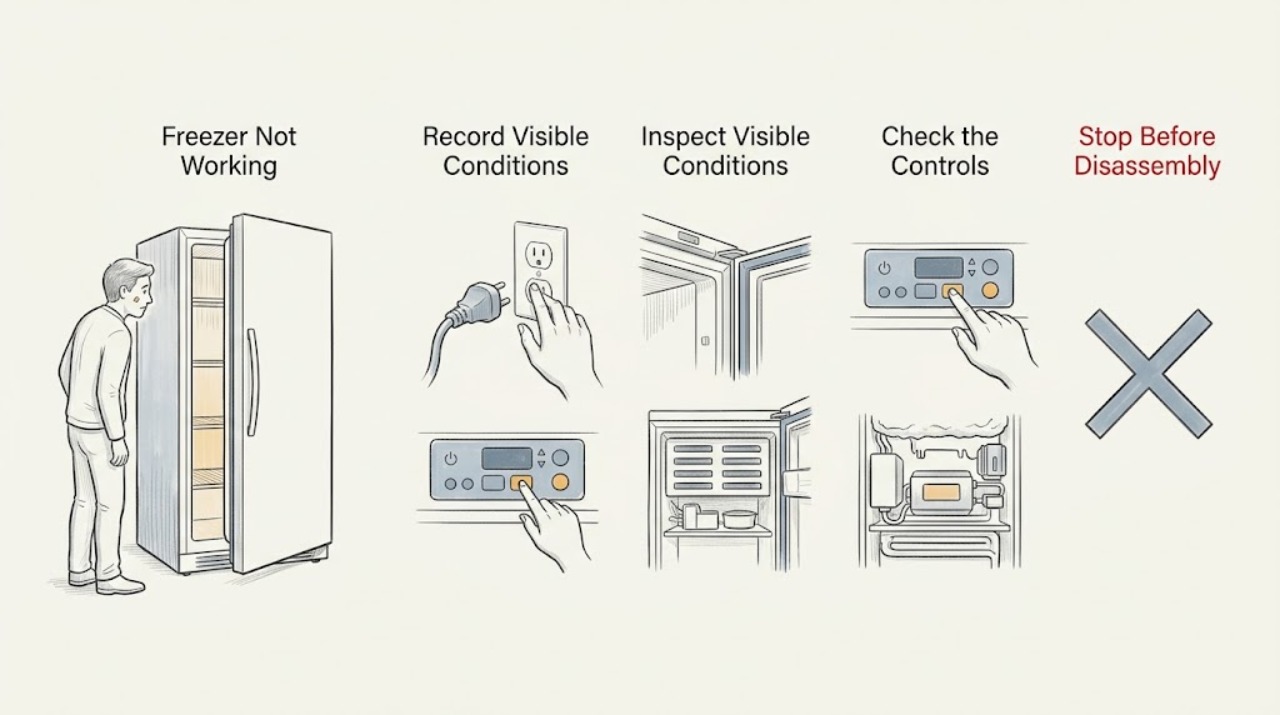
Work through in order
Diagnostic checks
Use only checks that match the exact appliance or system and its official guide.
-
Check 1
Record the complete Thermador model number and serial information available, then write down exactly what fails: blank display, no interior light, unresponsive controls, warm cabinet, alarm or code, door or drawer problem, frost, water, or ice-maker failure. Note whether the refrigerator section or other connected functions still operate.
Expected result: The unit has no visible power, the display is active but reports an alert, the controls respond, the freezer is warm, or only one function such as ice making is affected.
Next step: Keep the door closed if food is warming and use the matching manual for all later control checks. If the code is not explained for the exact model or the symptom is mixed, stop at external observations and arrange service.
Why this matters
Why: A blank appliance and a powered but warm cabinet follow different paths. Thermador model families also differ in control layout, modes, and available features, so an exact model and display record are needed before interpreting a code or setting.
-
Check 2
From a dry, safe position, check the accessible power path without moving the freezer or opening a panel: confirm the plug is seated, the appliance main switch is on if fitted, and the outlet has power using a known-safe small appliance. Check the household breaker or fuse once; do not use a wet outlet or repeatedly reset a tripping circuit.
Expected result: The plug or switch was off, the outlet has no power, the breaker or fuse is open, the cord or outlet is damaged or uncertain, or the power supply appears normal while the display remains dead.
Next step: Restore only an obviously switched-off supply once if it is safe. If the breaker trips again, the outlet is uncertain, the cord is damaged, or the display stays dead, leave the freezer off and use a qualified electrician or appliance technician.
Why this matters
Why: Thermador lists an unplugged unit, an off main switch, a power failure, a dead socket, and a tripped breaker or fuse as causes of a refrigerator that does not turn on. A normal outlet with a dead appliance points to an appliance power or control fault rather than a cooling-setting issue.
-
Check 3
With the display active, compare the freezer zone's on/off state, set temperature, and selected modes with the exact Thermador manual. Look for Eco, SuperFreeze, Vacation, Sabbath, showroom or display behavior, a control lock, and any zone that is intentionally disabled. Do not assume a symbol or mode has the same meaning on another Thermador model.
Expected result: The zone is off, a special mode is active, the target temperature was changed, a control lock is shown, the display shows an error, or settings look normal while the cabinet remains warm.
Next step: Correct only a clearly documented user setting and allow the model's normal recovery period with the door closed. If a mode cannot be cleared, a code returns, or the freezer remains warm, stop setting changes and arrange service.
Why this matters
Why: Thermador says refrigeration controls and features differ by model. Eco and SuperFreeze change operation or temperature targets on models that support them; an error or normal settings with poor cooling points beyond a simple mode correction.
-
Check 4
Check the freezer door or drawer from the front without forcing it: remove a package, bin, shelf, or ice container that prevents full closure, and inspect the visible gasket for a gap, fold, or damage. Confirm that stored food is not pressing against the door or blocking the normal internal air path described by the model manual.
Expected result: The door or drawer closes after an obstruction is removed, a gasket gap remains, an ajar alert is present, frost is concentrated around the opening, or the seal appears normal while cooling is absent.
Next step: Keep the opening clear and limit door openings. If the gasket is damaged, the drawer is misaligned, the alert remains with a closed door, or frost returns, keep food protected and request service.
Why this matters
Why: An incomplete seal admits warm air and can produce an alarm, frost, or a warm cabinet. Thermador's connected refrigeration guidance includes door-ajar notification, but the presence and behavior of that feature depend on the model.
-
Check 5
With the door open only briefly, look for a heavy or localized frost layer, blocked vents, spilled liquid frozen around a drawer, or a fan area that cannot be checked without removing a panel. Do not scrape ice with a sharp tool, use a heat gun, pour water into the cabinet, or remove an evaporator cover.
Expected result: Airflow openings are blocked by food, frost is light and localized near a poor seal, frost covers a large area, the fan is inaccessible, or no frost or obstruction is visible while the unit stays warm.
Next step: Rearrange only loose food that blocks a documented vent and keep the door closed. Do not perform a forced defrost; arrange service for heavy frost, an inaccessible fan, or cooling loss without an external cause.
Why this matters
Why: A blocked air path or extensive frost can keep cold air from reaching the cabinet, but frost behind a cover or no visible cause requires model-specific diagnosis. Thermador's cleaning instructions require the unit to be switched off and warn against water entering lights or drainage openings.
-
Check 6
Separate a cooling failure from an accessory failure: note whether the cabinet is actually cold, whether a compressor or fan sound is present or absent, whether an ice maker or water filter alert is the only symptom, and whether the door alarm or display still works. Do not place hands near moving parts or remove service covers.
Expected result: Only ice making or water filtering is affected, the cabinet is cold but an alarm remains, the cabinet is warm with no cooling sound, the compressor runs continuously, or unusual vibration, heat, or odor is present.
Next step: Use the exact manual for a water-filter or ice-maker setting only if the cabinet remains cold. For a warm cabinet, continuous abnormal operation, or any heat or odor warning, protect food and arrange service instead of testing the sealed system.
Why this matters
Why: Thermador's troubleshooting page treats ice production, water filters, and power as separate functions, while its freezer features page identifies model-dependent cooling modes. A warm cabinet with a continuing cooling fault is more urgent than an accessory-only alert.
-
Check 7
Record any alarm, error code, water-filter symbol, or Home Connect notification exactly as shown, including when it appeared and whether it returns after the door is closed. Do not apply a reset or code explanation from another Thermador model; use the model's owner manual or official support page.
Expected result: The message identifies a door, temperature, water filter, ice maker, or system condition; the code is unexplained; or the message disappears but the freezer remains warm or unresponsive.
Next step: Save the exact code, model, and temperature behavior for service. Perform only the manual's documented user action once; if the alert returns or cooling is abnormal, leave the unit off as appropriate and request qualified service.
Why this matters
Why: Thermador provides separate troubleshooting and model-specific feature guidance, and its water-filter instructions note that reset behavior differs by appliance. A cleared message does not prove that cooling or food storage is safe.
-
Check 8
After recording the symptom and only when there is no water, smoke, odor, abnormal heat, or electrical warning, make one model-approved power confirmation: use the appliance's normal off control if available, then restore power as the manual directs. Monitor the display and cooling response without repeatedly opening the door or cycling the breaker.
Expected result: The display and cooling return, the same code or warm condition returns, the unit stays dead, or the breaker trips again.
Next step: Keep the freezer off for a returning fault, protect food elsewhere, and arrange qualified Thermador service. Use a licensed electrician when the house circuit, outlet, or breaker is implicated; do not open the appliance to test voltage.
Why this matters
Why: A single approved reset can clear a transient control state, but a returning fault is evidence of an unresolved appliance problem. A repeat breaker trip indicates an electrical fault rather than a normal freezer reset.
Use your observations
Decision map
Find the observation that best matches what you see, then follow the next safe action.
-
PATH 01Next step
What you see
The display, interior light, and controls are all dead.
Do this next
Check the accessible plug, switch, outlet, and breaker once from a dry position. If supply is normal, the cord or outlet is damaged, or the breaker trips again, leave the freezer off and obtain qualified electrical or appliance help.
Why this path and its safety boundary
Why it matters: Treat this first as a power, outlet, main-switch, fuse, or control-power problem.
-
PATH 02Next step
What you see
The display is active but the freezer zone is off, locked, in a special mode, or set differently than expected.
Do this next
Use the exact Thermador manual to correct one documented setting and allow recovery with the door closed. A mode that cannot be cleared or a returning warning needs service.
Why this path and its safety boundary
Why it matters: A model-specific control state may be preventing normal cooling.
-
PATH 03Next step
What you see
The door or drawer does not close fully, an ajar alert is present, or frost is concentrated at the opening.
Do this next
Remove only visible obstructions, close the door, and limit openings. Request service for a damaged gasket, misaligned drawer, persistent alert, or returning frost.
Why this path and its safety boundary
Why it matters: A closure or gasket problem may be admitting warm air.
-
PATH 04Next step
What you see
The freezer is warm and food is softening, but there is no obvious door or setting issue.
Do this next
Keep the door closed, move food to reliable cold storage, and arrange qualified service. Do not remove panels, force a defrost, or diagnose refrigerant or compressor parts yourself.
Why this path and its safety boundary
Why it matters: A cooling, airflow, fan, sensor, or sealed-system fault is possible.
-
PATH 05Next step
What you see
Only the ice maker or water-filter alert is affected while the cabinet remains cold.
Do this next
Use the exact manual for the ice-maker, filter, and water-supply checks. Do not disconnect water lines or keep using the appliance if water leaks or the cabinet warms.
Why this path and its safety boundary
Why it matters: The main cooling system may still be operating, but an accessory or water-path setting needs model-specific attention.
-
PATH 06Next step
What you see
An error or alarm returns after one approved confirmation, the panel remains unresponsive, or the freezer stays warm.
Do this next
Leave the unit off as appropriate, protect food, and provide service with the exact model, message, settings, temperature behavior, and reset result.
Why this path and its safety boundary
Why it matters: The issue is not resolved by a user setting or transient reset.
-
PATH 07Next step
What you see
Water reaches electrical parts, smoke, burning odor, abnormal heat, sparking, visible damage, or a repeated breaker trip occurs.
Do this next
Do not touch wet electrical areas or open panels. Isolate power only from a safe, dry position, keep the freezer off, and obtain emergency, electrical, or qualified appliance help as appropriate.
Why this path and its safety boundary
Why it matters: This is a shock, fire, water, or building-electrical hazard.
Helpful context
Understand the symptom
Define the failure before touching settings
A freezer may appear not to work because its display is blank, a zone is switched off, a mode changes its target, the door is ajar, or it is powered but no longer cooling. Write down the full model number, the display state, any exact code or alarm, the cabinet temperature trend, and whether interior lights or fans respond. Thermador repeatedly notes that features and controls vary by model, so use the matching owner manual rather than a control sequence from another appliance.
Protect food and stay outside the cabinet
If the freezer is warming, limit door openings and move vulnerable food to a reliable freezer or other safe cold-storage option. Do not taste food to decide whether it is safe. User checks should stay at the display, door or drawer, normal switches, and other explicitly accessible points. Never remove an evaporator cover, condenser cover, electrical panel, or sealed-system component.
Safety boundary
Stop conditions
- Do not open electrical, evaporator, condenser, compressor, or sealed-system panels; probe live voltage; bypass a door switch; or handle refrigerant components.
- Do not chip frost, use a sharp tool or heat gun, pour water into the cabinet, or force a drawer, shelf, or door to move.
- Do not generalize a Thermador code, symbol, control-lock state, mode, or reset sequence across models; use the exact owner manual.
- Do not repeatedly cycle the breaker or keep the freezer running when food is warming, water is leaking, or a fault returns after one approved confirmation.
- Stop for water near electrical parts, smoke, burning or electrical odor, abnormal heat, sparking, visible damage, or a repeated breaker trip; isolate power only if safe and obtain qualified help.
Only after diagnosis
Potential parts
- door gasket or drawer seal
Consider this only after a qualified diagnosis confirms that a damaged or deformed gasket is preventing the exact model's door or drawer from sealing.
Confirm the complete Thermador model and manufacturer's fit information before ordering; do not infer fit from a warm-freezer symptom. - temperature sensor or electronic control
Consider this only when qualified service isolates a sensor or control fault after power, settings, door, and airflow observations are documented.
Verify the exact model and have electrical diagnosis and replacement performed by qualified service. - evaporator fan or compressor component
Consider this only when a qualified technician confirms a cooling-system component fault after user-accessible power, setting, closure, and airflow checks.
Do not infer a sealed-system or motor part from a no-cooling symptom; model, service diagnosis, and manufacturer fit information determine compatibility.
When checks do not resolve it
Need a professional?
Arrange qualified Thermador service when the freezer remains warm after a safe power, control, door, and airflow check; when an error or alarm returns; when the panel remains unresponsive; when heavy frost, a fan, compressor, sensor, or sealed-system fault is suspected; or when a door, drawer, gasket, water path, or cabinet is damaged. Use a licensed electrician for an unsafe outlet, cord, house circuit, or repeated breaker trip. Keep warming food in reliable cold storage. Stop immediately for water near electrical parts, smoke, burning odor, abnormal heat, sparking, visible damage, or any other unsafe condition.
Have this ready
- Provide the complete model and serial information, exact display or alarm message, power and breaker observations, selected mode and setpoint, door or drawer condition, frost or airflow observations, cabinet temperature trend, ice-maker or water symptoms, and the result of the one approved confirmation. Mention water, odor, smoke, heat, sparking, or breaker events first.
Common questions
FAQ
What should I check first when my Thermador freezer is not working?
Define whether it has no power, no response, no cooling, an alarm or code, a door problem, or an accessory problem. Record the model and display, then check the accessible plug, outlet, switch, breaker, settings, and door closure from a dry position.
Why is my Thermador freezer on but not cold?
Check the exact temperature and mode, door or drawer seal, visible obstruction, frost, and whether the cooling system sounds normal without opening panels. Keep the door closed and move food to reliable cold storage if it is warming; persistent loss of cooling needs service.
Can a Thermador freezer mode make it seem like it is not working?
Yes, depending on the model. Thermador documents model-dependent Eco, SuperFreeze, Vacation, Sabbath, and other controls. Use the exact owner manual to identify the mode and make one documented correction rather than copying a sequence from another model.
What if my Thermador freezer has a door alarm or the drawer will not close?
Remove only a visible package, bin, shelf, or ice container that blocks closure and inspect the visible gasket for a gap or damage. Keep openings brief; a persistent alarm, misaligned drawer, or damaged seal needs service.
Should I reset my Thermador freezer if it is not working?
Only after recording the display and only if there is no water, odor, smoke, heat, or electrical warning. Use the exact manual's one approved power confirmation. If the fault returns or the breaker trips, leave the unit off and arrange qualified service.
When is a Thermador freezer unsafe to troubleshoot?
Stop for water near electrical parts, smoke, burning or electrical odor, abnormal heat, sparking, visible damage, or a repeated breaker trip. Keep the appliance off, isolate power only if safe, protect food elsewhere, and obtain qualified help.
Read the exact guide
Official sources
- Freezer Features | Refrigeration Support | ThermadorThermador · Thermador freezer models when the exact manual confirms the listed feature
- How to Clean Your Refrigerator or Freezer | ThermadorThermador · Thermador refrigeration units when performing user-accessible cleaning or seal checks
- Refrigerator Troubleshooting | Problems & Solutions | ThermadorThermador · Thermador refrigerators and freezer-related functions covered by the support guide
- Appliance Features | Refrigeration Support | ThermadorThermador · Thermador built-in, freestanding, column, and under-counter refrigeration features as applicable by model
- Parts & Accessories | Refrigeration Support | ThermadorThermador · Thermador refrigeration parts searches after the exact model and diagnosis are known
Community feedback
Share a repair observation
Share a plain-text repair observation. Accepted observations are published automatically; this page may take a moment to update.