
On this page
Start here
Quick answer
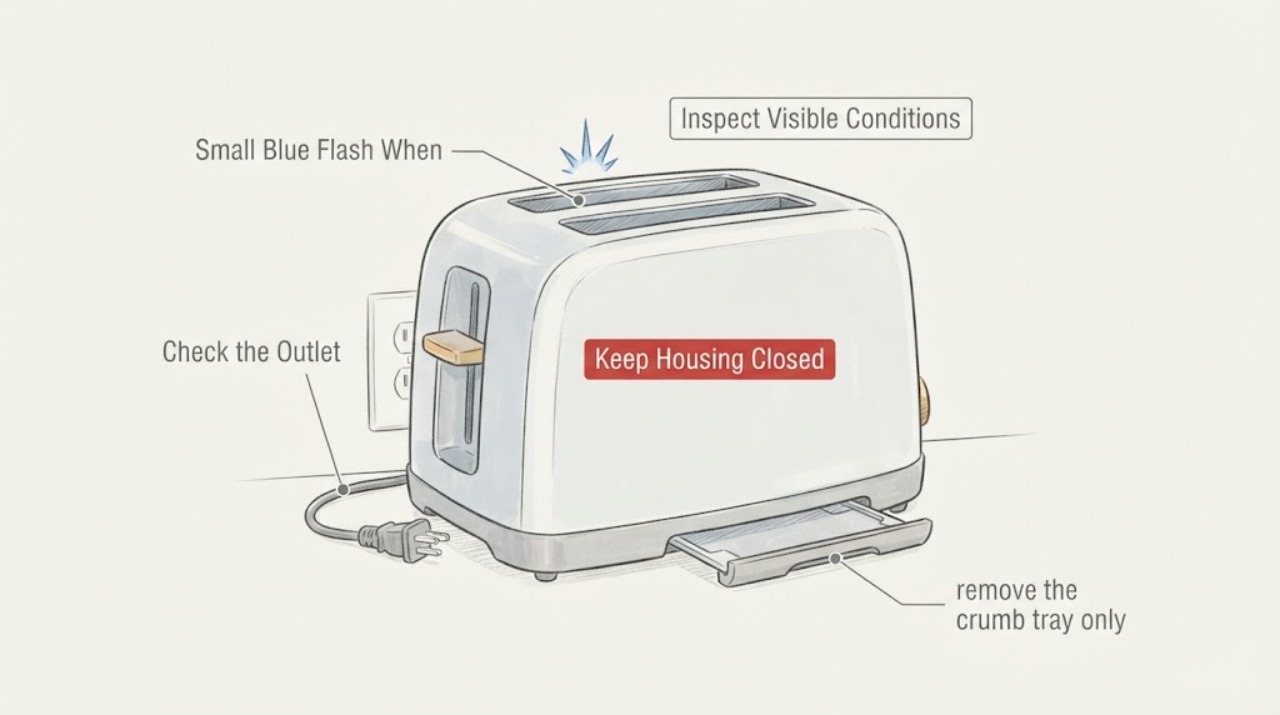
Treat a visible blue flash from a toaster as an electrical or fire-safety warning until the exact model manual or a qualified service provider explains it. Do not run the toaster again to see whether the flash repeats, reach into a slot, or open the case. If it is safe to do so, turn the control off, unplug it by the plug, move flammable items away and let the toaster cool. Once it is cold and disconnected, inspect the cord, plug, outlet area and removable crumb tray from outside; do not probe the slots or remove a jam with metal. A flash with smoke, burning odor, heat, damaged cord, tripped protection, a stuck energized element, or visible damage means keep the toaster out of service and arrange qualified repair or replacement. Check the model and series label against the manufacturer or safety-recall information, because a completion-time flash alone does not identify a normal switching event, bad element, loose connection or recalled defect.
Before you begin
Safety first
- Do not re-energize the toaster to reproduce the flash, insert metal or tools into a slot, open the housing, bypass the lever or switch, bend heating elements, test live terminals, use an extension cord as a workaround, or attempt an internal repair.
Work through in order
Diagnostic checks
Use only checks that match the exact appliance or system and its official guide.
-
Check 1
Stop the cycle without touching the slots or the toaster body. If there is no active flame and the plug and outlet are cool and reachable, turn the control off and unplug by gripping the plug; otherwise keep clear and disconnect power only from a safe accessible control or have qualified help do it.
Expected result: The flash was followed by smoke, burning odor, heat, a crackling sound, a tripped breaker or GFCI, a damaged plug or cord, or the toaster appears quiet with no visible damage.
Next step: For any warning sign, leave the toaster unplugged and arrange qualified repair, manufacturer service or replacement. Even without another sign, do not run a test cycle; continue only with cold, unplugged external checks.
Why this matters
Why: CPSC treats sparks, smoke, overheating and damaged appliance cords or plugs as electrical hazards. A quiet exterior does not prove the toaster is safe to energize again, and a single flash does not identify an internal cause.
-
Check 2
After the toaster is unplugged and completely cool, inspect the cord, plug and the visible outlet area without removing covers or touching energized wiring. Look for cuts, melting, discoloration, looseness, scorch marks, moisture or an outlet that feels hot.
Expected result: The cord, plug or outlet shows damage, heat, looseness, moisture or scorch marks, or all visible external surfaces are intact and cool.
Next step: Keep the appliance out of service and obtain qualified electrical or appliance help when any defect is present. Do not substitute an extension cord, bend plug blades, open the outlet or rewire the toaster; if the exterior is intact, move to the manual-approved crumb-tray check without re-energizing it.
Why this matters
Why: CPSC says damaged insulation, sparking near a plug, hot receptacles and appliance smoke or sparks require discontinuing use and qualified repair. An intact exterior only narrows the visible check; it does not clear the heating elements, switch or internal connections.
-
Check 3
With power disconnected and the toaster cold, remove the crumb tray only if the exact owner manual identifies it as removable. Empty visible crumbs and check for loose material around the tray opening; do not insert a knife, fork, metal probe or any object into a slot and do not shake the toaster over a sink.
Expected result: The tray is full or has charred debris, the manual does not show a user-removable tray, or material is lodged inside the slots or near the heating elements.
Next step: Clean only the accessible tray and exterior as the manual directs. If material remains in a slot, the tray is not user-serviceable, or there is charring or element damage, leave the toaster unplugged and use qualified service or replacement; do not attempt a restart.
Why this matters
Why: The opened manuals warn that crumb buildup can create a fire hazard and that metal objects can damage heating elements or cause shock. Visible debris may explain smoke or odor, but it does not prove that the blue flash was caused by crumbs or make internal debris safe to remove.
-
Check 4
Record where the flash appeared and when it was noticed without reproducing it: inside a slot, at the plug or outlet, immediately as the toast released, or after the toaster was already quiet. Photograph only the unplugged, cooled exterior, model label and any visible mark.
Expected result: The flash location is uncertain, the event was at the plug or outlet, or it was visibly inside the toaster near a food slot or element.
Next step: Give the description and photographs to the landlord, manufacturer or qualified servicer. Keep the toaster unplugged; do not remove the housing, bridge a switch, bend an element or test live voltage.
Why this matters
Why: Location and timing help a servicer separate a receptacle or cord concern from an appliance symptom, but they do not establish a normal end-of-cycle arc or identify an element, switch, relay or connection. Repeating the cycle would add fire and shock exposure without providing a safe user-level test.
-
Check 5
Read the model and series label from the outside or underside only after the toaster is unplugged and cool, then check the manufacturer's support page and applicable safety-recall notices. Give the servicer the model, event timing, flash location, cord and outlet condition, smoke or odor history and any tripped protection.
Expected result: The model matches a recall or safety notice, the toaster remains damaged or abnormal, or no model-specific explanation is available.
Next step: For a matching recall, follow the manufacturer's current remedy and keep the toaster out of service. Otherwise use an authorized service center or replace the toaster if the manufacturer does not provide a safe user-level remedy; do not power it for confirmation.
Why this matters
Why: Hamilton Beach's opened recall notice shows why model and series identification matters: some specific toasters could remain energized after popping up and present a fire hazard. That notice does not make an unknown toaster part of the recall, and no model-specific component diagnosis can be made from a blue flash alone.
Use your observations
Decision map
Find the observation that best matches what you see, then follow the next safe action.
-
PATH 01Next step
What you see
The flash was accompanied by smoke, a burning smell, heat, crackling, a breaker or GFCI trip, a hot or damaged plug, or a scorch mark.
Do this next
Keep the toaster unplugged and clear of combustible items. Arrange qualified appliance or electrical service, or replace it; do not restart it, open it or handle a hot or damaged connection.
Why this path and its safety boundary
Why it matters: This is an electrical or fire-safety warning. The symptom cannot be treated as a harmless end-of-cycle glow, and the visible sign does not identify which internal part is involved.
-
PATH 02Next step
What you see
The exterior cord, plug and outlet are cool and intact, and no smoke, odor, heat or protection trip occurred, but the flash was visible inside a slot or its location is uncertain.
Do this next
Do not run another cycle. Follow only the exact manual's cold, unplugged crumb-tray cleaning instructions and then obtain model-specific manufacturer or qualified service guidance.
Why this path and its safety boundary
Why it matters: The outside check found no hazard that can be cleared by observation. A visible internal flash still does not establish that the heating element, switch or end-of-cycle mechanism is safe.
-
PATH 03Next step
What you see
The model and series number matches a current safety recall or a manufacturer notice about staying energized after the toast cycle.
Do this next
Keep the toaster unplugged and follow the manufacturer's recall remedy or contact path. Do not cut the cord, dismantle the toaster or perform a workaround unless the current official remedy explicitly directs a safe procedure for that exact model.
Why this path and its safety boundary
Why it matters: The model-specific notice takes priority over a generic explanation; a toaster that remains energized after popping can create a fire hazard even if the flash is small.
-
PATH 04Next step
What you see
The only available information is that a small blue flash appeared when the cycle finished, with no model, no confirmed location and no external damage visible.
Do this next
Keep the toaster disconnected, document the label and event without reproducing it, and ask the manufacturer or a qualified service provider for model-specific guidance. Do not infer a normal condition or order an internal part from the color alone.
Why this path and its safety boundary
Why it matters: The symptom is enough to justify stop-use precautions but not enough to distinguish a switching transient from arcing, a cord or outlet problem, a damaged element, debris or a model-specific defect.
Helpful context
Understand the symptom
A blue flash is a safety symptom, not a diagnosis
A small flash seen when the toast cycle ends could be inside the slot, at the plug or outlet, or a reflection from a hot element. The color does not distinguish those locations or prove that a particular component failed. CPSC lists bright flashes or showers of sparks as an electrical warning and says an appliance that produces smoke or sparks near its cord, body or plug should be unplugged and repaired or replaced. That makes the first decision whether to stop using the toaster, not whether to repeat the cycle.
Only perform cold, unplugged external checks
Manufacturer toaster manuals limit the user to safe operation and cleaning. The opened KitchenAid manual says to unplug before cleaning, not to insert oversized food, foil or utensils, and not to dislodge food while the toaster is plugged in. The opened Sage/Breville manual likewise says to remove the plug and let the toaster cool before cleaning or moving, keep the crumb tray in place, and have maintenance other than cleaning performed by an authorized service center. These instructions support removing accessible crumbs according to the exact manual, but they do not support probing a slot, bending an element or opening the housing.
When checks do not resolve it
Need a professional?
Keep the toaster unplugged and obtain qualified appliance or electrical help after any visible flash with smoke, odor, heat, crackling, damage or a protection trip, whenever the flash location is inside the toaster or uncertain, or whenever the model matches a safety notice. Do not repeat the cycle or open the toaster to identify the cause.
Safety scope: Do not re-energize the toaster to reproduce the flash, insert metal or tools into a slot, open the housing, bypass the lever or switch, bend heating elements, test live terminals, use an extension cord as a workaround, or attempt an internal repair.
Have this ready
- Provide the model and series label, the exact end-of-cycle timing, where the flash appeared, whether smoke, odor, heat or crackling occurred, the cord and plug condition, any protection trip, photographs of the unplugged exterior, and the applicable manual or recall result.
Common questions
FAQ
Is a small blue flash at the end of a toast cycle normal?
Do not assume it is normal. The flash color and timing do not identify whether it came from a heating element, switch, cord, plug or outlet. CPSC treats sparks or smoke near an appliance as a reason to unplug and obtain repair or replacement, while the manufacturer manuals require model-specific safe use and service for malfunctioning or damaged units.
Should I run the toaster again to see if the flash repeats?
No. Repeating an energized test adds fire and shock exposure and does not safely identify the cause. Leave it unplugged, record the timing and visible location from outside, and give that information to the manufacturer or a qualified servicer.
Can I clean the toaster after seeing the flash?
Only after unplugging it and allowing it to cool completely, and only within the exact manual's user-cleaning instructions. An accessible crumb tray may be emptied, but do not insert a knife, fork, probe or other metal object into a slot, and do not open the housing or remove material from the heating elements.
What if the flash came from the plug or wall outlet instead of the slots?
Keep the toaster disconnected and do not use that outlet for the toaster until the cord, plug and receptacle have been checked by qualified help. CPSC identifies sparking, hot receptacles and damaged insulation as warning signs; do not bend plug blades, pull on the cord or open the receptacle.
How do I know whether my toaster is recalled?
Read the model and series label only while the toaster is unplugged and cool, then compare it with the manufacturer's current recall or support information. A recall notice applies only to the listed models and series; an unknown toaster cannot be assigned that defect from a flash alone.
Read the exact guide
Official sources
- Safety RecallHamilton Beach Brands · Opened official Hamilton Beach recall page. It is used only to explain why model and series identification matters and why a matching recalled toaster must remain out of use; it does not apply the recall to an unknown toaster.
- Use and Care - 859730215230 - Toaster - enKitchenAid / Whirlpool · Opened official KitchenAid/Whirlpool toaster manual. It is used as a manufacturer example for safe unplugging, no metal or foil in slots, no clearing food while plugged in, damaged-cord service and model-specific care; no KitchenAid identity is assigned to the task.
- CPSC Guide to Home Wiring HazardsU.S. Consumer Product Safety Commission · Opened official CPSC consumer-safety guide. It supports general electrical hazard recognition and stop-use/qualified-repair boundaries; it does not diagnose the unidentified toaster or claim that every blue flash has one cause.
- The ‘Bit More’ BTA720/BTA730 Instruction ManualBreville / Sage · Opened official Breville-hosted Sage toaster manual. It is used for family-level examples of unplugging, cooling, no metal utensils, crumb-tray fire-risk and authorized maintenance; it does not establish compatibility or a fault meaning for an unidentified toaster.
Community feedback
Share a repair observation
Share a plain-text repair observation. Accepted observations are published automatically; this page may take a moment to update.