
On this page
Start here
Quick answer
A toaster that does not heat should be checked from the outside. Confirm the outlet, plug it directly into a suitable outlet, make sure the bread lifter latches, and press Cancel if a cycle needs to stop. Clean the crumb tray only with the toaster unplugged and cool. If the lifter will not latch in a working outlet, only one side heats, the cord or plug is damaged, or the unit smells hot or smokes, stop using it; the heating elements and internal controls need qualified inspection or replacement rather than a user repair.
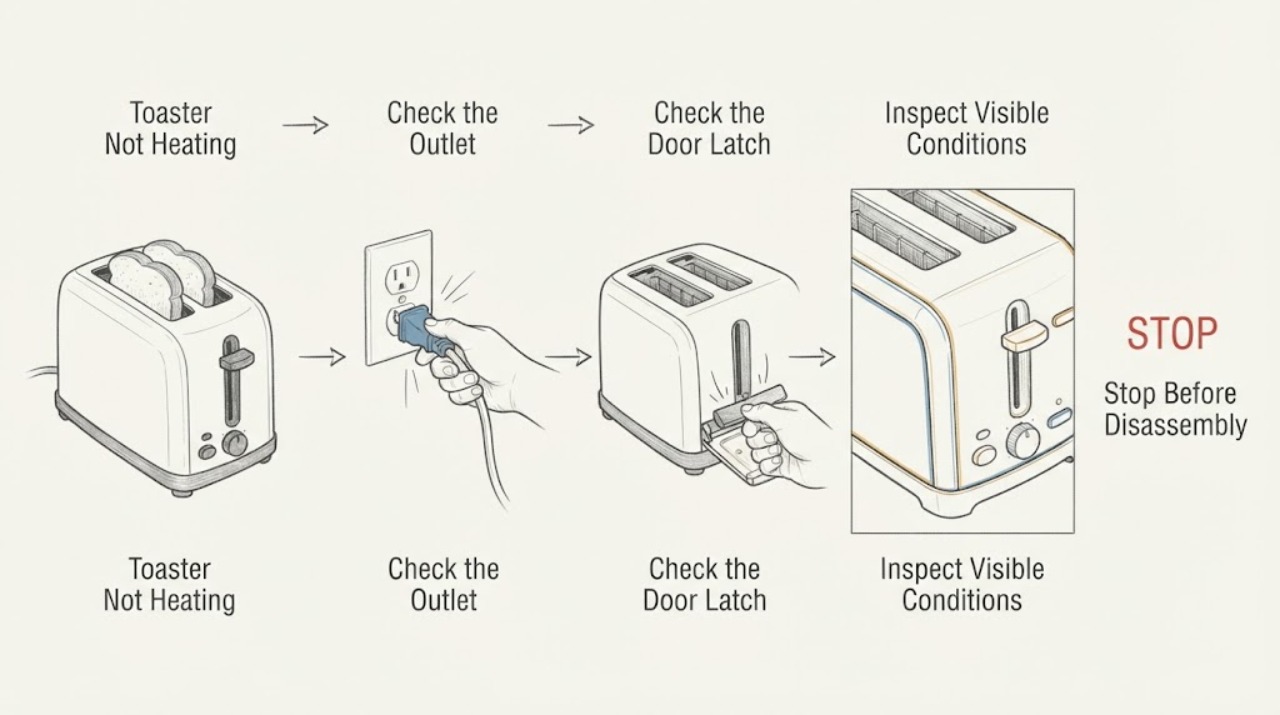
Work through in order
Diagnostic checks
Use only checks that match the exact appliance or system and its official guide.
-
Check 1
Check the outlet with another small appliance, then plug the toaster directly into that outlet. Inspect the plug and cord from the outside for cuts, looseness, scorch marks, or heat.
Expected result: The outlet works and the connection looks sound, or the outlet, plug, or cord is abnormal.
Next step: Do not use a damaged or hot connection. Have the outlet or toaster assessed by a qualified professional.
Why this matters
Why: A failed outlet can mimic a dead toaster; heat or damage at the connection is an electrical hazard.
-
Check 2
With no food or utensil in the slots, press the bread lifter down once. Note whether it latches and whether the indicator or elements operate normally.
Expected result: The lifter latches, will not latch, or latches briefly and releases.
Next step: Do not hold the lifter down by hand or dismantle the toaster. Stop using it if it will not latch normally.
Why this matters
Why: The guide says the lifter will not latch unless the toaster is plugged in; failure in a working outlet points to a control or safety mechanism issue.
-
Check 3
If the toaster heats unevenly, observe from above during one supervised cycle whether both sides glow or whether one side remains cold. Do not touch the slots or place metal inside.
Expected result: Both sides heat, one side is cold, or there is smoke, a burning odor, or an element that stays on after cancel.
Next step: Cancel, unplug after the lifter is up and the unit is safe, and leave it out of service for qualified inspection.
Why this matters
Why: Uneven heat or an abnormal element indicates an internal heating or control fault; smoke or an element that will not stop creates a fire risk.
-
Check 4
After the toaster is unplugged and fully cool, empty and wipe the crumb tray as the guide describes. Never try to dislodge lodged food while it is plugged in.
Expected result: The tray is heavily loaded, food is lodged, or the toaster remains unable to heat after safe cleaning.
Next step: If the toaster still will not heat or a crumb is lodged, keep it unplugged and arrange service or replacement rather than inserting a utensil.
Why this matters
Why: Crumbs can raise fire risk, but safe cleaning does not prove an internal heat fault is repaired.
Use your observations
Decision map
Find the observation that best matches what you see, then follow the next safe action.
-
PATH 01Next step
What you see
The outlet is dead but the toaster and cord look normal
Do this next
Use a working outlet and have the original outlet checked if it fails other appliances
Why this path and its safety boundary
Why it matters: The power source is the first unresolved cause
-
PATH 02Next step
What you see
The lifter will not latch in a working outlet
Do this next
Do not bypass it or hold it down; stop using the toaster
Why this path and its safety boundary
Why it matters: The toaster's control or safety mechanism is not engaging
-
PATH 03Next step
What you see
The lifter latches but one side stays cold
Do this next
Unplug when safe and seek qualified inspection or replace the appliance
Why this path and its safety boundary
Why it matters: An internal heating element or connection may have failed
-
PATH 04Next step
What you see
Smoke, burning odor, sparking, or an element stays energized after cancel
Do this next
Stop the cycle if safe, disconnect power, and do not use it again until assessed
Why this path and its safety boundary
Why it matters: The appliance presents a fire or electrical safety concern
Helpful context
Understand the symptom
A no-heat symptom can mean the toaster is not receiving power, the lifter is not engaging its control, or an internal heating or safety component has failed. The outside checks can separate those cases without inserting tools or opening the housing.
Toaster and toaster-oven controls differ. Use the exact model guide for settings; do not assume a toaster-oven temperature or timer procedure applies to a slot toaster.
When checks do not resolve it
Need a professional?
Stop use for a damaged cord or plug, smoke, sparking, abnormal heat, a lifter that will not latch, or persistent no heat after the safe outlet and cleaning checks.
Common questions
FAQ
Can I test the toaster with a knife or fork?
No. Unplug and cool the toaster before clearing food, and never insert utensils into the slots.
Why will the lifter not stay down?
The guide says it will not latch unless the toaster is plugged in. If a working outlet does not change the symptom, the control or safety mechanism needs attention.
Can crumbs cause no heat?
Crumbs can affect safety and fire risk, so clean the tray unplugged and cool. Persistent no heat still requires diagnosis.
Should I open the toaster to test the elements?
No. Internal heating and control repairs should be handled by the manufacturer or a qualified service person.
Read the exact guide
Official sources
- Hamilton Beach Toaster (22910, 22910C, 22912, 24910)- Use and CareHamilton Beach · Hamilton Beach slot toaster operation and safety
Community feedback
Share a repair observation
Share a plain-text repair observation. Accepted observations are published automatically; this page may take a moment to update.