
On this page
Start here
Quick answer
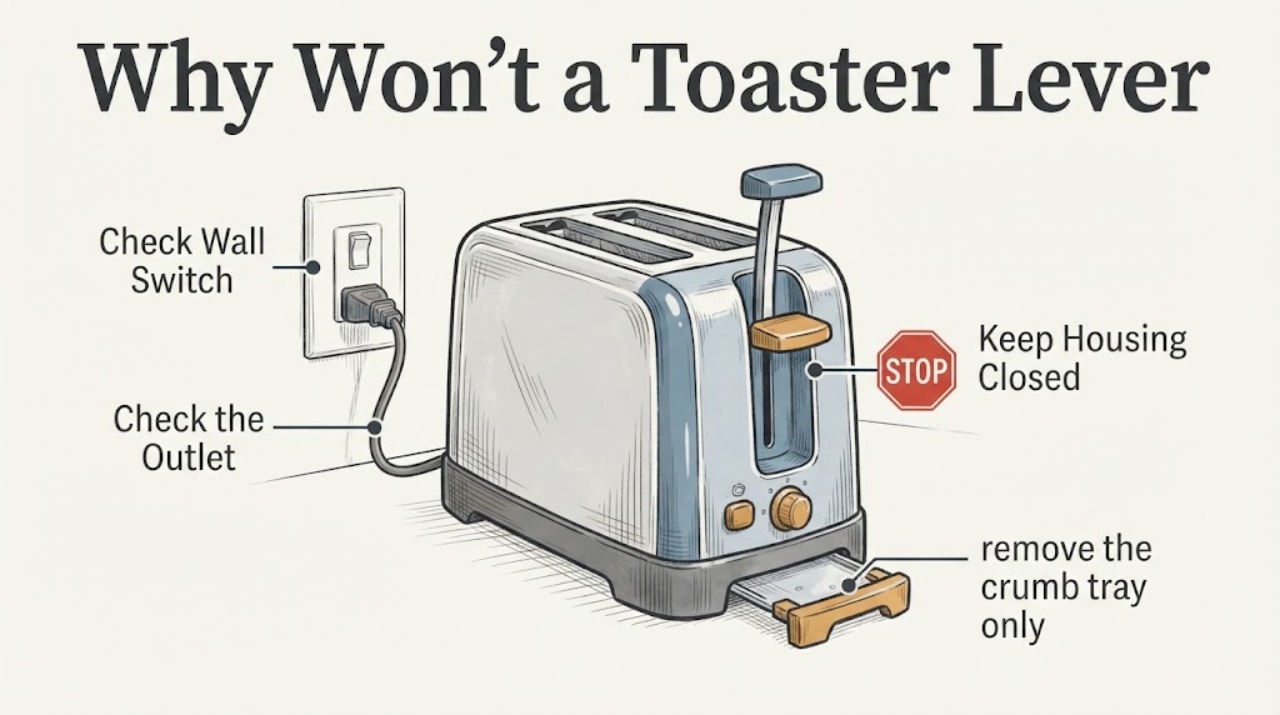
Unplug the toaster, let it cool, remove any bread, and check the outside before trying the lever again. A manual toaster needs live power for its lift mechanism, and manufacturer guidance also identifies crumbs around the lever or an incorrectly seated crumb tray as possible causes on some models. Check the cord and outlet without using a damaged appliance, clean only the accessible crumb tray and lever area as the exact manual allows, and reseat the tray fully. If the lever still rises immediately, the toaster smells hot, sparks, has a damaged cord, or needs a cover removed or an interlock bypassed, stop using it and arrange service or replace it; do not open the toaster or hold the lever down by force.
Before you begin
Safety first
- Do not operate with a missing tray, hold the lever down by force, insert tools into the slots, bypass a switch/interlock, remove the cover or perform live electrical tests.
Work through in order
Diagnostic checks
Use only checks that match the exact appliance or system and its official guide.
-
Check 1
Switch the toaster off, unplug it and let it cool completely. Remove all bread or food from the slots without inserting a knife, fork or other tool; inspect the cord, plug, housing and lever opening from the outside.
Expected result: The cord or plug is damaged/hot, there is a burnt odor or sparking, an object is jammed, or the outside appears intact and cool.
Next step: For damage, odor, sparks or a jam that cannot be removed safely, keep the toaster unplugged and obtain service or replace it. Otherwise continue with the outlet and tray checks.
Why this matters
Why: A damaged or overheated appliance is not a lever-adjustment problem. A cool, intact exterior permits only low-risk external checks and does not prove the internal carriage is sound.
-
Check 2
Check whether the toaster is connected to a live outlet without using the toaster if its cord or plug is damaged. From a safe, dry position, verify the outlet with a known-working small appliance or the home's normal outlet test, as the manufacturer guidance permits.
Expected result: The outlet is dead, the toaster has no visible power response, or the outlet is live but the lever still rises immediately.
Next step: If the outlet is dead, use the household breaker/outlet repair path. If the outlet is live and the lever still will not engage, unplug again and continue only with the external tray/crumb check; do not hold the lever down by force.
Why this matters
Why: KitchenAid says the lift lever will not stay down unless the unit is plugged into a live outlet. A live outlet with an immediate rise shifts attention away from a simple power absence, but it does not identify a particular internal part.
-
Check 3
With the toaster unplugged and cool, remove the crumb tray only in its intended direction, empty it, wipe accessible crumbs, and slide it back until it is firmly seated. Check the accessible lever area for loose crumbs; do not shake, bang, pry the slots or spray cleaner inside.
Expected result: The tray was missing or not seated, crumbs were built up around the lever, or the tray/lever area was already clean and correctly assembled.
Next step: If the tray was the issue, use the toaster only after it is dry and the exact manual permits operation. If the lever still rises, stop and use service or replace the toaster; do not operate without the tray or bypass a safety feature.
Why this matters
Why: Breville documents a wrongly inserted tray as a no-operation condition, while KitchenAid says debris near the lever can prevent full engagement. A clean and correctly seated exterior does not prove the internal latch or sensor is good.
-
Check 4
Confirm the toaster's brand and model from its rating label and retrieve its exact manual before any further reset or control sequence. Do not use a different brand's lever, sensor or latch procedure as a substitute.
Expected result: The exact manual is available, or the toaster remains unidentified and the lever still will not stay down after the external checks.
Next step: Follow only the exact manual's user-level cleaning and operating steps. If no model-specific manual is available or the lever continues to rise, leave the toaster unplugged and arrange qualified service or replacement.
Why this matters
Why: Manual and automatic toaster mechanisms differ: KitchenAid documents a manual lift-lever path, while Breville's opened manual uses a carriage and sensor/tray logic. The unbranded symptom cannot identify which design or component is present.
Use your observations
Decision map
Find the observation that best matches what you see, then follow the next safe action.
-
PATH 01Next step
What you see
The outlet is dead or the toaster's cord/plug is damaged, hot or discolored.
Do this next
Keep the toaster unplugged. Use a qualified electrician for a damaged or dead outlet and service or replace the toaster for a damaged cord or plug; do not retry it to make the lever stay down.
Why this path and its safety boundary
Why it matters: The lever symptom is occurring with an unsafe or unavailable power source, not a confirmed lever defect.
-
PATH 02Next step
What you see
The outlet is live, the toaster is cool and intact, and the lever area contains loose crumbs or the crumb tray is not fully seated.
Do this next
Unplug, clean only the accessible area, and reseat the tray exactly as the toaster manual shows. Stop if the lever still rises or if cleaning would require opening the housing.
Why this path and its safety boundary
Why it matters: An external obstruction or tray-position condition can prevent a model's carriage or lever from engaging; this is not evidence that the lever should be forced.
-
PATH 03Next step
What you see
The outlet is live and the tray/lever area is clean and correctly assembled, but the lever rises immediately.
Do this next
Keep the toaster unplugged and arrange service or replace it. Do not wedge the lever down, bridge a switch, insert tools into the slots or remove the cover.
Why this path and its safety boundary
Why it matters: The remaining cause is unresolved at the unbranded scope; it could be a model-specific carriage, sensor or latch issue, but no component diagnosis is supported.
-
PATH 04Next step
What you see
Bread or another object is jammed, the toaster smells burnt, sparks, overheats or trips power during a test.
Do this next
Switch off and unplug if safe, let the toaster cool, do not reach into the slots or restart it, and obtain qualified service or replace the appliance.
Why this path and its safety boundary
Why it matters: This is a fire, shock or hot-jam hazard rather than a routine lever adjustment.
Helpful context
Understand the symptom
Power and crumbs are the first external checks
KitchenAid's support pages identify two distinct user-level checks for this symptom: the lift lever needs a live outlet, and buildup around the lever can stop it engaging fully. Those pages are manufacturer-specific, so they support the diagnostic direction rather than a universal lever design. The outlet, cord, plug, lever opening and crumb tray can be checked without opening the housing.
The crumb tray must match the toaster's instructions
Breville's official toaster manual says an incorrectly inserted crumb tray can prevent operation and that the tray must be clicked firmly into place. It also warns not to operate without the tray and to clean only after switching off, unplugging and allowing the toaster to cool. Other toaster models may use a different tray or carriage arrangement, so do not force a tray or borrow a hidden lock procedure.
A lever that still will not engage is a service boundary
A lever that rises after a verified power and external-cleaning check may have a model-specific carriage, sensor or latch fault, but the unbranded task does not establish which mechanism is present. Do not wedge the lever down, insert tools into the slots, bypass a switch or remove the cover. Toaster manuals reserve electrical and internal work for the appropriate service path.
When checks do not resolve it
Need a professional?
Safety scope: Do not operate with a missing tray, hold the lever down by force, insert tools into the slots, bypass a switch/interlock, remove the cover or perform live electrical tests.
Have this ready
- Provide the brand/model label, outlet result, cord/plug condition, tray position, exact lever behavior and any odor, spark, heat, jam or breaker event.
Common questions
FAQ
Why does a toaster lever pop back up immediately?
A live-power problem is one documented cause, and crumbs near the lever or an incorrectly seated crumb tray can affect operation on some models. Check those external conditions after unplugging and cooling. If the lever still rises, the unbranded appliance needs its exact manual or service; do not force it down.
Can I hold the lever down or bypass the latch to make the toaster work?
No. Holding it down or bypassing a switch can defeat the toaster's intended control and safety behavior. Leave it unplugged and arrange service or replacement if the lever will not stay down after the external checks.
Can crumbs cause the lever not to stay down?
They can interfere with engagement on some manual toasters. KitchenAid specifically directs owners to check buildup around the lever, and Breville requires the crumb tray to be firmly clicked into position on its documented model. Unplug and cool first, clean only accessible areas, and do not use the toaster without its tray.
Read the exact guide
Official sources
- Bread Won't Stay Down - ToasterKitchenAid Product Help · Opened KitchenAid support page. It says to press the lever all the way down and check buildup around the lever; the article uses this only for an external check, not for a universal toaster mechanism.
- Toasters Safety and Operating InstructionsKitchenAid · Opened KitchenAid toaster safety manual. It supports unplugging/cooling before cleaning, returning the tray and not immersing the toaster; it does not establish a repair procedure for the unidentified toaster.
- Lift Lever Will not Stay Down - ToasterKitchenAid Product Help · Opened KitchenAid support page. It states that the lever will not stay down unless the unit is plugged into a live outlet; because the task has no brand/model, the article does not transfer a KitchenAid-specific internal design.
- BTA850/BTA870 Instruction BookletBreville · Opened Breville manual. It identifies a particular sensor/carriage design and says a wrongly inserted crumb tray can prevent operation; those model-specific facts are not asserted as universal for the unbranded task.
Community feedback
Share a repair observation
Share a plain-text repair observation. Accepted observations are published automatically; this page may take a moment to update.