
On this page
Start here
Quick answer
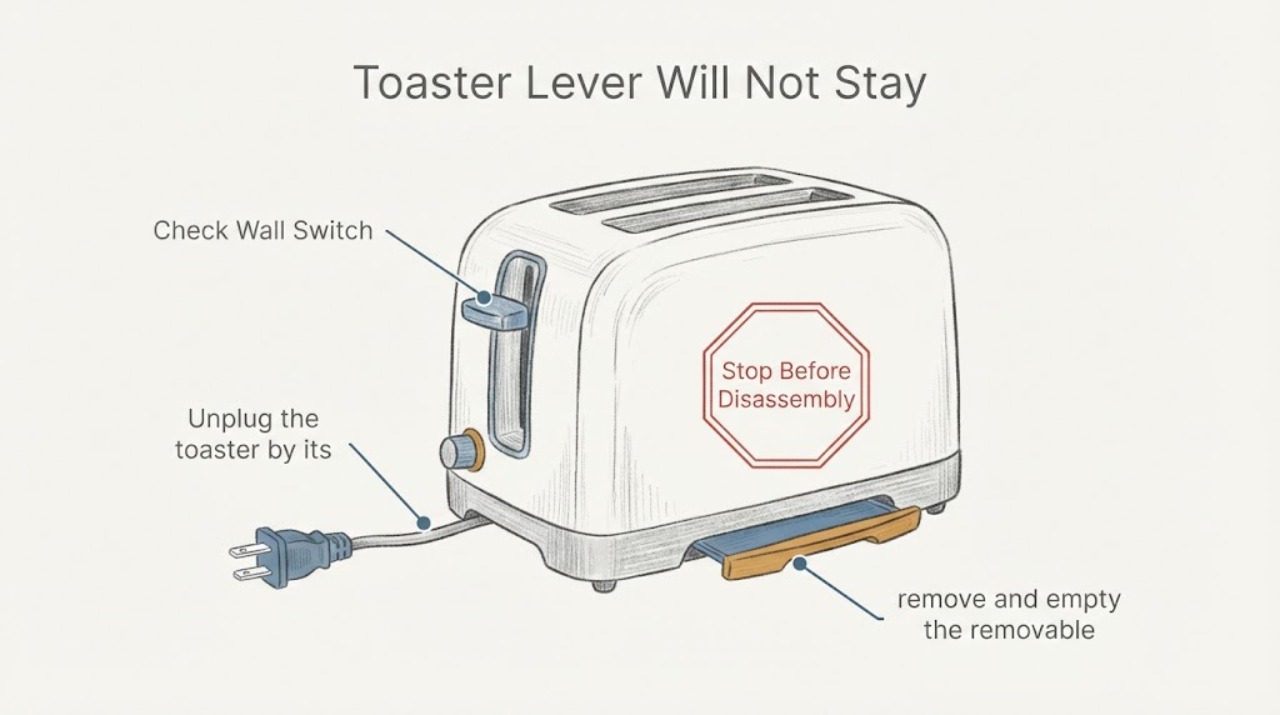
A toaster lever may not latch when the toaster has no power, when the carriage or slot is obstructed, or when the mechanism has an internal fault. First confirm the plug and outlet, then unplug the toaster and let it cool completely before checking only the removable crumb tray and visible slot area. Do not use metal tools, open the housing, or bypass a latch. If the lever still will not stay down while the empty toaster is powered and unobstructed, stop using it and arrange model-specific service.
Work through in order
Diagnostic checks
Use only checks that match the exact appliance or system and its official guide.
-
Check 1
Check that the toaster plug is fully inserted into a working outlet and that any outlet switch is on, then try the lever once without forcing it.
Expected result: The toaster has power and the lever latches, or the toaster remains unpowered and the lever will not latch.
Next step: If the outlet is unpowered, use a known-good outlet only if safe and permitted by the model instructions. If the outlet works but the toaster remains unpowered, unplug it and arrange service; do not bypass the latch.
Why this matters
Why: Hamilton Beach states that the bread lifter will not latch when the toaster is not plugged in or during a power outage.
-
Check 2
Unplug the toaster by its plug, place the lifter up, and allow the appliance to cool completely before looking for a visible jam or obstruction.
Expected result: A slice, thick food item, or debris is visibly wedged, or the slots and carriage area are visibly clear.
Next step: If food is visibly jammed, follow the exact manual's nonmetal removal method only after cooling. If nothing is accessible, do not insert tools or open the housing; continue to the crumb-tray check.
Why this matters
Why: Hamilton and Breville manuals treat jammed food as a cool-and-unplug condition; a clear slot means the lever problem is not explained by that visible obstruction.
-
Check 3
With the toaster unplugged and cool, remove and empty the removable crumb tray, then gently turn the toaster upside down over a bin only if the model manual permits it.
Expected result: Loose crumbs fall out and the tray can be replaced correctly, or crumbs remain packed in the carriage/slot area or the tray cannot be removed normally.
Next step: Replace the tray before any test. If crumbs are trapped where they cannot be reached without disassembly, stop and request service rather than probing the mechanism.
Why this matters
Why: Breville's opened toaster manual directs users to remove the tray, gently shake out additional crumbs, and avoid banging the toaster; it also warns that crumb buildup can create a fire hazard.
-
Check 4
Inspect the outside of the slot and the bread guides for damage or an item that is too thick, without touching heating elements or using a metal utensil.
Expected result: The slot is clear and the guides move normally, or a damaged guide, foreign object, or unsuitable thick item is visible.
Next step: Remove only loose, accessible material after the toaster is cool and unplugged. If the guide, slot, cord, or housing is damaged, do not test the toaster; arrange service.
Why this matters
Why: The manuals support using the toaster only for suitable food in the slots and warn against contacting heating elements or using nonapproved utensils on lodged food.
-
Check 5
After the tray is installed and the external area is clear, perform one brief empty-toaster latch test only if the exact manual permits normal operation and the appliance is dry and undamaged.
Expected result: The lever latches and releases normally, or it still springs back immediately despite power and a clear, cool carriage.
Next step: If the lever still will not stay down, unplug the toaster and stop using it. Request qualified service or replacement guidance for the exact model; do not hold the lever down or bypass the latch.
Why this matters
Why: A successful latch test points to the earlier power or accessible obstruction condition; a repeat failure leaves an internal mechanism or model-specific fault unresolved.
Use your observations
Decision map
Find the observation that best matches what you see, then follow the next safe action.
-
PATH 01Next step
What you see
The toaster was unplugged, the outlet is not supplying power, or a power outage is present.
Do this next
Restore safe power or use the model's documented outlet check. If the toaster still does not latch on a known-good supply, stop and seek service.
Why this path and its safety boundary
Why it matters: The documented latch prerequisite is missing, so the lever behavior does not establish a mechanical failure.
-
PATH 02Next step
What you see
A slice or thick food item is visibly wedged in the slot.
Do this next
Unplug the toaster, allow complete cooling, and follow the exact manual's safe nonmetal removal method. Do not force the lever or insert metal.
Why this path and its safety boundary
Why it matters: The toaster is in a jam condition; the heating elements and carriage may still be hot.
-
PATH 03Next step
What you see
The toaster has power, the tray and visible slot are clear, and the lever still will not stay down.
Do this next
Unplug the toaster and arrange qualified model-specific service; do not disassemble, defeat the latch, or continue repeated tests.
Why this path and its safety boundary
Why it matters: The available external evidence does not identify the internal cause or a compatible replacement part.
-
PATH 04Next step
What you see
There is smoke, burning odor, sparking, melted plastic, exposed wiring, a damaged cord or plug, or a crumb fire.
Do this next
Stop using the toaster, disconnect power only if safe, keep clear of heat and flames, and arrange qualified service or replacement. Do not test it again.
Why this path and its safety boundary
Why it matters: This is outside normal user checks and presents a fire or shock concern.
Helpful context
Understand the symptom
A lever that will not latch is a decision point
The task has no brand or model, so these checks stay at the common toaster level. Hamilton Beach manuals explicitly say that the bread lifter will not latch when the toaster is not plugged in. If power is present but the lever releases immediately, the external checks below can rule out a simple power or accessible obstruction issue; they cannot identify an internal latch, control, or electromagnet part.
Clear a jam only after power is removed
Toaster slots and accessible surfaces can remain hot. The opened official manuals require unplugging and cooling before dislodging food, prohibit metal utensils, and warn that crumbs can create a fire hazard. Treat a stuck lever or food item as a reason to stop and cool the appliance, never as a reason to hold the lever down or defeat a safety mechanism.
When checks do not resolve it
Need a professional?
Arrange qualified model-specific service when the toaster has power but the lever still will not latch after the unit is unplugged, cool, clear of accessible crumbs or food, and reassembled with its crumb tray. Provide the rating-label model and describe whether the lever releases immediately, whether the outlet works, and whether any jam or heat damage was observed.
Common questions
FAQ
Why will the toaster lever not stay down?
The first documented possibility is missing power: Hamilton Beach says the bread lifter will not latch unless the toaster is plugged in. If power is present, check only for a cooled, visible obstruction and removable crumb buildup; a persistent failure needs model-specific service.
Can I hold the lever down or bypass the latch?
No. The latch is part of the appliance's normal operating sequence. Do not tape, wedge, tie, or electrically bypass it; unplug the toaster and arrange service if it will not latch normally.
Can I use a knife or metal tool to free the bread?
No. Unplug the toaster and let it cool completely first. The opened manuals warn against metal utensils and against touching the heating elements; use only the exact model manual's safe removal method, or arrange service.
Could crumbs prevent the lever from staying down?
Crumbs can obstruct the carriage or create a fire hazard, but the opened sources do not prove that crumbs are the cause of every latch failure. Unplug and cool the toaster, empty the removable tray, and stop if debris cannot be reached without opening the housing.
Read the exact guide
Official sources
- How to Use Your ToasterHamilton Beach Brands, Inc. · Opened official consumer toaster manual; used for external safety boundaries, power/latch behavior, unplugging, cooling, and no-metal/no-bypass guidance.
- 840125700 Commercial Toaster ManualHamilton Beach Brands, Inc. · Opened official toaster manual; used for the common power prerequisite and unplug/cool boundary, not for a model-specific part diagnosis on the unknown toaster.
- Toaster Grille-pain TostadorHamilton Beach Brands, Inc. · Opened official toaster manual; used for the general latch sequence and warning against contacting heating elements or using nonapproved utensils.
- the Smart Toast 4-Slice Toaster Instruction ManualBreville · Opened official Breville toaster manual; used only for general toaster safety practices and explicit external crumb-tray cleaning, not for compatibility or an internal diagnosis on the unknown toaster.
Community feedback
Share a repair observation
Share a plain-text repair observation. Accepted observations are published automatically; this page may take a moment to update.