
On this page
Start here
Quick answer
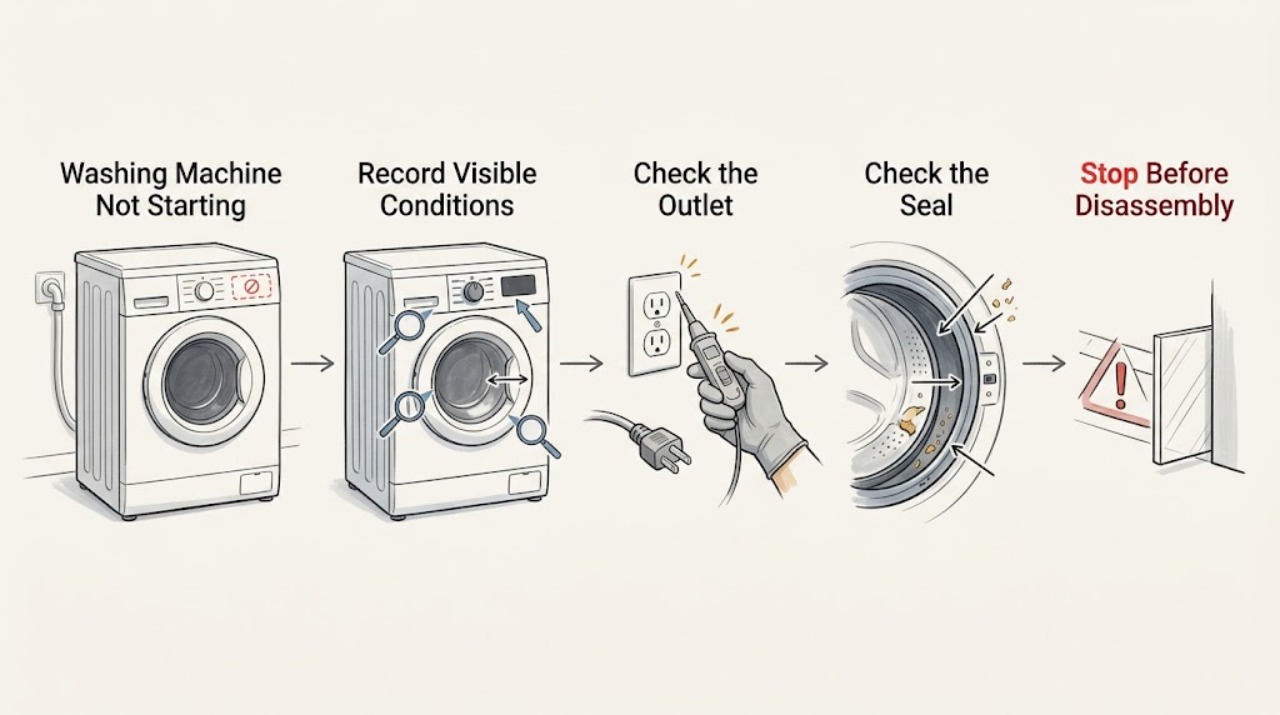
Separate a completely dark Toshiba washer from a powered washer that will not begin. If the display and indicators are dark, check the plug, outlet, and household breaker only from a dry, safe position; do not repeatedly reset a tripped circuit. If the panel lights but the cycle does not start, close the door or lid fully, check for trapped clothing, cancel delay or preset operation, release child lock if the exact manual allows it, choose a valid cycle, and press Start or Start/Pause after Power. A front-load model may wait for a locked door and water-fill condition; a top-load model may wait for the lid, required water level, or preset time. Record any code and stop for leakage, water near electricity, burning odor, smoke, sparks, repeated trips, or overflow. Do not bypass a door or lid lock, reach into a moving drum, open panels, or repeat resets to force operation.
Work through in order
Diagnostic checks
Use only checks that match the exact appliance or system and its official guide.
-
Check 1
From a dry, safe position, press Power once and record whether the Toshiba washer remains completely dark or shows any display, indicator, or lock icon.
Expected result: No indicator responds, or the panel lights but Start does not begin a cycle.
Next step: Use the power branch for a dark unit and the no-start branch for a lit unit; do not open the control panel or repeatedly press Power.
Why this matters
Why: A dark panel points first to power delivery or the control power path; a lit panel points to an interlock, setting, water prerequisite, code, or control-command branch.
-
Check 2
For a dark panel, inspect the plug and cord from a dry position and check whether the outlet or household breaker has power using only normal safe household checks; do not touch wet electrical equipment or repeatedly reset a tripped circuit.
Expected result: The plug is loose, the outlet or breaker is unavailable, the breaker trips again, or the outlet and breaker appear normal but the washer stays dark.
Next step: Stop for repeated trips, heat damage, smoke, or a burning odor. Otherwise leave the washer off and arrange qualified appliance or electrical service for a persistent dark panel.
Why this matters
Why: A loose connection or household supply issue can explain no display. A repeated trip or normal household supply with a dark washer supports a washer power-path fault rather than a cycle-setting problem.
-
Check 3
For a lit panel, close the front door or top lid fully and check only the visible seal or opening for trapped clothing; do not force the door, bypass the interlock, or reach into a moving drum.
Expected result: The lock icon appears and Start works, the door or lid will not register closed, or the washer reports a door or lid code.
Next step: Do not operate with the lock bypassed or the door forced. Record the icon or code and request service if the interlock does not engage normally.
Why this matters
Why: Toshiba identifies a door or lid not closed properly as a no-start condition. A latch or interlock that still does not register after the visible opening is clear needs service.
-
Check 4
Read the control panel for child-lock, delay, Preset, pause, or cycle-status indicators; select a valid cycle and press Start or Start/Pause only as the exact model manual describes.
Expected result: A child-lock or delay indicator is active, the machine is paused or waiting for a preset time, or no setting explains the no-start.
Next step: Cancel the delay or release the lock only through the model-authorized control sequence; if the washer still ignores Start, stop repeated attempts and arrange service.
Why this matters
Why: A locked control or intentional delay can look like a failure. If the control state is normal but the start command is ignored, the fault may be in the control or interlock path.
-
Check 5
If the washer lights but does not proceed to filling, observe from outside whether the water tap is open, the inlet hose is kinked, and the inlet-screen area shows an obvious external obstruction; do not remove hoses from a pressurized or leaking connection.
Expected result: Water supply is off or weak, the hose is kinked, the washer begins filling, or no water enters despite normal household supply.
Next step: Stop for leakage or water near electricity. If external supply conditions are normal but filling does not begin, leave the washer off and request qualified service.
Why this matters
Why: Toshiba lists supply, pressure, hose, inlet-screen, and water-level conditions as reasons a washer may wait or not start. No flow after safe external checks points to an inlet or control diagnosis.
-
Check 6
Record every display code or alarm exactly, including when it appears, and compare it only with the troubleshooting table for the complete Toshiba model; do not guess a code from a similar washer.
Expected result: The code clears once through the model instructions, returns, or is a dangerous-fault or overflow indication.
Next step: Stop operation for overflow or a serious-fault indication, preserve the exact code, and arrange qualified service rather than repeatedly clearing it.
Why this matters
Why: A returning or serious code is evidence of an unresolved fault. Toshiba top-load guidance treats certain dangerous-fault codes and overflow as service conditions.
-
Check 7
Only when there is no leak, water near electricity, burning odor, smoke, spark, repeated trip, or visible damage, perform one power or control reset explicitly authorized by the exact model manual.
Expected result: The washer starts normally and remains stable, or the no-start symptom, code, trip, or abnormal sound returns.
Next step: Do not repeat the reset. Keep the washer off and provide the model, code, settings, and sequence to qualified service if anything returns.
Why this matters
Why: A one-time reset can clear a temporary control state but cannot establish that an interlock, supply, valve, motor, or control fault is repaired.
Use your observations
Decision map
Find the observation that best matches what you see, then follow the next safe action.
-
PATH 01Next step
What you see
The display and indicators remain dark, the plug and household supply appear normal, and there is no trip, heat damage, or odor.
Do this next
Leave the washer off and request qualified appliance service; do not open panels or test energized parts.
Why this path and its safety boundary
Why it matters: A washer-side power connection, control power, or internal electrical fault is more likely than a cycle setting.
-
PATH 02Next step
What you see
The panel lights, but the door or lid does not register closed or a lock indicator or code remains.
Do this next
Clear only visible clothing from the opening and close it normally. Do not force or bypass the lock; request service if it still does not register.
Why this path and its safety boundary
Why it matters: The door or lid interlock is preventing the start command, or the interlock may be faulty.
-
PATH 03Next step
What you see
The panel lights, but Child Lock, Delay, Preset, Pause, or an unselected cycle prevents immediate operation.
Do this next
Use the exact model's authorized control sequence to release the lock or cancel the delay, select a valid cycle, and press Start once.
Why this path and its safety boundary
Why it matters: The washer may be waiting by design rather than failing to start.
-
PATH 04Next step
What you see
The washer does not begin filling, the water level prerequisite is not met, or the inlet hose, tap, pressure, or inlet screen has an external issue.
Do this next
Perform only safe external checks allowed by the model guide. Stop for leaks or electrical exposure and request service if normal supply does not restore filling.
Why this path and its safety boundary
Why it matters: Water-supply or inlet conditions may be holding the cycle before agitation or tumbling begins.
-
PATH 05Next step
What you see
An error returns, the washer overflows, the breaker trips again, or there is a burning odor, smoke, spark, leak, or abnormal movement.
Do this next
Stop use, isolate water or power only from a safe dry location, keep clear of wet or damaged parts, and obtain qualified appliance or electrical service.
Why this path and its safety boundary
Why it matters: Treat the appliance as unsafe or unresolved rather than continuing a start test.
Helpful context
Understand the symptom
First split no power from no start
A Toshiba washer that is completely dark needs a power-path check. A washer with lights or a display has a different decision path: door or lid interlock, child lock, delay or preset, cycle selection, water level, or an error may be preventing the start command. Record which state you see before changing settings.
Front-load and top-load behavior differs
Toshiba front-load guides require the door to close and lock before a cycle can begin. Toshiba top-load guides describe conditions such as a closed lid, a required water level, and Preset mode that can make a washer appear idle. Use the guide for the complete model and region; do not apply a top-load lid procedure to a front-load door lock or assume every display icon has the same meaning.
Safe reset and service boundary
A single model-authorized reset may clear a temporary control condition, but it cannot repair a failed interlock, supply, valve, motor, or control. If the symptom returns, a code remains, or the washer leaks or trips power, leave it off and arrange qualified service.
Safety boundary
Stop conditions
- Stop immediately for leakage, overflow, water near the cord or electrical equipment, smoke, sparks, a burning odor, heat damage, repeated breaker trips, or abnormal movement.
- Do not bypass a door or lid lock, force a door open, reach into a moving drum, open panels, test energized parts, or repeatedly reset the breaker.
- Do not open a front-load door when water is visible, and do not handle a hot or pressurized water connection; follow the exact model guide or call service.
- Stop and arrange service for a returning error, a persistent dark panel, or a start command that remains ignored after the model-authorized setting checks.
Only after diagnosis
Potential parts
- door or lid lock assembly
Consider only if a qualified diagnosis confirms that the interlock does not register a normally closed door or lid.
Confirm complete model, region, and front-load or top-load configuration before selecting a part. - water inlet valve or inlet screen
Consider only if qualified testing finds that normal water supply does not reach the washer because of the inlet assembly.
Water and electrical work require model-specific instructions and qualified service; do not remove a pressurized hose to diagnose it. - control or power-supply component
Consider only after a qualified diagnosis links a persistent dark panel or ignored start command to the control or power path.
Do not choose or install an electrical component from the symptom alone; confirm model fit and professional diagnosis.
When checks do not resolve it
Need a professional?
Request qualified Toshiba appliance service when a normal outlet and settings do not restore operation, the door or lid interlock does not register, water does not enter after safe external checks, an error returns, or a one-time model-authorized reset fails. Obtain urgent appliance or electrical help for leaks, overflow, water near electricity, smoke, sparks, burning odor, heat damage, or repeated trips.
Common questions
FAQ
Why is my Toshiba washing machine completely dark?
Check the plug, outlet, and household breaker only from a dry, safe position. If the household supply is normal but the display remains dark, leave the washer off and request qualified service rather than opening the control panel.
Why does my Toshiba washer light up but not start?
Check the door or lid closure, visible trapped clothing, Child Lock, Delay or Preset, cycle selection, and the Start or Start/Pause sequence in the exact model guide. A lock that does not register or a returning code needs service.
Can a Toshiba washer wait before starting even when it is not broken?
Yes. A top-load model may be in Preset mode or waiting for a required water level, and a front-load model may wait for the door to lock. Use the exact manual to identify intentional waiting before treating it as a fault.
When should I stop trying to start the washer?
Stop for leakage, overflow, water near electricity, a burning odor, smoke, sparks, heat damage, abnormal movement, or repeated breaker trips. Also stop repeated resets when the dark panel, ignored Start command, lock failure, or error returns.
Read the exact guide
Official sources
- T21 User Manual.pdfToshiba Lifestyle · Toshiba front-load washing-machine operation, door lock, power, water, error, and start troubleshooting
- Washing MachineToshiba Lifestyle · Toshiba washing-machine FAQ and model-specific troubleshooting entry points
- AW-T08DU1400LM+AW-T08DU1600LM_UserManual.pdfToshiba Lifestyle · Toshiba top-load washing-machine power, lid, Preset, water-level, inlet, error, and start troubleshooting
Community feedback
Share a repair observation
Share a plain-text repair observation. Accepted observations are published automatically; this page may take a moment to update.