
On this page
Start here
Quick answer
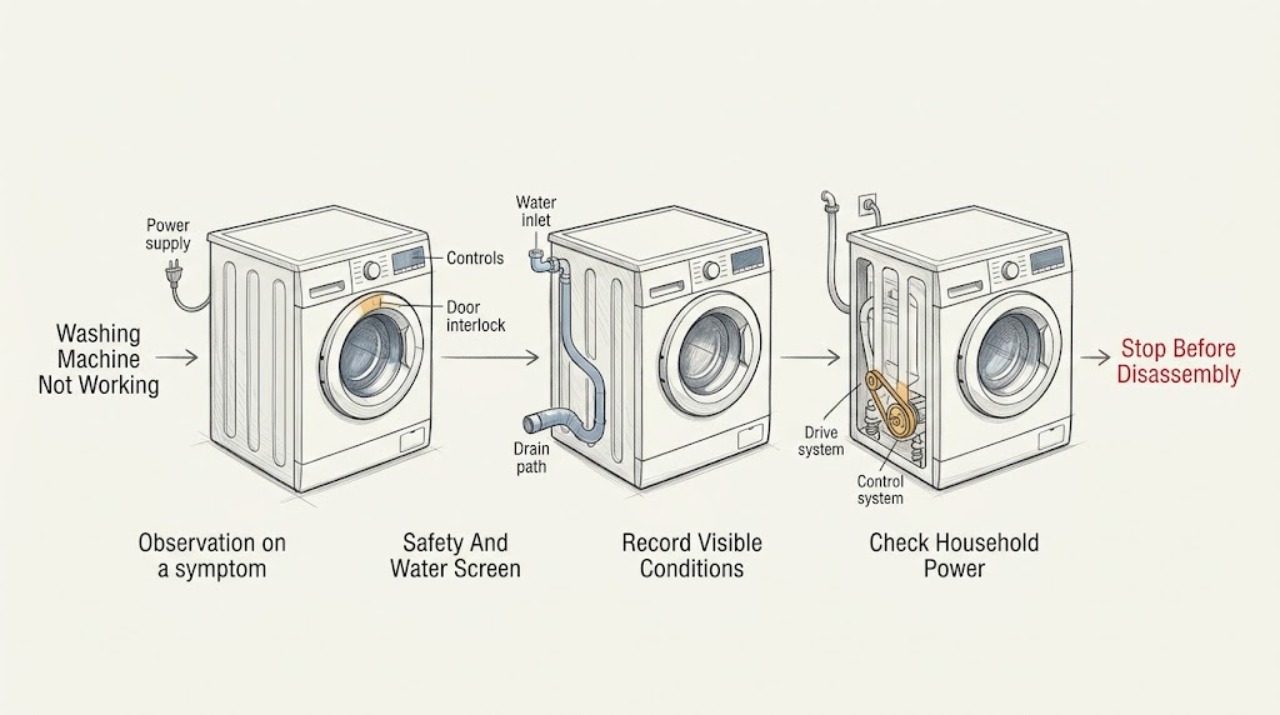
Start by defining what ‘not working’ means: no display or response, a programme that will not start, no water entering, no drain or spin, a leak, severe movement, or a code. With the washer dry and safe, check the plug, household supply, breaker, power switch, selected programme, Start or Start/Hold command, delay or preset setting, and the door or lid closure. Toshiba’s official FAQ lists power, breaker, plug, power switch, Start/Hold, and preset mode for a machine that does not operate. Then record the programme stage and inspect only visible water hoses, the drain hose, door or lid, and the floor. A low fill, a pause while balancing, or a locked door can be a protection response on some models, while a leak, standing water, violent movement, burning smell, smoke, sparks, hot plug, damaged cord, or repeated breaker trip requires immediate stopping. Do not bypass a lock, open panels, reach into a moving basket, or borrow an error-code or filter procedure from another Toshiba model. Follow one model-authorized reset only when there is no hazard; if the washer remains unresponsive, will not fill, drain, spin, or complete, or the same code returns, keep it out of use and arrange qualified service.
Work through in order
Diagnostic checks
Use only checks that match the exact appliance or system and its official guide.
-
Check 1
Stop the washer and stand on a dry surface; look at the floor, plug, outlet, cord, hoses, controls, cabinet, and basket without touching wet electrics or moving laundry.
Expected result: Record water near electricity, an active leak, hot water or steam, smoke, burning smell, sparks, a hot or discolored plug, damaged cord, severe movement, exposed metal, or a repeated breaker or protection trip.
Next step: Stop using the washer. Close the water supply if safely accessible and isolate power only from a dry safe position; keep clear and arrange qualified appliance or electrical service.
Stop if: Do not touch wet electrical parts, reach into a moving basket, restore power after a trip, move the washer through water, or run another cycle to reproduce the symptom.
Why this matters
Why: These are water, shock, fire, burn, or mechanical hazards, not ordinary user-setting symptoms.
-
Check 2
When the washer is safe and stationary, record the complete Toshiba model number, top-load or front-load configuration, selected programme, load, and the exact point at which operation failed.
Expected result: Record blank or lit display, beeps, lock or lid indicators, water level, whether the motor or pump sounds, whether the basket moves, and any exact code or symbol.
Next step: Open the matching Toshiba manual or support page and use only the branch for that model and configuration; preserve a photo or exact transcription of the display.
Stop if: Do not infer a part failure or apply a code table, filter location, or emergency release from another Toshiba washer.
Why this matters
Why: Model and stage separate a power problem from a control, door or lid, fill, drain, drive, balance, leak, or error condition. A code is useful only with its model and phase.
-
Check 3
From a dry position, check whether other safe loads in the same area have power, whether the washer plug is fully seated, whether its power switch is on, and whether a breaker or fuse is visibly tripped; do not open an outlet or live appliance.
Expected result: Record a whole-home outage, a room or circuit outage, a loose or hot plug, a tripped breaker, a washer display that stays blank, or a display that returns normally.
Next step: If the supply is normal and the connection is cool and intact, continue to controls. If the circuit trips again, the plug or cord is damaged, or the outlet is hot, keep the washer off and arrange electrical and appliance service.
Stop if: Do not repeatedly reset a breaker, use an extension lead to bypass a fault, pull a plug with wet hands, or open the plug, outlet, or washer cabinet.
Why this matters
Why: Toshiba lists supply, household fuse or breaker, plug, and power switch among the first checks for a washer that does not operate. A hot or damaged connection or a recurring trip indicates an electrical fault rather than a simple restart.
-
Check 4
With no hazard present, confirm the door or lid is closed, the intended programme and water level are selected, the Start or Start/Hold command is pressed as the manual shows, and Preset, Delay, Child Lock, or Pause is not holding the cycle.
Expected result: Record whether the display accepts commands, a lock or delay indicator remains, the start command is ignored, or the washer starts and then stops.
Next step: Correct only an unambiguous setting and close the door or lid without force. If the control remains unresponsive or the lock will not clear using the manual, stop and arrange service.
Stop if: Do not bypass, tape, magnetize, or force a door or lid interlock, and do not enter a service mode to make the washer start.
Why this matters
Why: Toshiba’s FAQ identifies Start/Hold and Preset mode as possible reasons a machine appears not to operate. A door or lid condition can prevent starting, but an unresponsive control or recurring lock state needs model-specific service assessment.
-
Check 5
If the display and controls work but the washer does not fill, confirm the water tap is open and inspect the visible inlet hoses for a kink, crush, loose connection, or leak without disconnecting a pressurized hose.
Expected result: Record no water at the tap, low household flow, a closed or frozen supply, a kinked hose, a leak at a connection, a normal inlet sound with no water, or a model-specific water-inlet code.
Next step: Correct only an obvious tap or hose-position issue when dry and safe. Stop for a leak, damaged hose, persistent code, or no fill after the visible check and arrange service.
Stop if: Do not remove an inlet hose under pressure, insert tools into a valve, use hot water unless the exact manual permits it, or keep filling a leaking washer.
Why this matters
Why: The supply, hose, inlet screen, valve, door or lid state, or control may be involved. A normal sound without filling does not prove a valve failure, and a model-specific code cannot be generalized.
-
Check 6
If the washer stops with water or will not advance past drain, inspect the visible drain hose and its outlet from a dry position for a kink, crush, blockage, improper height, displacement, or overflow; do not pull the washer out.
Expected result: Record standing water, a pump hum with no flow, an overflowing standpipe, a hose routed too high or under the washer, a damaged hose, or a clear external path with water retained inside.
Next step: Stop for a leak, overflow, wet electrical area, or inaccessible blockage. If the exact manual documents a user-cleanable filter, follow it only after safe power isolation and water containment; otherwise arrange service.
Stop if: Do not disconnect a wet hose, open an undocumented filter or pump cover, reach into standing water, or run repeated drain cycles.
Why this matters
Why: Toshiba manuals identify drain-hose routing and blockage as model-specific checks, while faulty drainage can cause water backup and electrical or fire risk. A clear external hose leaves internal pump, hose, control, or lock conditions possible.
-
Check 7
If the washer fills but will not spin or moves violently, wait for the basket to stop completely, then observe the load distribution and the washer’s level and clearance from a safe position; do not reach under the cabinet.
Expected result: Record a single heavy item, a tangled or uneven load, an inclined or unstable floor, removed or missing installation hardware where applicable, repeated banging, or movement that persists with a balanced load.
Next step: When safe, stop and redistribute only accessible laundry as the exact manual permits; correct only an obvious external installation issue without pulling the washer. Arrange service if movement is severe or returns.
Stop if: Do not touch laundry while the basket moves, tilt or drag the washer, remove panels or suspension parts, or run a high-speed test after violent movement.
Why this matters
Why: Toshiba describes load-balance correction and level, stable installation as relevant to spinning and vibration. Persistent severe movement can damage hoses, wiring, flooring, or the machine and may indicate a mechanical fault.
-
Check 8
With the washer stopped, identify the first visible wet point without touching wet electrics: inlet connection, detergent or softener area, door or lid seal, drain hose, pump-filter area if documented, or underneath the cabinet.
Expected result: Record whether water appears during fill, wash, drain, spin, or after shutdown; whether a hose connection is loose, a seal is damaged, foam is excessive, or water comes from an inaccessible location.
Next step: Close the water supply and isolate power only from a dry safe position. Keep the washer out of use and arrange service for any active, concealed, recurring, or electrically affected leak.
Stop if: Do not operate with water on the floor, reach beneath the cabinet, loosen hoses, or reset power while the area is wet.
Why this matters
Why: Timing and first wet point distinguish an inlet or dispenser issue from a drain, seal, oversudsing, tub, or concealed leak. Water under the cabinet cannot be safely traced by removing panels.
-
Check 9
Transcribe the exact code, symbols, beeps, stage, and water state; only when the washer is dry, cool, intact, and hazard-free, perform one power or restart action explicitly authorized by the exact Toshiba manual.
Expected result: Record whether the code clears, the display returns, the washer resumes the same stage, the code returns, the washer starts without a command, or a breaker trips.
Next step: Stop after one unsuccessful authorized recovery and arrange service with the exact code and stage. Do not keep resetting to continue operation.
Stop if: Do not guess a code meaning, enter service mode, bypass a lock, reconnect power after smoke or a trip, or reset a wet washer.
Why this matters
Why: Toshiba model manuals can associate particular indications with lid, water-inlet, drainage, balance, or other conditions, but codes vary by model and region. A returning code or spontaneous movement indicates a persistent fault.
-
Check 10
Keep the washer out of use and prepare the model, configuration, programme, stage, display, water level and temperature, load, power result, hose and drain observations, lock state, first wet point, movement, sound, and safety symptoms for qualified service.
Expected result: The machine remains blank or unresponsive, will not fill, drain, spin, or complete, leaks, returns a code, locks unexpectedly, moves violently, makes abnormal noise, overheats, or trips protection.
Next step: Arrange Toshiba appliance service. Use a qualified electrician when the outlet, cord, household circuit, or protection device is implicated, and a plumber when an external water or drain connection is the source.
Stop if: Do not remove panels, access the motor or pump while energized, make live measurements, bypass protection, or choose parts from ‘not working’ alone.
Why this matters
Why: A control, interlock, inlet valve, pump, drain hose, drive, suspension, sensor, wiring, or household supply fault remains possible; the broad symptom does not identify a safe replacement part.
Use your observations
Decision map
Find the observation that best matches what you see, then follow the next safe action.
-
PATH 01Safety boundary
What you see
Water is near the plug, outlet, cord, controls, or floor electrics, or smoke, burning smell, sparks, exposed wiring, hot connections, or a repeated protection trip is present.
Do this next
Stop use, close the water supply if safe, isolate power only from a dry safe position, keep clear, and arrange qualified appliance or electrical service.
Why this path and its safety boundary
Why it matters: The washer has an immediate shock, fire, or water hazard and should not be diagnosed by repeated operation.
Safety stop: Do not touch wet electrical parts, move the washer, restore power, or run another cycle.
-
PATH 02Safety boundary
What you see
The display and controls are blank or the washer has no response, while the area is dry and there is no odor, heat, or visible damage.
Do this next
Check the household supply, plug seating, power switch, and breaker from a dry position. Arrange service if the supply is normal but the washer remains blank.
Why this path and its safety boundary
Why it matters: A supply, plug, breaker, power switch, cord, or internal control path may be involved; Toshiba’s FAQ lists supply and control checks first.
Safety stop: Do not repeatedly reset a breaker, open the outlet or cabinet, or use a substitute power connection.
-
PATH 03Safety boundary
What you see
The display is on but the programme does not start or the Start command is ignored.
Do this next
Use the exact manual to verify the programme, Start command, delay, and door or lid closure once. Arrange service if the controls or interlock remain unresponsive.
Why this path and its safety boundary
Why it matters: The selected programme, Start/Hold command, Preset or delay, control lock, door or lid closure, or interlock may be holding the cycle.
Safety stop: Do not force or bypass the door or lid lock, enter service mode, or repeatedly restart the washer.
-
PATH 04Safety boundary
What you see
The washer starts its programme but no water enters, or a water-inlet indication appears.
Do this next
Check only the visible tap and hose condition without disconnecting a pressurized line. Stop for a leak or persistent no-fill condition and arrange service.
Why this path and its safety boundary
Why it matters: The tap, household pressure, inlet hose, screen or valve, door or lid state, or control may be involved.
Safety stop: Do not remove a hose under pressure, insert tools into an inlet valve, or keep operating with a leak.
-
PATH 05Safety boundary
What you see
The washer stops with water, will not advance past drain, or a drain indication appears.
Do this next
Stop use, inspect only the visible drain path from a dry position, and follow a model-documented filter procedure only after safe isolation and water containment. Arrange service if water remains.
Why this path and its safety boundary
Why it matters: A kinked or blocked drain hose, incorrect routing, pump or filter where fitted, household drain, control, or safety lock may be involved.
Safety stop: Do not disconnect a wet hose, open an undocumented access point, reach into water, or run repeated drain cycles.
-
PATH 06Safety boundary
What you see
The washer fills but does not spin, pauses while balancing, bangs, walks, or vibrates violently.
Do this next
Wait for complete stop, observe load and level from outside, and make only a safe manual-authorized load correction. Keep the washer off and arrange service for severe or recurring movement.
Why this path and its safety boundary
Why it matters: An uneven load or unstable installation may trigger protection, while persistent movement or abnormal noise can indicate a mechanical or drive fault.
Safety stop: Do not touch moving laundry, tilt or drag the washer, remove transport or suspension parts, or repeat a high-speed test.
-
PATH 07Safety boundary
What you see
Water appears at an inlet connection, dispenser, door or lid seal, drain hose, underneath the cabinet, or on the floor.
Do this next
Close the water supply and isolate power only from a dry safe position; keep the washer out of use and arrange service with the first wet point recorded.
Why this path and its safety boundary
Why it matters: The leak may involve a hose, seal, dispenser, drain path, tub, pump, or concealed connection, and water can make electrical operation unsafe.
Safety stop: Do not tighten wet fittings, remove panels, reach underneath, or run another cycle to locate the leak.
-
PATH 08Safety boundary
What you see
An exact code, lock indication, or abnormal stop returns after one model-authorized check, or the code does not match the model manual.
Do this next
Keep the washer off and arrange service with the exact code, model, stage, water state, and photos of the display.
Why this path and its safety boundary
Why it matters: The fault is persistent or model-specific; a generic reset or cross-model code interpretation could create a hazard.
Safety stop: Do not guess the code, repeatedly clear it, bypass the lock, or access internal components.
-
PATH 09Safety boundary
What you see
Power, controls, visible hoses, load, and one authorized recovery do not restore normal operation, or the safe cause cannot be established externally.
Do this next
Keep the washer isolated and arrange qualified Toshiba appliance service with the complete observation record.
Why this path and its safety boundary
Why it matters: A concealed control, interlock, valve, pump, drive, sensor, wiring, or supply fault remains possible.
Safety stop: Do not remove panels, make live measurements, bypass protection, or select a replacement component from the broad symptom alone.
Helpful context
Understand the symptom
Separate the symptom before choosing a cause
‘Not working’ is a starting description, not a diagnosis. A blank display points first to supply and controls; a lit display with no movement points toward programme, door or lid, water, or control conditions; a cycle that stops with water points toward drain or protection conditions; and a washer that moves violently has a load, level, installation, or mechanical safety concern. Write down the exact stage, sound, water level, indicator, and code before changing anything.
Toshiba models do not share one procedure
Toshiba sells different top-load and front-load configurations across regions. The official top-load manual used as a reference here has a lid, a model-specific drainage route, and model-specific indications; a front-load washer may have a door interlock, different drain access, and different codes. Use the complete model number and its matching manual before cleaning a filter, releasing a lock, interpreting a code, or removing a hose.
Some pauses are protective
A washer may pause while it corrects an unbalanced load, waits for a lid or door condition, fills to a selected level, or completes a drain or safety sequence. Toshiba’s top-load manual describes load-balance correction, a short delay before spin while drainage occurs, and a lid that cannot be opened during some operations. A pause becomes a fault when the machine never resumes, leaks, overheats, repeats a code, or requires repeated power cycling.
Do not turn a check into a hazard
Unplug before any manual-authorized cleaning or maintenance, keep hands away from a moving basket, and do not work in a wet area. Toshiba warns that faulty drainage can back up water and create shock or fire risk. Never remove panels, defeat the door or lid interlock, or test internal wiring as a first response to a broad ‘not working’ symptom.
One authorized recovery, then a useful service handoff
When the washer is dry and free of safety symptoms, one manual-authorized power or programme recovery can distinguish a transient state from a recurring fault. Repeating resets can hide a supply, lock, pump, motor, or control problem. Give service the model, configuration, exact stage, code, water level, hose observations, load, movement, leak location, and every odor or electrical symptom.
Safety boundary
Stop conditions
- Stop immediately for water near electricity, an active leak, smoke, burning smell, sparks, a hot or damaged plug or cord, exposed wiring, severe movement, or a repeated breaker or protection trip.
- Do not touch laundry while the basket moves, place hands under the cabinet, tilt or drag the washer, or operate it on an unstable or wet surface.
- Do not open panels, make live electrical measurements, modify the machine, bypass a door or lid lock, or enter service mode as a first check.
- Do not disconnect a pressurized or wet inlet or drain hose, open an undocumented filter or pump access, or reach into standing water.
- Do not apply a code, reset, filter, or part procedure from another Toshiba model, and do not repeat cycles or resets to conceal a recurring fault.
Only after diagnosis
Potential parts
- door or lid interlock assembly
Consider only when the exact model will not recognize a correctly closed door or lid after safe water and control checks and qualified diagnosis identifies the interlock.
Confirm the complete Toshiba model and front-load or top-load configuration; never bypass the safety interlock. - water inlet valve or inlet hose
Consider only when the tap and visible hose are sound but model-specific diagnosis confirms a failed valve or damaged hose causing the no-fill symptom.
Confirm model, valve arrangement, hose connection, and water specification; do not remove a pressurized hose as a first check. - drain pump or drain hose
Consider only when the external drain path is clear and qualified diagnosis confirms a failed pump, damaged hose, or model-specific drain restriction.
Confirm the exact model and whether a user-accessible filter or pump exists; do not open a wet or energized drain assembly. - drive or suspension component
Consider only when a balanced load and stable installation are confirmed but qualified diagnosis identifies a drive, bearing, suspension, or related mechanical fault.
Confirm the exact model and mechanical diagnosis; violent movement or abnormal noise is a reason to stop, not to select a part from the symptom alone.
When checks do not resolve it
Need a professional?
Arrange qualified Toshiba appliance service when the washer remains blank, will not start, fill, drain, spin, or complete after the visible checks and one model-authorized recovery; when a code or lock returns; or when there is a leak, severe movement, abnormal noise, overheating, or inaccessible component. Arrange electrical service for a hot, damaged, wet, or repeatedly tripping outlet, cord, plug, or circuit. Arrange plumbing help for an external supply, standpipe, or household drain problem. Treat smoke, sparks, burning smell, rapid flooding, water near electricity, and exposed wiring as immediate safety conditions.
Common questions
FAQ
Why is my Toshiba washing machine not turning on?
Check the household supply, breaker or fuse, plug, power switch, Start/Hold command, and Preset or delay state from a dry position. Toshiba lists these checks for a washer that does not operate. If the outlet or plug is hot or damaged, the breaker trips again, or the display stays blank with normal supply, stop and arrange service.
What should I check if the Toshiba washer has power but will not start?
Confirm the selected programme, Start or Start/Hold command, Preset or delay, and the door or lid closure. Do not force or bypass the lock. If the display ignores commands or the lock state returns, record the model and arrange service.
Why does my Toshiba washer stop with water inside?
Record the programme stage and inspect only the visible drain hose for a kink, crush, blockage, incorrect routing, or overflow. A model-specific filter or pump procedure may exist, but do not open an undocumented access point. Water near electricity, a leak, or water that remains after the safe visible check requires service.
Why does my Toshiba washing machine fill but not spin?
Wait for the basket to stop, then check the load distribution and stable, level installation from outside. Toshiba describes balance correction and stable installation as relevant to spinning. Persistent banging, walking, abnormal noise, or failure with a balanced load is a reason to stop and arrange service.
Can I reset a Toshiba washing machine that is not working?
Only perform one restart or reset that the exact Toshiba manual authorizes, and only when the washer is dry, cool, intact, and free of leaks, odor, smoke, sparks, severe movement, and protection trips. If the symptom or code returns, keep it out of use and arrange service instead of repeating resets.
Read the exact guide
Official sources
- Washing MachineToshiba Lifestyle · Toshiba washing machines represented by the regional FAQ; codes and controls remain model-dependent
- BEFORE CALLING THE SERVICEMANToshiba Lifestyle · Use as a top-load model reference only while confirming the user's exact Toshiba model; do not generalize its codes or access procedures to other configurations
- 洗濯機・衣類乾燥機 お客様サポートToshiba Lifestyle · Toshiba laundry products; use the appropriate regional support route and exact model manual
- Does not operateToshiba Lifestyle · Toshiba washing machines using the referenced regional FAQ; confirm the exact model and region before applying a control sequence
Community feedback
Share a repair observation
Share a plain-text repair observation. Accepted observations are published automatically; this page may take a moment to update.